
Mobile Forms for Service Completion Reports: A Practical Guide to Operational Clarity
 By Bob Fitzjohn16 min read
End payment disputes and the Friday scramble. Our guide to mobile forms for service completion reports shows you how to get verified proof of service and get...

In this article
- Key Takeaways
- The High Cost of "I’ll Finish the Report Later": Why Manual Systems Fail
- Essential Features of Professional Mobile Forms for Service Completion
- Ensuring Accountability: Linking Completion Reports to GPS and QR Verification
- From Field to Finance: Integrating Reports with Invoicing and Accounting
- Implementing Mobile Reporting Without the Tech Headache
- Achieving Total Operational Clarity in the Field
- Frequently Asked Questions
It’s 4:00 PM on a Friday, and you’re still chasing three different technicians for their handwritten notes just so you can finally send out your invoices. You’ve likely dealt with the frustration of illegible paper forms or, worse, a client refusing to pay because they claim a job wasn't finished. Adopting mobile forms for service completion reports is the most effective way to end this cycle of administrative friction and protect your business from unnecessary disputes.
We understand that the manual way of managing field work is failing modern service businesses, especially when 2026 data shows that 74% of mobile workers feel customer expectations are higher than ever. You deserve a system that provides instant, verified proof of service without creating a second job for your staff. This guide will show you how to turn field data into professional reports that link directly to your billing software. We will explore how to use GPS verification and digital checklists to create total operational clarity and get paid faster.
Key Takeaways
- Eliminate the "Friday Afternoon Scramble" by capturing job details in real-time, preventing the missed billables that often slip through the cracks of manual systems.
- See why mobile forms for service completion reports are your best defense against payment disputes, using mandatory photo evidence and on-the-spot digital signatures.
- Strengthen team accountability with GPS and QR code verification that proves work was done at the right place and time without micromanaging your staff.
- Bridge the gap between the field and the office by syncing completion data directly with Xero or QuickBooks for instant, accurate invoicing.
- Build a stress-free transition by auditing your current paper trail and starting with a single core form to prove the system works before scaling up.
Table of Contents
- The High Cost of "I’ll Finish the Report Later": Why Manual Systems Fail
- Essential Features of Professional Mobile Forms for Service Completion
- Ensuring Accountability: Linking Completion Reports to GPS and QR Verification
- From Field to Finance: Integrating Reports with Invoicing and Accounting
- Implementing Mobile Reporting Without the Tech Headache
The High Cost of "I’ll Finish the Report Later": Why Manual Systems Fail
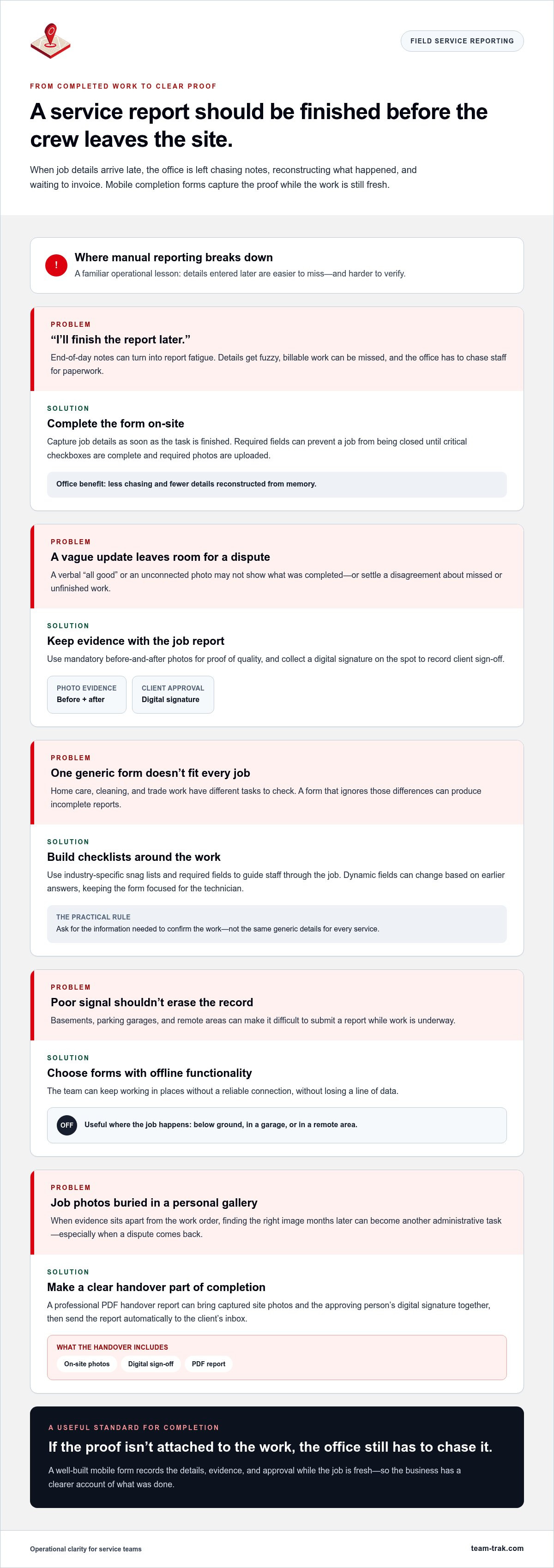
I've spent years managing crews, and I know exactly how Friday afternoon feels when you're staring at a stack of blank timesheets. You're trying to remember if the leak was fixed on Tuesday or Wednesday, and your technician is already mentally on the weekend. This "Friday Afternoon Scramble" is more than just a headache; it's a financial leak. When reports are delayed, details get fuzzy, and billable hours simply vanish. Relying on memory or messy paperwork instead of mobile forms for service completion reports means you're making decisions based on guesses, not facts. Operational realism tells us one thing clearly: a report that isn’t submitted on-site is a report that isn’t reliable.
The Breakdown of Trust in Field Services
Effective Field service management (FSM) relies on data that is captured the moment a task is finished. In 2026, clients are more demanding than ever. Statistics show that 74% of mobile workers report that customer expectations have risen compared to previous years. They don't just want the job done; they want proof. Relying on a grainy WhatsApp photo or a verbal "it's all good" isn't enough to protect your reputation. Vague reports lead to "he said, she said" disputes that can delay payment for weeks. There is a specific kind of psychological relief that comes from seeing a "Job Complete" notification hit your dashboard in real-time, backed by the data you need to stand your ground.
Common mistakes I've seen include:
- Accepting verbal confirmations that leave no paper trail for the office.
- Waiting until the end of the day to log job details, leading to "report fatigue."
- Using generic messaging apps that separate the proof of work from the actual work order.
Administrative Friction and Cash Flow
Every hour your team spends on manual data entry is an hour they aren't generating revenue. Chasing staff for reports doesn't just waste your time; it stalls your entire invoicing cycle. If a report takes three days to reach the office, your invoice is already three days late. This "admin leakage" adds up quickly. We've built our tools to simplify operation tasks by removing the need to re-type details from a coffee-stained paper form into a spreadsheet. When you move from chasing staff to simply verifying results, you reclaim your peace of mind and your cash flow. Professional mobile forms for service completion reports ensure that the link between the field and your finance team is unbreakable and instantaneous.
Essential Features of Professional Mobile Forms for Service Completion
What separates a professional system from a basic digital form? It’s the ability to enforce accountability without adding more work for your team. Professional mobile forms for service completion reports don't just record data; they act as a safeguard for your reputation. I’ve seen countless disputes over "missed spots" in the cleaning industry or "unfinished tasks" in trades that could have been avoided with a simple time-stamped photo. By making certain fields mandatory, you ensure that your staff captures the exact proof you need before they even leave the site.
Smart Task Management and Checklists
Generic templates often fail because they don't account for the specific snags of your industry. A home care provider needs different data than a HVAC technician. Effective task management and checklists allow you to build industry-specific snag lists that guide your team through every job. By using "required fields," you eliminate the frustration of receiving incomplete reports. The app simply won't allow a technician to close a job until every critical checkbox is ticked and every required photo is uploaded. This creates a level of consistency across your teams that paper systems can never match.
Key features to look for in a professional form include:
- Mandatory Photo Evidence: Capturing "before and after" shots to provide undeniable proof of quality.
- Digital Signatures: Getting client sign-off on the spot to prevent "I never agreed to this" payment issues later.
- Dynamic Fields: Forms that change based on previous answers, keeping the interface clean for the technician.
- Offline Functionality: Ensuring your team can work in basements, parking garages, or remote areas without losing a single line of data.
Visual Documentation and Proof
Visual evidence is the ultimate tool for resolving disputes. In 2026, clients expect a high level of transparency, and a professional PDF handover report sent automatically to their inbox provides exactly that. This report should include the photos captured on-site and the digital signature of the person who approved the work. It replaces the "paperwork shuffle" with a streamlined, digital workflow that feels high-end to your customers. When you provide this level of detail, you aren't just finishing a job; you're building a brand of "calm authority" and reliability. If you want to stop the manual chase for job details, you can reach out to see how these forms fit your specific workflow.
One common mistake I’ve noticed is relying on a technician's personal phone gallery for job photos. This creates a massive administrative headache when you need to find a specific image months later for a dispute. A professional mobile form keeps all documentation linked directly to the job record, making it searchable and secure. This level of organization is what allows a small business to operate with the precision of a much larger enterprise.
Ensuring Accountability: Linking Completion Reports to GPS and QR Verification
Accountability often feels like a dirty word in field services, but for an experienced operator, it’s the foundation of a good night’s sleep. It isn't about spying on your team; it's about having undeniable proof that the work was done. GPS verification ensures that mobile forms for service completion reports are filed exactly where they should be: at the client’s site. This simple digital safeguard stops "ghost reporting," which is when a staff member fills out their logs from a coffee shop or their living room instead of the job location. By anchoring the report to a physical location, you eliminate the guesswork and protect your business from one of the most common operational headaches.
We believe in a dual-layer of proof that provides total clarity. This starts with a QR code check-in and check-out at the entrance of the site. When your technician arrives, they scan a code to start the clock. When the job is finished, the final report is submitted with a GPS location verification stamp. This combination creates a closed loop of evidence. It doesn't just stop fraud; it also protects your staff against false claims from clients who might insist a technician never showed up. When you have the data to prove attendance, disputes disappear before they even start.
Eliminating Attendance Fraud
There is a massive difference between "tracking staff" and "verifying service." Great staff members actually appreciate these systems because it validates their hard work and professionalism. In my experience, the best employees want their efforts to be seen and recorded. Using QR codes at the site entrance acts as a digital proof of presence that is much harder to dispute than a handwritten signature on a clipboard. It builds a culture where high performance is the standard and "cutting corners" isn't an option. This transparency is what allows you to manage a growing team without needing to be in five places at once.
Building Client Confidence
In 2026, transparency is your strongest selling point. When you can provide a client with a full audit trail that proves exactly when your team arrived, what they did, and when they left, you win their trust instantly. You can use this data to win more contracts by positioning your business as the most transparent provider in the market. I’ve seen this work firsthand; one cleaning firm I consulted with reduced their client complaints by 40% simply by switching to location-stamped mobile forms for service completion reports. Clients stopped calling to complain because they were receiving automated proof of work before they even had a chance to wonder if the job was done. This level of operational clarity turns a standard service into a premium partnership.
From Field to Finance: Integrating Reports with Invoicing and Accounting
I’ve lived through the nightmare of having a perfect job completed on Monday, only for the invoice to go out ten days later because the paperwork was sitting in a van. It’s a classic operational trap. You’ve done the work, you’ve proven the service, but your cash flow is still stalled because the office is waiting on the field. The "One Fluid Workflow" philosophy changes this by ensuring that as soon as your technician clicks "submit," the gears of your finance department start turning. When you use mobile forms for service completion reports, you aren't just collecting data; you're triggering your payment cycle.
Linking to Online Accounting Systems
Manual invoicing is the single biggest bottleneck for any growing service business. Re-typing job details from a digital report into a spreadsheet or accounting software is a recipe for "admin leakage" and human error. Modern systems allow you to integrate directly with Xero and QuickBooks, creating a seamless bridge between the job site and your bank account. This is vital for any trades and field service company that needs a bulletproof paper trail for tax and audits. By 2026, research shows that approximately 65% of routine scheduling and dispatching tasks are automated in companies using modern management systems. If you're still doing this by hand, you're falling behind the curve of efficiency.
Automating the Billing Cycle
Setting up automated triggers is where you truly reclaim your time. Imagine a scenario where a client signs the mobile form on-site, and a draft invoice is immediately generated in your accounting system with all the parts, labor, and travel time already calculated. This is made possible through timesheet automation that links directly to job completion data. It removes the guesswork and the "Friday afternoon scramble" to remember who worked which hours. The relief of knowing your books are up-to-date by the time you close your laptop on Friday evening is worth the transition alone.
Eliminating the manual re-entry of data doesn't just save time; it protects your profit margins. When you capture job details directly through mobile forms for service completion reports, you ensure that every billable minute and every used material is accounted for. There is no more "forgetting to bill for that extra part" because the app required it to be logged before the job could close. If you're ready to stop the manual data entry and speed up your billing cycle, get in touch to see how we can link your field reports to your finance team. This level of integration turns your operational data into a powerful tool for financial growth.
Implementing Mobile Reporting Without the Tech Headache
I’ve managed teams long enough to know that the biggest hurdle to new technology isn't the software itself; it's the change in habits. You don't need a complex IT department to roll out mobile forms for service completion reports. You just need a practical, phased approach that respects your team's time and your own sanity. Implementation shouldn't feel like a second job. If it does, you're likely overcomplicating the process or using a tool that wasn't built for the reality of field work.
Follow these five steps to transition from paper to digital clarity:
- Step 1: Audit your paper trail. Look at where information currently gets lost. Is it the coffee-stained notes? The forgotten timestamps? Identify the biggest "leak" first.
- Step 2: Start with one core form. Don't digitize your entire office on day one. Start with a single "Daily Cleaning Report" or "Job Completion Log" to prove the system works.
- Step 3: Onboard with empathy. Show your staff how the app protects them. When a client claims work wasn't done, the app’s GPS and photo evidence act as the technician’s shield.
- Step 4: Review and refine. After the first week, look at the data. Are the checklists clear? Adjust the fields based on real-world feedback from your team.
- Step 5: Connect the cash. Once the reporting is steady, link it to your accounting software to turn that field data into instant invoices.
Choosing a Practical Platform
Avoid the "enterprise" trap. Many software solutions are built for corporate boardrooms, not for a technician standing in a rainy parking lot. You need a mobile staff app that is intuitive and works on standard smartphones. Look for tools built by people who have actually managed field teams and dealt with payroll. A platform that is too complex for daily use will simply be ignored by your staff, leaving you right back where you started with missing reports and manual data entry.
Managing the Transition
The most common mistake I see is introducing too many features at once. This overwhelms your team and leads to "tech-resistance." Focus on the benefit of "Proof of Service" from day one. When your staff realizes that mobile forms for service completion reports mean they don't have to spend their Friday evenings answering your "did you finish this?" texts, they’ll embrace the change. By 2026, the standard for operational excellence is high, but the path to get there should be simple. Set clear expectations, provide a little bit of training, and watch the administrative friction disappear.
Achieving Total Operational Clarity in the Field
You didn't start your business to spend your weekends deciphering messy handwriting or arguing with clients about whether a technician actually showed up. Adopting mobile forms for service completion reports is the final step in moving from a state of constant administrative friction to a state of calm, data-driven control. By capturing GPS-verified reports and utilizing QR code accountability, you provide your clients with the transparency they expect in 2026 while protecting your staff from unfair disputes.
The transition doesn't have to be a tech headache. When your field work links directly to your Xero or QuickBooks account, your invoicing cycle shrinks from days to minutes. This is a platform built for operators, by operators, who understand the pressures of payroll and the necessity of accurate labor costing. You've done the hard work; it's time to ensure your reporting reflects that professionalism and gets you paid faster.
Ready to stop chasing paperwork? Discover how Team-Trak simplifies your field operations today.
Take the first step toward a more organized, profitable future. Your peace of mind is worth the switch.
Frequently Asked Questions
What should be included in a service completion report?
A professional report needs time-stamped photos, a digital signature from the client, and a clear list of completed tasks. It should also include GPS data to verify the location and any specific notes about the materials used. This ensures you have a full audit trail for every job you complete. This level of detail is what prevents "he said, she said" disputes that often delay payment and damage your reputation.
How do mobile forms improve my business’s cash flow?
Mobile forms speed up your billing cycle by allowing you to generate invoices the moment a job is finished. Instead of waiting for paper reports to reach the office, the data is synced instantly to your finance team. This eliminates the "Friday afternoon scramble" and ensures you get paid days or even weeks earlier than with manual systems. It’s the most effective way to turn field work into immediate cash flow and operational clarity.
Do my staff need expensive hardware to use mobile completion forms?
No, your team can use standard smartphones they already own to submit their reports. A practical mobile staff app is designed to work on both iOS and Android devices, removing the need for you to buy or manage extra hardware. This makes it easy to scale your team without a massive upfront investment in equipment. It also means your staff are already familiar with the interface, reducing the time needed for training and onboarding.
Can I use mobile forms offline if there is no signal on-site?
Yes, professional forms are built with offline functionality to handle the reality of field work. Your staff can fill out the report in a basement or remote area, and the data will save locally on their device. Once they regain a signal, the app automatically syncs the information back to your office without losing a single detail. This ensures that a lack of signal never becomes an excuse for a missing report or inaccurate data entry.
How does GPS verification work with completion reports?
GPS verification captures the exact coordinates of where the report was submitted. This provides undeniable proof that your technician was actually at the client's site when they claimed the work was finished. It’s a simple way to use mobile forms for service completion reports to protect your reputation against false claims of non-attendance. It builds trust with clients who value transparency and gives you peace of mind that your team is where they should be.
Can I integrate mobile completion reports with Xero or QuickBooks?
Yes, you can link your field reports directly to your online accounting systems like Xero or QuickBooks. This integration allows you to turn field data into draft invoices automatically. It removes the need for manual data entry and ensures that your labor costs and material usage are accurately reflected in your books by the end of the day. You'll avoid the common mistake of forgetting to bill for extra parts or travel time logged on-site.
Disclaimer
The information provided in this article is for general informational purposes only and reflects the opinions and experiences of the author. While every effort has been made to ensure accuracy, Team Trak makes no guarantees regarding completeness

Written by
Bob Fitzjohn
Founder of Team-Trak and serial entrepreneur with over 50 years’ experience building and scaling service businesses. Bob writes about workforce management, operational efficiency, automation, and the realities of running small businesses in today’s environment.


