
The Hidden Costs of Manual Time Tracking: Why Your Service Business is Losing More Than Just Minutes
 By Bob Fitzjohn10 min read
Tired of payroll chaos & rounding errors? Learn the benefits of automated time tracking software to reclaim lost profits & provide GPS-verified proof of serv...

In this article
It's Friday afternoon and you're at the kitchen table with a pile of timesheets, a WhatsApp thread and a calculator. One sheet says a job finished at 5:00. You're fairly sure it wrapped up before half four. Another has a number that's either a 7 or a 1.
You'll pay both as written, because chasing them takes longer than the difference is worth. That's how manual time tracking works: it never sends you a bill, so it feels free. This article shows where the money actually goes, how to work out what it costs your business, and what to change first.
If you'd rather see verified visits than read about them, you can try Team-Trak free for 7 days. No card needed.
The Short Answer
- Manual time tracking costs you in five places: rounded-up hours, admin time, disputed visits you can't prove, invoices that wait on timesheets, and records that won't hold up if pay is questioned.
- None of these appears as a line in your accounts, which is why they're easy to underestimate.
- A 15-minute daily round-up across ten field staff adds up to about 650 paid hours a year.
- The fix is to record time at the moment and place the work happens, then let timesheets build from that record.
Table of Contents
Why Manual Timesheets Cost More Than They Look
Paper timesheets, spreadsheets and "I'm here" messages share one weakness. They're filled in after the work, from memory, by someone who wasn't watching the clock.
Most padded hours aren't dishonest. A technician finishes at 4:42, doesn't note it down, and writes 5:00 at the end of the week because that's roughly what it felt like. Nobody has done anything wrong, yet you're paying for time nobody worked. Repeat that across every visit and every person, and it becomes a habit you pay for every week.
The other pattern is quieter. In most small service businesses the owner becomes the checking system. Every sheet passes through one person's head, so that person holds up payroll, invoicing and every client question at once.
The Five Hidden Costs of Manual Time Tracking
1. Rounded-up hours and time leakage
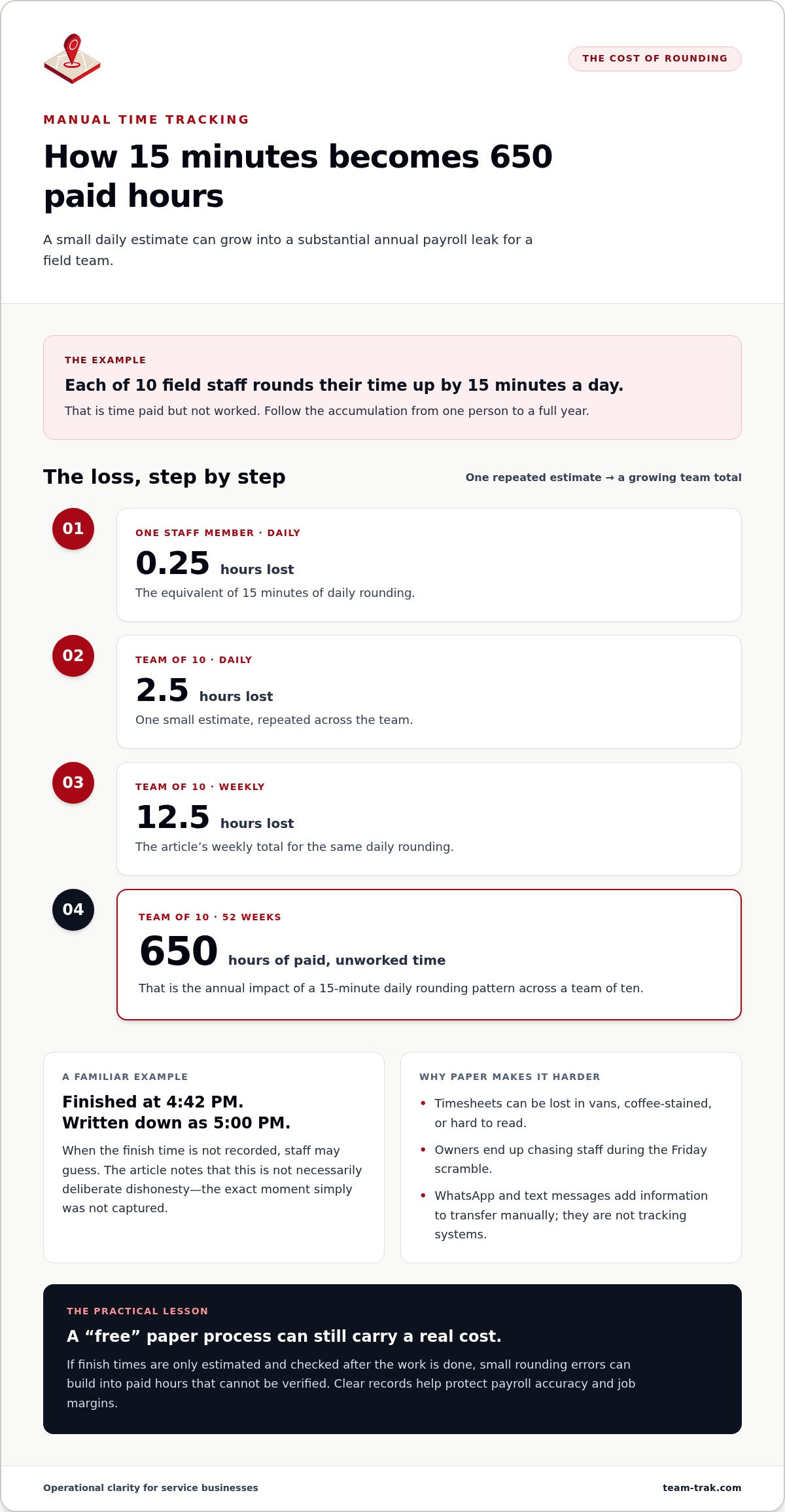
Rounding is where money leaks out without anyone noticing. Say each of ten field staff rounds their day up by 15 minutes, five days a week:
| Period | Paid hours nobody worked |
|---|---|
| One person, one day | 0.25 hours |
| Team of 10, one day | 2.5 hours |
| Team of 10, one week | 12.5 hours |
| Team of 10, 52 weeks | 650 hours |
At a hypothetical $18 an hour, that's $11,700 a year. The rounding doesn't have to be deliberate. It only has to be consistent. Add the occasional colleague signing in for a friend who's running late, and the gap widens.
2. The admin hours nobody counts
Manual tracking usually means typing the same hours twice: once from paper into a spreadsheet, then again into your accounting software. Each copy is another chance for a 7 to become a 1.
Next pay run, write down how long you spend on each of these:
- Collecting timesheets, or waiting for them to turn up.
- Messaging staff to explain missing or unreadable entries.
- Typing hours into a spreadsheet, Xero or QuickBooks.
- Fixing pay mistakes after the run, and apologising for them.
Most owners are surprised less by any one item than by the total. That time comes out of evenings, sales and actually running the work.
3. Disputes you can't settle
A client rings to say nobody came on Tuesday. The timesheet says your cleaner was there for two hours. Your cleaner says the same. You have nothing else to show.
The hard part isn't the refund. It's that you can't tell your client, or yourself, whether the visit happened. So you offer a goodwill credit to keep the contract, and on a recurring contract the real risk is losing years of work, not one invoice.
There's a second cost, too. When honest staff have nothing to point to, every disputed visit chips away at their trust in you. A time-stamped record with a GPS check at check-in and check-out settles the question for both of you.
4. Invoices that wait on timesheets
You can't bill a client until you know the hours, and you can't know the hours until the sheets are in and added up. Every day that takes is a day your cash sits with the client.
Memory-based logs also lose the small things: the 40-minute top-up visit, the second trip back to a site. Those hours get paid to staff and never reach an invoice. For businesses billing by the visit, such as cleaning companies with dozens of regular clients, it adds up quickly.
5. Records that won't hold up
Most employers are expected to keep accurate records of the hours their staff work. In the US, the Fair Labor Standards Act sets recordkeeping rules for hourly staff. In the UK, minimum wage and working time rules expect you to be able to show hours worked. A sheet filled in on Friday for the whole week is weak evidence if pay is ever challenged.
This is general guidance, not legal advice. Check what applies to your business with an accountant or employment adviser.
Your Options, Compared Fairly
| Approach | Good at | Falls short | Fits when |
|---|---|---|---|
| Paper timesheets | Cheap, familiar, no training | Filled in later, from anywhere; lost; slow to add up | Two or three staff you see most days |
| Spreadsheets | Flexible, free | Someone still types every hour; prove nothing about attendance | You need totals, not proof |
| WhatsApp or texts | Instant, already on every phone | Buried in chat; can be sent from anywhere; no payroll from a thread | Quick updates alongside a proper record |
| Basic time clock apps | Record when someone started and stopped | Often don't check where; may not reach client billing | One fixed workplace |
| GPS check-in at the job site | Time and place at arrival and departure; timesheets build from it | Staff need a smartphone and signal at check-in; some setup | Staff spread across client sites |
Two other categories come up. Full field service suites handle quoting, dispatch and stock, but they're heavy and slow to roll out for a small team. Fleet-style trackers follow vehicles all day, which is more than most businesses need and something staff often resent.
How to Work Out What Manual Tracking Costs You
Before you buy anything, spend an hour on these five checks:
- Time last month's pay run. Add up the hours spent collecting, chasing, typing and correcting.
- Look for round numbers. If most finish times end in :00 or :30, people are estimating.
- Count your disputes. List the credits, refunds or awkward calls from the last six months, and what each cost.
- Measure the invoice gap. How many days pass between the end of a week's work and the invoice going out?
- Test your proof. Pick any visit from last month. Could you show who was there and for how long?
Then decide:
- If you supervise everyone yourself at one site, paper may be all you need for now.
- If staff work across client sites and you've had even one dispute you couldn't settle, record time and location at the visit.
- If payroll takes more than an hour a week, prioritise timesheets that build themselves.
- If invoices regularly wait on timesheets, choose a system where approved hours feed straight into billing.
Common Mistakes When Moving Off Paper
- Presenting it as a way to check up on people. Staff hear "we don't trust you". Lead with what's true: a verified record protects their hours when a client questions a visit.
- Reviewing every entry. Most scheduled work happens exactly as planned. The time should go on the few visits that didn't, not on re-reading the ones that did.
- Using one check-in radius for every site. It suits a flat but fails at a large office block, where staff get flagged daily for using the wrong entrance.
- Rounding up "to be fair". Rounding every visit up to the next 30 minutes across a team of fifteen can quietly cost more than a part-time wage. Round to the nearest interval, or not at all.
- Running both systems for months. A short overlap is sensible. A long one means double the admin you were trying to remove.
Where Team-Trak Fits
If you want to do all this without the spreadsheet, here's how Team-Trak handles it. A cleaner arrives at a client's flat and taps check-in. The phone takes one GPS reading, and the record shows the time and the distance from the property: say 22 m at 8:56. They tap again when they leave. Location is checked at those two moments only, never in between.
Records that pass the checks approve themselves. A check-in outside the site's radius or outside the scheduled time is flagged as pending with the reason, so you review the handful that need a look. Approved visits become timesheets automatically, with your rounding rule applied per visit.
Payroll exports and QuickBooks, Xero and Zoho connections are on the Growth plan and above, and client invoices from approved visits are on Professional. Plans start at $19 a month, and you only pay for staff who checked in that month.
As Steve Gillard, Director of Steve Gillard Plumbing, puts it: "Timesheets used to take hours to reconcile. Now they are done automatically and without errors."
Frequently Asked Questions
What are the hidden costs of manual time tracking?
The main hidden costs of manual time tracking are rounded-up hours paid but not worked, admin time spent collecting and re-typing timesheets, disputed visits that can't be proved, invoices delayed by messy timesheets, and records that are weak evidence if pay is questioned.
How much does rounding up timesheets cost a business?
It depends on team size and pay rates. As an example, ten staff each rounding up 15 minutes a day, five days a week, adds up to about 650 paid hours a year, or roughly $11,700 at $18 an hour.
Is GPS check-in the same as tracking staff all day?
No. A GPS check-in system like Team-Trak takes a single location reading when a worker checks in and another when they check out. It doesn't follow anyone before, during or between visits.
Do small service businesses need time tracking software?
Not always. A business with two or three staff at one site the owner supervises can manage on paper. Once staff are spread across client sites, or payroll and invoicing take hours each week, recording time at the visit usually pays for itself.
Can automated timesheets connect to Xero or QuickBooks?
Many can. In Team-Trak, approved timesheets feed payroll exports, QuickBooks sync and invoice exports formatted for Xero and Zoho on the Growth plan and above.
Record Time Where the Work Happens
Manual time tracking costs you through rounding, admin, disputes, slow invoices and records that won't hold up, and none of it shows up on a statement. Record each visit when and where it happens, review only the exceptions, and let pay and invoices follow from that record.
Start your 7-day free trial. No credit card needed, and your first practice check-in takes under a minute.
Disclaimer
The information provided in this article is for general informational purposes only and reflects the opinions and experiences of the author. While every effort has been made to ensure accuracy, Team-Trak makes no guarantees regarding completeness or accuracy. For legal, payroll or compliance questions, please consult a qualified adviser.

Frequently asked questions
What are the most common hidden costs of manual time tracking?
The most common hidden costs are "time leakage" from rounding up, administrative labor spent chasing paper, and the loss of client contracts due to unverified service claims. You also pay for data entry errors that occur when transferring info from paper to spreadsheets. These costs act like a silent tax on your margins, often going unnoticed until you calculate the cumulative hours lost every week.
How much money does manual time tracking actually waste?
Research from the American Payroll Association shows that organizations without automation lose an average of 2% to 8% of their gross payroll to time theft and rounding. For a service business with a $500,000 annual payroll, that's a loss of up to $40,000 every year. This waste comes from paying for unworked minutes that staff naturally add to their paper timesheets to "round out" their day.
Is digital time tracking considered 'spying' on employees?
No, digital tracking is about verification and support, not surveillance. When introduced correctly, it protects honest employees by ensuring they are paid accurately for every minute worked and travel time. It replaces the "he-said, she-said" tension with objective data. Most staff actually prefer the clarity of a mobile app over the stress of remembering their hours and filling out paper forms at the end of a long week.
How does manual time tracking lead to payroll errors?
Manual tracking relies on human memory and illegible handwriting, which results in error rates significantly higher than automated systems. Errors usually happen during the "Double Entry" phase when an office manager misinterprets a smudged digit while typing data into a spreadsheet. These mistakes damage staff morale and require even more administrative hours to reconcile and fix after the pay run is complete.
Can manual time tracking affect my business legal compliance?
Yes, manual systems often fail to provide the unalterable audit trail required by labor regulations like the Fair Labor Standards Act (FLSA). If you face a tribunal or audit, "good enough" paper records are easily dismissed as unreliable. One of the major benefits of automated time tracking software is the creation of a permanent, digital record of attendance and breaks that serves as a robust legal defense for your business.
What is the ROI of switching to an automated time tracking system?
The ROI is typically immediate, often paying for itself in the first month by eliminating rounding errors and reducing administrative labor. Beyond the direct payroll savings, the software allows you to identify your most profitable sites and stop "goodwill credits" given to clients during disputes. You reclaim the hours previously spent on manual data entry, allowing you to focus on high-value sales and scaling your field operations.
How do I stop staff from rounding up their hours on paper timesheets?
You can't effectively stop rounding on paper because it's human nature to estimate when recording time after the fact. The only real solution is to switch to real-time verification using GPS or QR codes at the job site. This ensures that the clock starts and stops exactly when the staff member is present. It removes the temptation to "add 15 minutes" and ensures you only pay for verified work.
What happens to my billing accuracy with manual systems?
Billing accuracy suffers because manual logs often miss small site visits, travel time, or specific job-site costs. When you rely on memory, you end up under-billing for labor, which directly hits your profit margins. One of the benefits of automated time tracking software is linking field work directly to your invoicing, ensuring that every billable hour is captured and documented. This transparency justifies your rates to clients and protects your revenue from leakage.
Written by
Bob Fitzjohn
Founder of Team-Trak and a British entrepreneur with nearly fifty years' experience building and managing businesses with large, flexible teams. Bob writes about scheduling, timesheets, verified attendance and the day-to-day realities of running a service business.


