
Field Service Task Management Software: A Practical Guide for Operators (2026)
 By Bob Fitzjohn17 min read
Stop chasing staff and fighting invoice disputes. Our guide to field service task management software shows you how to get proof of work and operational clar...

In this article
- Key Takeaways
- What is Field Service Task Management Software?
- The 4 Pillars of Accountable Task Management
- Verification vs. Trust: Solving the 'Did They Show Up?' Problem
- How to Eliminate Client Disputes with a Service Portal
- Operational Clarity: Why Service Founders Choose Team-Trak
- Trade the Friday Scramble for Operational Clarity
- Frequently Asked Questions
It is 4:30 PM on a Friday, and instead of heading home, you are chasing down three different staff members to find out if the Smith job actually got finished. You know the feeling. One client is questioning the invoice, another claims the technician only stayed for twenty minutes, and your manual timesheets are a mess of illegible handwriting. Managing a remote team should not feel like a constant interrogation or a guessing game. If you are struggling with inconsistent task completion or disputes over service quality, the right field service task management software can change your entire operation.
You likely started your business to provide a great service, not to spend your weekends acting as a private investigator or an unpaid data entry clerk. We understand the friction of legacy systems because we have lived through the stress of disorganized admin. This guide will show you how to replace manual follow ups and client friction with a verifiable system that provides total operational clarity. We will walk through how to establish proof of work, link your daily tasks directly to your accounting software, and ensure your team delivers consistent results without you needing to be on the phone all day.
Key Takeaways
- Shift from "hope-based management" to data-driven verification using GPS and QR codes to ensure you always know when and where work is happening.
- Modern field service task management software acts as a digital bridge between your office and the field, replacing manual follow ups with total operational clarity.
- Verification systems protect your best employees from false claims by providing undeniable digital proof of their service quality and time spent on site.
- Stop the administrative scramble by linking completed task checklists directly to accounting tools like Xero or QuickBooks for seamless invoicing.
- Eliminate client disputes before they start by granting customers view-only access to their job history and verified proof of work.
Table of Contents
What is Field Service Task Management Software?
Think of field service task management software as a digital bridge. It connects your office, your remote staff, and your clients in a way that paper diaries and verbal promises never could. For most operators, management is often "hope-based." You hope the team arrived on time. You hope they followed the safety checklist. You hope they didn't miss that specific instruction the client mentioned last week. This software replaces that uncertainty with data-driven verification. It provides a clear, unalterable record of what happened on-site, when it happened, and who did the work.
The core of this system relies on three pillars: intelligent scheduling, dynamic checklists, and real-time verification. While the broader category of Field Service Management (FSM) covers everything from inventory to complex asset maintenance, task management focuses on the "proof of service." It ensures that the specific work you promised your client is actually being executed to your standards every single time. It is the difference between telling a client "the job is done" and showing them a GPS-verified timestamp and a completed checklist of every task performed.
The Invisible Costs of Manual Task Tracking
Manual systems come with a heavy price that doesn't show up on a receipt. We call it the "admin leak." This is the hour you spend every morning clarifying task statuses via phone calls or the thirty minutes you lose on a Friday trying to decipher a coffee-stained paper timesheet. If a staff member loses a job slip, those billable hours might never make it to your invoice. Beyond the money, there is an emotional toll. Without visibility, you are forced to micro-manage. You become the bottleneck in your own business, constantly checking in because you don't have a system that checks in for you. This lack of clarity is exactly why many founders look to simplify operation hurdles through automation.
From WhatsApp Chaos to Operational Clarity
Many small businesses start by using WhatsApp or SMS to coordinate their teams. It feels easy at first, but generic messaging apps are not management tools. They are black holes for data. Photos of completed work get buried in personal camera rolls. Critical instructions are missed in long group chats. Most importantly, there is no audit trail. When a client disputes a bill three weeks later, scrolling through hundreds of messages to find proof of work is a nightmare. A dedicated app creates a single source of truth. It ensures that every photo, signature, and GPS check-in is pinned to the specific job, providing a professional shield against disputes and giving your team the clarity they need to work independently.
The 4 Pillars of Accountable Task Management
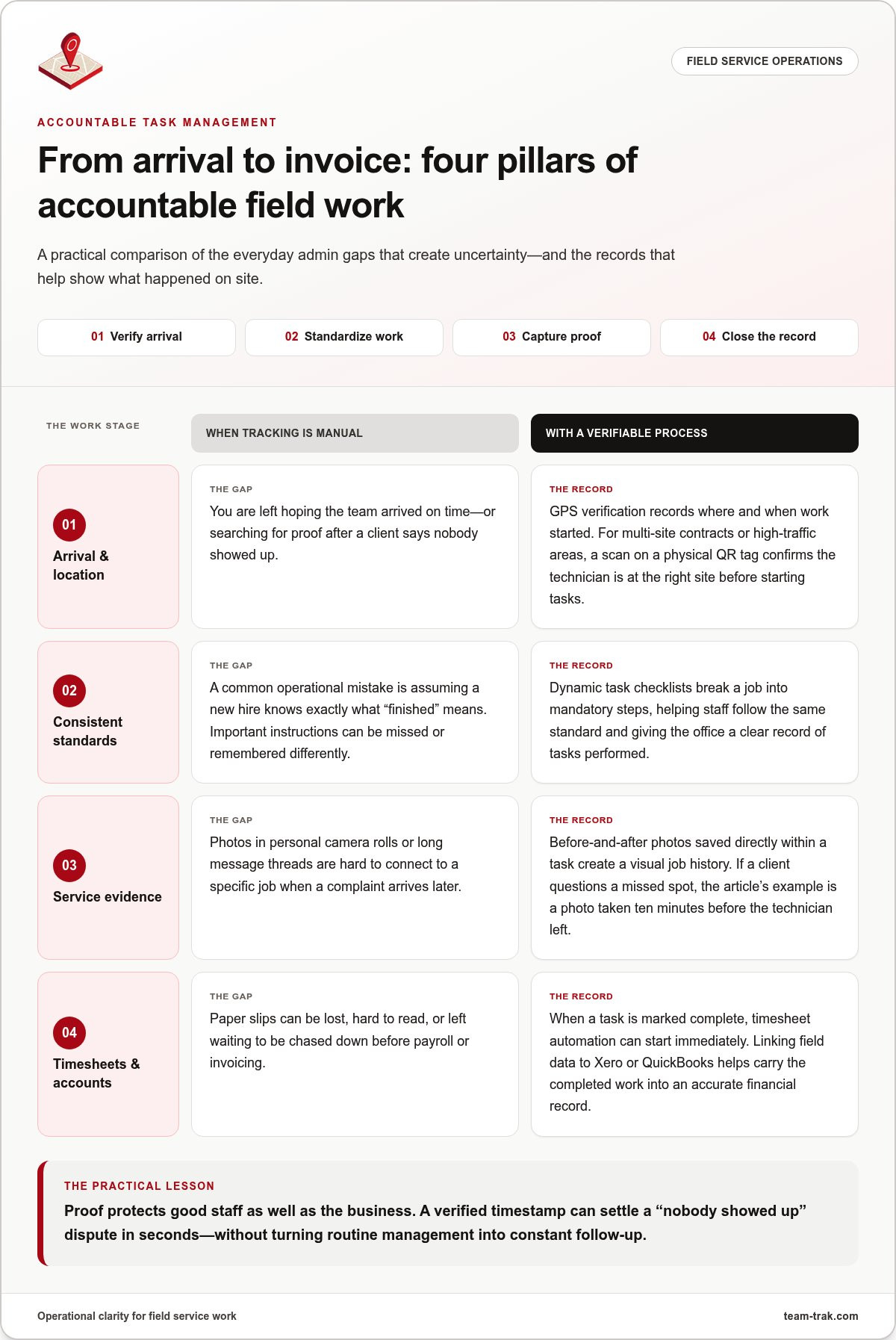
Accountability is not just a buzzword. It is the backbone of a profitable service business. To stop the "Friday afternoon scramble" we mentioned earlier, your field service task management software must stand on four specific pillars. These pillars transform your operation from a chaotic collection of messages into a streamlined, verifiable system that protects your bottom line and your reputation.
Pillar 1 & 2: Verification and Standardized Work
Verification is the first step toward peace of mind. Using GPS verification provides a digital breadcrumb of where and when work started. This is not about "spying" on your team. It is about protecting your business and your staff from client claims that "nobody showed up." I have seen countless disputes resolved in seconds simply because we could show a verified timestamp of a technician standing on the client's doorstep. For multi-site contracts or high-traffic areas, QR code tracking offers an even higher level of precision. A quick scan on a physical tag ensures the technician is exactly where they need to be before they can even start their tasks.
Once they are on-site, the focus shifts to the "What" and the "How." One of the most common operational mistakes is assuming a new hire knows your specific standard of "finished." Dynamic task checklists bridge this gap. By breaking down a complex job into a series of mandatory steps, you ensure a junior staff member performs with the same attention to detail as your most experienced pro. It standardizes your output. This is the only way to scale a service business without losing the quality that won you those clients in the first place.
Pillar 3 & 4: Closing the Feedback Loop
Visual proof is the ultimate dispute-killer. Capturing "before and after" photos directly within a task creates a visual history that clients cannot argue with. When a client calls to complain about a missed spot, you can simply point to the high-resolution photo taken ten minutes before the technician left. This real-time communication feeds into the final pillar: getting paid. When a task is marked as complete, timesheet automation kicks in immediately.
Linking this field data to accounting tools like Xero or QuickBooks means you no longer have to chase paper slips to run payroll or send an invoice. It turns a job well done into an instant, accurate financial record. If you are tired of the administrative friction that comes with manual tracking, you might want to explore how these pillars can stabilize your daily operations and give you back your weekends.
Verification vs. Trust: Solving the 'Did They Show Up?' Problem
One of the most common mistakes I see business owners make is confusing trust with a system. You trust your team. You hired them because they are capable and honest. However, trust is a feeling; a system is a fact. When a client calls at 8:00 AM claiming your crew never arrived, your "trust" in your staff doesn't help you resolve the conflict. It often leads to a "he-said, she-said" situation that leaves everyone frustrated. Transitioning to a system-verified management style isn't about lack of faith in your people. It is about having the data to back them up.
In fact, a robust field service task management software actually protects your best employees. I have seen countless instances where a technician was unfairly accused of cutting corners or arriving late. Without data, the owner usually sides with the client to save the contract. With verification, you can prove exactly when your staff arrived and what they did. This shift from trust-based to system-verified management provides a professional shield for your team. Industry observations suggest that having undeniable GPS stamps can reduce client disputes by up to 90%, simply because the evidence is right there in the portal.
The Role of QR Codes in High-Stakes Operations
For cleaning and maintenance teams working in large commercial buildings, QR code tracking is a game changer. Unlike a simple button tap on a phone, a QR code requires the staff member to be physically standing in front of a tag. This is crucial for high-traffic sites where missing a single room can lead to a major complaint. Physical check-ins are inherently more reliable because they eliminate the possibility of someone "clocking in" from the car or a block away. Proof of Presence is a non-negotiable requirement for modern commercial contracts.
GPS Stamps: Protecting Your Reputation
When a client claims your team never arrived, the stress can be overwhelming. You are forced to choose between offending a customer or doubting a loyal employee. Using location data as a shield allows you to handle these calls with calm authority. You can look at the dashboard, see the GPS-verified arrival time, and politely correct the client's misunderstanding with hard evidence. This level of visibility is often misunderstood as "big brother" surveillance, but it is actually about busting the myths of operational visibility to create a more transparent workplace. Your reputation is your most valuable asset; don't leave it to chance when you can secure it with data.
How to Eliminate Client Disputes with a Service Portal
Every operator knows the sinking feeling of a client calling to dispute a bill two weeks after the work was done. You know the job was completed correctly. Your staff knows it too. But without a shared window into the work, you are left defending your reputation against a client's fading memory. This is where a dedicated client portal changes the game. By moving from reactive communication to proactive transparency, you stop disputes before they even begin.
The process starts with granting your clients "View-Only" access to their specific job history. This doesn't mean they see your internal notes or payroll data. It means they can see a verified timeline of every visit. When your team marks a task as finished in your field service task management software, the system can automatically deliver a completed checklist to the client's inbox. This immediate feedback loop provides a transparent audit trail of every visit, ensuring the client feels informed and in control without you having to send a single manual update.
Integrating photo evidence into these final service reports is the ultimate "dispute killer." If a technician encounters a pre-existing issue on-site, they snap a photo. When the job is done, they take another. These images are pinned to the task record, creating an undeniable visual history. This level of detail transforms a standard invoice into a professional proof-of-service document that is very difficult to argue with.
Transparency as a Competitive Advantage
Providing this level of visibility helps you win bigger commercial contracts that demand high levels of accountability. Facility managers and property owners don't want to chase you for updates. In my experience, giving clients access to a portal can reduce "How is my job going?" phone calls by as much as 50%. It allows your office staff to focus on growth rather than answering basic status questions. If you want to simplify operation hurdles, moving toward a self-service model for your clients is the most effective shortcut.
The Psychology of Professionalism
There is a deep psychological shift when a client receives a verified report instead of just a bill. They value "proof of service" over a lower price point because it provides them with peace of mind. For short-term rental and Airbnb hosts, this is a non-negotiable requirement. They need to know their property is guest-ready from miles away. When you provide an audit trail with timestamps and photos, you aren't just a service provider; you are a reliable partner. This reliability is what builds long-term retention and allows you to charge what you are actually worth. If you are ready to stop the back-and-forth and start proving your value, it might be time to see how a client portal can protect your business.
Operational Clarity: Why Service Founders Choose Team-Trak
The software market is crowded. It's full of flashy tools that promise the world but often deliver a technical headache. Many of these systems are built by developers who have never set foot on a construction site or managed a cleaning crew. Team-Trak is different. We act as a calm authority because we've sat in your chair. Our field service task management software isn't about adding more features. It's about providing the operational clarity you need to grow. We take a "Humans First" approach. If the app is too complex for your staff to use in the field, it doesn't matter how powerful the dashboard is. We make it easy for them so it can be powerful for you.
Designed for Trades, Cleaning, and Construction
Building a system for Trades and Field Service Companies requires understanding the real-world environment. Your team works in basements, on remote job sites, and in high-pressure situations where signals can be weak. Our mobile app is designed to work reliably in these conditions. It ensures that data is captured even when the internet is patchy. Once the work is done, the information flows directly into your business ecosystem. Linking your field data to Xero or QuickBooks is not just a feature; it's the end of manual data entry. It's the beginning of accurate, stress-free payroll and invoicing.
The Founder's Promise: Built by Operators
We built Team-Trak to solve the "Friday afternoon scramble" once and for all. As operators, we know the weight of administrative friction. We've lived through the missing job slips and the client disputes that eat into your evening. Our core mission is to provide undeniable "Proof of Work" that protects your reputation and your profit. We believe that your software shouldn't be a source of financial stress. That's why we offer a transparent path forward with no long-term contracts and no hidden fees. You stay because the system works, not because a contract forces you to. It's time to trade your daily chaos for total operational clarity. Explore Team-Trak's Core Platform today and see how a system built by operators can change your business.
Trade the Friday Scramble for Operational Clarity
You didn't start your business to spend your life chasing paper or arguing with clients over timestamps. You started it to provide a service you're proud of. Moving to a professional field service task management software is the most direct path to reclaiming your time and your peace of mind. By establishing a system of GPS-verified attendance and automated checklists, you remove the guesswork from your daily operations. You protect your team from unfair claims and give your clients the transparency they deserve.
Integrating these field insights directly with Xero or QuickBooks means your admin work is finished the moment the job is done. There are no long-term contracts to sign and no hidden fees to worry about. You deserve a partner that understands the realities of the field and prioritizes your relief over complex technology. It's time to stop managing by hope and start leading with data. Your future of streamlined, stress-free management is closer than you think.
Ready to simplify your operations? Explore Team-Trak for free.
Frequently Asked Questions
Will my staff feel like I'm spying on them with GPS tracking?
Most staff members actually appreciate the system once they realize it acts as a professional shield against unfair client complaints. It isn't about spying; it's about providing undeniable evidence that they were on-site and did the job right. Clear communication about why you're using field service task management software helps build a culture of accountability rather than suspicion. It protects your best workers from false accusations and ensures their hard work is always documented.
How long does it take to set up field service task management software?
You can usually have your account active and your first few jobs scheduled within a single afternoon. The most time-consuming part is often just uploading your client list and creating your initial checklists. Because the system is built for busy operators, the onboarding process is low-friction and intuitive. You don't need a degree in IT to get your team up and running with the mobile app.
Can this software work for very small teams of 2 or 3 people?
Small teams often see the biggest benefit because they usually lack dedicated administrative staff. When the founder is also the lead technician, every minute spent on a "where are you?" phone call is a minute lost on a billable job. This software acts as a virtual office manager that handles verification while you're busy on-site. It allows a small crew to punch well above their weight in terms of professionalism.
Does the mobile app work when there is no internet connection?
Yes, the mobile app is built to handle low-signal environments like basements or rural construction sites. Staff can still complete their checklists and capture photos while offline. The app stores this data locally on the device and automatically syncs it to your main dashboard as soon as the phone regains a stable internet connection. You'll never lose proof of work just because of a dead zone.
Can I customize the checklists for different types of jobs?
Customization is a core feature that allows you to maintain high standards across different service lines. You can build unique templates for every type of job, ensuring a residential cleaning checklist looks entirely different from a commercial maintenance report. This flexibility ensures that even your newest hires follow your specific "brand way" of doing things from their very first day on the job.
How does the software integrate with Xero or QuickBooks?
The system uses a direct API link to sync your completed job data with your accounting platform. Once a task is verified and marked as finished in the field service task management software, the details are ready for your billing tool to process. This eliminates the need to manually copy hours or job descriptions into your accounting software. It turns a job well done into an instant, accurate financial record.
What happens if a staff member forgets to check in with a QR code?
If a staff member misses a check-in, the admin dashboard will flag the entry for your review. You can manually verify the work through other means, such as photo timestamps or GPS breadcrumbs, and then update the record yourself. It's a simple fail-safe that ensures your payroll and client billing remain accurate even when human errors happen. You stay in control of the final data.
Is there a limit to how many clients can access the portal?
There is no limit to the number of clients you can invite to use the portal. You can provide every customer with their own view-only window into their specific job history and verified reports. This self-service approach is a powerful way to scale your communication. It builds long-term trust without adding a single minute to your daily administrative workload.
Disclaimer
The information provided in this article is for general informational purposes only and reflects the opinions and experiences of the author. While every effort has been made to ensure accuracy, Team Trak makes no guarantees regarding completeness

Written by
Bob Fitzjohn
Founder of Team-Trak and serial entrepreneur with over 50 years’ experience building and scaling service businesses. Bob writes about workforce management, operational efficiency, automation, and the realities of running small businesses in today’s environment.


