
It’s 4:30 PM on a Friday, and instead of wrapping up for the week, you’re stuck in a familiar loop of chasing missing timesheets and answering client emails about unverified work. You know the feeling of operational confusion all too well. It’s the stress of not knowing exactly where your team is or if a specific task was actually completed to your standards. Adopting the right field workforce management software is the most effective way to clear this fog and finally reclaim your time.
We agree that running a service business shouldn’t feel like a constant administrative battle against disorganized data. This guide will show you how to quietly remove that friction and provide total visibility over your remote team without the need for complex tech. We’ll preview the core features that solve real-world problems, explain how to choose a system tailored to your specific industry, and provide a practical rollout strategy for moving from chaos to calm. Discover how to replace the weight of administration with the peace of mind that comes from total accountability.
Key Takeaways
- Replace manual paper logs with a real-time digital hub that connects your office directly to your mobile team.
- Use GPS verification and QR codes to provide undeniable proof of work and end client disputes over hours worked.
- Prioritize staff ease of use to ensure your field workforce management software is actually adopted by your team every day.
- Master the Quiet Transition strategy to move from operational chaos to calm without overwhelming your remote staff.
What is Field Workforce Management Software and Why Does it Matter?
Every Friday afternoon, thousands of business owners experience the same headache: the timesheet scramble. It is a frantic rush of text messages, phone calls, and scribbled notes as you try to piece together who was where and for how long. This isn’t just a minor scheduling hiccup; it is a symptom of deep operational confusion. Field workforce management software serves as a digital hub that connects your home office to your remote team in real-time. It is the bridge between the work being done on-site and the data you need to run your business properly. Ultimately, field workforce management software is a practical tool designed to replace operational confusion with long-term peace of mind.
To understand the broader context, it helps to look at the history of What is Field Service Management. While the industry has existed for decades, the shift from “old school” paper logs to digital systems has changed the game for small and mid-sized operators. You are no longer flying blind. Instead of wondering if a technician arrived on time or if a cleaner finished their checklist, you have instant visibility. This shift isn’t about adding complex tech for the sake of it. It is about creating a reliable system that works while you focus on growing the business.
The High Cost of Administrative Friction
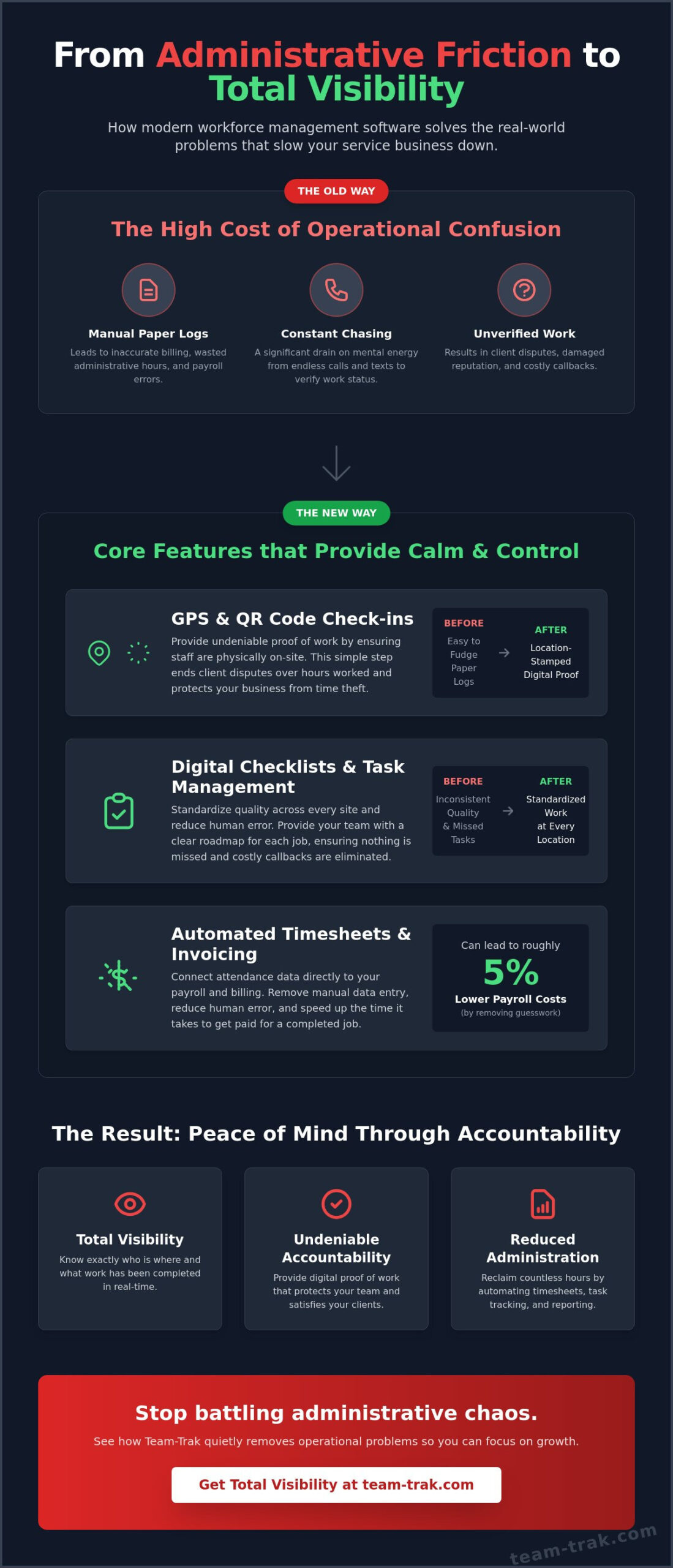
Administrative friction is the hidden tax on your company’s growth. When you rely on manual reporting or legacy processes, you lose more than just time. You lose revenue through inaccurate billing and hours wasted on manual data entry. Chasing staff for check-in times or task updates is a significant drain on your mental energy. This disorganized approach often leads to missed tasks and client disputes that damage your reputation. By digitizing these workflows, you remove the friction that keeps you stuck in the day-to-day weeds. If you’re new to these tools, understanding what is workforce management software and how it automates these manual processes is the first step toward reclaiming your time.
Visibility vs. Spying: A Modern Approach
Many business owners worry that tracking feels like a “Big Brother” tactic. However, a modern approach focuses on visibility rather than spying. Establishing a culture of accountability actually protects your staff as much as your business. For instance, GPS location verification provides undeniable proof of work, ensuring your team is credited for every minute they spend on-site. When a client disputes an invoice, you don’t have to guess or argue. You simply present the data. This level of transparency builds trust with your employees and professionalizes your relationship with every client you serve.
Core Features that Solve Real-World Operational Problems
Most software providers talk about revolutionary technology, but when you’re managing a cleaning crew or a construction site, you don’t need a robot; you need a system that works. Practical field workforce management software focuses on the high-friction areas of your day: knowing where people are, what they’ve done, and how much to pay them. While Gartner defines field service management as a way to optimize mobile resources, for a business owner, it’s really about having a reliable digital paper trail that prevents disputes and saves time. Understanding the benefits of field service management software can help you see exactly how these tools translate into recovered hours and fewer client disputes each week.
GPS and QR Code Check-ins
Old-school paper logs are easy to fudge. Using QR code check-in and check-out is the modern alternative that provides undeniable proof of work. By placing a unique code at the job site, you ensure staff are physically present before they can start their shift. This location-stamped data protects your business from time theft and gives your clients total confidence that they’re getting the service they paid for. It’s a simple way to replace operational confusion with accountability.
Checklists and Task Management
Standardizing quality across different sites is one of the hardest parts of scaling a mobile team. Human error leads to callbacks, and callbacks eat your profit. By utilizing task management and checklists, you provide your team with a clear roadmap for every job. Whether it’s a safety check on a trade site or a specific cleaning protocol for a short-term rental, digital checklists ensure nothing is missed. When the task is ticked off in the app, you see it in the office immediately.
The Financial Link: Timesheets and Invoicing
The real magic happens when your attendance data talks to your bank account. Manual data entry is where errors thrive, leading to overpaid staff or undercharged clients. Research shows that modern workforce management software can lead to roughly 5% lower payroll costs by simply removing the guesswork from attendance tracking. These automated timesheets feed directly into your billing cycle, reducing the gap between finishing a job and getting paid. If you’re tired of the manual data entry, it might be time to see how these tools fit into your workflow.
Choosing the Right Software for Your Specific Industry
The most powerful tool in the world is useless if your team refuses to use it. When you are evaluating field workforce management software, the “ease of use” for your staff on the ground is more important than any desktop dashboard. Most software fails because it is too complex for a technician with wet hands or a cleaner in a rush. You want a grounded, human-first onboarding process that focuses on solving their daily frustrations rather than adding more digital chores. Avoid the trap of feature bloat; you need a system that simplifies your operations, not one that requires a degree to navigate. A solid understanding of what is workforce management software and its core capabilities will help you cut through the marketing noise and choose a platform that genuinely fits your team’s daily workflow.
Construction and Trades
In the building industry, you aren’t just managing employees; you are often coordinating a mix of full-time staff and sub-contractors. Effective construction field management requires robust site-level tracking that links directly to your project timelines. By ensuring site attendance is recorded accurately, you can track your labor spend against your budget in real-time. This visibility helps you spot where a project might be slipping before it becomes a financial disaster on your books.
Cleaning and Short-Term Rentals
If you manage residential properties, your biggest challenge is the high frequency of check-ins across dozens of different locations. For Airbnb and short-term rental hosts, providing instant proof of service is vital for maintaining high guest ratings. Your software should allow remote teams to check in, complete a specific cleaning checklist, and provide data-stamped confirmation immediately. This accountability removes the need for you to physically visit every site to verify the quality of work.
Trades and Field Service Companies
Efficiency for service teams is built on the back of smart schedules and optimized routing. Whether you are in plumbing, electrical, or landscaping, your software must be reliable even in low-signal areas. We see similar needs for high-reliability workforce management in the utilities sector, where field staff need constant access to task data. For trades and field service companies, the goal is to maximize the number of jobs completed each day without burning out your crew. If you are ready to see how a tailored approach can work for your specific crew, get in touch with us today.
Implementation: Moving from Chaos to Calm
Moving from a paper-based system to field workforce management software doesn’t have to be a shock to the system. You don’t need a large IT department to make this work; you just need a logical plan. We recommend the “Quiet Transition” strategy. Start small by focusing on attendance and automated timesheets first. Once your team is comfortable with checking in and out, you can gradually introduce more complex features like task checklists. This staged approach reduces staff pushback and ensures your data is clean from day one.
Measuring your return on investment is the final step in moving from chaos to calm. Compare the cost of the software against the hours you currently spend on manual admin. If you are reclaiming five hours a week from chasing timesheets and resolving billing disputes, the system has already paid for itself. This saved time allows you to focus on high-value tasks, like winning new contracts or improving service quality, rather than being buried in digital paperwork.
The Rollout Strategy
A successful rollout depends on transparency and empathy. Address staff concerns about tracking by explaining that the app is there to protect them. It ensures they get paid accurately for every minute worked and provides proof of their hard work if a client complains. Training should take under ten minutes. If the mobile app is intuitive, your team will adopt it quickly. Set clear expectations for check-ins from the start, and lead by example by using the office dashboard to provide support rather than just monitoring.
Strengthening Client Relationships
One of the most overlooked benefits of field management is the impact on your customers. By using client portal software, you provide a level of self-service transparency that sets you apart from “old school” competitors. Clients can see when a job was completed and view the verified proof of work without having to call your office. This professional approach builds long-term trust and significantly reduces the volume of “where is my person?” phone calls, freeing up your phone lines for new inquiries.
Continuous Operational Improvement
Once the system is live, use the data to identify bottlenecks in your operations. You might notice that certain sites consistently take longer than estimated or that travel times between jobs are eating into your profit margins. Implementing mobile workforce management solutions allows you to scale your business without the need to hire more administrative staff. The end goal is a business that runs smoothly and maintains high standards, whether you are personally watching over every job or not.
Take Control of Your Operations Today
Managing a remote team shouldn’t feel like a constant battle against disorganized paperwork and unverified claims. By implementing the right field workforce management software, you replace that daily friction with a reliable system of accountability. You gain the peace of mind that comes from GPS-verified attendance and automated timesheets that feed directly into your invoicing. This visibility doesn’t just reduce your administrative load; it professionalizes your business and protects your bottom line.
The end goal is simple: a business that runs smoothly whether you’re watching or not. With seamless accounting integration and clear proof of work, you can finally move away from the Friday afternoon scramble and focus on meaningful growth. It’s time to trade operational confusion for data-driven results and professional clarity.
Quietly solve your operational problems with Team-Trak today. You’ve built a great business; now it’s time to give it the structure it deserves.
Frequently Asked Questions
Is field workforce management software suitable for very small teams?
Yes, field workforce management software is highly effective for teams of any size. Even if you only have two or three staff members, the time saved on manual data entry pays for itself. Small businesses often feel the weight of administrative friction more acutely than large ones. Automating these tasks early allows you to scale your operations without immediately needing to hire additional office help.
How does GPS verification actually work for my field staff?
GPS verification within field workforce management software captures a precise location stamp only at the specific moment your staff checks in or out. It isn’t a constant tracking tool that follows their every movement throughout the day. This data provides undeniable proof of work by confirming they were physically at the job site when they started their shift. It’s a practical way to build accountability without creating an invasive atmosphere.
Will this software integrate with my existing accounting tools like Xero or QuickBooks?
Yes, the platform links directly with popular online accounting systems like Xero and QuickBooks. This connection allows you to move your verified attendance data into your payroll and invoicing workflows without any manual re-entry. It eliminates the common errors that happen when you’re typing numbers from paper logs into your books. This integration ensures your financial records stay balanced and your staff are paid accurately.
What happens if my staff forget to check in or out using the QR code?
If a staff member forgets to scan a QR code, you can manually adjust their records through the management dashboard. While the goal is to establish a consistent habit of digital check-ins, the software is flexible enough to handle real-world oversights. You’ll see a flag for any missing data, which gives you a chance to resolve the issue quickly and keep your attendance records accurate for billing and payroll.
How does a client portal help my service business grow?
A client portal provides your customers with total transparency, which significantly builds trust and professional authority. Instead of calling your office to check on a job, they can log in and see the verified status themselves. This self-service model reduces your administrative pressure and helps you retain clients who value clear, data-driven communication. It’s a simple way to make your business look much larger and more organized than the competition.
Is my data secure when using a mobile workforce management app?
Your data is stored in secure, cloud-based servers that use modern encryption standards to protect sensitive information. This is much safer than relying on paper timesheets or spreadsheets that can be easily lost, stolen, or accidentally deleted. By using a mobile app, your business records are automatically backed up and accessible only to you and your authorized managers. It provides a reliable digital trail for compliance and resolving disputes.

Disclaimer
The information provided in this article is for general informational purposes only and reflects the opinions and experiences of the author. While every effort has been made to ensure accuracy, Team Trak makes no guarantees regarding completeness