
Contractor Proof of Work App: Verify Visits, Build Trust
 By Bob Fitzjohn8 min read
Stop disputing site attendance. Discover how a contractor proof of work app verifies visits, backs honest staff, and creates clear records without extra admin.

In this article
A client says nobody arrived for the job. Your contractor says they were there, but the useful details are buried in messages or sitting on a personal phone. A contractor proof of work app can help create a clearer record, linked to the right job and location, so you’re not trying to piece together a visit after the fact.
Good records should answer practical questions: who attended, when they arrived and left, and what work was completed. They should also be fair to your team. Verification is there to support honest staff and resolve client questions, not make people feel mistrusted. This article compares practical ways to record site visits, explains what evidence is useful, and shows how to choose an approach that fits your workflow without adding another layer of admin.
Key Takeaways
- Define what each job record needs to show, and keep evidence of attendance separate from evidence that tasks were completed.
- Compare paper, spreadsheets, WhatsApp, photo apps and GPS check-in tools to find an approach that fits your team without collecting unnecessary data.
- Use a contractor proof of work app only if it makes records easier to link to the correct job and review when something needs attention.
- Build a simple process from scheduling through manager approval, then use approved attendance records to support timesheets.
Table of Contents
What a Contractor Proof of Work App Needs to Prove
A useful job record links evidence to a specific contractor, location and scheduled visit. It helps establish when the visit happened and what information was captured, rather than leaving you to reconstruct events from messages later. A contractor proof of work app should make it easy to find the record for the job in question.
Most visits go to plan. The time gets lost on the exceptions: a client queries one appointment, and you’re searching through separate timesheets, chats and phone photos to work out what happened. A clear record can help both the client and the team member resolve the question without relying on anyone’s memory alone.
Attendance evidence is not the same as completion evidence
A check-in and check-out record can support when a visit began and ended, and whether the contractor was at the expected location at those moments. It doesn’t show that a particular task was completed. Photos, notes or task records may document visible work, but they’re separate evidence and not every app includes them. For a broader look at job records, see this guide to proof-of-service documentation.
Say a client reports that a scheduled repair visit didn’t happen. The contractor remembers attending, but the client saw no one. A visit record can help establish arrival and departure; a relevant job note or photo may help show what work was done. Neither should be treated as proof of the other.
Compare Contractor Proof of Work Options Without Adding Unnecessary Data Collection
Choose evidence for the question you need to answer, not the largest amount of data you can collect. A small team with familiar sites may manage well with paper. As visits grow, however, records spread across tools and take longer to reconcile.
Paper sheets: Cheap and familiar, but can be misplaced, filled in later or slow to total.
Spreadsheets: Flexible and easy to adapt, but depend on manual updates and don’t independently verify a visit.
WhatsApp: Quick for messages and updates, but attendance details can get buried in chats.
Photo apps: Useful for documenting visible progress, but a photo alone may not establish who attended or how long they stayed.
GPS check-in tools: Can link arrival and departure records to a job location, but check whether location is captured only at check-in and check-out or collected continuously.
Choose evidence that answers the question your clients actually ask
For “Did the contractor attend?”, use an attendance record. For “When did they arrive?”, look for recorded check-in and check-out times. A progress question may call for a relevant photo or note, while task completion is better supported by a task record. Manual approaches can work, but matching the right evidence to the right job often means more checking and reconciliation. This comparison of digital proof and manual reporting explores that trade-off.
GPS verification can be a location snapshot at arrival and departure; it doesn’t have to mean continuous location collection. Optional QR check-ins can add an on-site step at selected locations, without placing codes at every client property.
If you’re weighing up a more connected way to record visits, explore a field operations workflow that links scheduled jobs with attendance records.
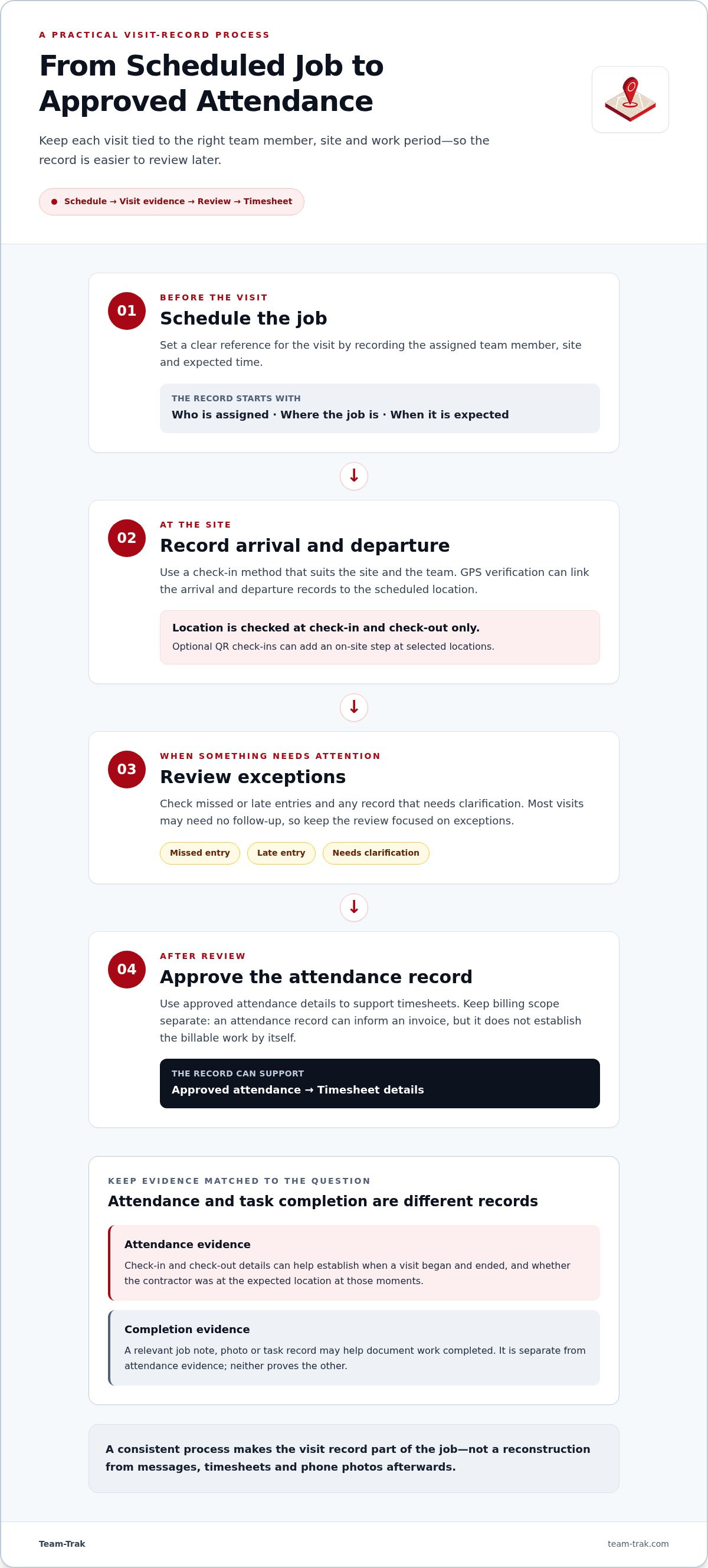
Build a Contractor Proof of Work Process That Leads to Clearer Records
A reliable process makes the record part of the job, not a Friday-afternoon reconstruction. Keep the steps consistent so each visit is tied to the right contractor, location and work period.
- Schedule the job. Record the assigned team member, site and expected time so the visit has a clear reference.
- Record arrival and departure. Use a check-in method that fits the site and team. A GPS verification process can link arrival and departure records to the scheduled location.
- Review exceptions. Check missed or late entries and any records that need clarification. Most visits may need no follow-up, so focus review on the exceptions.
- Approve the record. Once checked, use approved attendance details to support timesheets. Billing is separate: an attendance record can inform an invoice, but it doesn’t establish the billable scope by itself.
Consistent time records can reduce the manual cross-checking that creeps in when timesheets are rebuilt from separate notes. The guidance on automated timesheets for field teams covers how approved visit records can flow into time records.
Where Team-Trak fits in the verified-visit process
Team-Trak links scheduled visits with GPS readings recorded only when a team member checks in and out. Optional QR check-ins can add an on-site step at selected locations. A manager can review exceptions, and approved verified visits generate timesheets. Temporary contractors can check in through a schedule link in their phone’s browser without installing the app.
Client invoicing is a separate function, available on the Professional plan. Explore Team-Trak to see how its scheduled-job and visit-record workflow could fit your operation.
Make the Next Visit Easier to Explain
Before changing tools, choose one recurring job and write down the questions that tend to come up afterwards. Was the visit made? What needs doing? What evidence would help clarify a client’s concern? Those answers give you a practical test for any contractor proof of work app and help your team understand what’s being recorded and why.
Keep the process proportionate. Ask staff for feedback after using it on real jobs, then adjust the evidence required if it creates friction or doesn’t answer the questions clients actually ask. A useful record should make follow-up easier for everyone, not turn routine work into another admin task.
When you’re ready to consider how a connected workflow could fit your operation, Explore Team-Trak. Start with the jobs that create the most uncertainty and build a clearer process from there.
Frequently Asked Questions
Is a proof of work app the same as a time-tracking app?
Not always. Before choosing, check what you need to produce at the end of each work period. If you mainly need hours for payroll, a time record may be enough. If you need to answer client queries, consider whether records can be found by job and shared with the people who need them. That helps avoid paying for a process that adds admin without solving your main problem.
Can an app prove that a contractor completed the work, not just attended?
Set the completion standard before the job begins. For a repair, that might mean recording the agreed outcome and noting any parts or follow-up work still outstanding. This gives the contractor and client the same reference point, and prevents a visit being described as fully complete when further work remains. Keep the standard proportionate to the job.
Do temporary contractors need to install an app to check in with Team-Trak?
No. For an occasional assignment, send the temporary contractor their unique schedule link with the visit details before the job. Keep instructions about the work itself clear and separate from check-in, so the contractor knows both how to record the visit and what the client expects to be done.
What should I do if a team member forgets to check out?
Don’t guess or silently change the time. Ask the team member when they left and why the check-out was missed, then record that explanation with the proposed correction. A manager can review the details before approving the entry. Keeping the reason visible makes the record easier to understand than a corrected time with no context.
Disclaimer
The information provided in this article is for general informational purposes only and reflects the opinions and experiences of the author. While every effort has been made to ensure accuracy, Team Trak makes no guarantees regarding completeness
Written by
Bob Fitzjohn
Founder of Team-Trak and serial entrepreneur with over 50 years’ experience building and scaling service businesses. Bob writes about workforce management, operational efficiency, automation, and the realities of running small businesses in today’s environment.


