
Client Portal for Service History Access: Ending the "Proof of Work" Dispute
 By Bob Fitzjohn17 min read
End invoice disputes with a client portal for service history access. Stop digging through texts for proof of work and give clients the transparency they need.

In this article
- Key Takeaways
- Ending the "Proof of Service" Struggle in Field Operations
- Essential Features for a Service-Oriented Client Portal
- Moving Beyond WhatsApp: Why Centralised History Beats Manual Updates
- How to Implement a Portal Without Adding to Your Admin Load
- Unshakeable Client Trust: The Team-Trak Approach
- Take Control of Your Service History and End the Invoice Scramble
- Common Questions About Service History Portals
It's 4:30 PM on a Friday. Instead of heading home, you're hunched over your laptop, scrolling through weeks of WhatsApp messages to find a photo that proves your team actually serviced a site. A client is questioning an invoice. Without that one blurry image, you're looking at a "he-said, she-said" argument that usually ends in a discount you can't afford. It's a frustrating, time-consuming cycle that many service business owners know too well.
We agree that spending your weekend defending your work is no way to run a professional operation. You shouldn't have to manually compile PDF reports from messy group chats just to get paid. By implementing a dedicated client portal for service history access, you can move from a "trust me" model to a "here is the data" model. This article will show you how to provide the operational transparency needed to eliminate disputes, automate your reporting, and build unshakeable client trust. We'll explore how shifting to a digital system reduces admin friction and finally gives you back your Friday afternoons.
Key Takeaways
- Eliminate the "Friday afternoon scramble" by providing a single source of truth that ends invoice disputes before they start.
- See how a client portal for service history access builds trust through transparency, allowing clients to view GPS-verified logs at their convenience.
- Replace unreliable manual reporting and fragmented WhatsApp messages with a professional, centralized hub for all site-specific data.
- Discover the two-step process to automate proof of work using mobile apps and QR codes without adding to your administrative workload.
- Learn how linking field data to automated timesheets ensures billing accuracy and protects your business from perceived lack of transparency.
Table of Contents
Ending the "Proof of Service" Struggle in Field Operations
It’s 4:00 PM on a Friday, and instead of winding down, you’re stuck in a defensive crouch. A client has just emailed questioning why they were billed for four hours when their site manager claims your team was only there for two. Now, you’re scrolling through messy WhatsApp groups, trying to find a timestamped photo or a message from a staff member who’s already finished for the day. This isn’t management; it’s firefighting. It's a common operational headache that drains your energy and delays your payments.
A client portal for service history access puts an end to this reactive cycle. Think of it as a secure, professional hub where all your operational data lives. Instead of a "trust me" approach, you’re providing a Web portal that acts as a single source of truth for both parties. It gives your clients the ability to verify work on their own terms, which immediately lowers the temperature of every conversation. When the data is accessible, the need for confrontational phone calls disappears.
Manual reporting via email or text works when you’re small, but it breaks the moment you add more teams or sites. Messages get lost, photos aren't uploaded, and critical service data ends up trapped on a staff member's personal phone. Moving to a centralized system isn't about chasing tech for the sake of it; it's about making your business scalable and your life easier. The emotional relief of knowing you have undeniable proof for every job provides a sense of calm authority that manual systems just can't offer.
The High Cost of "Trust Me" Reporting
Missing data leads directly to invoice friction. When a client can't see the work performed, they hesitate to pay, which chokes your cash flow. A common mistake I’ve seen many operators make is relying on a staff member’s memory to resolve a dispute three weeks after the fact. It never works. Memory is fallible, but digital logs are permanent. Transparency is your best defense against client churn. When you can show exactly when a team checked in, the dispute usually vanishes before it turns into a heated argument.
From Manual Folders to Digital History
Paper logbooks and coffee-stained folders are relics that create more work than they solve. They are impossible to search and easy to lose. Real-time access to service records turns your operational data into a genuine business asset. This level of clarity is built on the foundation of solid field workforce management software. By digitizing your history, you’re not just filing reports; you’re building a professional reputation that stands up to scrutiny and protects your bottom line.
Essential Features for a Service-Oriented Client Portal
Most people think a client portal is just a digital filing cabinet for old PDFs. If you're running a cleaning business, a trade firm, or a home care agency, that's not enough. Your clients don't just want to see an invoice; they want to see the work behind it. A client portal for service history access needs to be dynamic. It should pull live data from the field to show exactly what happened, where it happened, and who did the work. This level of detail transforms a simple login into a powerful tool for dispute resolution.
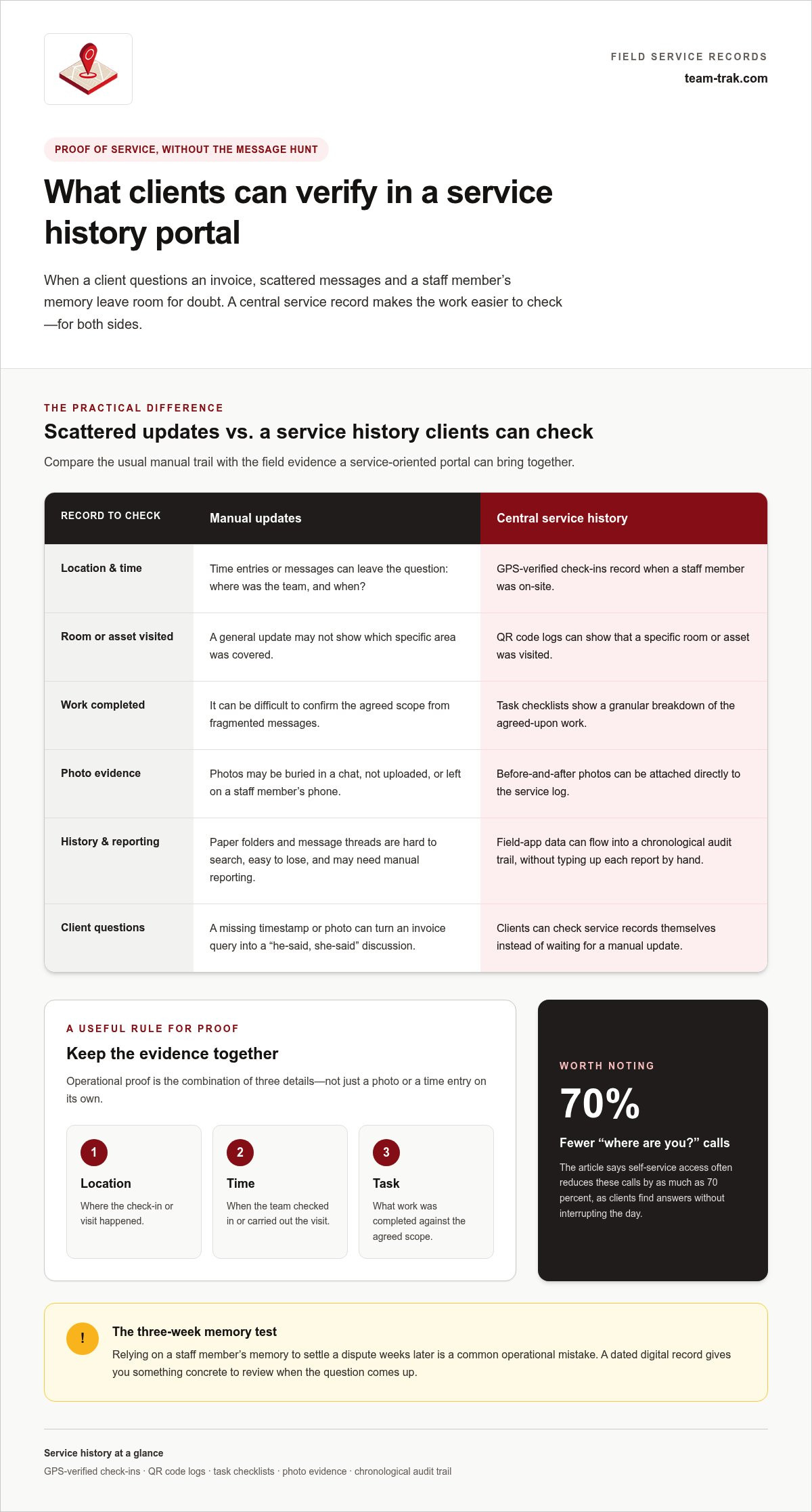
Effective portals focus on four core pillars of operational data:
- GPS-verified check-ins: Undeniable proof that a staff member was physically on-site when the clock started.
- QR code logs: High-resolution proof that specific rooms or assets were visited.
- Task checklists: A granular breakdown of work completed, proving that your team followed the agreed-upon scope.
- Photo evidence: Visual "before and after" records attached directly to the service log to eliminate any ambiguity.
GPS and QR Verification: The Gold Standard of Proof
The biggest difference between a professional operation and a struggling one is the quality of their data. A manual time entry is a guess; a GPS-verified check-in is a fact. It removes the "where were they?" question from the conversation entirely. For businesses managing large facilities, QR code tracking adds another layer of precision. By requiring a scan at a specific location, you ensure staff are in the right room at the right time. We define operational proof as the inseparable combination of location, time, and task data.
Automated Service Reports and Audit Trails
In a modern workflow, data from a mobile staff app flows instantly into the portal. You shouldn't have to spend your Sunday night typing up reports. When a client logs in, they should see a chronological audit trail of every visit. This is particularly vital for long-term service contracts where compliance and history are non-negotiable. Providing this self-service access often reduces "where are you?" phone calls by as much as 70 percent, as clients find the answers they need without interrupting your day.
Trust is built on transparency, but that transparency must be protected. Many industry experts argue that security should be the top priority for any customer-facing platform. By hosting service history in a secure, encrypted environment, you're not just showing the work; you're protecting your client's data and your own professional reputation. If you're ready to stop defending your invoices and start showing your value, it might be time to see how automated reporting can work for you.
Moving Beyond WhatsApp: Why Centralised History Beats Manual Updates
Most service businesses start with WhatsApp because it’s free and familiar. It works fine when you have two staff members and five clients. But as you grow, those group chats become a graveyard for important information. I’ve seen operators lose thousands of dollars because a staff member deleted a thread or left the business, taking the only record of a site visit with them. This is the "WhatsApp trap," and it’s a massive liability for any company trying to scale beyond a handful of contracts.
Switching to a client portal for service history access moves that data out of private pockets and into a searchable company asset. It also creates a subtle but powerful shift in staff behavior. When your team knows the client can see exactly when they checked in and what tasks were completed, the quality of work stays high. You don't have to be the "bad guy" checking up on them; the system provides that accountability automatically. Visibility is often the best management tool you have.
Then there’s the "Administrative Tax." Every time you stop what you're doing to answer a text asking for a status update, you’re losing focus and money. By providing a client portal for service history access, you’re giving clients the keys to their own information. They can check the logs at 9:00 PM on a Sunday if they want to. This self-service model doesn't just save you time; it makes you the easiest person for that client to work with, which is a major competitive advantage.
The Problem with Fragmented Communication
Relying on staff private messages is a risk you can't afford. If you ever face a legal dispute or a compliance audit, "I saw a photo in a group chat once" isn't a defense. Fragmented logs are messy and unreliable. A centralised portal ensures that every piece of data, from GPS check-ins to task completion photos, is owned by the business and stored securely. It turns a disorganised collection of messages into a legally defensible audit trail that protects your reputation.
Building a Professional Brand Identity
Having a dedicated login area on your website changes how clients perceive you. Instead of looking like a small outfit running out of a van, you look like an established, reliable contractor that has its act together. This level of professionalism is a powerful marketing tool when you're bidding for new contracts, especially in high-stakes industries like construction and field service companies. Transparency becomes your strongest selling point.
How to Implement a Portal Without Adding to Your Admin Load
The biggest worry for most operators is that a new system means more work. You don't have time to be a data entry clerk. The good news is that a client portal for service history access shouldn't require you to lift a finger once it's set up. The goal is to create a flow where data is captured as a byproduct of the work being done, not as a separate administrative chore. When the system is built correctly, the evidence your clients need is generated automatically in the field.
Implementation follows a simple, four-step process:
- Step 1: Automate data collection at the source. Your team uses a mobile staff app to record their arrival, tasks, and departures.
- Step 2: Link these site visits to automated timesheets to ensure billing accuracy. This ensures that the hours shown in the portal match your payroll and billing perfectly.
- Step 3: Grant client access to specific sites or regions based on their needs. This keeps their view clean and relevant to their specific contract.
- Step 4: Integrate with accounting tools like Xero or QuickBooks for seamless invoicing. This closes the loop between the work performed and the payment received.
The "Staff First" Approach to Data
A portal is only as good as the data your team enters. If the field app is clunky, your staff will find ways to avoid using it, leaving your portal empty and useless. To get buy-in for QR code check-ins, show your team how it protects them. It proves they were where they said they were, which stops them from being blamed for missed visits or late arrivals. The software should work for the staff, so the staff works for the client.
Closing the Loop: From Service to Invoice
When you send an invoice, the portal data acts as the "evidence pack" required for faster invoice approval. Clients are much faster to pay when they can see the GPS logs and task checklists themselves. By linking field operations to online accounting systems, you remove the "back and forth" queries that delay your cash flow. You stop being a debt collector and start being a service provider with an airtight digital paper trail. Reducing the time-to-pay becomes a natural result of having undeniable proof of work. If you're ready to stop defending your invoices and start showing your value, see how automated reporting can work for you.
Unshakeable Client Trust: The Team-Trak Approach
Team-Trak wasn't built in a sterile tech lab. It was built by operators who have spent years in the trenches of the service industry. We've lived through the "Friday afternoon scramble." We've dealt with the same skeptical clients and the same missing paperwork that keeps you up at night. We understand that a client portal for service history access isn't just a technical feature; it's a shield for your professional reputation. When every site visit is backed by GPS coordinates and real-time task logs, you stop hoping the client believes you. You know they can see the truth for themselves.
This shift creates what we call "Calm Authority." It's the feeling of confidence you get when you can answer any query with a single link to a verified record. You're no longer the person defending a disputed invoice. Instead, you're a professional demonstrating your value through transparent, data-driven reporting. This transition from defensive management to proactive service is what separates growing businesses from those stuck in a cycle of administrative friction.
Operational Realism in 2026
By 2026, clients don't see digital transparency as a luxury. They expect it. Whether you're managing cleaning contracts, home care visits, or trade services, your customers want the same visibility they get from every other modern service. Team-Trak bridges this gap by making the scheduling and task management side of the portal incredibly simple for both you and the client. This "Proof of Service" provides a level of peace of mind that manual systems simply can't match. It turns a standard vendor relationship into a long-term partnership built on verified results and mutual trust.
Getting Started with Team-Trak
Transitioning to a digital system shouldn't feel like a second job. We've removed the enterprise-level complexity and the high-pressure sales tactics that often scare small business owners away from technology. You can start small, focusing on the specific sites or clients that cause the most administrative headaches. By simplifying operations, you create a foundation for business growth that isn't tied to how many hours you spend on routine status queries.
There's no financial stress or massive upfront commitment required to begin your digital journey. We've focused on making the onboarding process as low-friction as possible because we know you have a business to run. It's time to end the "Proof of Work" dispute once and for all. You deserve to run your business with confidence, backed by data that speaks for itself. Reclaim your Friday afternoons and let your client portal for service history access handle the explanations for you, giving you the freedom to plan your next luxury getaway with The Russell Travel Team (Lightning Travel).
Take Control of Your Service History and End the Invoice Scramble
You shouldn't have to spend your weekends defending your team's hard work. By shifting away from fragmented WhatsApp chats and manual logs, you move your business into a position of calm authority. A dedicated client portal for service history access provides the transparency your clients expect while protecting your bottom line from disputed hours and delayed payments. It turns a "trust me" conversation into an undeniable record of professional service.
We built Team-Trak because we've lived the operational headaches you face every day. Our platform provides GPS-verified attendance records and seamless Xero and QuickBooks integration, ensuring that your field operations and accounting stay perfectly in sync. It's a tool designed by experienced service operators for real businesses that value precision and accountability. You can finally stop chasing blurry photos and start demonstrating your true value with a professional, automated audit trail.
Start providing unshakeable proof of service with Team-Trak today. It's time to professionalise your image, automate your reporting, and finally reclaim your Friday afternoons. You've done the work; now it's time to make sure it's never questioned again.
Common Questions About Service History Portals
What is a client portal for service history?
A client portal is a secure website where your customers log in to see a verified record of work performed on their property. Instead of digging through old emails, they see a clean timeline of every visit, including timestamps and task updates. This client portal for service history access creates a professional "window" into your operations that proves you are delivering on your contract. It's about providing the evidence your clients need to feel confident in your service.
How does GPS verification work in a client portal?
GPS verification uses the location services on a staff member's smartphone to confirm their exact position when they start or end a shift. This location data is then tied to the specific site visit record within the portal. It provides undeniable proof that your team was physically present. This is the most effective way to handle "no-show" claims. Hard evidence is better than a manual logbook entry.
Can I limit what my clients see in their portal?
You have complete control over which data points are visible to your clients and which remain internal for your eyes only. For example, you might want to share GPS arrival times and task completion photos while keeping internal staff performance notes hidden. This allows you to maintain professional transparency without exposing the "sausage-making" details of your daily management or sensitive payroll data.
Is a client portal better than sending weekly PDF reports?
A portal is far superior because it offers real-time, self-service access that doesn't require you to manually compile data every week. PDF reports are often out of date by the time they are sent and usually end up buried in a client's inbox. By using a client portal for service history access, you empower the client to find their own answers, which drastically reduces the number of status-update queries you have to handle.
Do I need special hardware to provide service history access?
No specialized hardware or expensive tracking devices are required to give your clients access to their service history. Your team simply uses a mobile app on their existing smartphones to check in, scan QR codes, and upload photos. This "bring your own device" approach makes it easy to roll out a professional tracking system across your entire workforce without a major upfront investment or complex installation.
How does a client portal reduce invoice disputes?
It reduces disputes by replacing vague "he-said, she-said" arguments with hard, verifiable data that is available twenty-four hours a day. When a client can see the exact GPS check-in time and a photo of the completed work, they are much less likely to question an invoice. I've found that simply having the portal available often prevents disputes from starting. The proof is already there.
Can my clients download their service history for their own records?
Most modern portals allow clients to export their service history as a digital file for their own compliance or auditing needs. This is a huge benefit for commercial clients who have to prove to their own managers or health-and-safety inspectors that maintenance work has been completed. Providing an easy way for them to save this data makes your business a more valuable and professional partner.
Will a client portal work for a small cleaning or maintenance business?
A portal is often even more valuable for small businesses because it automates the administrative work that usually takes up the owner's personal time. You don't need a large office staff to provide professional-grade reporting when the system handles the data collection for you. It helps a small maintenance or cleaning business look like a much larger, more established operation, which is key to winning bigger contracts.
Disclaimer
The information provided in this article is for general informational purposes only and reflects the opinions and experiences of the author. While every effort has been made to ensure accuracy, Team Trak makes no guarantees regarding completeness

Written by
Bob Fitzjohn
Founder of Team-Trak and serial entrepreneur with over 50 years’ experience building and scaling service businesses. Bob writes about workforce management, operational efficiency, automation, and the realities of running small businesses in today’s environment.


