
It’s Friday afternoon and you’re staring at a pile of crumpled paper timesheets, wondering if your team actually spent six hours at the remote site or if they’re just guessing. When a client calls to dispute an invoice, you have no real proof to offer, so you often end up eating the cost just to keep the peace. Managing a mobile team shouldn’t feel like a constant game of detective work, but without a clear system for workforce management scheduling, administrative chaos becomes the norm. You started this business to provide a great service, not to spend your weekends chasing staff for signatures or arguing over minutes.
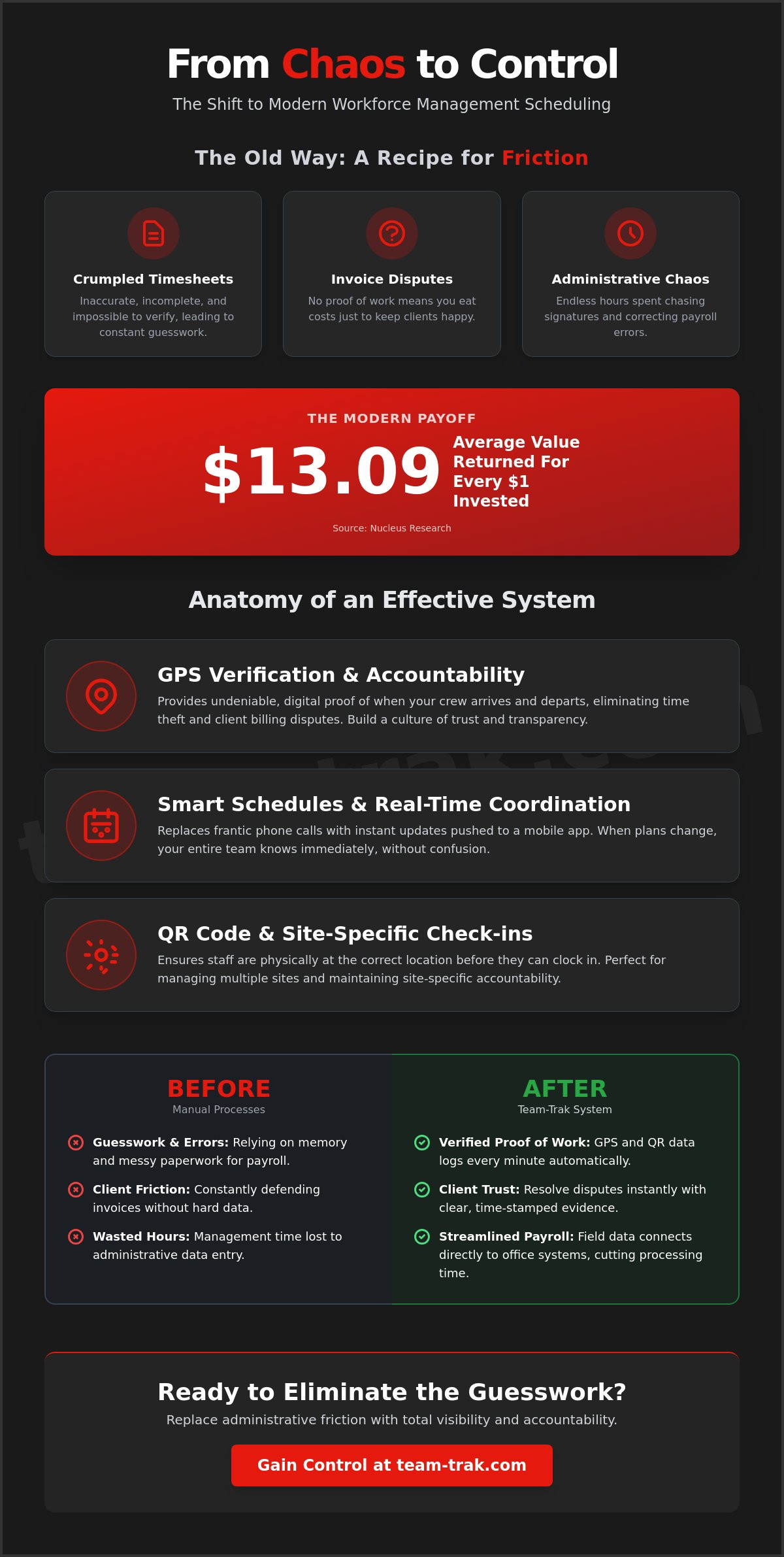
You aren’t alone in this frustration, but there’s a more profitable way to operate. Organizations that move away from manual processes to modern systems see an average of $13.09 in value for every dollar invested, according to Nucleus Research. This guide will show you how to replace that friction with total visibility and accountability. We’ll explore how to automate your timesheets, use GPS verification to protect your margins, and streamline your payroll so you can finally get back to the work that actually grows your business.
Key Takeaways
- Move beyond the point where manual spreadsheets break and learn how to align staff availability with client needs effortlessly.
- Identify how GPS verification and QR code check-ins provide undeniable proof of work while eliminating client billing disputes.
- Discover a practical framework for workforce management scheduling that reduces administrative friction and protects your profit margins.
- Learn how to overcome staff resistance to new technology by using simple mobile tools that make their daily routines easier.
- Understand how connecting field data to your office systems cuts payroll processing time and provides the visibility needed to scale.
What is Workforce Management Scheduling for Field Teams?
Managing a mobile team isn’t just about filling slots on a calendar. It is about ensuring the person you promised the client actually walks through the door at the right time. Effective workforce management scheduling serves as the critical bridge between your client obligations and your staff’s actual availability. In the past, many owners relied on a whiteboard and a prayer. By 2026, the industry standard has shifted from simply guessing where people are to verifying their presence with real-world data. This change eliminates the administrative friction that occurs when your schedule doesn’t talk to your timesheets.
The Move Away from Manual Spreadsheets
Most service businesses start with a basic spreadsheet. It works well enough when you have two or three employees you see every morning. But once you scale beyond five people, the manual system starts to break. You end up dealing with messy paper timesheets, “lost” hours, and the inevitable payroll errors that cause staff friction. These manual processes are a drain on your energy. The hidden cost isn’t just the hours spent on data entry; it’s the lack of operational control that leads to client disputes. Modern Workforce Management replaces this old school chaos with a reliable system that updates in real time.
Why Visibility is the Foundation of Trust
Visibility is often misunderstood as micromanagement. In reality, it is about having the proof of work needed to defend your team and your profit margins. When you have a clear view of remote sites, you can resolve disputes before they turn into unpaid invoices. This level of transparency builds a culture of accountability. It’s much easier to manage a team when everyone knows the expectations are clear and verified. Workforce management scheduling is a system for operational peace of mind that ensures every hour billed is an hour worked. By using tools that simplify operations, you remove the confusion that typically stalls a growing business. Organizations that adopt these modern solutions report an average of $13.09 in value for every dollar invested, according to Nucleus Research.
Core Features of an Effective Scheduling System
For a service business owner, a calendar is just a starting point. The real challenge is knowing if the person assigned to the job actually arrived and performed the work as promised. This is where What Is Workforce Management? concepts meet the gritty reality of field operations. A robust system for workforce management scheduling must do more than display names and times. It needs to provide hard evidence of attendance and job completion to protect your profit margins and maintain client trust.
GPS Verification and Accountability
In the field, GPS location verification is a non-negotiable tool for accountability. It effectively eliminates “time theft” and operational confusion without requiring you to be on-site yourself. When staff know their hours are logged precisely based on their location, it removes the stress of manual entry. They feel confident that they’re being paid for every minute they work. This data also acts as a shield for your business reputation. If a client disputes an invoice, you have the digital proof to show exactly when your crew arrived and departed. It turns a potentially heated argument into a simple, data-driven conversation.
Smart Schedules and Real-Time Coordination
Static schedules are obsolete the moment a staff member calls in sick or a client shifts a booking. You need smart schedules that push updates directly to a dedicated mobile staff app. This real-time coordination replaces the flurry of phone calls and texts that usually follow a last-minute schedule change. To ensure site-specific accountability, QR code check-ins are essential. They confirm staff are physically at the correct location before they can start their shift.
By linking task management checklists to specific shifts, you ensure that “proof of work” is documented in real time. A dedicated mobile app acts as the central hub for your team. It isn’t just about the clock; it’s about clarity. When a worker opens their shift, they see exactly what needs to be done. This level of detail helps your workforce management scheduling system move from a simple calendar to a full operational mentor. If you’re looking to reduce administrative pressure and gain visibility, chat with us about your workflow.
Reducing Administrative Friction in Your Workflow
Friday afternoon shouldn’t be a battle with stacks of paper and messy handwriting. For many service business owners, the administrative friction of reconciling schedules with actual hours worked is the biggest drain on their time. If you’re still manually comparing a calendar to a text message or a crumpled paper slip, you’re losing money. Transitioning to a streamlined system for workforce management scheduling quietly removes these operational problems by ensuring your office data matches the reality in the field. It allows you to move from a state of constant chasing to a state of calm control.
Automating the Timesheet Nightmare
The real shift happens when your schedule is no longer a static document. By implementing timesheet automation, you can save hours of administrative work every week. Instead of spending your weekend data-entering hours, the system automatically compares scheduled shifts against actual clocked hours. This ensures payroll accuracy and provides instant data for your invoicing and billing tools. When your scheduling and time-tracking work in harmony, you eliminate the “guessing” that leads to overpaying or underbilling. It’s about replacing messy processes with precise, reliable pay information.
Overcoming Team Resistance
The most common objection from owners is the fear that their team won’t use new technology. It’s a valid concern, but the solution lies in how you position the change. You should frame the software as a tool for fairness rather than surveillance. When everyone is held to the same standard, your best workers feel protected because their hard work is finally visible. In the context of Rethinking Workforce Management Strategies, modern employees actually value the clarity and accountability that digital tools provide.
We focus on a “No stress” setup for staff who aren’t tech-savvy. A simple QR code check-in is much easier for a field worker than calling the office to report arrival or trying to remember their hours on a Friday afternoon. It takes seconds. There is no complex training or hardware required. By making the process effortless for the team, you ensure the data you need flows back to the office without friction. If you’re tired of the manual chase, see how we can automate your Friday admin.
Scaling Your Service Business with Team-Trak
Scaling a service business is often where the wheels fall off. As you add more crews, the administrative friction that used to be a nuisance becomes a full-blown crisis. You can’t just work harder; you have to work smarter. Team-Trak acts as an operational mentor, helping you move from managing by chaos to managing by data. By choosing a system that helps you simplify operations, you connect your field teams directly to the office. This link ensures that as your business grows, your overhead doesn’t grow with it. Modern workforce management scheduling is the foundation of this growth.
From Scheduling to Invoicing
A truly efficient business follows a straight line from the initial booking to the final payment. With the right system, your workflow becomes a closed loop: you set the schedule, the team performs a GPS check-in, they complete their task checklists, and the data flows straight into an invoice. This end-to-end process removes operational confusion and ensures you never miss a billable minute. Because the platform links directly to online accounting systems, your finance management becomes a background task rather than a weekend chore. Organizations using workforce management software report an 80% reduction in the time managers spend on scheduling, according to Nucleus Research.
Building Trust with Client Portals
Visibility shouldn’t stop at your office door. Providing a client portal is a powerful way to differentiate your business from “old school” competitors. It shows your clients that you’re reliable and transparent. Scheduling is no longer just a calendar for your staff; it’s proof of work for your customers. They can see when the job was done and who did it, which builds long-term trust and reduces the volume of support calls you receive. This level of accountability is what turns a one-time job into a recurring contract.
For businesses in trades and field services, the path to scaling is clear. You need a system that quietly removes problems so you can focus on the big picture. Stop chasing timesheets and start protecting your profit margins today. Track Smarter. Work Faster. Get started with a demo and see the difference for yourself.
Take Control of Your Field Operations
Managing a mobile team shouldn’t feel like a second job. By moving away from messy spreadsheets and embracing a streamlined workforce management scheduling system, you reclaim the time you currently lose to administrative friction. You’ve seen how GPS-verified attendance and automated timesheets don’t just save hours on a Friday afternoon; they protect your profit margins and provide the proof of work your clients demand. This isn’t about micromanaging your staff. It is about creating a culture of accountability where hard work is visible and payroll disputes are a thing of the past.
Scaling your service business requires a foundation of reliable data. Whether you’re managing cleaners, contractors, or home care providers, having one central app for your team simplifies everything from the first shift to the final invoice. It’s time to replace the operational confusion with precise, automated control. You can get started in minutes with no credit card needed for your trial. Our platform is designed specifically for field teams who need technology that quietly removes problems rather than adding more complexity. If you want to explore how to choose the right workforce management app for small service business without adding complexity to your day, our practical guide walks you through exactly what to look for.
Upgrade your scheduling and stop the admin chaos today. It is the smartest way to ensure your business thrives while you finally get your weekends back. Track Smarter. Work Faster.
Frequently Asked Questions
Is workforce management scheduling just for large companies?
No, it is actually essential for teams of any size, especially those with five or more employees. Small businesses often feel the weight of administrative friction more than large corporations because they lack dedicated HR departments. Using a system for workforce management scheduling ensures that even a small crew remains accountable and profitable without the need for complex software. It provides the visibility you need to manage remote sites effectively.
How does GPS verification actually work for my field staff?
GPS verification works by capturing a staff member’s location only at the moment they clock in or out via the mobile app. It is not a constant tracking device. Instead, it provides a digital stamp that proves they were physically at the job site when they started their shift. This simple verification helps resolve client disputes quickly and ensures that your payroll data is based on actual presence rather than guesswork.
Can I link my scheduling software to my accounting system like Xero or QuickBooks?
Yes, you can link the platform directly to your existing online accounting systems. This connection allows your verified timesheet data to flow naturally into your invoicing and billing tools. By automating this link, you eliminate the need for manual data entry on Friday afternoons. It reduces the risk of human error and ensures that your financial records always match the actual work performed in the field by your team.
What happens if my staff forget to check in using a QR code?
If a staff member forgets to check in, you can manually adjust the records through the core platform. However, the system is designed to make checking in effortless, which naturally reduces these occurrences. When a check-in is missed, it creates a visible gap in the proof of work data. This allows you to have a quick conversation with the employee to ensure the schedule is updated accurately before your payroll is processed.
Does scheduling software help reduce my monthly payroll costs?
Yes, implementing workforce management scheduling often leads to lower payroll costs by eliminating time rounding and unauthorized overtime. According to Nucleus Research, organizations using these tools report a 46% decrease in payroll processing time. You aren’t just saving on the wages paid; you’re also reducing the expensive administrative hours spent chasing paper timesheets and correcting manual errors. It ensures you only pay for verified work that actually happened.
How long does it take to set up a new scheduling system for a small team?
You can set up a new system in minutes since there is no complex hardware to install. Most small teams are up and running within a single afternoon. Because the mobile staff app is intuitive, your crew won’t need extensive training to start using QR codes or GPS verification. It’s a no stress transition that quietly removes operational problems so you can focus on growing your service business immediately. To see how other service businesses have made this shift, explore how service businesses are replacing admin stress with operational visibility using a reliable team track process.

Disclaimer
The information provided in this article is for general informational purposes only and reflects the opinions and experiences of the author. While every effort has been made to ensure accuracy, Team Trak makes no guarantees regarding completeness