
It’s 4:30 PM on a Friday, and instead of wrapping up for the week, you are buried under a mountain of smudged paper timesheets and a string of unreturned “where are you?” texts. You are certain the job was finished, but the client is disputing the bill, and you have no digital trail to prove your team was actually on-site. This “Friday Scramble” is an exhausting reality for owners who still rely on manual logs and phone calls to track their operations. Finding a practical workforce management app for small service business shouldn’t mean adding more complexity to your day. You need a tool that works as hard as you do without requiring a degree in software engineering to set up.
We understand that you don’t need flashy buzzwords or enterprise jargon; you just need to know the work is getting done. You want the confidence that comes with visibility and the relief of an admin load that doesn’t eat your weekends. This article will show you how to move from manual scheduling to a streamlined system that provides undeniable proof of service and cuts your weekly admin time in half. We will explore how to choose a solution that links your field activity directly to your invoicing, giving you back your time and providing the professional image your clients expect. You can finally replace the noise of constant check-in calls with the clarity of automated data.
Key Takeaways
- Identify the hidden administrative costs and “visibility gaps” created by relying on paper diaries and messaging apps to manage your field team.
- See how a workforce management app for small service business provides reliable proof of service through GPS verification, helping you settle client disputes with facts.
- Learn how to introduce new software as a tool for staff protection, ending the stress of lost paper trails and ensuring everyone is paid accurately.
- Discover the path to “quiet” management, where you gain full visibility of job progress and staff locations without making a single phone call.
The Hidden Cost of “Old School” Scheduling in Service Businesses
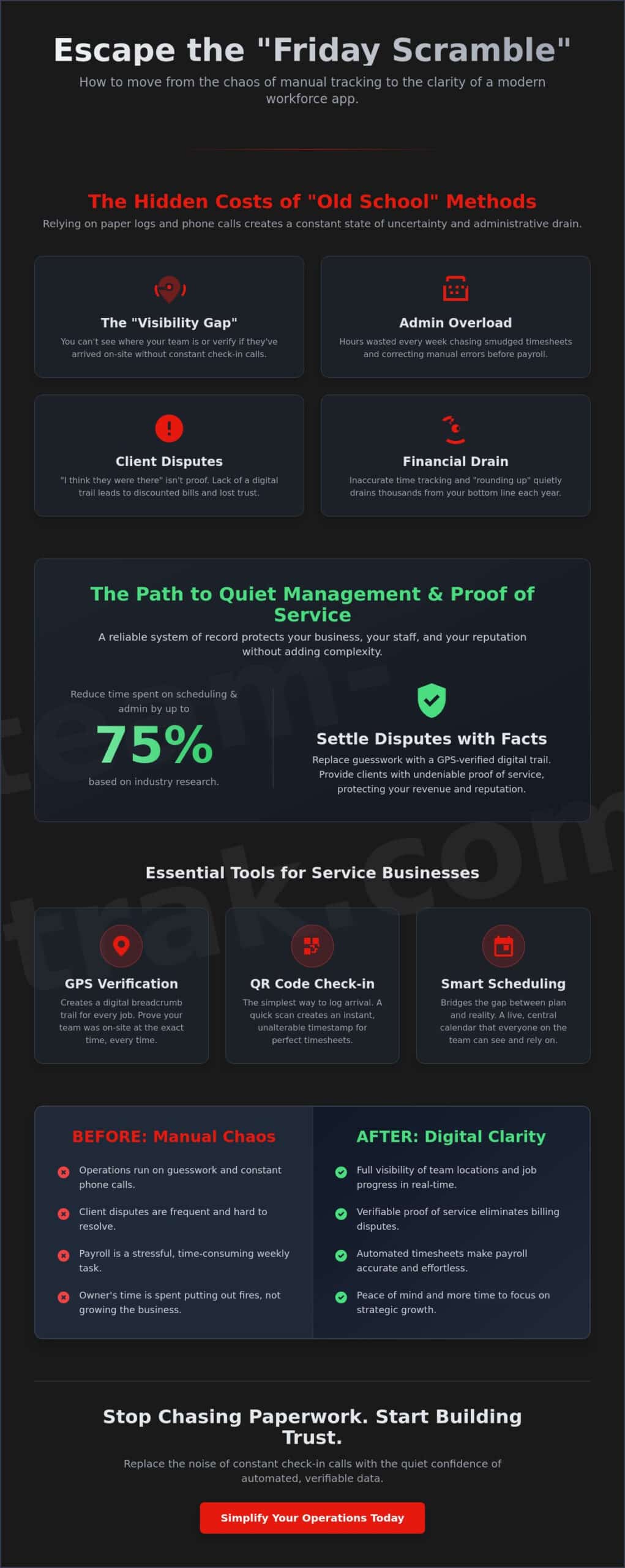
Running a mobile team with a paper diary and a WhatsApp group feels manageable when you’re starting out. However, as your business grows, these manual methods create a dangerous “visibility gap.” You can’t see where your team is, and you can’t verify if they actually arrived on-site when they said they did. This lack of oversight often leads to the “Friday Scramble,” a stressful ritual where you spend hours chasing staff for missing hours and correcting manual timesheet errors before payroll. It’s a heavy administrative burden that pulls you away from higher-value work.
The administrative drain is significant. Research indicates that modern Workforce management solutions can reduce time spent on scheduling by up to 75%. When you’re manually entering data from smudged notebooks into a spreadsheet, you aren’t just wasting time; you’re risking your reputation. One missed appointment or a late arrival that goes unrecorded erodes client trust faster than any marketing campaign can build it. Investing in a workforce management app for small service business isn’t about chasing trends. It’s about protecting your time and ensuring your brand remains reliable.
Beyond the Whiteboard: Why Manual Systems Fail
Information gets lost in text threads. Verbal updates are forgotten or misremembered. Manual systems simply cannot provide the “proof of work” that modern clients demand. When a client calls to ask why a technician wasn’t there, “I think they were” isn’t a professional answer. This creates constant psychological stress for founders who never feel truly in control of their operations. Without a digital trail, you’re left making five phone calls a day just to verify locations and job status. The good news is that the right field service operations software can eliminate this manual dispatching chaos entirely, giving you clear visibility without the constant interruptions.
The Financial Impact of Inaccurate Attendance
Time theft in a small service business is defined as any instance where an employee is paid for time they didn’t actually spend performing work at a job site. It’s rarely malicious; it’s usually just the result of “rounding up” to the nearest fifteen minutes because there’s no way to track exact arrival times. Even a small discrepancy of 15 minutes per staff member each day can drain thousands of dollars from your bottom line over a year. Beyond the payroll leak, the cost of client disputes is often higher. If you can’t prove your team was there, you’re often forced to discount bills or lose customers entirely. Adopting a workforce management app for small service business ensures every minute is recorded and every invoice is backed by solid data.
Essential Features of a Practical Workforce Management App
A basic digital calendar tells you where your team should be, but it won’t tell you if they actually arrived. For a mobile team, a calendar is just the first step. You need a workforce management app for small service business that bridges the gap between a plan and reality. The goal isn’t to micro-manage; it’s to create a reliable system of record that protects your business, your staff, and your reputation. As you hire and manage employees, the complexity of these operations increases. You need features that provide visibility without burying you in extra admin.
Proof of Service: GPS and QR Verification
The most important feature for any field-based business is verification. GPS location verification provides a digital breadcrumb trail for every job. It isn’t about “spying” on staff. It’s about having the data to prove to a skeptical client that your technician was on-site from 9:00 AM to 11:00 AM. This verification is your best defense against billing disputes and late-payment excuses.
While GPS is great for tracking, QR code check-in and check-out offers the simplest, most intentional way to verify presence. A staff member scans a code at the job site, instantly logging their arrival. This simple act creates an automated timestamp that flows directly into your timesheets. It eliminates the guesswork and the “rounding up” that often happens with manual logs. When conflicts arise, you have a clear, unalterable record to settle the matter quickly.
Smart Scheduling vs. Simple Calendars
Simple calendars are static. They don’t update when a job runs late or a technician gets stuck in traffic. Your business needs smart schedules that link directly to staff mobile apps. This ensures that every team member has the latest information in their pocket. Beyond just a time and place, a practical workforce management app for small service business should include:
- Automated reminders to reduce “no-shows” and late arrivals.
- Specific task checklists to ensure quality control.
- The ability to upload photos as proof of a job well done.
- Real-time status updates that you can see from your dashboard.
Verbal instructions are easily forgotten. By replacing them with digital task lists, you ensure that every job meets your standards every time. If you’re ready to stop chasing updates and start seeing results, reach out to us today to see how these features work in practice.
Implementing a Management App Without the Stress
You’ve likely felt the hesitation from your team when mentioning new software. Many field staff view tracking as a sign of distrust or just another hurdle in their already busy day. However, the secret to a smooth rollout is shifting the narrative from “tracking” to “protection.” When you introduce a workforce management app for small service business, you aren’t just looking for visibility; you’re providing your team with a shield against client disputes and the frustration of manual logs.
The transition works best when you take a “Slow Roll” approach. Don’t feel pressured to use every feature on day one. Start by moving your schedule from the whiteboard or group chat into the app. Once the team sees the benefit of having job details and addresses in their pocket, you can gradually introduce checklists or photo uploads. Choosing an app that doesn’t require a degree to operate ensures that even your least tech-savvy workers can hit the ground running without feeling overwhelmed.
Getting Your Field Team on Board
Practical tools that simplify operations protect staff from “he-said-she-said” arguments. If a client claims a job wasn’t finished or a technician never showed up, the app provides the timestamped proof needed to defend your team’s hard work. It ends the frantic phone calls and ensures everyone is on the same page. For staff who aren’t comfortable with complex technology, focus on the simplicity of the interface. If they can send a text message, they can use a mobile app to check in and check out of a job site.
Transitioning to Automated Timesheets
One of the biggest wins for your team is ending the stress of remembering start and end times. Manual logs are notoriously inaccurate, often forcing staff to guess their hours at the end of the week. By using timesheet automation, you remove this burden entirely. This data flows directly into your records, ensuring that payroll is fast, accurate, and undisputed.
When you look at How To Track Employee Hours effectively, the focus should always be on reducing friction for both the owner and the employee. Linking your workforce management app for small service business to your billing process means you spend less time on data entry and more time on growing your operations. This quiet automation creates a professional environment where staff feel supported and you regain your weekends. If you’re ready to simplify your admin, get in touch with our team to discuss a stress-free implementation plan.
How Team-Trak Simplifies Operations for Growing Service Teams
Most software is designed for people who sit at desks. It assumes you have a stable internet connection, a second monitor, and hours to figure out complex settings. But when you are looking for a workforce management app for small service business, your reality is different. You’re dealing with traffic, changing job specs, and staff who are constantly on the move. Team-Trak was built by operators who understand that “quiet” management is the goal. You don’t want to be the person making ten phone calls a day just to check if a job started. You want a system that gives you visibility without the noise. Many service business owners have discovered how a reliable team track process replaces admin stress with operational visibility, turning daily disputes into resolved records before they escalate. If you’re still struggling with manual dispatching chaos, learning how to streamline your field service operations software is the natural next step toward total control of your day.
By simplifying operations, you stop reacting to daily fires and start focusing on the bigger picture. When you can see every check-in and every completed task in real-time, you regain the mental space needed to grow. This isn’t just about saving a few hours; it’s about changing your role from a daily firefighter to a business strategist. Plus, providing your clients with a professional portal and transparent reporting helps you win more contracts by proving you’re more organized than the competition. It’s the difference between hoping the work is done and having the data to prove it.
Designed for Real-World Field Work
Whether you are managing teams in construction or handling the fast-paced world of Airbnb management, you need tools that work in the field. Our mobile staff app is designed to be lean and intuitive, ensuring your team spends their time working, not fiddling with their phones. To close the loop on your admin, Team-Trak links directly to your existing accounting systems. This ensures your verified timesheets turn into invoices with just a few clicks, helping you get paid faster and with zero data-entry errors. It’s built for trades and field service companies that need reliability over flashy features.
Regaining Control of Your Time
True peace of mind for a founder comes from knowing exactly what is happening across every job site without having to be there in person. When you trust your data, you can finally step back from the daily grind and look toward your next expansion. The administrative headache doesn’t have to be the price of growth. Ready to simplify your admin? Get in touch with Team-Trak today.
Take Control of Your Friday and Your Future
You’ve spent years building your reputation through hard work and reliability. Don’t let manual administration and “visibility gaps” tear it down. Moving to a workforce management app for small service business isn’t just a technology upgrade; it’s a commitment to a quieter, more organized way of working. You deserve the peace of mind that comes with knowing your team is on-site without making a single phone call. By replacing the “Friday Scramble” with automated systems, you regain your weekends and your focus.
The path to a streamlined business starts with simple, practical steps. GPS-verified attendance provides total visibility, while automated timesheets link directly to your invoicing to end the data-entry nightmare. Adding a client portal ensures your customers see the same professional image you strive to project every day. You don’t have to stay buried in paperwork to grow your team. It’s time to trade the administrative headache for precise, data-driven results that protect your bottom line. Book a demo to see how Team-Trak can simplify your service business. You’ve done the heavy lifting, now let the right tools handle the rest.
Frequently Asked Questions
Is an employee scheduling app worth it for a very small team?
An app is worth the investment because it builds a solid foundation for growth and prevents the chaos of manual logs even with a team of two or three. While text threads and paper diaries might feel free, they cost you hours in double-checking and verification. Starting early ensures your processes are professional and scalable, allowing you to focus on winning new business instead of fixing old timesheets.
How do I stop staff from forgetting to check in and out?
The best way to ensure compliance is to make the process a physical part of the job site arrival routine using QR code check-ins. When a staff member arrives at a location, scanning a physical code is a more intentional act than just tapping a button on a phone. You can also set automated reminders that trigger based on the scheduled start time to nudge anyone who hasn’t logged their arrival yet.
Can I track my staff location without them feeling micromanaged?
You can maintain visibility without constant oversight by focusing on “point-in-time” GPS verification during check-in and check-out. This approach provides the proof of service you need for your clients without requiring you to watch a live map all day. It is about having a digital breadcrumb trail that protects the staff member’s hard work against false claims of non-attendance or early departures.
What is the difference between a scheduling app and a workforce management app?
A basic scheduling app typically only handles the “where and when” by showing a calendar of shifts. In contrast, a workforce management app for small service business covers the entire operational cycle. This includes attendance verification, task checklists, and automated timesheets that link to your billing. It bridges the gap between planning the work and proving the work was actually completed to your specific standards.
Just as you use advanced tools to manage your team’s output, savvy job seekers are using platforms like Rezumi to understand the reality of ATS resume checkers and ensure their applications are optimized for automated review systems.
Will a workforce management app help me with client disputes?
These apps are your most effective tool for resolving client disputes because they provide unalterable, timestamped data for every job. If a client questions a bill or claims a technician never arrived, you can share a professional report showing the exact GPS-verified arrival times. This transparency often settles disputes before they escalate, protecting your revenue and your professional reputation from unfair claims.
How much time can I actually save on admin with a scheduling app?
Industry research shows that using a workforce management app for small service business can reduce time spent on scheduling by up to 75%. For most owners, this translates to several hours saved every week that were previously spent on manual data entry and phone calls. By automating the link between timesheets and invoicing, you can effectively cut your total weekly administrative workload in half.

Disclaimer
The information provided in this article is for general informational purposes only and reflects the opinions and experiences of the author. While every effort has been made to ensure accuracy, Team Trak makes no guarantees regarding completeness