
GPS-Verified Attendance: What It Proves, and What It Does Not
 By Bob Fitzjohn7 min read
Learn what gps-verified attendance proves at a client site, what it cannot show, and how to compare GPS check-ins with QR codes and paper records fairly.

In this article
A client says the cleaner never arrived. The cleaner says they checked in on time. Your messages and handwritten records leave you with two accounts and no clear way to settle it. A gps-verified attendance record can help, but it isn’t a verdict on everything that happened during a visit.
It’s fair to want reliable evidence while limiting GPS readings to check-in and check-out. A GPS check-in records whether a phone was within the job site’s set radius at a particular time. It can’t prove who held the phone or how the work was done. This guide explains what GPS-verified attendance can and can’t establish, how it compares with QR codes, paper and other digital records, and how to choose a practical, fair process for your team.
Key Takeaways
- Use gps-verified check-ins to create a time-and-location record, then assess separately whether the visit’s work met expectations.
- Compare paper, digital logs and optional QR checks against your team’s needs. A small, stable team may be well served by paper.
- Set a clear review process for late, missed, out-of-range or pending records so routine visits don’t create unnecessary admin.
- Connect schedules, visit records and timesheets in a simple workflow that gives staff a fair record and managers fewer details to reconstruct.
Table of Contents
What GPS-Verified Attendance Proves at a Client Site
A client says nobody arrived. A team member says they checked in on time, but a message thread and handwritten timesheet don’t settle the question. A gps-verified record links a check-in or check-out to a time and the phone’s location in relation to the job site. It gives both sides a clearer starting point for resolving the dispute.
The record shows whether a device was within the site’s set radius at a recorded moment. It doesn’t prove who was holding the phone, whether the work met the expected standard or what happened during every minute between check-in and check-out.
What information belongs in a useful verified visit record?
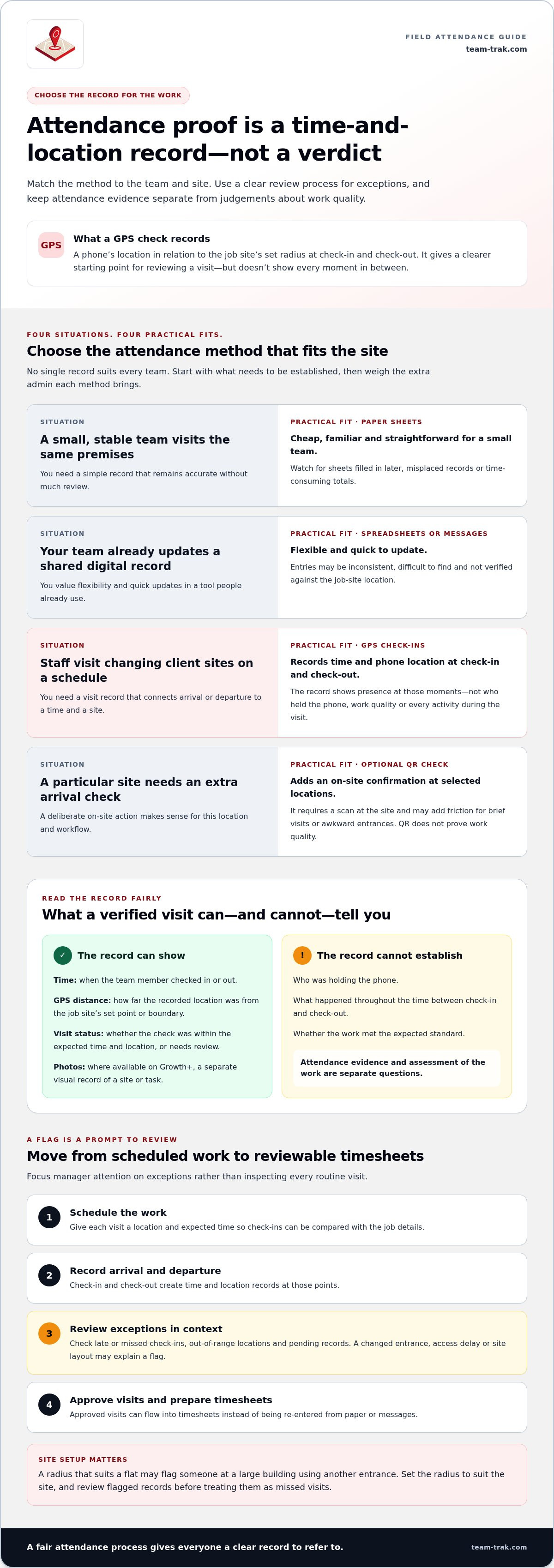
Keep the details distinct so a manager can see what the record does and doesn’t show:
- Time: when the team member checked in or out.
- GPS distance: how far the recorded location was from the job site’s set point or boundary.
- Visit status: whether the check-in was within the expected time and location, or needs review.
- Photos: where available on Growth+, a separate visual record that may help document a site or task.
GPS verification records a phone’s location at check-in and check-out only. Optional QR checks can add an on-site confirmation at selected locations. They complement GPS, but don’t prove work quality. Optional QR check-ins may suit sites where an extra arrival check is useful.
Set the check-in radius to suit the site. One radius may work at a flat but flag a team member at a large building who used a different entrance. Review flagged records in context before treating them as missed visits.
GPS Verification, QR Codes and Paper Records: Compare the Options
The right attendance method depends on how often visits are disputed and how spread out your work is. A small, stable team visiting the same premises may find paper perfectly adequate. When staff move between client sites, a digital record can make arrival times easier to review without reconstructing them from messages.
| Method | Strength | Limitation |
|---|---|---|
| Paper sheets | Cheap, familiar and simple for a small team. | Can be filled in later, misplaced or slow to total. |
| Spreadsheets or messages | Flexible, quick to update and often already in use. | Entries may be inconsistent, hard to find and not location-verified. |
| GPS check-ins | Link a scheduled visit to a time and a phone location at check-in or check-out. | Show presence at those moments, not work quality or every activity during the visit. |
| Optional QR checks | Add an on-site check at selected locations. | Require a scan at the site and may add friction where visits are brief or entrances are awkward. |
Attendance records and pay rules are related, but they aren’t interchangeable. For work covered by US federal rules, the U.S. Department of Labor guidance on compensable hours explains how hours worked are treated. Apply the rules relevant to your own jurisdiction.
When should a service business add an on-site QR check?
Use QR as an optional extra where a particular site benefits from a deliberate on-site action, rather than requiring it at every customer property. GPS checks suit scheduled mobile visits across changing locations. QR can add a site-specific step where useful.
Quick comparison: use paper if it stays accurate with little review; use GPS for mobile scheduled visits; add QR selectively when the site layout and workflow make an extra check worthwhile. To see how GPS and optional QR checks can work together, explore field-team attendance records.
How GPS-Verified Visits Become Reviewable Attendance Records
A useful attendance process shouldn’t require a manager to inspect every visit. Build a clear path from the rota to the timesheet, then focus review time on records that need a decision.
- Schedule the work. Give each visit a location and expected time so the check-in can be compared with the job details.
- Record arrival and departure. The team member checks in and out, creating time and location records at those points.
- Review exceptions. Look at late or missed check-ins, out-of-range locations and records marked pending. A flag is a prompt to review, not proof of wrongdoing. A changed entrance, access delay or site layout may explain it.
- Approve and prepare timesheets. Once records are reviewed, approved visits can flow into timesheets instead of being re-entered from paper or messages.
Most routine visits need little intervention. Reviewing exceptions directs a manager’s attention to the records that need context, while giving staff a consistent record to refer to if a visit is questioned.
What does GPS-verified attendance look like in Team-Trak?
In Team-Trak, staff check in and out using the app or a phone browser. GPS is recorded at those moments and compared with the job site’s check-in radius. Managers review exceptions, then approved visits generate timesheets automatically. The record supports attendance administration, but doesn’t establish task quality. The GPS verification process helps organise these records, while automated timesheets reduce manual re-entry.
If you want to see how this approach could fit your field team, explore Team-Trak’s attendance tools.
Build a Clear Attendance Process for Your Team
Before introducing a gps-verified attendance process, explain what staff can expect. Agree how check-ins will be used, who reviews exceptions and how a team member can add context if a record looks unusual. Clear expectations make verification a shared process rather than a source of suspicion.
Apply the same review approach across the team. A consistent process gives staff a fair way to support their account of a visit and helps managers resolve questions without rebuilding the story from scattered messages. Start with the locations where attendance records would make the biggest practical difference, then adjust the process based on what works for your team.
If you’re ready to put a simpler process into practice, start your seven-day free trial. A clearer record can make attendance questions easier to handle and help you build a process your team can trust.
Frequently Asked Questions
Is GPS-verified attendance the same as tracking staff all day?
No. GPS-verified attendance records location only at check-in and check-out. Team-Trak takes GPS readings at those moments, not continuously, so managers get records tied to visits rather than a history of movements between jobs. Before rollout, explain this boundary to staff and agree what to do if a phone is unavailable or a check-in needs context.
Can a GPS check-in prove that a job was completed?
No. A location record can support that a device was at the site, but it can’t confirm the work standard or every task. Use evidence relevant to the job, such as a completed checklist, manager notes or optional site photos where your process uses them. If a client raises a concern, review those records before drawing conclusions.
Are QR codes required for GPS-verified attendance?
No. Teams can use GPS check-ins without QR codes at customer properties. Add an optional QR step only at selected sites where staff can reliably scan it and the extra action answers a real attendance question. GPS suits mobile visits across changing addresses; QR may add useful confirmation at a fixed site with a suitable scan point.
Disclaimer
The information provided in this article is for general informational purposes only and reflects the opinions and experiences of the author. While every effort has been made to ensure accuracy, Team Trak makes no guarantees regarding completeness
Written by
Bob Fitzjohn
Founder of Team-Trak and serial entrepreneur with over 50 years’ experience building and scaling service businesses. Bob writes about workforce management, operational efficiency, automation, and the realities of running small businesses in today’s environment.


