
Field Service Software that Integrates with Xero: A Guide for Practical Operators (2026)
 By Bob Fitzjohn17 min read
Find field service software that integrates with Xero to end the Friday scramble. Automate timesheets, verify work with GPS, and get paid for every minute.

In this article
- Key Takeaways
- Beyond the Data Sync: Why Your Field Service Software Needs a Xero Connection
- Eliminating the "Friday Scramble" with Automated Timesheets
- Proof of Service: Using GPS and QR Verification to Protect Your Margins
- Reducing Client Disputes Through Real-Time Transparency
- Making the Switch: Moving from "Old School" to Modern Xero Integration
- Reclaiming Your Time and Protecting Your Margins
- Frequently Asked Questions
It is 4:00 PM on a Friday. Instead of heading home, you are hunched over a desk, trying to decipher a technician’s scribbled notes while cross-referencing GPS logs to see if they actually spent three hours on-site. You know this "Friday scramble" all too well. It is the exhausting ritual of chasing timesheets and manual data entry that leads to billing errors and those uncomfortable client disputes where a homeowner swears your team arrived late. Finding the right field service software that integrates with xero is the only way to stop the bleed. When your field data doesn't talk to your accounting software, you aren't just losing time. You are losing money on every unrecorded minute.
We have lived through the stress of manual payroll and the frustration of "he-said, she-said" billing. This guide shows you how to bridge the gap between field operations and Xero to ensure every billable second is accounted for. We will look at how to use GPS verification and QR codes to create indisputable proof of work. You will learn how to automate your workflow, eliminate manual entry errors, and finally get the operational peace of mind that comes from a business that runs itself.
Key Takeaways
- Stop the hidden drain of double-handling data by choosing field service software that integrates with xero to sync hours directly to your invoices.
- Trade the stressful "Friday scramble" for automated timesheets that turn hours of chasing staff into a simple, one-click payroll task.
- Protect your margins with GPS and QR code verification that provides indisputable proof of service for every technician on-site.
- Eliminate invoice disputes and build trust by giving customers self-service access to their job history through a professional client portal.
- Follow a practical 4-step framework to transition your team from messy paper systems and WhatsApp threads to a streamlined mobile app.
Table of Contents
- Beyond the Data Sync: Why Your Field Service Software Needs a Xero Connection
- Eliminating the "Friday Scramble" with Automated Timesheets
- Proof of Service: Using GPS and QR Verification to Protect Your Margins
- Reducing Client Disputes Through Real-Time Transparency
- Making the Switch: Moving from "Old School" to Modern Xero Integration
Beyond the Data Sync: Why Your Field Service Software Needs a Xero Connection
Double-handling data is a silent profit killer. Every time an office manager takes a scribbled note from a technician and manually types those details into a Xero invoice, your business pays for the same job twice. Once for the labor in the field, and once for the administrative friction in the office. In the world of Field Service Management (FSM), the goal is to move from job completion to cash-in-bank as fast as possible. If your field notes and your accounting software live in two different worlds, that "bridge" is broken. You end up with a lag between work done and money received.
By 2026, the standard for operational excellence has shifted. Waiting until Monday morning to see how your team performed last week is no longer enough. You need real-time visibility. Using field service software that integrates with xero allows you to capture data at the source. This eliminates the "Friday scramble" and ensures that the information your accountant sees is the same information your technician recorded on-site. It is about creating a seamless flow that protects your cash flow and your sanity.
The End of Manual Data Entry
Re-typing paper job sheets is a recipe for disaster. It's where "forgotten" billable items happen. Maybe a technician used an extra couple of fittings or stayed an extra thirty minutes, but they forgot to mention it because they were rushing to the next call. When you use automated timesheets, those minutes are captured instantly. They sync directly to Xero, ensuring your margins are protected from human error. There is a profound psychological relief in knowing your books actually match your field reality. You stop guessing and start knowing.
Bridging the Gap Between Field and Office
Friction between the operational team and the finance department usually stems from a lack of clarity. The office wants accurate numbers; the field wants to get the job done. Integration creates a single source of truth that satisfies both. It allows you to simplify your operation by removing the middleman of manual entry. This is how you scale. You shouldn't have to hire a new admin person every time you add two more technicians. With a direct link to Xero, your current team can handle a much higher volume of work because the software handles the heavy lifting of data migration. It’s about working smarter, not just harder.
Eliminating the "Friday Scramble" with Automated Timesheets
Every business owner in the service industry knows the Friday afternoon dread. It is 3:30 PM, and instead of wrapping up the week, you are stuck in the office. You are scrolling through WhatsApp threads, checking paper diaries, and sending "where are your hours?" texts to technicians who have already switched off for the weekend. This is the "Friday Scramble." It is a chaotic, manual reconstruction of the week’s events that inevitably leads to errors. When you use field service software that integrates with xero, this entire process changes from a high-stress chase into a simple administrative check.
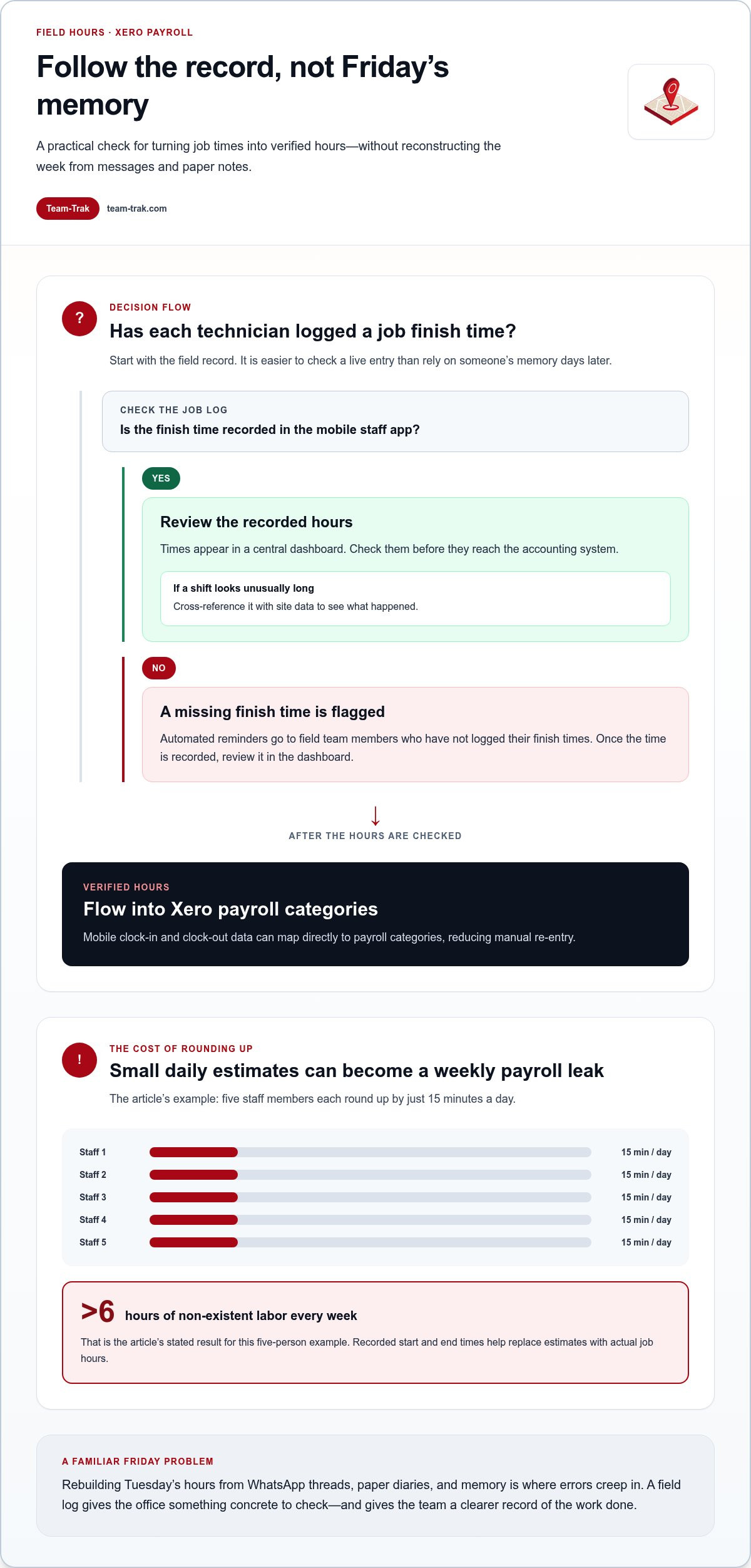
The beauty of automated timesheets is that they capture reality as it happens. Instead of relying on a technician's memory on a Friday for a job they did on Tuesday, the system records the exact start and end times in the field. These hours don't just sit in a silo; they map directly to your Xero payroll categories. This level of precision ensures you are paying for work actually performed, not "estimated" hours that have been rounded up to the nearest hour. If five staff members round up their time by just 15 minutes a day, you are paying for over six hours of non-existent labor every single week. Precision protects your margins.
From App to Payroll: The Seamless Flow
Technicians use a mobile staff app to clock in and out of jobs, creating a digital breadcrumb trail of their day. This data flows into a central dashboard where you can verify hours before they ever touch your accounting system. If a shift looks unusually long, you can cross-reference it with site data to see what actually happened. This transparency is a game-changer for reducing overtime disputes. When the data is backed by real-time logs, the "he-said, she-said" conversations about stay-late pay simply disappear. It creates a culture of accountability that benefits both the honest employee and the business owner.
Reducing Administrative Friction
Chasing staff for compliance is one of the most draining parts of being a founder. It pulls you away from high-level growth tasks and buries you in spreadsheets. Automated systems take the "bad guy" role out of your hands by sending automated reminders to field teams who haven't logged their finish times. This reduces the friction between the office and the field, allowing you to focus on winning new contracts rather than auditing old ones. To learn more about reclaiming your time, read our deep dive on Automated Timesheets: Ending the Friday Afternoon Scramble. If you are ready to stop the weekly chase, you might want to explore how automation can clear your Friday schedule.
Proof of Service: Using GPS and QR Verification to Protect Your Margins
I have been on the receiving end of those phone calls. A client rings up, frustrated, claiming your technician was only on-site for twenty minutes when you have billed them for a full hour. Without data, you are forced to choose between losing the client or losing your margin. In these moments, "I was there" simply isn't enough. You need verifiable proof. Using field service software that integrates with xero allows you to move beyond trust and into the territory of indisputable evidence. It turns a technical log into a professional audit trail that protects your reputation.
The core of this protection lies in GPS location verification. When a staff member clocks into a job, the system captures their coordinates and timestamps the entry. This isn't about micromanaging your team; it's about having their back when a customer questions an invoice. For high-accountability environments like commercial cleaning or home care, QR code check-in adds another layer of certainty. It proves the technician was physically standing in the room, not just parked around the corner. When this data syncs to Xero, your "Proof of Work" becomes "Proof of Value" that justifies every cent on the bill.
How Verification Works in the Field
- Step 1: The technician arrives and checks in via the mobile app. The system verifies their location against the job address using GPS or a physical QR code scan.
- Step 2: Digital task checklists are completed in real-time. This ensures quality standards are met and provides a granular record of what was actually done.
- Step 3: All data is automatically timestamped and synced. When you generate the Xero invoice, you have a complete history ready to be shared if the client asks for clarification.
Protecting Your Reputation and Revenue
Client disputes are draining. They suck the energy out of your day and create friction in your cash flow. Having access to verification data allows you to win these disputes before they escalate. Instead of a defensive argument, you provide a transparent service report. This level of professionalism builds deep trust with your clients. They know that if you bill for ninety minutes, your team was there for ninety minutes. If you want to dive deeper into how this visibility works, check out our guide on Field Service Tracking Software: Busting the Myths. It is about replacing doubt with data and ensuring your business is paid fairly for the work it delivers.
Reducing Client Disputes Through Real-Time Transparency
Disputes usually start with a question mark. A client opens an invoice, forgets the specifics of the job, and pauses. That pause is where your cash flow goes to die. Most disputes aren't malicious. They're born from a lack of information. When you implement field service software that integrates with xero, you aren't just syncing numbers. You are providing a window into your operations that eliminates doubt. Transparency is the fastest way to get an invoice approved and paid. It turns a transaction into a partnership based on clear, shared data.
Choosing a field service software that integrates with xero ensures your field evidence is always tied to your financial records. This connection is vital for maintaining a healthy relationship with your customers. When they can see exactly what was done, when it was done, and who did it, the "Friday afternoon" phone calls complaining about billing disappear. You move from a defensive position to one of operational clarity.
The Power of the Client Portal
Providing a Client Portal gives your customers self-service access to their entire job history. They don't need to call you at 8:00 PM to ask for a copy of a service report from three months ago. It is all there, ready for them to download. This level of professional reporting justifies your pricing and builds long-term loyalty. It shows you are an organized, modern operation rather than a legacy business struggling with paperwork. It also cuts down on those "Where is my invoice?" emails. In my experience, those emails are often just a stall tactic because the client lacks the internal info they need to approve the spend. Give them the data upfront, and you remove the excuse to delay.
Linking Field Evidence to Xero
The real magic happens when you connect field evidence directly to the Xero record. If a technician takes a "before and after" photo or completes a complex task checklist, that data shouldn't be buried in a gallery on their phone. It should live with the invoice. This creates a paperless trail that satisfies even the most difficult auditors or procurement officers. You can learn more about setting up these systems in our guide on Choosing Invoicing Software for Service Businesses. When every Xero invoice is backed by a timestamped photo and a digital sign-off, the room for argument disappears. You get paid faster because there is nothing left to question. This operational clarity is what allows you to scale without increasing your administrative burden. If you are tired of chasing payments and defending your work every single month, let’s talk about how real-time transparency can fix your cash flow.
Making the Switch: Moving from "Old School" to Modern Xero Integration
"The way we've always done it" is a dangerous phrase in a service business. WhatsApp threads are excellent for quick chats, but they are a nightmare for payroll. Paper job sheets feel familiar, yet they often end up lost, coffee-stained, or left in the back of a van. These manual methods create a "black hole" where billable minutes and operational clarity disappear. Moving to field service software that integrates with xero isn't just a technical upgrade. It is a cultural shift that moves your business from reactive chaos to proactive control.
Making the transition doesn't have to be a multi-month ordeal. I have found that a simple 4-step framework works best for practical operators. First, audit your leaks by identifying exactly where data is being double-handled. Second, select your field service software that integrates with xero based on how well it fits your field team's workflow. Third, run a pilot with your most reliable technician to iron out the kinks. Finally, use that pilot's success as proof to roll the system out to the rest of the team. This staged approach reduces stress and ensures buy-in from the people actually using the app.
Overcoming the "Software is Hard" Hurdle
Most technicians don't hate software; they hate "admin" that gets in the way of their job. The best platforms prioritize operational clarity over complex, nested menus. When you train your team, don't focus on the accounting benefits for the office. Focus on how the app makes their life easier. Show them how a QR scan replaces a messy timesheet and stops those annoying "Where were you on Tuesday?" phone calls. When they see the app as a tool rather than a chore, compliance follows naturally. Start small by syncing one department first. It is better to have one team running perfectly than an entire company struggling with a new system all at once.
The Future of Your Service Business
In 2026, technology has leveled the playing field. Small teams can now operate with the same enterprise-level precision as national franchises. The ultimate goal is to build a business that runs smoothly even when you aren't on-site. By bridging the gap between the field and Xero, you reclaim the time needed to focus on high-level growth. You can dive deeper into these strategies in our guide on Mastering Field Workforce Management Software in 2026. This is how you move from being a "busy" operator to a truly effective business owner. The long-term ROI isn't just found in the hours saved on admin; it is found in the peace of mind that comes from knowing every job is verified and every invoice is accurate.
Reclaiming Your Time and Protecting Your Margins
Business operators shouldn't be slaves to their spreadsheets or spend their weekends chasing missing timesheets. We have explored how bridging the gap between site work and invoicing is about more than just moving data; it is about reclaiming your mental space. By implementing GPS-verified attendance and QR code check-ins, you create a culture of accountability that protects your margins from "estimated" hours and rounded-up logs. This shift ensures that the work your team performs is always reflected accurately in your financial records.
When you finally deploy field service software that integrates with xero, you ensure that every billable minute is captured with precision. This move eliminates the "Friday scramble" and provides the operational clarity you need to scale. Team-Trak was designed by operators who have personally managed staff and felt the administrative pressure of a growing service business. We offer direct Xero and QuickBooks integration to help you focus on growth rather than data entry.
It is time to move past the chaos of paper and WhatsApp threads. Start your journey toward operational clarity with Team-Trak and build a business that runs smoothly even when you aren't on-site. You have worked hard to build your reputation; let's make sure your systems are strong enough to protect it.
Frequently Asked Questions
How does field service software actually connect with Xero?
The connection happens via a secure API link. You simply log into Xero through the software settings and grant permission for the two platforms to share data. From that point, your customer lists, inventory items, and tax rates are synced. It means when a job is finished in the field, the invoice is ready in Xero with all the right details already filled in. It is a one-time setup that removes the need for manual data migration.
Do my field technicians need their own Xero login?
Your field team stays entirely separate from your accounting records. Technicians use a dedicated mobile staff app to clock in and out or complete checklists. They never see your bank balances, profit margins, or payroll figures. Only the authorized office staff handles the final sync to Xero. This setup protects your sensitive financial information while still giving you the field data you need for accurate billing and payroll.
Can I track subcontractors using field service software that integrates with Xero?
Subcontractors can be managed just as easily as your full-time staff. By using field service software that integrates with xero, you can capture a subcontractor's exact site time via GPS or QR codes. This creates a verifiable record you can use to check against the invoices they send you. It stops the guesswork and ensures you are only paying for the actual hours they spent on your client's site, protecting your margins.
Will this software help me with HMRC or tax compliance?
It provides the digital audit trail required for modern tax compliance. By capturing data at the point of service and syncing it directly to your accounting platform, you satisfy requirements for digital record-keeping. It reduces the risk of human error during manual entry, which is a common cause of compliance issues. You have a clear, timestamped path from the field technician's check-in to the final tax return in Xero.
What happens if my team is in an area with no mobile signal?
The software is designed for the reality of field work, including "dead zones" with no signal. Technicians can still check in, complete tasks, and capture signatures while offline. The app stores this data securely on their phone. As soon as they reach a 4G or Wi-Fi connection, the system pushes all that information to the cloud and updates your records automatically. No data is ever lost because of a poor connection.
How long does it take to set up the Xero integration?
You can be up and running in under an hour. The technical connection between the platforms is almost instant. The most important part is mapping your Xero chart of accounts to your service types. Once those links are established, the automation takes over. It is a small time investment that pays for itself the very first time you process a week's worth of invoices in minutes instead of days.
Can I attach job photos and signatures to my Xero invoices?
Indisputable proof is a core feature of field service software that integrates with xero. Technicians take "before and after" photos and collect digital signatures directly on their mobile devices. These assets are attached to the job record. When the invoice is generated, these files can be included as attachments, giving your customers total transparency and making it much harder for them to dispute a legitimate bill for work completed.
Is it possible to manage multiple service locations with one Xero account?
You can easily manage multiple regions or sites within a single accounting setup. The software allows you to categorize jobs by location or department. When this data flows into Xero, it can be assigned to specific tracking categories. This means you can run a profit and loss report for each location separately, giving you a clear view of which parts of your business are the most profitable and where you need to improve.
Disclaimer
The information provided in this article is for general informational purposes only and reflects the opinions and experiences of the author. While every effort has been made to ensure accuracy, Team Trak makes no guarantees regarding completeness

Written by
Bob Fitzjohn
Founder of Team-Trak and serial entrepreneur with over 50 years’ experience building and scaling service businesses. Bob writes about workforce management, operational efficiency, automation, and the realities of running small businesses in today’s environment.


