
How to Automate Billing for Service Calls: A Practical Guide for Field Operations
 By Bob Fitzjohn16 min read
Learn how to automate billing for service calls and stop revenue leaks. Turn GPS-verified field data into accurate invoices and get paid for every minute.

In this article
- Key Takeaways
- The Administrative Leak: Why Manual Billing Costs More Than You Think
- Step 1: Capturing "Proof of Service" at the Source
- Step 2: Turning Field Data into Automated Timesheets
- Step 3: Seamless Integration with Accounting Systems
- The Operator’s Reward: Transparency and Reduced Disputes
- Take Control of Your Operational Clarity
- Frequently Asked Questions
It’s 5 PM on a Friday, and you’re staring at a pile of crumpled job sheets and a WhatsApp thread full of vague "job finished" messages. You’re trying to guess if your technician was actually on-site for three hours or if they’re rounding up, all while knowing that every minute you miss is money out of your pocket. It’s a stressful, manual cycle that leads to administrative leak and awkward client disputes over unverified time. If you want to stop the bleeding, you need to understand how to automate billing for service calls using real-time data instead of guesswork.
We’ve been in your shoes and know that the secret to a profitable service business isn't working harder; it’s capturing proof of service the moment it happens. Industry data shows that automating digital workflows can reduce the administrative burden of manual scheduling and paper-based work by 60% to 80%. This guide will show you how to eliminate manual data entry by turning field-verified arrivals and departures into professional invoices. We’ll preview a "set and forget" workflow that integrates with your existing accounting tools like Xero or QuickBooks, giving you back your weekends and providing the operational clarity you need to grow.
Key Takeaways
- Stop the "billing amnesia" caused by crumpled job sheets and vague messages that lead to undercharging for your team's time.
- Learn how to automate billing for service calls by using GPS-verified data to anchor every invoice in physical reality.
- Replace manual data entry with a mobile staff app that bridges the gap between field work and office administration.
- Streamline your finances by connecting field data directly to accounting systems like Xero or QuickBooks for a single source of truth.
- Build client trust and reduce payment disputes by offering "proof of service" reports and self-service portal access.
Table of Contents
The Administrative Leak: Why Manual Billing Costs More Than You Think
Every business owner in the service industry knows the Friday afternoon scramble. It is 4 PM, and instead of winding down, you are chasing three different technicians for their site notes. You are scrolling through a chaotic WhatsApp thread, trying to figure out if that job in the suburbs took two hours or four. This is the "admin tax." It is the invisible cost of manual systems that eats your profit before the invoice is even sent. When you rely on memory or messy paper trails, you aren't just losing time; you are losing money through a slow, steady leak.
Many operators look into how to automate billing for service calls because they are tired of the paperwork. However, the real driver is "billing amnesia." If a technician forgets to record an extra 45 minutes spent troubleshooting a faulty valve, you don't bill for it. Because you lack hard evidence, you simply don't charge. Research shows that manual scheduling and dispatching can consume 2 to 4 hours of an administrative staff's day. That is time that should be spent growing the business, not playing detective with last week's job sheets.
Paper-based systems and group chats fail as soon as you scale beyond a couple of vans. They don't provide a "single source of truth." Without a digital record, you are left with administrative chaos where billable hours are forgotten and clients feel empowered to dispute every charge. Transitioning to a professional system provides the operational clarity needed to stop these leaks and ensure every minute on-site is accounted for.
The Real-World Cost of Human Error
The most common operational mistake is "rounding down" out of uncertainty. If you aren't 100% sure when your team arrived, you probably shave off time to avoid a client argument. Over a year, rounding down just 15 minutes per job for a team of five can cost thousands in lost revenue. This friction also kills staff morale. Your office team hates being the "timesheet police," and your field crew feels nagged. Moving toward timesheet automation removes the human element from data collection, turning "he-said-she-said" into indisputable facts.
Moving Beyond the Spreadsheet Trap
Spreadsheets are great for storing data, but they aren't an automation strategy. They require manual entry, which is where the errors begin. As you grow, Excel becomes a liability rather than an asset. Modern Field service management (FSM) requires tools that capture data at the source. This is the tipping point where you move from surviving the week to managing a scalable operation. By replacing manual entry with verified field data, you replace stress with precision and reliability.
Step 1: Capturing "Proof of Service" at the Source
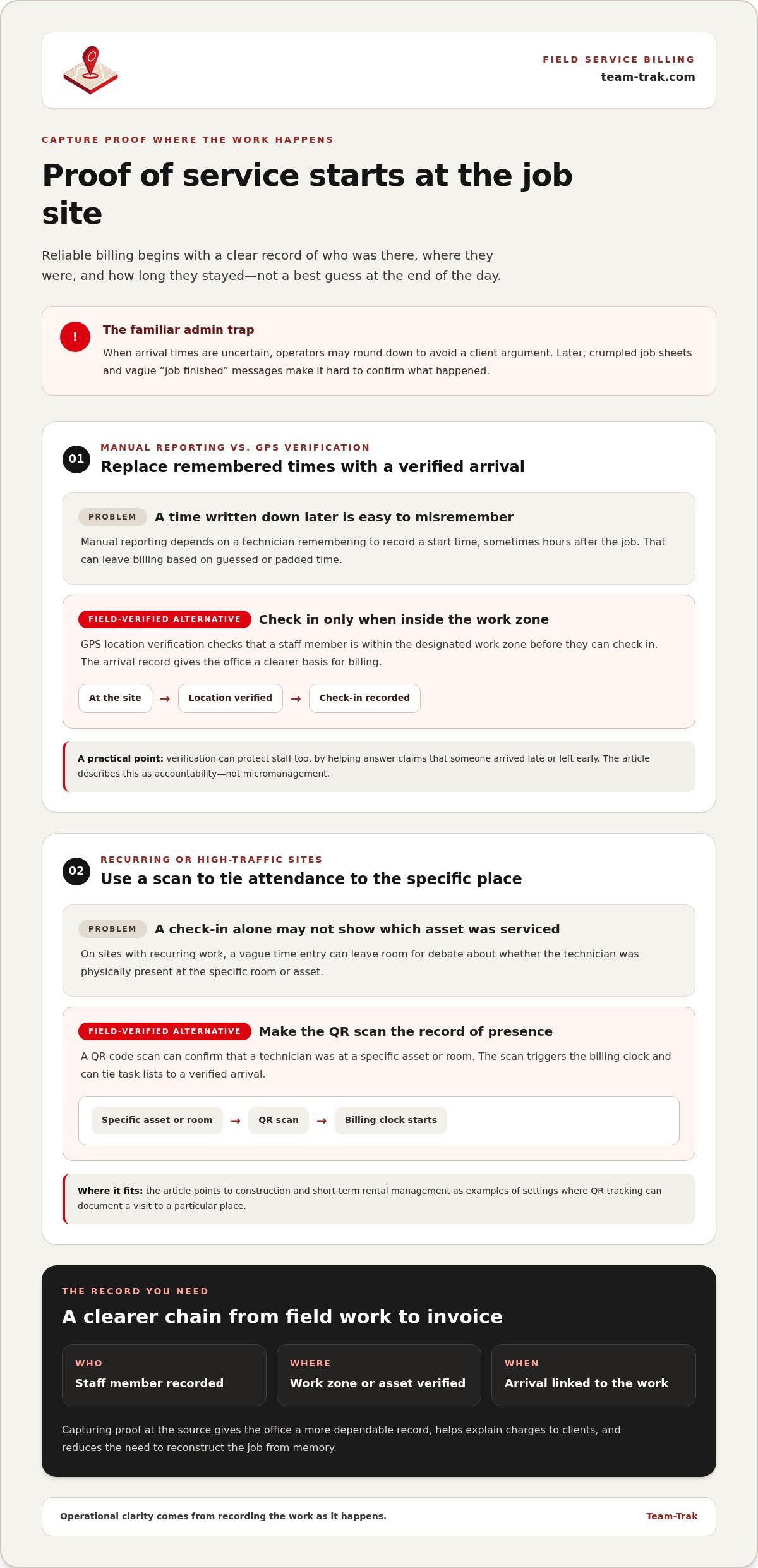
If you want to know how to automate billing for service calls effectively, you have to start where the work happens: the field. Most operators make the mistake of focusing on the invoice first. In reality, the invoice is just the final output. The real foundation is "Proof of Service." This is the verified data that proves who was there, where they were, and exactly how long they stayed. Without this, your billing is built on a shaky foundation of guesswork and "trust but verify."
Capturing this data at the source is essential for business growth because it eliminates the friction of manual reporting. When a technician arrives at a job site, their presence should be anchored to a physical reality. This creates a digital breadcrumb that makes your billing indisputable. By moving to a "verify and trust" model, you provide your team with clear boundaries and your clients with total transparency.
GPS Verification vs. Manual Reporting
Manual reporting relies on a technician remembering to write down their start time, often hours after the job is done. This leads to "ghost billing," where time is padded or simply guessed. GPS location verification solves this by ensuring a staff member is actually within the designated work zone before they can check in. From an operator's perspective, this isn't about micromanagement. In fact, staff often prefer it. It protects them from unfair client claims that they arrived late or left early. It replaces vague time-tracking with workforce visibility that respects privacy while ensuring accountability.
QR Codes: The Digital Signature for Service Calls
For high-traffic sites or recurring contracts, QR code tracking acts as a digital signature. In industries like construction or short-term rental management, a physical scan proves the technician was physically present at a specific asset or room. This scan triggers the billing clock immediately. It ensures that specific task lists are tied to a verified arrival, leaving no room for debate when the bill arrives. This level of detail turns a standard service call into a professional, data-backed transaction.
Capturing this data is the first step toward a "set and forget" workflow that keeps your cash flow moving without the constant need for oversight. If you are ready to see how verified data can transform your operations, you can chat with our team about your specific workflow.
Step 2: Turning Field Data into Automated Timesheets
Capturing data in the field is only half the battle. To truly master how to automate billing for service calls, you need a bridge that carries that information from the job site to your accounting desk without human interference. A mobile staff app serves as this bridge. It turns a technician's phone into a data collection tool that works in the background while they focus on the task at hand. This shift eliminates the "Friday afternoon interrogation" where you're forced to ask your team where they were four days ago.
The old school method of waiting for paper timesheets or WhatsApp summaries creates a massive lag in your cash flow. By the time you get the data, it's often cold and full of errors. When you convert check-in and check-out timestamps directly into billable hours, you reduce the "timesheet to invoice" cycle from days to mere minutes. It's about moving from a state of reactive guessing to proactive management.
The Workflow of a Modern Service Call
A streamlined operation follows a logical, repeatable path that requires zero manual data entry from the office team. This workflow ensures that every service call is documented as it happens, not as it's remembered.
- Step 1: Check-in. Staff arrive on-site and check in via the app using GPS or QR codes. They immediately see their task checklists, ensuring no part of the job is overlooked.
- Step 2: Real-time Sync. As the technician works, data syncs to the core management platform. You can see progress from your desk without making a single phone call.
- Step 3: Generation. Automated timesheets are created based on these verified attendance logs, ready for your final review.
Ensuring Accuracy in Labor Billing
Accuracy is about more than just start and stop times; it's about the rules that govern your workforce. Calculating overtime, unpaid breaks, and travel time manually is a recipe for burnout and human error. A professional system handles these variables automatically based on the rules you set. This is especially vital when managing 3rd party contractors. Instead of blindly trusting an invoice they send you at the end of the month, you have your own record of their hours on-site. When you pair this with task management, you have the "what" behind the "when," providing a complete picture of the service call for your records and your clients.
Step 3: Seamless Integration with Accounting Systems
You have verified the site visit and generated the timesheet. Now comes the part that usually kills your productivity: typing that data into your accounting software. If you're still copy-pasting hours from a spreadsheet into Xero, you're inviting human error into your most sensitive data. Learning how to automate billing for service calls requires a direct link between your field operations and your ledger. We've lived through the stress of Sunday night reconciliations, and we know that time is better spent elsewhere.
Double-handling data is a profit killer. When your field management software talks directly to QuickBooks or Xero, you create a "single source of truth" that protects your margins. An approved timesheet should flow straight into a draft invoice without a single manual keystroke. This isn't just about speed; it's about accuracy. One misplaced decimal point during manual entry can turn a profitable job into a loss. Instead of chasing paper, your office staff can finally focus on growth rather than data entry.
Connecting Field Ops to the Ledger
Real-time financial visibility allows you to see the health of your business as it happens, not three weeks later when the bank statement arrives. To link to online accounting systems is to remove the #1 cause of billing errors: the manual data transfer. In industries like commercial cleaning or home care, where labor is your biggest expense, even a small error in calculation can be disastrous. From an operator's perspective, this integration provides an indisputable audit trail for tax compliance while giving you total peace of mind.
Choosing the Right Billing Framework
Different jobs require different pricing models. Whether you use flat-rate billing for standard repairs or hourly rates for complex troubleshooting, your system should handle the math. Understanding how to automate billing for service calls means choosing a system that adapts to your pricing, not the other way around. Automated frameworks apply complex rules, like weekend surcharges or multi-technician rates, without requiring you to use a calculator. If you're still deciding on a platform, check out our guide on invoicing software for service businesses to find the best fit for your specific operational needs. This level of control ensures you never undercharge for a difficult job just because the math was too hard to do on a Friday evening.
Ready to stop the double-handling and get your books in order? Chat with our team to see how we sync with your accounting tools.
The Operator’s Reward: Transparency and Reduced Disputes
The true reward of knowing how to automate billing for service calls isn't just a faster bank transfer. It's the end of the uncomfortable "he-said-she-said" phone calls that drain your energy. We've all had that one client who insists the technician arrived 20 minutes late or left early, even when you know they did the work. Without data, you're forced to either argue or cave and give a discount. Neither is good for business. Transitioning to a verified system replaces these defensive conversations with "calm authority."
When your billing is backed by "Proof of Service" reports, you aren't just chasing payments; you're confirming value. You stop being a debt collector and start being a professional partner who provides an indisputable record of work. This shift in positioning is what allows a business to scale without the owner needing to personally oversee every dispute. By providing transparency upfront, you eliminate the friction that causes payment delays in the first place.
The Power of the Client Portal
The most effective way to reduce billing friction is to give the client the answers before they even ask the questions. A client portal provides self-service access to service history, GPS-verified arrival times, and completed checklists. For trades and field service companies, this transparency is a massive competitive advantage. It builds a level of trust that manual systems simply can't match. Instead of a client calling to ask, "Why was it this much?" they can log in and see exactly when the technician checked in and which tasks were completed. This reduces your office call volume and ensures your invoices are paid without hesitation.
Final Checklist for Automated Billing Success
Moving from administrative chaos to a "set and forget" workflow doesn't happen by accident. It requires a deliberate shift in how you handle field data. If you're ready to master how to automate billing for service calls, use this checklist to audit your current operation:
- Audit your data leaks. Identify where you're currently losing billable hours. Is it forgotten notes, rounded-down times, or missing job sheets?
- Equip your field team. Give your staff a user-friendly mobile app that handles check-ins and task lists automatically. If it's hard for them to use, they won't use it.
- Connect your systems. Ensure your field management platform and your accounting ledger are talking to each other. Eliminate double-handling of data entirely.
- Invite the client in. Use a portal to provide total transparency. When clients can see the proof of work for themselves, disputes virtually disappear.
Adopting these steps turns your billing process from a weekly headache into a silent, background engine. You'll find that when the administrative friction is gone, you finally have the headspace to focus on the high-level strategy that actually grows your company.
Take Control of Your Operational Clarity
Moving from guesswork to data-backed billing isn't just about efficiency; it's about reclaiming your peace of mind. You've seen how capturing proof of service at the source eliminates the "admin tax" and protects your hard-earned margins. By integrating field data directly with your ledger, you remove the friction that keeps you stuck in the office on weekends. It's the difference between merely surviving the week and managing a scalable, professional operation.
Learning how to automate billing for service calls is a fundamental step for any business owner who values their time. With GPS-verified attendance for 100% accuracy and direct integration with major accounting platforms, you can finally leave manual data entry behind. Team-Trak was built by operators, for operators, because we've lived through the stress of disorganized administration. We know that when you have proof of work, you have the confidence to grow.
Simplify your operations and automate your billing with Team-Trak today. You don't have to stay stuck in the Friday scramble forever. It's time to trade the administrative chaos for a system that works as hard as your team does.
Frequently Asked Questions
How does GPS verification help with billing accuracy?
GPS verification creates a digital geofence around the job site, ensuring a technician can only check in when they are actually there. This eliminates "rounding up" and ensures you only bill for time spent on-site. It's a foundational step in learning how to automate billing for service calls because it removes the need for manual oversight and guesswork.
Can I automate billing if I use sub-contractors for service calls?
You can absolutely include sub-contractors in your automated workflow. By giving them access to your mobile staff app, they record their time just like your internal team. This provides you with an independent, verified record of their work. It makes it much easier to verify their invoices before you pay them, ensuring you never overpay for outsourced labor.
What happens if a technician forgets to check out of a job?
If a technician leaves a site without checking out, the system can send an automatic reminder to their phone. Managers also receive an alert for any "open" jobs at the end of the day. You can then use GPS breadcrumbs to verify the actual departure time and correct the record manually, ensuring your billing remains precise and fair.
Do I need special hardware to automate my service call billing?
You don't need any specialized hardware or expensive vehicle tracking devices to get started. The entire system runs on the smartphones your team already carries in their pockets. Technicians simply use a mobile staff app to check in and out, making the transition low-cost and highly accessible for small to mid-sized service businesses.
How does automated billing integrate with tools like Xero or QuickBooks?
Integrating your field data with your ledger is the most effective way to handle how to automate billing for service calls. Approved timesheets flow directly into your accounting software as draft invoices. This removes the need for double-handling and ensures your financial records are always accurate. It cuts the administrative cycle from hours of data entry to a few clicks.
Is it difficult to move from a paper-based system to automated billing?
The move from paper is often the biggest relief a business owner experiences. While it requires a brief period of staff training, the elimination of lost job sheets and messy handwriting makes it worth the effort. Most teams find the mobile app much easier than carrying around clipboards, and the office team finally gets their weekends back.
How does a client portal reduce the time spent on administrative tasks?
A client portal acts as a self-service hub where customers can view their own service history and proof of work. This significantly reduces the volume of "where is my invoice?" emails. When clients can see the data themselves, your office team spends less time answering basic questions and more time on high-value tasks that grow the business.
Can automated billing handle different rates for different service types?
Yes, the system can handle complex billing rules automatically. You can set different labor rates for emergency calls, weekend work, or specific service categories. When a technician selects a task from their checklist, the system applies the correct rate. This ensures your billing is always consistent and you never undercharge for difficult or after-hours jobs.
Disclaimer
The information provided in this article is for general informational purposes only and reflects the opinions and experiences of the author. While every effort has been made to ensure accuracy, Team Trak makes no guarantees regarding completeness

Written by
Bob Fitzjohn
Founder of Team-Trak and serial entrepreneur with over 50 years’ experience building and scaling service businesses. Bob writes about workforce management, operational efficiency, automation, and the realities of running small businesses in today’s environment.


