 Team-Trak
Small Business Operations Software: Service Firm Guide
 By Bob Fitzjohn7 min read
Small business operations software should cut admin, not add to it. Compare spreadsheets, separate apps and connected systems to choose a practical fit.

In this article
A client calls to say nobody arrived. Your team member says they checked in, but the rota, job updates and timesheet are in different places. Now you’re cross-checking messages instead of preparing invoices. Small business operations software should connect those records, not create another admin task.
You’re right to be cautious: a spreadsheet may be enough for a small team, while a larger field operation may need a more connected workflow. This guide compares simple tools, separate apps and joined-up systems fairly. You’ll see which problems to solve first, what each approach can and can’t do, and how to choose a proportionate setup that links field work to accurate timesheets and billing.
Key Takeaways
- Start by identifying where schedules, visit updates and timesheets stop matching, then choose software that addresses that specific gap.
- Compare small business operations software by workflow fit and staff effort, not by the number of features it offers.
- Decide whether paper, spreadsheets or separate apps are still sufficient before moving to a connected platform.
- Look for a practical path from scheduled work to accurate records and billing, with manager attention focused on exceptions.
Table of Contents
What small business operations software should solve for service teams
A client calls to query a visit. The schedule says the job was booked, a message says the team member arrived, and the timesheet shows a different start time. Before you can answer, you’re comparing records that were entered separately and may not tell the same story.
Small business operations software should help coordinate the work and records that keep a service firm running, rather than offer a catalogue of every tool a business might use. Useful operations software connects daily work records without assuming every firm needs one platform. For teams working at client sites, that may mean linking a scheduled job to attendance, job updates and the records used to prepare timesheets or invoices. The wider category of field service management software covers tools for organising off-site work and related business processes.
Where service-business admin piles up between a scheduled job and an invoice
Admin tends to build up in the handoffs. A calendar holds the booking, messages carry changes, and a handwritten note or timesheet records the hours later. Someone then has to enter the same details again, reconcile differences and decide which version to use for billing. A useful invoice tracking process depends on having clear visit records to work from.
The difficult part of a disputed visit isn’t only answering the client. If there’s no shared record to check, the client may feel dismissed and an honest team member may feel they aren’t trusted. Clear records help you resolve the question without turning it into a judgement about either person.
But a new system isn’t always the answer. If your jobs are predictable and one person can keep a spreadsheet accurate without repeated chasing, that simple process may still suit the business. Consider software when keeping records aligned takes more effort than the work itself.
How to choose small business operations software without adding admin
Start with the gap, not a feature list. Compare each option by whether it reduces repeated entry, gives staff a workable routine and produces records you can use for review, pay and billing. The SBA guide to managing business operations also covers the broader work of running a business, including financial recordkeeping.
Choose the lightest system that closes the operational gap you can name.
| Approach | Works well when | Watch for |
|---|---|---|
| Paper or spreadsheets | Work is predictable and one person can keep records current. | Updates and hours may need re-entering; a spreadsheet alone can’t verify a visit. |
| Separate point tools | You need to fix one clear task, such as scheduling or invoicing. | Staff and managers may still have to copy details between systems. |
| Connected operations platform | You need job, attendance and billing records to carry through a shared workflow. | Extra features or steps can add admin if they don’t solve a real problem. |
A practical decision framework for a small field team
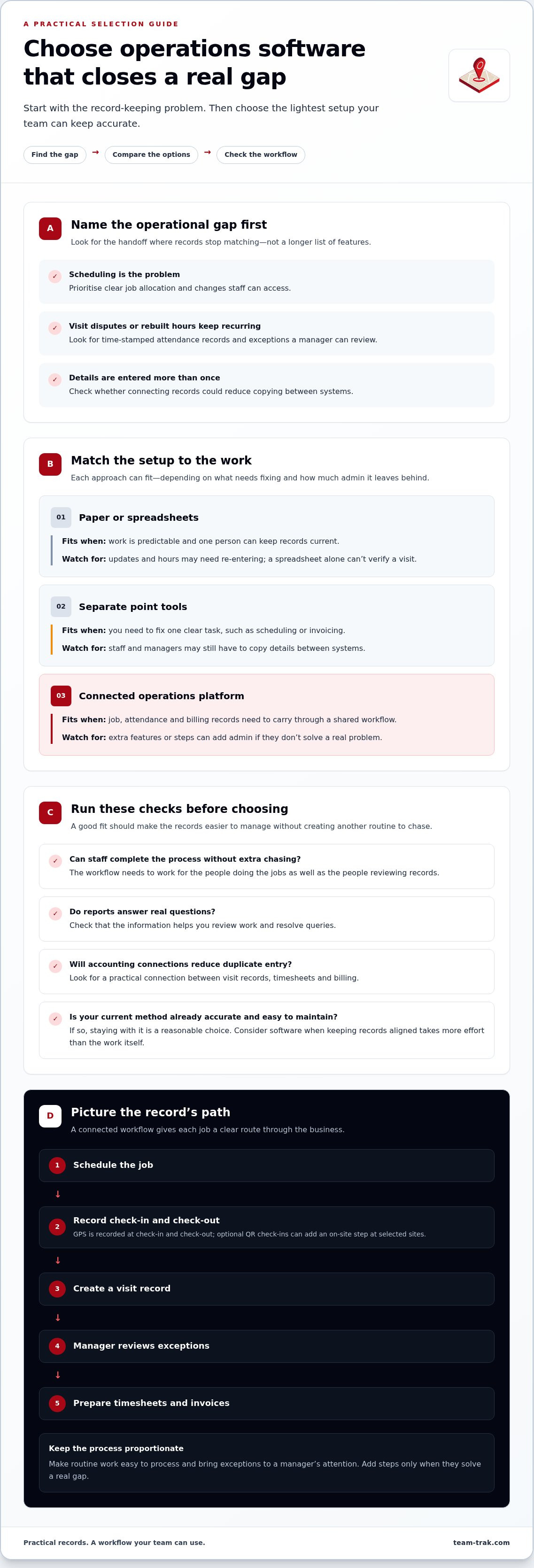
If the main issue is scheduling, prioritise clear job allocation and changes staff can access. This guide to choosing employee scheduling software can help you assess that need. If visit disputes or rebuilt hours keep recurring, look for time-stamped attendance records and exceptions a manager can review. Field service management software may cover a wider workflow, so focus on the parts your team will actually use.
Before choosing, check whether reports answer real questions, accounting connections reduce duplicate entry, and staff can complete the process without extra chasing. If your current method is accurate and easy to maintain, staying with it is a reasonable choice. If you want to see how a connected workflow can support field teams, explore Team-Trak’s operations platform.
Connect schedules, verified visits and admin in one practical workflow
A connected process gives each job a clear path through the business: Schedule → Check-in/out → Record → Manager review → Timesheet → Invoice. Staff see the job, record their arrival and departure, and create a visit record that can be reviewed before hours are used for pay or billing. The aim isn’t to review every routine visit manually. It’s to make ordinary work easy to process and bring exceptions to a manager’s attention.
For location-based verification, GPS is recorded only when a team member checks in and checks out. Optional QR check-ins can be used at selected sites when an additional on-site step is useful, but they don’t need to be part of every job.
When a connected workflow fits, and how to start without a heavy rollout
This approach is worth considering when approved visits need to become timesheets without rebuilding hours from messages. Team-Trak connects schedules, check-in and check-out records, manager review and timesheets. Approved visits can support payroll records and client invoicing; temporary workers can check in through a browser link without an app or login.
Start with one recurring admin problem and map how its record should move through your business. Keep the process focused, then add steps only if they solve a real gap. Setup takes under 10 minutes and requires no special hardware. For a closer look at automated timesheets for service businesses, consider how approved visit records can reduce manual timesheet preparation and support clearer invoice records.
If this workflow fits your team, you can start a seven-day free trial with no credit card needed.
Make your next step a practical one
A useful small business operations software setup should solve a specific record-keeping gap, not add steps for their own sake. Choose a workflow your team can use, then review whether it makes the records easier to manage.
Frequently Asked Questions
Is small business operations software worth it for a very small team?
It may be worth it if essential job information lives in one person’s memory. Ask what would happen if you were unavailable when a client queried a visit or a team member needed the latest job details. If someone else can find the right information and keep work moving, software may not be a priority yet.
How can I get staff to use new operations software?
Make the reason clear before asking anyone to change their routine. Show staff how the process helps answer practical questions, such as which job comes next or how to flag a schedule change. Ask them to try the workflow on a normal shift, then listen for awkward steps. A process that makes sense in the office may feel different between client sites.
Can operations software replace accounting software?
No. Operations software can organise work records and prepare information for billing, while accounting software remains the place for your wider financial records. The two can complement each other: for example, Team-Trak connects with QuickBooks, Xero and Zoho. Before choosing tools, decide which system should hold each record so your team doesn’t maintain the same information twice.
Disclaimer
The information provided in this article is for general informational purposes only and reflects the opinions and experiences of the author. While every effort has been made to ensure accuracy, Team Trak makes no guarantees regarding completeness
Written by
Bob Fitzjohn
Founder of Team-Trak and serial entrepreneur with over 50 years’ experience building and scaling service businesses. Bob writes about workforce management, operational efficiency, automation, and the realities of running small businesses in today’s environment.


