 Team-Trak
Reduce Administrative Overhead Without Adding More Work
 By Bob Fitzjohn7 min read
Find duplicate entries across jobs, attendance, timesheets and invoices to reduce administrative overhead. Learn to fix handoffs without weakening checks.

In this article
The fastest way to reduce administrative overhead isn’t to remove checks. It’s to stop entering the same visit details twice. A scheduled job can become a message, a handwritten note, a timesheet entry and then an invoice line, with every handoff creating another chance for information to go missing.
You already know accuracy matters: staff need correct hours, and clients need a clear record of each visit. But when Friday’s timesheets are rebuilt from messages and memory, the process can make that accuracy harder to prove.
This article shows where repeat admin accumulates, which handoffs to fix first and how to simplify job, attendance and billing records without weakening checks or staff trust. The aim is fewer duplicate entries, not less reliable evidence.
Key Takeaways
- Map the handoffs from scheduled job to invoice to see where details get entered more than once.
- To reduce administrative overhead, audit recurring tasks by frequency, duplicated information and the cost of errors.
- Choose tools for the work they handle well, and identify which steps still rely on manual transfer or follow-up.
- Connect attendance records to timesheets so routine visits need less manual checking while exceptions remain available for review.
Table of Contents
Why Administrative Overhead Builds Up in Service Businesses
Friday arrives, and the timesheet still isn’t ready. You’re piecing together who attended which job from messages, notes and what people remember. A missing start time means another message to a team member; a vague visit note can leave you unsure what to put on a client’s invoice.
The work often starts with a schedule, then moves into an attendance record, a timesheet, payroll and billing. Each handoff can mean copying the same job, date, hours or staff details into another place. If a time changes but only one record is updated, someone has to find the mismatch before pay or an invoice can be finalised.
These indirect tasks are part of administrative overhead costs. The aim isn’t to remove useful checks. It’s to reduce administrative overhead by removing duplicate entry while keeping a reliable record of what happened.
Which admin tasks quietly repeat across a working week?
Necessary controls confirm that the right person attended, the hours are accurate and the client is billed for the agreed work. Re-keying the same visit details across a rota, chat, spreadsheet and accounts tool doesn’t add another check; it adds another chance for a typo or omission. Paper timesheets can suit a small, steady operation, but they may need reconstructing or transcribing later.
Most routine visits are straightforward. The attention goes on the exceptions: a late arrival, an unexpected change or a record with no clear finish time. If those details are scattered, finding the one visit that needs review can mean checking many messages and records. That’s where paper timesheet handling can create extra follow-up, weaken confidence in hours and delay billing.
Reduce Administrative Overhead Without Adding Another Layer of Software
Before you add a tool, find the step that keeps creating work. An audit of one working week can show whether the problem is duplicate entry, unclear responsibility or a genuine check that should stay.
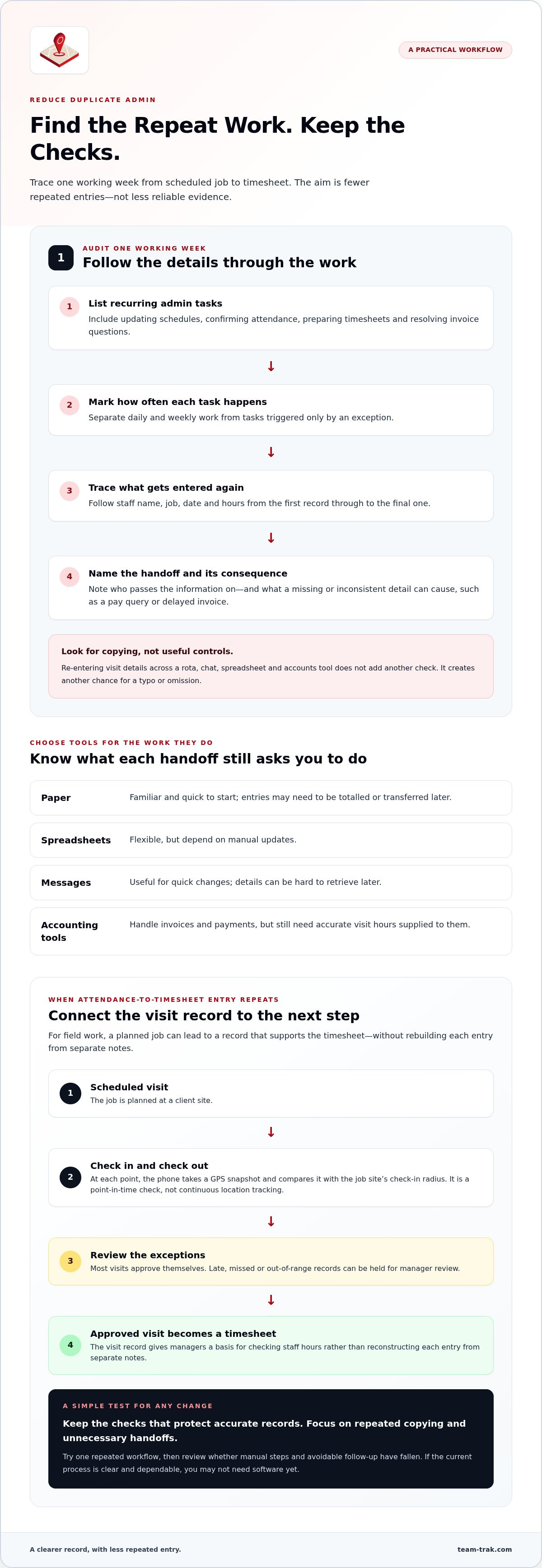
- List recurring admin tasks. Include updating schedules, confirming attendance, preparing timesheets and resolving invoice questions.
- Note how often each happens. Mark whether it’s daily, weekly or only triggered by an exception.
- Record what gets re-entered and where. Follow details such as staff name, job, date and hours from the first record to the final one.
- Identify each handoff and its consequence. Note who passes information on, and what happens when a detail is missing or inconsistent, such as a pay query or delayed invoice.
Then compare what your current tools actually do. Paper is familiar and quick to start, but someone may need to total or transfer entries. Spreadsheets are flexible, yet depend on manual updates. Messages are useful for quick changes, though details can be hard to retrieve later. Accounting tools handle invoices and payments, but still need accurate visit hours supplied to them.
How can you tell whether automation will remove work?
Map the current process before choosing software. Keep the checks that protect accurate records; focus on removing repeated copying or unnecessary handoffs. For a US business, the Department of Labor’s FLSA recordkeeping guidance explains federal requirements for covered employers, but it isn’t a substitute for local advice elsewhere.
Pick one repeated workflow, test a simpler way to handle it, then review whether manual steps and avoidable follow-up have fallen. If visit details are repeatedly copied into time records, explore the hidden cost of manual entry before deciding what to change. If your audit points to attendance-to-timesheet duplication, see how that workflow can be connected.
Link Verified Visits to Timesheets to Reduce Admin Overhead
For a service business whose staff work at client sites, the useful connection is between a planned job and a record that can support the next step. In Team-Trak, a scheduled visit is followed by check-in and check-out. At each point, the phone takes a GPS snapshot and compares it with the job site’s check-in radius. This is a point-in-time check, not continuous location tracking. See how GPS visit verification fits into the process.
Most visits approve themselves. A late, missed or out-of-range record can be held for manager review; once approved, the visit generates a timesheet. That gives managers a record to use for checking staff hours rather than rebuilding each entry from separate notes. Payroll exports and accounting integrations are available according to plan, while client invoicing by the hour or fixed price is available on Professional.
When does a connected field-workflow tool make sense?
It’s worth considering when your team regularly works across client sites and you’re still reconciling attendance, hours and invoice details by hand. If your current process is clear and dependable, you may not need software yet. The tool should fit the repeated work you identified, not add features your team won’t use.
Setup takes under 10 minutes, and a practice visit lets you try the check-in flow before deciding whether it suits your operation. If you want to see the process for yourself, see how Team-Trak works.
Make Your Next Admin Change a Small One
A process only works if the people using it can follow it during a busy shift. Before changing a routine, involve the staff member who handles that handoff and ask where confusion tends to creep in. Their view can reveal a small adjustment that makes the work clearer for everyone, without weakening the records you rely on.
Choose a change your team can maintain, then give it room to become part of the working week. If you’d like to explore a practical way to reduce administrative overhead, see how Team-Trak works.
Frequently Asked Questions
How do you measure administrative overhead in a small service business?
Look beyond the number of tasks and measure the time people actively spend doing them. For a short period, record the minutes spent processing, waiting for a reply and picking the task back up after an interruption. Separating hands-on work from waiting helps show whether the main burden is data handling, delayed responses or frequent interruptions.
Can a small service business reduce administrative work without buying software?
Yes. Set a clear routine for handling common changes, such as a cancelled job or a staff member running late. Decide who tells the client, who updates the team and how everyone knows the change has been handled. A simple agreed routine can help reduce administrative overhead without new software, especially when the team can follow it consistently.
Does accounting software alone reduce administrative overhead?
It can reduce some bookkeeping effort, depending on the features you use, such as preparing repeat invoice formats or organising financial reports. But accounting software serves a different purpose from confirming what happened at a job. If your main bottleneck is resolving uncertainty about a visit, improving the financial workflow alone won’t settle that question.
When should a service business automate an administrative task?
Automate when the process stays understandable through ordinary changes, not just on a perfect day. Before committing, check that staff know what to do when a job is cancelled, rescheduled or handed to someone else, and that a manager can correct a genuine mistake. If the team needs workarounds to handle these situations, clarify the process first.
Disclaimer
The information provided in this article is for general informational purposes only and reflects the opinions and experiences of the author. While every effort has been made to ensure accuracy, Team Trak makes no guarantees regarding completeness
Written by
Bob Fitzjohn
Founder of Team-Trak and serial entrepreneur with over 50 years’ experience building and scaling service businesses. Bob writes about workforce management, operational efficiency, automation, and the realities of running small businesses in today’s environment.


