It is 4:00 PM on a Friday and you are staring at a stack of scribbled timesheets and half-empty logbooks. Instead of finishing for the week, you are bracing for a long evening of cross-referencing text messages and GPS logs just to get your invoices out. Finding the best time billing software for your business is not about buying a digital stopwatch. It is about stopping the manual admin tax that steals your profit and drains your energy.
You know the frustration of a client questioning a bill because a staff member forgot to log their exit time. It is exhausting to act as a private investigator just to prove the work your team already finished. Most owners accept this friction as a part of the job, but manual data entry errors and missing logs are hidden costs you can no longer afford to ignore.
This guide will show you how to replace the paper trail with automated, accurate billing and verified proof of service. We will look at the most reliable tools for 2026 that link directly to your accounting software. You will discover how to gain total visibility over your team and reclaim your weekends with a system that works as hard as you do.
Key Takeaways
- Understand why the best time billing software provides verified proof of work rather than just relying on a simple, honesty-based timer.
- Learn how to choose between office-based tools and field-ready systems that offer GPS verification and mobile checklists for your team.
- Discover how to eliminate the Friday afternoon admin slog by moving from manual logbooks to automated timesheets that sync with your accounting system.
- See how providing clients with clear evidence of service protects your reputation and stops billable hours from leaking away through forgotten logs.
Beyond the Timer: What Really Makes the Best Time Billing Software?
You have likely spent years perfecting your craft, but the back-office side of things can still feel like a second, unpaid job. The best time billing software doesn’t just record when someone starts and stops. It acts as a bridge between the physical work done in the field and your company’s financial health. While basic time-tracking software might suffice for a solo freelancer, service businesses with teams need more than a digital stopwatch.
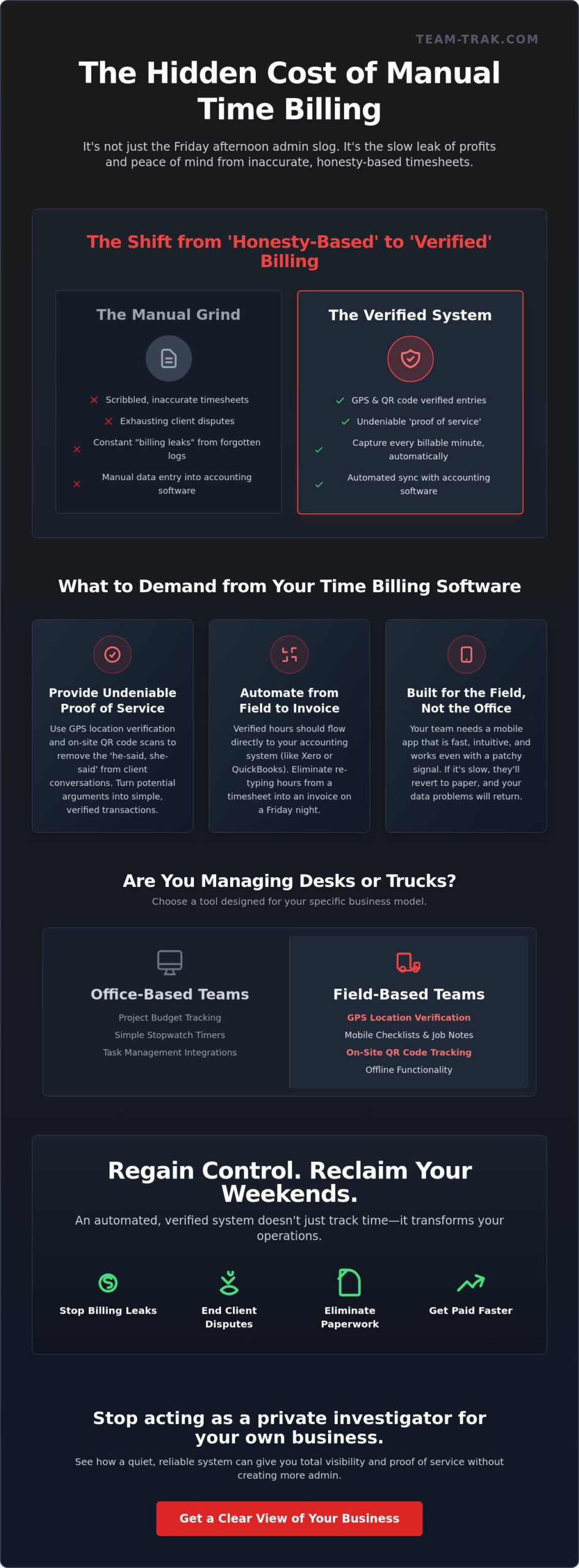
We are seeing a major shift from ‘honesty-based’ timesheets to ‘verified’ billing. In the past, you had to trust that a staff member wrote down the correct hours at the end of the day. Now, integrated operational platforms provide a level of oversight that protects both the owner and the employee. Every time a technician forgets to log a site visit or rounds down their hours to avoid a client’s question, your business suffers a ‘billing leak.’ These small leaks add up to significant lost revenue every year.
The difference between time tracking and time billing
Tracking hours is only half the battle. If those hours sit in a logbook or a spreadsheet, they aren’t helping your cash flow. Proper billing software takes those logs and turns them into professional invoices instantly. It handles the heavy lifting of timesheet automation, ensuring that billable hours are captured accurately while non-billable time is accounted for. This automation removes the friction of manual data entry, allowing you to focus on growth instead of paperwork.
Why ‘proof of service’ is the new industry standard
Clients are more skeptical than ever. They don’t want to just see a line item; they want to know the work happened. This is where ‘proof of service’ changes the conversation. By using GPS location verification and QR code check-ins, you remove the ‘he-said, she-said’ from client disputes. Proof of service is the digital receipt that validates every billable minute. It provides the objective data clients now expect, turning a potential argument into a simple, verified transaction.
Choosing the Right Tool for Your Specific Service Model
Not all service businesses are built the same. A graphic design agency has different needs than a plumbing outfit or a commercial cleaning crew. When searching for the best time billing software, you first need to decide if you are managing a desk-based team or a field-based one. Desk-based tools usually focus on project budgets and simple stopwatch timers. Field-based tools, however, prioritize physical visibility and proof of presence.
If your team is out on the road, a mobile-first interface is non-negotiable. The app needs to be fast and intuitive. It should also work even when the cellular signal is patchy or non-existent. If a technician has to wait two minutes for a screen to load, they will just write the time on a scrap of paper instead. This leads to the junk data problem that makes your office admin a nightmare. To scale your operations effectively, you need accurate billing data that comes directly from the source in real-time.
Integration is the final piece of the puzzle. Your chosen software should link seamlessly to tools like Xero or QuickBooks. You shouldn’t be re-typing hours from a timesheet into an invoice on a Friday night. The software should act as a quiet assistant that pushes verified logs straight to your accounting system. If you want to understand the full process of linking field operations to online accounting systems, a step-by-step approach can help you eliminate the scramble and turn a site check-in into a verified invoice. If you want to see how this looks for your specific industry, you might want to see how a simplified system looks in practice.
Essential features for field-based service teams
For teams on the move, GPS location verification is vital. It confirms your staff arrived at the correct site without you needing to make five phone calls. This isn’t about micromanagement; it is about having your team’s back if a client claims they never showed up. For multi-site contracts or high-traffic areas, learn more about how QR code tracking simplifies site management. It makes checking in as simple as a quick scan of a sticker on-site.
Selecting software that grows with your team
Watch out for per-feature pricing traps. Some vendors lure you in with a low base rate but then charge extra for essential tools like GPS or invoicing. You want a platform that offers a clear, predictable path as you add more staff. A client portal is also a huge win for transparency. It lets your customers see the proof of work themselves, which often leads to faster payments and fewer questions. For a deeper look at managing your team effectively, read our guide on mastering field workforce management software in 2026.
Top Time Billing Solutions for 2026: A Comparative Review
Finding the best time billing software for your business depends entirely on where your team spends their day. If you are sifting through a comparative review of top time billing solutions, you will notice that many tools cater to people sitting at desks. For a small business owner, the goal is to find a system that stops the Friday afternoon admin slog without adding more complexity to your life.
Toggl Track remains a popular choice for simple, desk-based freelancers who just need a basic timer. As of May 2026, their Starter Plan is $9 per user per month when billed annually. It is lightweight and gets the job done for solo operators. Paymo, on the other hand, is a more robust tool for teams needing integrated project management and invoicing, with their Small Office Plan priced at $10.90 per user. For medium-sized professional firms with complex project layers, BigTime provides the granular detail needed for high-level consulting and resource management. If you are evaluating your broader options, our guide to choosing invoicing software for service businesses walks through how to bridge the gap between field operations and billing to ensure you get paid faster with total accountability.
Team-Trak: The operator’s choice for field services
If your business involves people on the move, you need a system built for the real world. Team-Trak focuses on the specific needs of trades and field service companies. It moves beyond the simple timer by using an automated timesheet module paired with GPS location verification. This provides a unique peace of mind. You don’t have to wonder if a staff member arrived on time or left early. The system handles the verification, so you don’t have to play the role of a supervisor through five different phone calls. If you are ready to see how a field-first system can simplify your week, get in touch with our team today.
Toggl Track vs. Paymo: Which suits the office better?
When you are choosing between these two office-centric tools, consider your reporting needs. Toggl Track is excellent for “set and forget” tracking where you just want to see where the day went. Paymo is better if you want to dive deep into project profitability and task management across a growing workforce. However, neither is built to handle the mud and movement of a construction site or a cleaning route. If your team isn’t sitting at a computer, a simple ‘timer’ app will often result in forgotten logs and missing revenue. Choose a verification-led system when your reputation depends on proving exactly when and where the work happened.
Eliminating Billing Friction and Regaining Your Friday Afternoons
Think back to your last Friday afternoon. You likely spent it hunched over a desk, squinting at messy handwriting and trying to remember if a specific job took two hours or three. This ‘before’ state is the standard for many operators. It is a cycle of paper piles, late-night data entry, and the constant stress of knowing you might be under-billing. The best time billing software acts as an exit ramp from that chaos. It replaces guesswork with precision.
When you switch to a digital workflow, the ‘after’ state feels different. Invoices are generated from verified logs rather than memory. You gain clear visibility into your team’s day without needing to check in constantly. This isn’t just about efficiency; it’s about reclaiming your personal time. To see how this works in a real-world setting, you can see how to simplify your operations and reduce admin load.
Moving from paper to digital without the ‘startup stress’
You don’t need to overhaul your entire business in a single day. Many successful owners find it easier to start with one core feature. Focus on getting your timesheets right first. When you introduce the new system to your staff, frame it as a tool for their benefit. It’s about safety, payroll accuracy, and protecting them from client disputes. It isn’t about ‘spying.’ It’s about making sure everyone is treated fairly. For more on this transition, read about automated timesheets and ending the Friday afternoon scramble.
Turning billable data into faster payments
Sending a professional, accurate invoice immediately after a job changes the way clients see your business. It removes the ‘questioning’ phase where customers haggle over hours because the data is objective. When you can show exactly when a team member arrived and left a site, the bill becomes a statement of fact. This level of transparency builds trust and leads to faster payments. The goal of time billing is getting paid what you’re worth, without the argument. Using the best time billing software ensures that your bank balance finally reflects the hard work your team puts in every single day.
Take Control of Your Time and Your Profit
Manual billing is more than just a nuisance. It is a quiet drain on your business potential. By moving away from honesty-based logs and toward verified data, you eliminate the disputes that stall your cash flow and damage your reputation. You also give yourself permission to step away from the office on Friday afternoons. The best time billing software should act as a silent partner, providing GPS-verified attendance and seamless accounting integrations so you don’t have to spend your weekends at a desk.
We designed Team-Trak as operators who have been in the trenches, not just developers in a lab. Our goal is to give you the visibility you need to trust your team and the proof you need to satisfy your clients. You deserve a system that removes operational friction and lets you lead with clarity. It is time to stop chasing paper and start growing your business with confidence.
Ready to end the Friday afternoon scramble? Request a demo today.
Frequently Asked Questions
Is time billing software worth it for a small service business?
Yes, it pays for itself by stopping “billing leaks” where hours go unrecorded. Small service businesses often lose profit simply because staff forget to log their time correctly at the end of a busy shift. Moving to a digital system ensures every billable minute is captured accurately. It also removes the stress of manual admin, saving you hours of office time that can be spent on growing the business instead.
How does GPS verification actually work for billing?
It works by recording a location stamp when a staff member uses the mobile app to check in or out of a job site. This data is attached to the digital timesheet as objective proof of service. It doesn’t require extra hardware or tracking devices; it simply uses the phone’s existing sensors to confirm the team arrived where they said they did. This builds massive trust with your clients and settles disputes instantly.
Can I link my billing software to Xero or QuickBooks?
Yes, connecting to Xero or QuickBooks is a core feature of the best time billing software. It allows your verified timesheets to flow directly into your invoicing system without any manual intervention. You won’t need to re-type data or cross-reference paper logs on a Friday night. This integration ensures your financial records stay accurate and your billing cycle remains as short as possible for better cash flow.
What is the difference between a time tracker and a billing app?
A time tracker is just a digital stopwatch, while the best time billing software acts as a complete financial bridge. Billing apps take those tracked hours and automatically apply specific rates to generate professional invoices. They often include extra features like client portals and GPS verification to provide proof of work. They are designed to ensure you actually get paid for your time, not just to watch the clock.
How do I stop my staff from forgetting to use the app?
The easiest way is to use QR code check-ins on your job sites. If staff only have to scan a sticker to start their day, the friction of logging time disappears. You can also set up automated reminders through the mobile app to prompt them at the start and end of their shifts. When the system is simpler than a paper log, your team will actually use it without constant prodding from management.
Does time billing software help with tax and compliance?
It helps by creating a permanent, digital audit trail of all work performed and hours logged. While the software doesn’t process payroll directly, it provides the accurate, verified data you need for tax and labor compliance. Having digital records of site attendance and hours worked protects your business from liability. It ensures you have the right documentation ready if you ever face a records audit or a client inquiry.

Article by
Bob Fitzjohn
Bob Fitzjohn
Founder of Team-Trak and serial entrepreneur with over 50 years’ experience building and scaling service businesses. Bob writes about workforce management, operational efficiency, automation, and the realities of running small businesses in today’s environment.
Disclaimer
The information provided in this article is for general informational purposes only and reflects the opinions and experiences of the author. While every effort has been made to ensure accuracy, Team Trak makes no guarantees regarding completeness