
It’s 4:00 PM on a Friday, and instead of wrapping up the week, you’re chasing down crew leads for missing timesheets. You know the routine; there are scribbled notes on scrap paper, text messages with vague hours, and the looming dread of manual data entry that will likely eat up your entire evening. It’s a frustrating cycle that often leads to client disputes over unverified hours and simple human errors that eat into your margins.
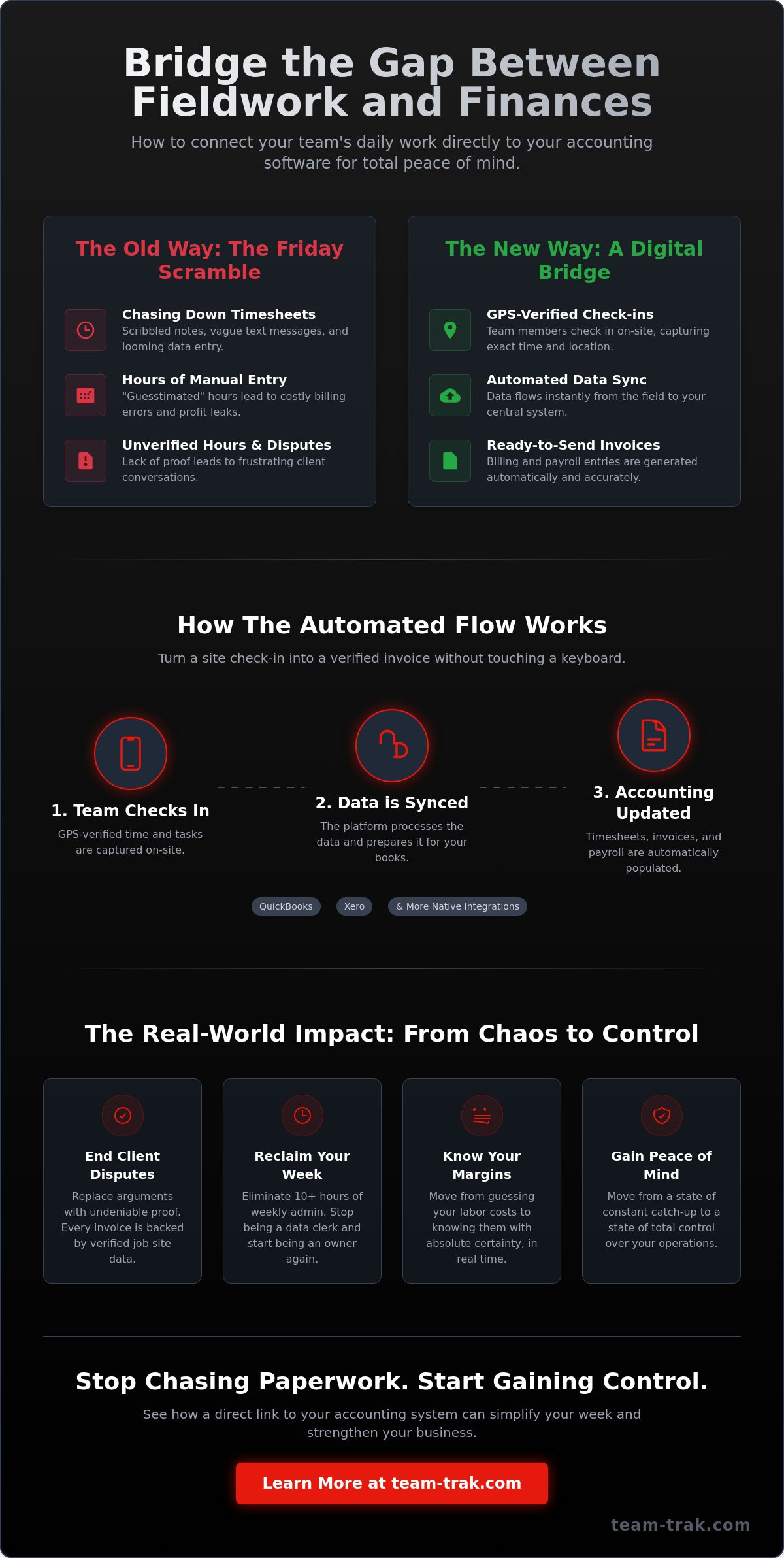
Most service founders accept this administrative friction as an unavoidable cost of doing business, but it doesn’t have to be your reality. You can eliminate the scramble and finally establish a reliable link to online accounting systems that turns a site check-in into a verified invoice. This transition replaces the stress of disorganized paperwork with the relief of precise, data-driven results.
This guide explores how to connect your field team’s daily work directly to your accounting software for total peace of mind. We’ll show you how to automate the flow from the job site to the final bill, giving you total visibility on labor costs and a much lighter administrative load.
Key Takeaways
- Stop the Friday scramble by turning field activities into a digital bridge that feeds directly into your financial records.
- Learn how to establish a secure link to online accounting systems like QuickBooks or Xero without writing a single line of code.
- Replace client disputes with total accountability by using verified job site data to back up every invoice you send.
- Reduce your administrative burden by automating the path from a team member’s check-in to a finalized billing entry.
- Discover how to choose a “low friction” platform that prioritizes native integrations and operational simplicity over complex technical setups.
Ending the Friday Admin Scramble: Why You Need a Direct Link to Online Accounting Systems
Most founders start their business because they’re good at a trade, not because they love data entry. Yet, as the team grows, the paperwork grows even faster. The link we’re talking about is more than just a button in a settings menu; it’s a digital bridge. It carries the reality of what happened on-site directly into your financial records without you having to touch a keyboard. When you establish a reliable link to online accounting systems, you’re essentially modernizing your accounting information system to handle real-world service variables in real time.
A direct connection ensures your books reflect the actual state of your business right now. Old school paper timesheets and verbal reports are reactive. They force you to look backward, often weeks after a job is finished. By the time you spot a labor cost overrun, the money is already gone. Automated data flows change the math. They turn the “Friday scramble” into a non-event because the data has been flowing into your system all week long. It’s about moving from a state of constant catch-up to a state of total control.
The Hidden Cost of Manual Data Entry
Chasing staff for attendance details is a massive time sink that most owners simply accept. It’s exhausting. You know the feeling of scrolling through text messages or trying to decipher coffee-stained notes just to get an invoice out. Beyond the fatigue, there’s a heavy financial risk. Guesstimated hours lead to billing errors that either cheat you out of profit or frustrate your clients. This administrative friction is a growth killer. If you’re spending ten hours a week on data entry, that’s ten hours you aren’t spending on winning new contracts or improving your service.
Moving Beyond the Spreadsheet
Spreadsheets are a silent killer of operational efficiency. They feel free, but they create silos where data goes to die. When your field data lives in a separate file from your accounting software, you never have a single source of truth. Transitioning to timesheet automation allows you to stop being a data clerk and start being an owner again. A direct link to online accounting systems means that when a worker checks in on-site, the wheels of your financial system start turning automatically. It’s the difference between guessing your margins and knowing them with absolute certainty.
How to Link Field Operations to Your Online Accounting Systems
Setting up a digital bridge doesn’t require a computer science degree. It starts with selecting a field management platform that natively supports your specific accounting software. Most modern systems use a secure API integration. This is just a practical way of saying the two programs have a secure, private conversation without you needing to write any code. Once you authorize the connection, you’ve established your primary link to online accounting systems.
The next step is mapping. You need to tell the software where each piece of field data belongs in your accounting ledger. For example, you’ll match “Site Labor” in your field app to “Wages” or “Direct Labor Costs” in your books. After mapping, you can set up automated triggers. You might want a completed job to trigger a draft invoice or a verified check-out to update a timesheet. Always run a few test entries first. Verify that the data lands in the right account before you turn on full automation for the entire team.
Automating the Timesheet-to-Payroll Pipeline
Manual typing is where errors live. By implementing timesheet automation, you move data from the job site to payroll without a middleman. Using GPS-verified check-ins ensures that billable hours are based on actual time spent on-site rather than memory. It’s a simple way to ensure accuracy for both the client and your staff. This reduces the gap between work completed and payroll processed, keeping your cash flow predictable and your team focused on the job at hand.
Streamlining Invoices and Billing
For trades and field service companies, the delay between finishing a job and sending the bill is often too long. You can close this gap by turning completed task checklists into ready-to-send invoices. Every billable minute is captured because the system records it as it happens. Pairing this approach with the right invoicing software for service businesses ensures that your billing process is both accurate and fast. If you want to build a complete workflow where field work flows directly into your billing system, learn how to create a seamless time tracking and invoicing process for your field team. If you want to see how this visibility can simplify your week, you might want to explore a simpler way to manage your team. This setup ensures that your link to online accounting systems remains a quiet, reliable part of your daily operations.
The Real-World Impact: Accuracy, Accountability, and Peace of Mind
Client disputes are a quiet profit killer. If you can’t prove exactly when your team arrived and left a job site, you’re often forced to offer discounts just to keep the peace. It’s a draining cycle. Establishing a direct link to online accounting systems provides a factual foundation for every invoice you send. You aren’t just asking for money; you’re providing a verified record of service. This level of transparency builds a professional image that sets you apart from less organized competitors.
Beyond the client relationship, there’s a deep sense of psychological relief for you as the founder. You don’t have to check the data twice or worry about transposed numbers. When field activity flows directly into your books, you know the numbers are right. This total visibility on labor costs is a cornerstone of simplifying operations. It removes the guesswork from your daily management and replaces it with a calm sense of control.
Proof of Service as a Financial Asset
Using GPS verification turns a simple site check-in into a verifiable financial asset. Timestamped data acts as an insurance policy for your business reputation. If a client questions an hour on their bill, you have the proof ready in seconds. This accountability doesn’t just protect your margins; it actually leads to faster client payments. When the data is indisputable, there’s no reason for a client to delay their payment.
Data-Driven Decision Making for Founders
A reliable link to online accounting systems allows you to see which jobs are actually profitable and which are quietly costing you money. You can identify patterns in staff performance through synced reports without needing to be on every job site. This clarity is what allows a business to scale. You can take on more work and manage a larger team without the need to hire more administrative staff to handle the paperwork. Reach out to see how we can help you gain total visibility over your field operations.
Choosing the Right Link for Your Service Business
Finding the right tool shouldn’t feel like a second job. You need a platform that connects to your books without a translator. When you evaluate a potential link to online accounting systems, prioritize native integrations with established names like Xero, QuickBooks, or Sage. These built-in connections are more stable than third-party workarounds. Look for a “low friction” setup. If you need a developer just to map your accounts, the system will likely create more admin than it saves. The goal is to spend less time in the software and more time on the job site.
Staff adoption is the ultimate test. If your team finds the mobile app clunky or confusing, they’ll stop using it. A bad mobile experience is where digital links go to die. If an app drains the battery or crashes in areas with poor signal, your data will be incomplete. This is why QR code tracking is often the most practical choice for site attendance. It’s fast. It’s reliable. It ensures you get the data you need without forcing your crew to navigate complex menus or manual logs.
Integration Checklist for Service Teams
Before you commit to a platform, ask these three questions. Does the data sync in real-time or in batches? Real-time sync gives you a more accurate view of your daily cash flow. Can the system handle multiple staff members on a single job site? Many tools struggle with crew-based work. Finally, check the security. Ensure the data is encrypted to meet modern standards like the SECURE Data Act 2026. You need a link to online accounting systems that protects your financial truth as much as it simplifies it.
Why Team-Trak is the Quiet Solution for Your Admin
Team-Trak was built for operators who are tired of the noise. It acts as a quiet bridge between your field team and your office. The platform is designed to be quietly efficient, removing the need for manual checks and constant follow-ups. By addressing the hidden cost of manual time billing, you can stop being a data clerk and start being a founder again. It’s about simplifying operations so you can scale without the stress of a growing paper trail. We don’t believe in flashy features that don’t solve real problems; we believe in visibility and proof of service.
Regain Your Time and Simplify Your Operations
Running a service business is hard enough without the weight of a manual paper trail dragging you down every Friday. You’ve seen how a direct connection between the job site and your office can end the administrative scramble and replace it with factual, real-time visibility. By establishing a reliable link to online accounting systems, you stop chasing missing timesheets and start trusting your numbers with absolute certainty.
This transition is about more than just digital tools. It’s about the peace of mind that comes from GPS-verified attendance for total accountability. We believe in systems designed by experienced operators who understand the unique pressure of managing real-world field teams. When your daily field data flows directly into your ledger, you eliminate the human errors that eat away at your profit margins. You don’t need a complex infrastructure; you just need a quiet, efficient bridge that works.
Simplify your admin and link your field team to your books today with Team-Trak.
The transition to automated billing doesn’t have to be a stressful project. Take the first step toward a lighter workload and enjoy the clarity that comes with a business that runs itself. You’ve built something great; now it’s time to let your systems support your next level of growth.
Common Questions About Linking Field Operations
How does linking my field operations to accounting save me time?
It eliminates the need to manually transfer data from scrap paper or text messages into your books. By establishing a direct link to online accounting systems, you stop the repetitive task of typing out hours and job details. This automation can save you several hours of administrative work every week. It allows you to focus on managing your crew instead of being stuck at a desk performing data entry.
Is it difficult to connect Team-Trak to my existing accounting software?
No, the connection process is designed to be low friction and doesn’t require any coding knowledge. You simply authorize the integration within the platform settings to connect with leaders like QuickBooks or Xero. Most founders are up and running in minutes. The system uses secure API integrations to handle the technical heavy lifting, ensuring your field data and financial records stay in sync without extra effort.
Will my staff find it hard to use a mobile app for timesheets?
The mobile app is built for the reality of a muddy job site, prioritizing speed and simplicity. Staff can check in and out with a quick QR code scan, which is much faster than filling out a traditional paper log. If your team can use a smartphone for basic tasks, they can use this app. It removes the burden of remembering hours at the end of a long shift.
What happens if the internet goes out on a job site?
The system is built to handle the inconsistencies of field work. If a team member loses their connection, the app stores the check-in or task data locally on their device. Once they return to an area with signal, the information syncs automatically. This ensures your link to online accounting systems remains accurate even when your team is working in remote locations or dead zones.
Can I still review timesheets before they sync to my accounting system?
Yes, you retain full control over every piece of data that moves into your books. You can review, edit, and approve every entry in the dashboard before it ever hits your accounting ledger. This step ensures that only verified, accurate information is used for payroll and client invoicing. It gives you a final layer of oversight to catch any mistakes before they become financial errors.
Does this integration help with tax compliance and audits?
It creates a clear, digital paper trail for every billable hour and job expense. Having GPS-verified records and timestamped data makes tax time significantly less stressful because you have indisputable proof of work. This transparency is vital for meeting modern data standards and ensures your business is always audit-ready. A reliable link to online accounting systems turns your daily operations into a secure financial record.

Disclaimer
The information provided in this article is for general informational purposes only and reflects the opinions and experiences of the author. While every effort has been made to ensure accuracy, Team Trak makes no guarantees regarding completeness