
It’s 4:00 PM on a Friday, and instead of heading home, you’re chasing down a technician for a crumpled paper timesheet. You know the drill. You’re squinting at messy handwriting and trying to remember if the team was actually on-site for four hours or five. It’s a frustrating ritual that leads to billing delays and awkward client disputes. You aren’t alone in feeling that time tracking and invoicing shouldn’t be this hard. Most service business owners find themselves stuck in this loop, losing hours to manual data entry and second-guessing their own records.
It’s time to move past the guesswork. You can build a workflow where field work flows directly into your billing system without you touching a single spreadsheet. In this article, you’ll learn how to bridge the gap between the job site and the final payment by using verified data. We’ll walk through setting up a system that uses GPS proof and automated modules to ensure your invoices match reality every single time. You’ll gain the peace of mind that comes with knowing your hours are accurate and your admin time is finally under control.
Key Takeaways
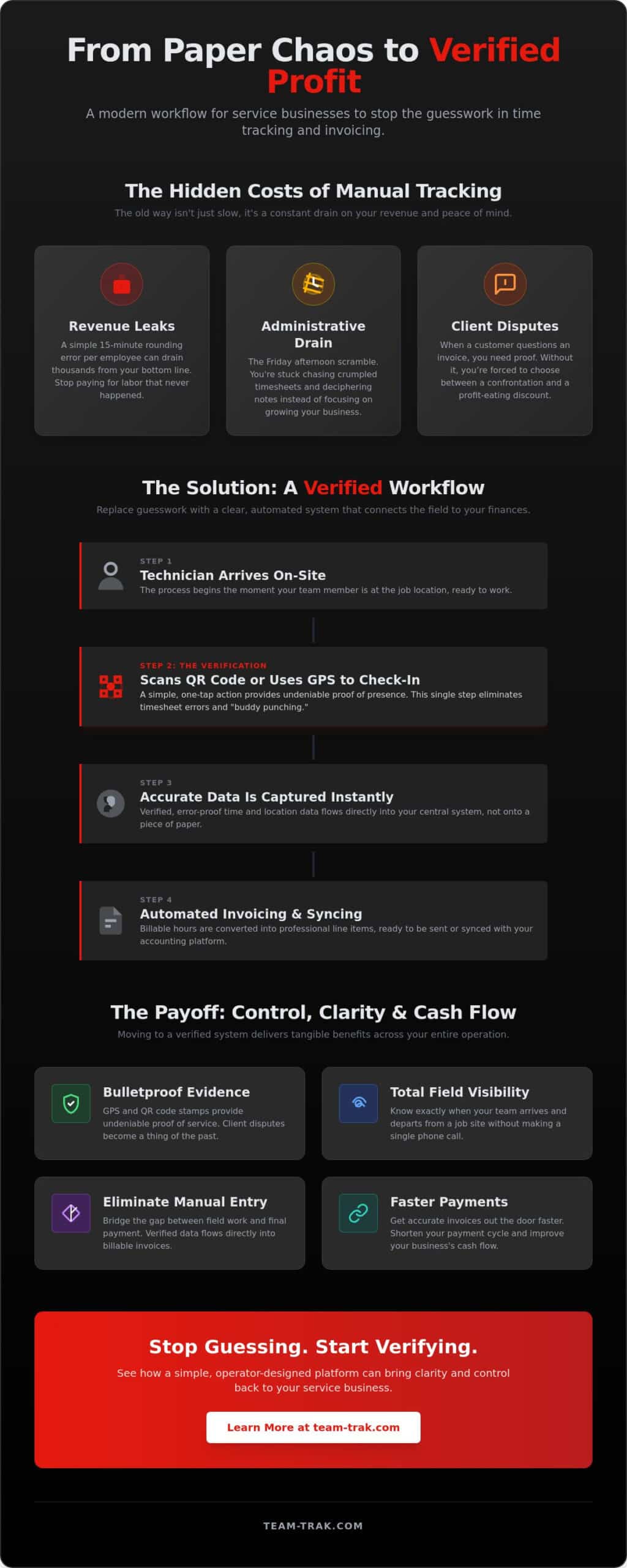
- Stop losing thousands every year to “rounded up” hours and the administrative stress of chasing down paper timesheets.
- Use GPS and QR code verification to prove your team was on-site, giving you total visibility without making a single phone call.
- Learn how to automate your time tracking and invoicing by turning verified shifts into professional billable line items without manual data entry.
- Bridge the gap between the job site and your final payment by syncing field data directly with your preferred accounting platform.
The Hidden Friction: Why Manual Time Tracking and Invoicing Fail Service Teams
Every service business owner knows the heavy weight of the Friday afternoon scramble. It starts with a series of frantic text messages and phone calls to technicians who are already heading home for the weekend. You’re looking for a missing Timesheet or trying to decipher a coffee-stained note about a job completed three days ago. This isn’t just an administrative chore. It is a psychological drain that keeps you from actually finishing your week with a sense of accomplishment. Instead of resting, you’re stuck playing a high-stakes game of telephone between the field and the office.
When you rely on manual time tracking and invoicing, you aren’t just dealing with slow processes; you’re dealing with invisible leaks in your revenue. Invoicing delays are the primary killers of healthy cash flow. If it takes you ten days to collect hours and another three to send the bill, you’ve already created a two-week gap before you even see a cent. Manual data entry also invites human error. A digit flipped during a late-night typing session can mean the difference between a profitable job and a loss. These small friction points eventually pile up into a mountain of operational stress.
The Cost of Inaccurate Billing
The “hidden cost” of a simple 15-minute rounding error per staff member can easily drain thousands of dollars from your bottom line every year. If five technicians round up their start and end times by just a few minutes every day, you’re paying for hours of labor that never actually happened. Beyond the financial loss, unverified hours lead to client disputes that can tarnish your reputation. When a customer questions an invoice and you don’t have proof of when your team arrived, you’re forced to choose between a confrontation or a discount. You can read more about how these small leaks add up in our guide on The Hidden Cost of Manual Time Billing for Small Service Businesses.
Moving from Trust to Verification
Running a team requires trust, but “trust but verify” is the healthiest mantra for a growing business. There is a massive difference between a simple stopwatch timer and a location-verified check-in. A timer only proves that a button was pushed; a location-verified record proves your team was physically on the job site. This level of visibility provides the ultimate peace of mind. You no longer have to wonder if the work was done or if the billing is fair. You have the data to back it up, allowing you to lead your team with confidence rather than suspicion.
Step 1: Capturing Bulletproof Field Data with GPS and QR Verification
Most digital timers are just high-tech versions of the same old problem. They still rely on a technician’s memory to hit a button at the right time. If your staff forgets to clock in until they’re halfway through a job, your records are already wrong. To build a reliable system for time tracking and invoicing, you have to move beyond simple timers. You need a system that captures data which can’t be debated. This starts with ensuring that a digital check-in only happens when your team is physically where they’re supposed to be.
By using a mobile staff app that requires a physical scan or a location stamp, you remove the burden of memory from your team. This creates a clear trail of evidence for every billable minute. Even government-level systems, such as the Invoice Processing Platform, emphasize the importance of electronic, centralized verification to eliminate the errors common in manual billing. When your data is captured accurately at the source, the rest of your office workflow becomes significantly quieter.
Implementing QR Code Check-ins
Placing a QR code at a client’s location is one of the simplest ways to ensure physical presence. When a technician arrives, they scan the code using their phone to start their shift. This “check-in/check-out” flow is intuitive and takes seconds, making it a system your staff will actually use. It replaces the “I forgot” excuse with a simple, repeatable action. You can learn more about how this works with our QR code tracking features. If you want to stop the guesswork today, reach out to see how we can help you set this up.
The Power of GPS Verification
GPS stamps provide the ultimate evidence if a client ever disputes a bill. It eliminates “buddy punching” because a shift can’t be started from a couch five miles away. It’s vital to frame this to your team as a tool for their protection, not just yours. GPS verification tracks the work, not the person, ensuring that their hard work is documented and they are paid fairly for every minute spent on-site. This layer of GPS verification gives you the proof you need to stand behind your invoices with total confidence.
Adding task management checklists to this workflow further strengthens your position. When a technician checks off completed tasks before clocking out, you aren’t just billing for time; you’re billing for specific results. This creates a complete picture of the service provided, leaving no room for questions when the invoice hits the client’s inbox.
Step 2: Converting Verified Timesheets into Professional Client Invoices
Once you’ve captured verified data from the field, the next hurdle is turning those records into money. In many offices, this is where the real bottleneck happens. A manager or owner spends hours copying data from a field app or a paper log into a separate billing tool. It’s a tedious process that invites mistakes. A seamless system for time tracking and invoicing should do this heavy lifting for you. By automating the transition from a verified shift to a billable line item, you ensure that every minute worked is actually paid for.
This isn’t just about speed; it’s about accuracy. Maintaining precise records through a digital workflow aligns with financial management best practices, helping you stay prepared for tax season and audits. When your billing is based on verified physical presence, you can stand behind every charge. You move from “guessing” what to bill to “knowing” exactly what the client owes. This shift can reduce the time you spend on admin from several hours a week to just a few minutes of review.
Automating the Timesheet Workflow
The goal is to eliminate manual re-entry entirely. When your team clocks out, those hours should sit in a queue ready for your approval. You can quickly review the GPS stamps and task checklists before they ever hit an invoice. This gives you a final layer of control without the data entry headache. You can learn more about this in our guide on Automated Timesheets: Ending the Friday Afternoon Scramble. Once approved, these hours convert into professional invoices instantly.
Invoicing with Confidence
Professionalism matters. An invoice that includes proof of service, such as check-in times or completed task lists, is much harder for a client to dispute. It shows you have a handle on your operations. By using a Client Portal, you give your customers transparency over their own billing history. This reduces the number of “where is this invoice?” emails you receive. It’s about simplifying operations for both you and your client. When you connect your time tracking and invoicing directly, you create a professional image that builds long-term trust.
If you are ready to stop the manual data entry and get paid faster, start automating your billing today.
Closing the Loop: Linking Your Field Operations to Online Accounting Systems
The final piece of the puzzle is the bridge between your field data and your bank account. You’ve already solved the problem of verified hours and professional billing, but if your field records don’t talk to your accounting software, you’re still stuck in a manual loop. True efficiency happens when your time tracking and invoicing system pushes data directly into platforms like Xero, QuickBooks, or Sage. This isn’t just a technical convenience. It is the only way to ensure your financial records actually match the reality of the work performed on-site.
When these systems speak the same language, the risk of double-entry disappears. You no longer have to worry about a typo in the office creating a massive headache during tax season. Instead, you gain total business visibility. You can track the journey of a job from the moment a technician scans a QR code to the moment the payment clears in your bank balance. This level of clarity allows a founder to stop reacting to daily fires and start leading with data. For a complete picture of how invoice tracking for service businesses can eliminate disputes and stabilize your cash flow, our founder’s guide walks through every step of bridging field work to final payment.
Why Integration Matters for Growth
Scaling a service business often feels like a trap. The more clients you take on, the more admin staff you think you need to hire just to keep up with the paperwork. A unified system changes that math. By linking your tools, you move from just managing tasks to managing a truly profitable business. You can handle more volume without increasing your overhead or your stress levels. For a deeper look at this transition, see our guide on Linking Field Operations to Online Accounting Systems.
Next Steps for the Practical Founder
The first step toward a better workflow is an honest audit of your current “time-to-invoice” lag. How many days pass between a job being finished and a bill being sent? If that number is higher than 48 hours, you’re likely losing money on cash flow. Your next move should be choosing a platform that prioritizes field verification over simple, unreliable timers. You can find more advice on this in our article about Choosing Invoicing Software for Service Businesses. It’s time to close the loop on your time tracking and invoicing and finally regain control of your business operations.
Regain Your Fridays with a Verified Workflow
Building a workflow that actually works shouldn’t feel like a second job. You’ve seen how moving from paper scraps to GPS-verified data removes the guesswork from your daily operations. By using QR codes and location stamps, you protect your reputation and your bottom line simultaneously. When you connect these field records directly to your accounting software, you finally stop the double-entry cycle that steals your evenings and weekends.
This isn’t about chasing a trend; it’s about getting the visibility you need to lead with confidence. A seamless system for time tracking and invoicing ensures that your bank balance reflects the hard work your team puts in every day. You deserve to end your week without a pile of unbilled hours and missing timesheets staring back at you.
Team-Trak was created by operators who understand these specific administrative pressures. With GPS-verified attendance tracking and direct integration with major accounting systems, it’s designed specifically for service-based founders who want to scale without the stress. See how Team-Trak turns field work into verified invoices. You’ve already done the hard work of building your business. Now, it’s time to enjoy the clarity of a system that runs as hard as you do.
Frequently Asked Questions
How do I stop staff from rounding up their hours on timesheets?
You can stop rounding by replacing manual logs with QR code check-ins at the job site. When a technician scans a code to start their shift, the software records the exact second they arrive. This removes the temptation to round up to the nearest fifteen minutes. It also takes the pressure off your team to remember their start times at the end of a long day.
Is GPS tracking for staff legal and how do I introduce it?
GPS tracking is legal in the U.S. for work purposes, though you must comply with state-specific laws. States like California, Texas, and Delaware require explicit employee consent before tracking begins. Introduce the system as a proof of service tool. Explain that it protects technicians by providing undeniable evidence of their hard work if a client ever questions a bill.
How do I handle a client who disputes the hours billed for a service?
Resolve disputes by sharing the verified GPS stamps and completed task checklists from the job. Instead of arguing over memories, you can present a professional record of when the team arrived and exactly what they accomplished. Most clients accept the charges immediately when presented with clear, data-backed proof of service. It turns a potential conflict into a demonstration of your professional standards.
Can I link my time tracking software directly to my accounting system?
You can absolutely link your time tracking and invoicing software to accounting tools like QuickBooks, Xero, or Sage. This integration ensures that every approved shift automatically becomes a billable line item in your accounting system. It eliminates the need for double-entry and prevents the common typing errors that occur when moving data from one spreadsheet to another.
What is the difference between a timer app and a field verification app?
A timer app only tracks how long a button was active, while a field verification app proves physical presence and work quality. Verification apps use tools like QR codes and GPS stamps to confirm the technician was actually at the client’s location. This provides a level of accountability that a simple stopwatch cannot match, ensuring your billing is always based on reality.
How much time can I actually save by automating my invoicing?
Automating your invoicing can save you several hours of admin work every single week. Instead of spending your Friday afternoon chasing down paper timesheets and manually entering data, you simply review and approve verified shifts. Many business owners find they can reduce their entire billing cycle from a half-day chore to a ten-minute review process. Without precise invoice tracking, unbilled work can slip through the cracks even after you’ve automated your timesheets, so pairing both systems together gives you the most complete protection for your revenue.

Article by
Bob Fitzjohn
Bob Fitzjohn
Founder of Team-Trak and serial entrepreneur with over 50 years’ experience building and scaling service businesses. Bob writes about workforce management, operational efficiency, automation, and the realities of running small businesses in today’s environment.
Disclaimer
The information provided in this article is for general informational purposes only and reflects the opinions and experiences of the author. While every effort has been made to ensure accuracy, Team Trak makes no guarantees regarding completeness