
What is Client Portal Software for Service Industries?
At its core, client portal software is a secure, private, and online space where your customers can log in to find everything related to the work you do for them. Think of it as a digital front door to your business, open 24/7, where clients can serve themselves without needing to call or email you for every little thing.
For years, this technology was dominated by software companies, who used portals as “help desks” for managing support tickets. But for a service business—like a cleaning, security, or maintenance company—a list of support tickets doesn’t prove the work got done. Your clients aren’t asking for technical support; they’re asking, “Did your team show up on time?” and “Can I see the invoice for last month?”
This is where modern client portals for service industries have changed the game. They move beyond passive support to provide active, real-time operational visibility. It’s the digital bridge between your team’s work in the field and your client’s peace of mind in the office.
The Evolution of the Service Portal
Client portals started as little more than secure folders online—a place to dump contracts and invoices. They were static and often neglected. Today, thanks to mobile technology and real-time data, they have evolved into dynamic dashboards. Instead of just seeing a PDF of an old invoice, a client can now see a live feed of activity, including:
- Which staff member is currently on-site.
- A timestamped log of when they arrived and when they left.
- A checklist of tasks completed during their visit.
This evolution marks a fundamental shift from reactive support (answering questions after the fact) to proactive transparency (giving clients the answers before they even think to ask the question).
Key Differences: CRM vs. Client Portal
It’s a common point of confusion, but the distinction is simple. A Customer Relationship Management (CRM) system is for you; it helps you manage your sales pipeline and internal notes about leads and customers. A client portal is for them; it manages your client’s experience after they’ve signed the contract.
While some CRMs offer a basic portal function, they often lack a direct connection to your live field operations. To truly deliver peace of mind, you need a system that links what your staff does on-site directly to what your client sees on their screen. In short, the client portal is the external, customer-facing proof of your operational promises.
Essential Features: What Your Clients Actually Want to See
When choosing client portal software, it’s easy to get lost in a long list of technical features. But what do your clients—the people who will actually use it—truly care about? It boils down to a few key areas that provide clarity, proof, and convenience.
A good portal for any business should include these fundamentals:
- Secure Document Hub: A central, organised place for contracts, insurance certificates, compliance documents, and historical invoices.
- Simple Communication: A way to send messages or share updates without getting lost in cluttered email inboxes.
- Invoice and Payment History: Easy access for clients to view past invoices and check their account status.
- Mobile-Responsive Design: The ability for a client to check in from their phone while they are on the go.
However, for a service-based business, these features are just the beginning. The real value comes from providing undeniable proof of service.
Proof of Service: GPS and Checklists
This is what separates a standard portal from one built for the service industry. Instead of just telling a client the job is done, you can show them. Features like GPS location verification provide a timestamped record proving your staff were on-site when they said they were. This builds immediate trust, especially with new clients or those managing properties remotely.
Digital checklists take this a step further. When your team completes a job, they can tick off each task in a mobile app, and that completed checklist instantly appears in the client’s portal. This shows value beyond just “showing up” and provides a granular record of the work performed.
Financial Transparency: Invoices and Billing
Few things damage a client relationship faster than “bill shock”—an invoice that is higher than expected with no explanation. A transparent client portal prevents this by giving clients visibility into accrued hours and work completed before the invoice is sent.
When your portal is linked to your team’s timesheets, clients can see a running total of work performed. Some systems even allow clients to review and approve digital timesheets, ensuring everyone is on the same page. This simple feature turns the billing process from a potential point of conflict into a routine administrative task. You can read more about this in our guide on building a seamless time tracking and invoicing workflow.
How a Portal Eliminates Client Disputes and Admin Chaos
As a business owner, how much of your day is spent answering the same questions? “Who was on site yesterday?” “Can you resend last month’s invoice?” “Why was this bill higher than last time?” This slow drip of administrative drag doesn’t just waste your time; it chips away at your focus.
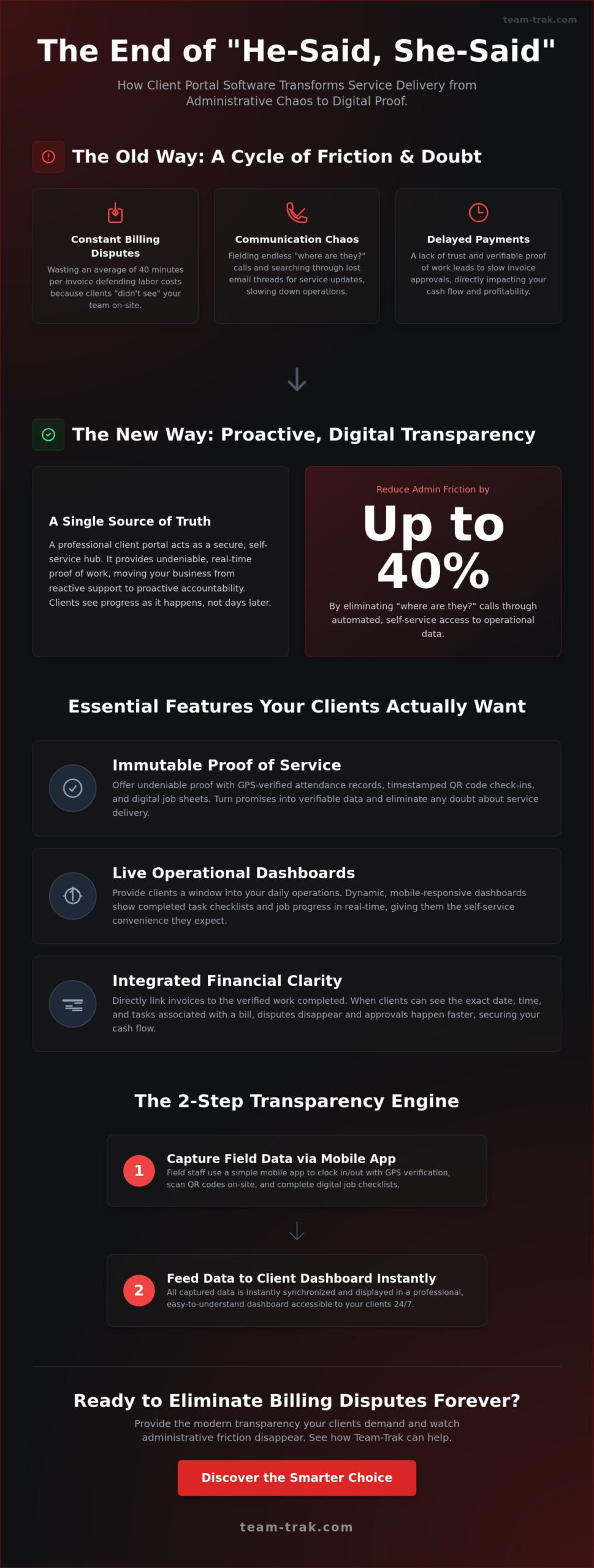
A client portal acts as a self-service hub that empowers your clients to find their own answers. It replaces subjective “he-said, she-said” arguments with objective, timestamped data. The psychological benefit is immense: when clients feel informed and in control, their trust in your service grows. This transparency is key to client retention and is something we explore in detail in The Field Service Retention Checklist.
The Death of the Billing Dispute
Billing disputes almost always stem from a lack of shared information. A client questions an invoice because they don’t have a clear, verifiable record of the hours worked or tasks completed. When your client portal contains automated, GPS-verified timesheets and completed job checklists, it becomes the single source of truth for billing.
The next time a client questions an invoice, your response is no longer a defensive scramble through paperwork. It’s a calm, simple instruction: “The full breakdown, including arrival and departure times for each visit, is available for you in the portal.” This transparency acts as a shield for your service reputation, proving your professionalism and accuracy.
Reclaiming Your Admin Time
A well-implemented client portal can significantly reduce the volume of inbound administrative enquiries. Those routine phone calls and emails—the ones that constantly break your concentration—start to fade away.
- “Where is my invoice?” They can download it from the portal.
- “Who was on site?” They can check the activity log in the portal.
- “Can you send your insurance certificate?” It’s stored securely in the portal.
By moving document sharing and status updates into a permanent, secure hub, you free up your team to focus on more valuable work. Automated notifications can keep clients informed of key events, meaning you don’t have to.
How to Choose the Right Client Portal Software for Your Business
The market is filled with options, and not all client portal software is created equal. The best choice for a graphic design agency is rarely the right choice for a commercial cleaning company. Making the right decision starts with understanding your primary business need.
Step 1: Define Your Primary Goal
Before looking at any vendors, ask yourself: what is the single biggest problem I am trying to solve?
- Is it file management? Are you drowning in email attachments and struggling to keep track of contracts and reports? A general-purpose portal might work.
- Is it customer support? Do you need a system for logging and tracking technical support requests? A help desk portal is likely the answer.
- Is it proof of service and billing accuracy? Are you dealing with disputes over hours worked and need to provide clients with operational transparency? You need a portal designed for field service businesses.
Your answer will immediately narrow the field and point you in the right direction.
Step 2: Compare Different Types of Portals
Client portals generally fall into three broad categories:
- General-Purpose & Agency Portals: These are popular with consultants, accountants, and creative agencies. They excel at secure file sharing, client onboarding workflows, and managing project deliverables. They are great for office-based work but typically lack features for tracking physical, on-site service delivery.
- Support & Help Desk Portals: Built for software and e-commerce companies, these portals (like Zendesk) are designed around a ticketing system. They help customers find answers in a knowledge base or submit a request for help. They are not designed to track mobile workers or provide proof of on-site attendance.
- Operational & Field Service Portals: This is a specialised category for businesses with staff in the field. These portals are built to answer the unique questions of service clients: “Where are your staff?” and “What work did they do?” They integrate directly with mobile staff apps to pull in real-time data like GPS locations, QR code check-ins, and completed task lists.
Step 3: Key Questions to Ask Vendors
Once you’ve identified the right category, ask vendors specific questions about how their system works in the real world:
- How does data get into the portal? Is it manual, or is it automated from a staff mobile app?
- Can I control exactly what each client sees? Can I set up different views for clients with multiple sites?
- Does it integrate with my existing accounting software (like Xero or QuickBooks)? We have a guide on linking field operations to accounting systems that you might find useful.
- What is the onboarding process like for my clients? Is it simple and intuitive for them to use?
Why Team-Trak is the Smarter Choice for Client Transparency
Team-Trak was built specifically for service businesses that need to provide undeniable proof of work. Our client portal isn’t an add-on; it’s the natural result of a fully integrated workforce management system. The “Track Smarter. Work Faster.” philosophy extends directly to your client relationships.
Data flows seamlessly from our simple-to-use mobile staff app directly into the client portal. When your employee checks in on-site using GPS verification, your client can see it. When they complete a digital checklist, that record is instantly available. There is no manual entry and no delay—just a live, honest look at your operations.
Unlike generic portals that only handle files, Team-Trak provides the operational data that stops disputes, builds trust, and helps you retain your best clients.
The Power of GPS-Verified Proof
Our platform’s core strength is its ability to provide accurate, reliable field data. This is what powers the most transparent client portal on the market for service businesses. You can eliminate client anxiety with real-time “on-site” status updates and back up every invoice with a verifiable log of activity. With UK-based support and a platform designed for the realities of modern field operations, you get a tool that works the way you do.
Setting Up is Effortless
Moving from manual chaos to automated precision shouldn’t be a stressful, expensive process. You can start building a more transparent, accountable business in minutes. See for yourself how a client portal built on a foundation of verifiable proof can transform your client relationships.
Experience the Team-Trak client portal today—no stress, just results.
Frequently Asked Questions (FAQs)
What is the main benefit of using client portal software?
The main benefit is improved efficiency and client trust. It reduces your administrative workload by allowing clients to self-serve for common requests (like finding invoices or checking service history), while also building confidence through transparency.
Do clients actually use portals, or do they still call?
Adoption depends on the portal’s value. If the portal provides instant, clear answers to their most common questions (e.g., “Was my site serviced today?”), they will use it enthusiastically. If it’s just a document dump, they will continue to call. The key is to offer real-time, valuable information they can’t get elsewhere.
How does a client portal help with billing disputes?
It provides a single, agreed-upon source of truth. When a portal contains immutable data like GPS-verified arrival/departure times and completed task checklists, it moves the conversation from opinion to fact. This data can be used to validate every line item on an invoice, effectively ending most disputes before they begin.
Can I limit what my clients see in the portal?
Yes, modern client portal software offers granular permission controls. You can specify which documents, reports, and data points each client login can access. This is essential for managing clients with multiple sites or different service levels, ensuring they only see information relevant to them.
Is client portal software secure for sensitive documents?
Reputable client portal vendors use industry-standard security measures, including data encryption and secure login protocols, to protect your and your clients’ data. It is significantly more secure than sending sensitive documents like contracts and invoices back and forth via email.
Does a client portal integrate with my existing accounting software?
Many do. Look for portals that offer integrations with popular platforms like Xero, QuickBooks, and Sage. This connection automates the flow of information from approved timesheets to invoicing, eliminating double-entry and ensuring billing accuracy.
How much does it cost to implement a client portal for a small business?
Pricing models vary. Some platforms charge a flat monthly fee, others charge per user (either per internal staff user or per client user), and some include it as part of a larger software package. Be sure to ask about any setup fees or hidden costs. For service businesses, the most cost-effective solutions are often those where the portal is an integrated part of a wider field management system.
What is the difference between a client portal and a project management tool?
A project management tool (like Asana or Trello) is primarily for internal team collaboration to manage tasks and timelines. A client portal is an external-facing platform designed for client communication, file sharing, and providing visibility into service delivery. While some project management tools have client-facing features, they are not typically designed to provide real-time proof of service like GPS tracking or verified timesheets.

Disclaimer
The information provided in this article is for general informational purposes only and reflects the opinions and experiences of the author. While every effort has been made to ensure accuracy, Team Trak makes no guarantees regarding completeness