
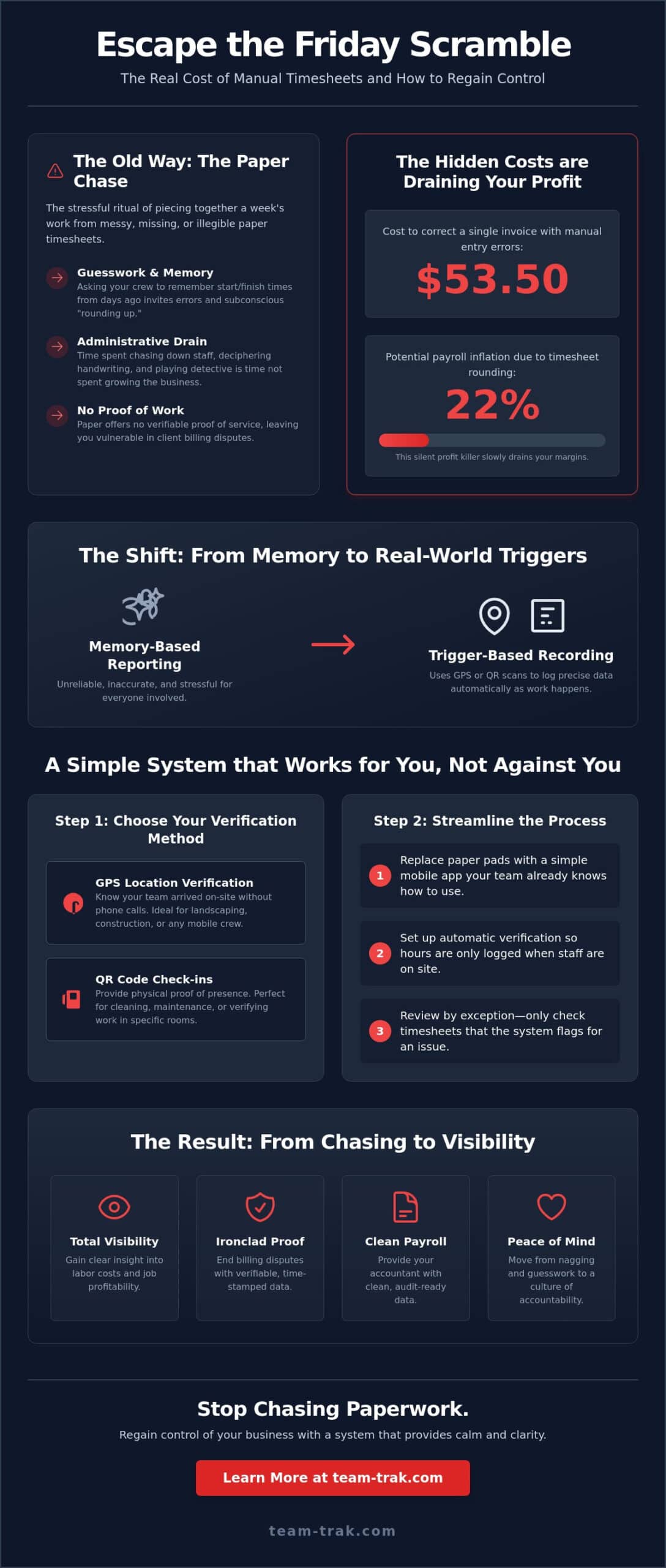
It’s 4:30 PM on a Friday, and instead of heading home, you’re stuck chasing crew leads for paper timesheets that are either illegible or missing entirely. You know the Friday scramble well. It’s that stressful ritual of trying to piece together a week’s worth of work from memory and messy scraps of paper while your accountant waits for data that should have been ready days ago. With manual data entry errors costing up to $53.50 per invoice to correct, this isn’t just a headache; it’s a drain on your bottom line.
You probably feel like you’re spending more time managing paperwork than actually growing your business. It’s a common frustration for operators who want to trust their team but need verifiable proof that staff are on-site and working. By switching to automated timesheets for service businesses, you can replace the guesswork with precise, digital verification. This guide will show you how to move away from legacy manual processes to a system that provides clean payroll data and total visibility. We’ll explore how simple tools like QR code check-ins and GPS verification can end the administrative friction and help you regain control of your Friday afternoons.
Key Takeaways
- Learn how to end the “Friday scramble” by replacing manual memory with real-world triggers that capture hours as they happen.
- Identify which triggers, like GPS verification or QR codes, work best for your crew to verify attendance without adding to their workload.
- Understand why implementing automated timesheets for service businesses is the simplest way to provide your accountant with clean, audit-ready data.
- Turn daily field operations into verifiable proof of service that protects your business from billing disputes and payroll errors.
- Gain clear visibility into your labor costs across different sites to ensure every hour worked is accounted for and profitable.
The Hidden Cost of Manual Timesheets for Service Businesses
When we talk about automated timesheets for service businesses, we aren’t just talking about a digital version of a paper log. We’re describing a shift from memory-based reporting to trigger-based recording. Instead of asking a technician to remember their start time at the end of the day, an automated system uses real-world actions, like a QR code scan or a GPS arrival, to log the data instantly. This transition is vital because modern time and attendance systems are designed to remove the human error that naturally occurs when people are busy doing the actual work.
For most owners, the real cost of manual tracking shows up during the “Friday scramble.” This is the expensive block of time you spend chasing staff for missing hours, deciphering messy handwriting, and trying to reconcile conflicting stories. It’s a massive administrative bottleneck. While you’re stuck at your desk playing detective, you aren’t quoting new jobs or managing your team. This manual process also invites “rounding up.” Research shows that 22% of payroll can be inflated due to timesheet rounding in companies that rely on manual entry. It’s a silent profit killer that slowly drains your margins without anyone noticing.
Why Traditional Time Tracking Fails Field Teams
Field work is chaotic. Expecting a crew member to remember exactly when they finished a job three days ago is a recipe for inaccuracy. Memory bias is real; most people will subconsciously round their finish time to the nearest half-hour in their own favor. Beyond memory, there’s the physical reality of the job. Paper timesheets get lost, stained by coffee, or left in the glove box of a truck. This lack of a clear, legible trail makes it nearly impossible to provide “proof of work” if a client disputes an invoice. Without a digital stamp, it’s just your word against theirs.
The Emotional Toll of Administrative Disorder
The friction of manual data creates a constant state of low-level stress for both you and your accountant. You can read more about this in our guide on The Hidden Cost of Manual Entry. Moving to automated timesheets for service businesses replaces the frustration of “chasing” with the calm of “visibility.” When you have clean, verified data flowing into your office, the number of defensive phone calls you have to make drops significantly. You stop being the person who nags and start being the leader who has total control over the numbers. It’s about moving from a culture of guesswork to a culture of accountability and peace of mind.
How to Implement Automated Time Tracking Without Adding Admin
Transitioning to automated timesheets for service businesses doesn’t have to be a complex overhaul. It’s about setting up a quiet system that works for you rather than creating more work. When you move away from paper, you aren’t just changing the medium; you’re changing the workflow. The goal is to capture data at the source so that by the time Friday afternoon rolls around, the work is already done. Maintaining compliance with Recordkeeping Requirements under the Fair Labor Standards Act (FLSA) becomes a natural byproduct of your daily operations rather than a stressful weekend task.
Choosing the Right Verification Method
The first step is deciding how your team will “check in.” For many, GPS Location Verification is the most practical choice. It allows you to know your team arrived on-site without making five phone calls to check their status. It’s ideal for landscaping or construction crews moving between multiple locations. Alternatively, QR Code Check-ins provide physical proof of presence. This is often the preferred method for cleaning or maintenance sites where a specific room or asset needs to be verified. Your choice depends on your industry; a short-term rental host might prefer the precision of a QR code in the laundry room, while a trades business might rely on GPS boundaries. If you’re evaluating which tools best fit your operation, our workforce management for service companies selection checklist can help you identify the right features for your specific needs.
Once you’ve chosen your triggers, follow these steps to streamline the process:
- Equip the team: Replace the paper pad with a simple mobile staff app. It’s a tool they already carry in their pocket.
- Set up automatic verification: Ensure hours are only logged when the team is actually within the designated job site.
- Review by exception: Instead of checking every single line, only look at timesheets that flag an issue, such as a late arrival or early departure.
- Link to accounting: Connect your field data directly to your invoicing and payroll systems to eliminate manual data entry.
Introducing the Change to Your Team
The biggest hurdle isn’t the technology; it’s the team’s habits. Frame the new app as a tool to ensure they get paid accurately and on time, every time. It removes the burden of them having to remember their hours or fill out stained sheets at the end of a long shift. When they see that the system protects their paycheck and reduces their paperwork, the “revolt” usually turns into relief. The best system is the one the team actually uses because it’s simpler than the old way. If you’re ready to stop the paper chase, you can see how simple it is to get started with a system built for the real world.
Bridging the Gap: Timesheet Software for Accountants
Your accountant probably dreads payroll week as much as you do. When you hand over a spreadsheet filled with manual entries, you aren’t giving them data; you’re giving them a puzzle to solve. Messy, unverified hours are a liability. They lead to constant back-and-forth emails, corrected paychecks, and awkward questions about missing logs. By implementing automated timesheets for service businesses, you bridge the gap between field operations and the back office. You move from “I think they were there” to “I know they were there.”
Modern systems are designed to turn field operations into audit-ready records without the manual effort. Integrating your field data with online accounting systems allows you to move information to the ledger in one click. This eliminates the risk of transcription errors, where a “7” accidentally becomes a “1” during data entry. You get a clean, direct line from the job site to the balance sheet, ensuring your financial records are as precise as the work your team performs.
Ending Payroll Disputes and Queries
Accurate records are your best defense against disputes. When a client questions a bill or an employee is confused about their pay, you need proof that stands up to scrutiny. Timesheet automation creates a digital paper trail that is virtually impossible to argue with. The system can automatically calculate overtime based on verified start and end times, removing the need for manual math. This level of precision builds a culture of trust. Your team knows they’ll be paid fairly for every minute worked, and your accountant knows the data is reliable.
Faster Invoicing and Better Cash Flow
Cash flow lives or dies by the speed of your billing. If it takes you a week to collect paper timesheets, it takes you at least a week to send an invoice. Automated systems allow you to reduce the time between “job finished” and “invoice sent” significantly. Accurate time billing ensures you never miss a billable hour again, capturing the small gaps of work that used to slip through the cracks of a paper pad. If you are ready to get the clean data your accountant needs, start by simplifying your field-to-office workflow today.
Regaining Control: The Long-term Benefits of Visibility
Visibility isn’t just a buzzword for your reports; it’s the simple act of knowing exactly where your labor costs are going across different sites. When you stop relying on memory and start using automated timesheets for service businesses, you gain a level of clarity that was previously impossible. You can see which jobs are eating your margins and which crews are working most efficiently. This isn’t about micromanagement. It’s about having the data you need to make informed decisions about where to send your team next.
This transition also builds a stronger culture. Accountability becomes a shared value rather than a point of contention. When you have a culture of trust backed by verified data, the tension around hours and pay disappears. Your team knows that their hard work is being recorded accurately, and you know that the business is protected from over-billing or time theft. It’s a professional standard that benefits everyone involved.
Scalability is perhaps the most significant long-term win. You simply can’t grow a service business if you’re stuck in the manual admin required for a five-person team. If you want to scale to twenty or fifty people, you need a system that runs without your constant intervention. Peace of mind comes from knowing the “back office” is running quietly in the background, allowing you to focus on high-level strategy rather than chasing paper.
Simplifying Your Daily Operations
Using smart schedules allows you to align verified timesheets with your planned shifts automatically. If a crew doesn’t check in on time, you know about it instantly rather than finding out days later through a client complaint. A mobile staff app acts as the essential bridge between the owner and the field, ensuring instructions are clear and hours are logged without friction. A quiet solution is a system that removes problems rather than creating new ones.
The Future of Your Service Business
Ultimately, this shift is about moving from “operator” to “owner.” By removing yourself from the tedious timesheet loop, you reclaim the time needed to build client relationships and improve your services. Verified data protects your reputation and prevents client disputes by providing clear proof of work for every invoice sent. It’s the foundation of a modern, efficient operation. To learn more about reclaiming your time, explore our guide on Automated Timesheets: Ending the Friday Scramble.
Reclaim Your Friday Afternoons
Running a service business shouldn’t mean being chained to a desk reconciling paper logs every week. We’ve seen how legacy manual systems create a bottleneck that drains your profit and your patience. By moving to automated timesheets for service businesses, you replace that administrative friction with a quiet, reliable system that works in the background. You get GPS-verified attendance for total visibility and a direct integration with your online accounting systems that makes payroll a simple, one-click task.
This transition is about more than just digital records; it’s about building a scalable operation where you act as the owner rather than the administrator. Team-Trak is designed specifically for service-based businesses by people who understand the daily pressure of managing field teams. It provides the proof of work you need to protect your reputation and the clean data your accountant requires to keep your business healthy. Ready to end the Friday timesheet scramble? Contact Team-Trak today.
It’s time to trade the administrative disorder for the clarity and peace of mind you deserve. Your business is ready for the next level of growth.
Frequently Asked Questions
Is automated timesheet software difficult for field staff to use?
No, the mobile staff app is designed to be more intuitive than a traditional paper pad. Most team members are already comfortable using smartphones for daily tasks, so the learning curve is minimal. Instead of filling out complex forms at the end of a shift, they simply scan a QR code or tap a button when they arrive. This reduces their administrative burden and ensures they get paid accurately for their time.
Can I use automated timesheets if my team works in areas with poor mobile signal?
You can still track time accurately in remote areas with poor reception. The app is designed to cache check-in and check-out data locally on the device when a signal isn’t available. Once the staff member moves back into a service area, the logs sync automatically with the core platform. This ensures that field data is never lost, even when working in basements or rural locations where connectivity is unreliable.
How does GPS verification work without being ‘spyware’?
GPS verification only records a location at the specific moment of check-in and check-out to confirm the team is at the correct job site. It doesn’t track their movements throughout the day or monitor them when they’re off the clock. This approach respects employee privacy while providing the “proof of work” you need for client billing. It’s a tool for accountability, not a surveillance device for constant monitoring.
Will automated timesheets really save me money on payroll?
Switching to automated timesheets for service businesses can save significant capital by eliminating manual rounding and transcription errors. Industry data shows that companies using manual entry often see 22% payroll inflation due to timesheet rounding. By capturing exact start and end times, you ensure you only pay for the labor actually delivered. It also removes the hidden administrative cost of your office staff spending hours every week chasing down paper sheets.
Does the software integrate with my current accounting platform?
Yes, the platform is built to link directly with popular online accounting systems. This integration allows you to push verified timesheet data straight to your ledger for invoicing and payroll. It eliminates the need for manual transcription, which reduces the risk of human error. Your accountant will have access to clean, audit-ready data, which significantly cuts down on the back-and-forth emails usually required to finalize your monthly figures.
What happens if a staff member forgets to check in or out?
If a staff member forgets to log their time, managers can manually adjust the entry through the core platform. Every change creates a clear audit trail, so you always know who modified the record and why. The system can also send automated reminders to staff if they haven’t checked in by their scheduled start time. This helps catch mistakes early, preventing the usual Friday scramble to fix missing data before payroll.

Disclaimer
The information provided in this article is for general informational purposes only and reflects the opinions and experiences of the author. While every effort has been made to ensure accuracy, Team Trak makes no guarantees regarding completeness