
It’s 4:30 PM on a Friday, and instead of heading home, you’re stuck chasing three different technicians to figure out exactly where they were on Tuesday morning. You’re likely exhausted by the “Friday afternoon scramble,” trying to reconcile smudged timesheets against a client’s complaint about an arrival time you can’t verify. This constant friction is why choosing the right workforce management for service companies is about more than just adopting new tech. It’s about reclaiming your sanity and protecting your profit margins.
You already know that manual processes and “best guess” billing lead to disputes and lost revenue. It’s frustrating to feel like you’re losing control of your remote team the moment they leave the office. You deserve to know the work is getting done without making five phone calls to check in. This article will show you how to choose a labour management system that provides clear field visibility and slashes your admin time without adding unnecessary complexity to your workflow.
We’ve put together a practical selection checklist focused on real-world operations. You’ll learn how to identify tools that offer GPS verification, automated billing, and true peace of mind, ensuring your business stays profitable and your team stays accountable.
Key Takeaways
- Understand why modern accountability is about more than just a digital timesheet. Learn how to replace manual tracking with a system that offers clear visibility into your daily field operations.
- Discover how GPS verification and QR code check-ins provide proof of service. These simple tools ensure you know exactly when and where work was completed without interrupting your team.
- Use our practical checklist to evaluate workforce management for service companies based on real-world usability. Focus on finding a mobile staff app that your team will actually use without constant troubleshooting.
- Identify the importance of integrating your field data with your online accounting systems. Reducing administrative friction starts with eliminating the need to manually re-enter data for payroll and billing.
- Learn how to turn field-verified data into professional, undisputed invoices. Accurate billing based on real evidence builds long-term client trust and protects your profit margins.
What is Labour Management Software for Service Companies?
For most business owners, the term “management” often feels like corporate code for “more paperwork.” In reality, effective workforce management for service companies is about two things: visibility and accountability. It isn’t about high-level strategy or complex forecasting. It’s about knowing your team arrived on site and having the data to prove it to your clients. While Workforce management (WFM) can encompass many enterprise-level functions, for a service business, it simply means replacing “old school” manual tracking with modern verification.
You might hear software companies talk about “human capital management” or “workforce infrastructure.” These terms are usually a red flag for service firms. You don’t manage “capital”; you manage people who are constantly moving between job sites. You need a tool that focuses on the core goal of simplifying your operations by reducing admin and increasing proof of service. It’s the difference between guessing how long a job took and having a digital record that stops disputes before they start.
The Difference Between Scheduling and Management
A calendar invite is a plan, but it isn’t management. Most teams start by using basic calendars to tell people where to go. The problem is that a calendar doesn’t tell you what actually happened. Did the technician arrive at 8:00 AM or 8:45 AM? Did they finish the checklist or just head to the next job? Management software captures the reality of the field in real-time. When a client calls to ask where their service person is, you don’t have to make three phone calls to find out. You just look at your screen and give them an answer based on real-time data.
Why Service Firms Need a Targeted Solution
Remote teams face unique challenges that office-based staff never deal with. Traffic, varied job sites, and client delays make manual timesheets a nightmare. Without a targeted system for trades and field service companies, you end up in the “Friday afternoon scramble,” trying to piece together a week’s worth of work from memory and text messages. Field-based labour management is the digital bridge between the office and the site. It removes the guesswork, ensuring that every hour worked is an hour billed accurately.
The 4 Essentials of Field-Based Labour Management
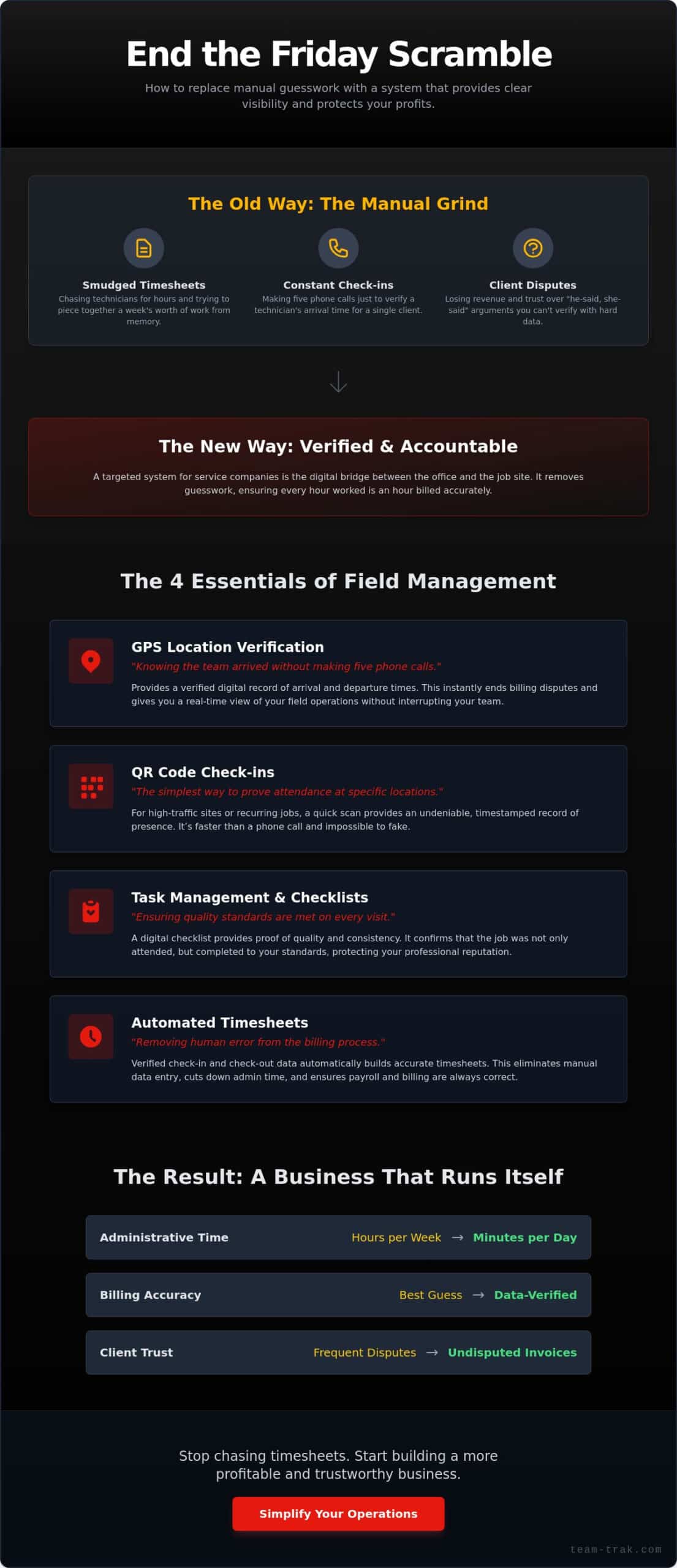
Most software focuses on the mechanics of scheduling shifts. But for workforce management for service companies, the real value lies in what happens after the shift starts. You need tools that provide proof of service, not just a plan. When your team is spread across different job sites, four core essentials ensure your business runs smoothly without constant oversight.
- GPS Location Verification: Knowing the team arrived without making five phone calls.
- QR Code Check-ins: The simplest way to prove attendance at specific locations.
- Task Management and Checklists: Ensuring quality standards are met on every visit.
- Automated Timesheets: Removing human error from the billing process.
Verification That Protects Your Reputation
Disputes regarding arrival times can damage your relationship with clients. Using GPS verification ends “he-said, she-said” arguments instantly. If a client questions a bill, you have a verified digital record of exactly when your staff arrived and departed. This level of accountability also improves the field workforce experience by providing remote staff with clear, objective proof of their hard work. For high-traffic sites or recurring cleaning contracts, QR code tracking offers an even faster way to confirm attendance. A quick scan provides a timestamp that can’t be faked, giving you total confidence in your field data.
Checklists as Proof of Quality
Consistency is the backbone of a professional service business. Task management and checklists ensure that quality standards are met on every single visit. When your team follows a structured digital list, they don’t forget the small details that lead to client complaints. These checklists turn “I think we finished” into “Here is the proof it is done.” This data can be captured in the field and used to provide instant updates to a client portal. It’s a quiet way to regain control of your business while reducing the need for manual check-ins.
Automated Timesheets for Accurate Billing
Manual timesheets are a major source of administrative friction. They’re often filled with “rounded” numbers or honest errors that eat into your profit margins. Automated timesheets pull data directly from the field, creating a record based on real check-in and check-out times. By removing the human element from data entry, you ensure that your payroll is accurate and your billing is undisputed. This is the foundation of workforce management for service companies that actually scales.
Selection Checklist: Choosing Software That Simplifies Your Day
Choosing the right workforce management for service companies shouldn’t feel like a second job. You don’t have time for a six-month implementation phase or a complex setup that requires a degree in IT. You need a system that works the moment you turn it on. While the benefits of workforce management include better cost control and easier compliance, those advantages only matter if the software actually fits your daily rhythm.
Evaluating the Staff Experience
If a tool is too hard to use, your team will find excuses to skip it. User-friendly isn’t a buzzword; it’s a requirement for field adoption. A dedicated mobile app is always better than a mobile-responsive website. Websites are clunky and slow when you’re standing on a windy job site with poor reception. Test the check-in and check-out flow yourself. It should take less than 10 seconds. If a worker has to navigate through five menus just to start their day, they’ll go back to paper timesheets by Tuesday morning.
Integration and Admin Reduction
The goal is to touch the data as few times as possible. High-quality timesheet automation should flow directly into your billing process. When you link your field data to online accounting systems, you eliminate hours of manual data entry and the errors that come with it. Look for “quiet” features that do the heavy lifting in the background, such as automated overtime calculations or alerts for missing check-outs. These small automations are what truly give you back your Friday afternoons.
Use this checklist to narrow down your options:
- Staff Usability: Is the app simple enough for someone who hates technology?
- Industry Fit: Does it handle the specific site requirements of the construction or trades industry?
- Client Visibility: Can you provide a client portal to stop the “where is my technician?” emails?
- Low-Friction Onboarding: Can you get started without a massive financial commitment or enterprise-level stress?
If a system checks these boxes, it will likely simplify your day rather than adding to your workload. If you’re ready to see how this looks in practice, reach out to us for a chat about your specific operational needs.
Closing the Loop: Turning Field Data into Accurate Invoices
Effective workforce management for service companies doesn’t end when the technician clocks out for the day. It ends when the payment is in your bank account. The data you’ve collected throughout the week, such as GPS timestamps, QR scans, and completed checklists, serves a higher purpose than just oversight. It becomes the bedrock of your billing. When you present a client with an invoice backed by real-world field data, you aren’t just asking for money. You’re providing proof of value.
Using automated timesheets removes the human error that typically plagues the end of the week. You no longer need to spend hours manually tallying hours or cross-referencing text messages with a paper log. The system handles the heavy lifting; it ensures every minute of labour is captured and ready for processing. This isn’t just about efficiency. It’s about the peace of mind that comes from knowing your numbers are right before the invoice even leaves your inbox.
Reducing Billing Friction
There’s a direct link between robust field service tracking and faster payment cycles. Most billing delays happen because a client has a question about a specific visit or a technician’s arrival time. When you have the data at your fingertips, you can justify costs proactively. If a dispute arises, you don’t have to guess. You simply pull the report. It’s the shift from hoping the hours are right to knowing the bill is perfect. Professional, data-backed billing builds a level of trust that keeps clients coming back.
The Founder’s Relief: Reclaiming Your Weekend
Ultimately, the right software should give you back your time. You didn’t start a business to become a full-time administrator chasing smudged timesheets and missing signatures. By implementing a system designed for the realities of field work, you replace constant stress with clarity. You gain a sense of control that allows you to step away from the business without worrying about the small details. Choosing the right workforce management for service companies is an investment in your own well-being.
It’s time to move from a state of frustration to a state of action. You’ve seen the checklist and you know what your business needs to grow without adding more admin to your plate. See how Team-Trak simplifies operations for service founders and helps you regain control of your week.
Take Back Control of Your Operations
Running a service business is demanding enough without the added weight of manual paperwork and billing disputes. By following this practical checklist, you can move away from the “Friday afternoon scramble” and toward a system that provides genuine peace of mind. Effective workforce management for service companies should feel like a quiet partner—much like how New Build Log assists construction managers with daily operations—that works in the background, not a complex hurdle for your team to jump over. It’s about finding the right balance between team accountability and administrative ease.
Focus on tools that offer GPS-verified attendance tracking and direct links to online accounting systems. These features ensure your billing is accurate and your admin time is slashed. At Team-Trak, we provide empathetic support for service founders because we’ve seen the daily pressure you face firsthand. You shouldn’t have to spend your weekends reconciling smudged timesheets or answering client queries about arrival times. You deserve a solution that lets you focus on growth while the software handles the verification.
Start simplifying your field operations with Team-Trak today.
Take the first step toward a more transparent, profitable business. You’ll be surprised how much lighter your week feels when the paperwork finally takes care of itself.
Frequently Asked Questions
What is the best way to track labour for a small service company?
The best way to track labour is to use a mobile app that combines GPS verification with a simple check-in process. This approach removes the guesswork of paper timesheets and ensures you aren’t paying for “rounded up” hours. For a small team, you need a tool that provides visibility without requiring a full-time administrator to manage it. It’s about having proof of work that stays in your pocket.
Can labour management software really reduce my administrative costs?
Yes, implementing workforce management for service companies can significantly lower administrative costs by eliminating the need to manually re-key data. When your field data flows directly into your billing system, you stop paying for the hours spent chasing missing timesheets. It also reduces costs associated with billing disputes, as you have verified timestamps to prove exactly when your team arrived and departed from a job site.
How do I stop my staff from forgetting to clock in and out?
The most effective way to ensure consistency is to make the process take less than 10 seconds. Placing QR codes at job site entrances or using geofencing alerts on a mobile app reminds staff to clock in the moment they arrive. When the system is easy to use and directly tied to their pay, compliance naturally increases. It’s about building a habit of accountability through a quiet, non-intrusive digital tool.
Is GPS tracking for employees legal for service businesses?
GPS tracking is generally legal for service businesses when used to verify work locations and timestamps during scheduled hours. It provides essential proof of service that protects both the business owner and the employee. However, it’s important to be transparent with your team and ensure tracking only occurs while they are on the clock. Always consult your local labor laws to stay compliant with specific regional privacy requirements.
What features should I look for in labour management software for construction?
Look for features like GPS location verification, digital checklists, and a robust mobile staff app that works on any device. Construction sites are often chaotic, so you need a system that captures data quickly without requiring technical expertise. It should also offer task management to ensure quality standards are met on every site visit. To see how specialized site documentation and reporting tools are priced, you can check out GoBuid. These tools help you manage remote teams across varied locations with total confidence.
How does automated timesheet software integrate with my accounting?
Modern automated timesheet software creates a direct link to your online accounting systems to push verified hours into your invoicing tool. This integration removes the human element from data entry, which is where most errors occur. Instead of tallying hours on a Friday afternoon, you simply review the data and sync it. This ensures your payroll is accurate and your client invoices are ready to send with zero manual effort.

Disclaimer
The information provided in this article is for general informational purposes only and reflects the opinions and experiences of the author. While every effort has been made to ensure accuracy, Team Trak makes no guarantees regarding completeness