It’s 4:30 PM on a Friday. You’re staring at a stack of illegible timesheets while a client argues that your team never arrived at the site. This is the “Friday afternoon scramble.” It’s a familiar exhaustion for any operator trying to manage a remote workforce with manual systems. You know that your reputation is only as good as your data. Yet, you’re currently drowning in administrative bloat and double-handling data. Transitioning to all-in-one field service software isn’t just about upgrading your tech. It’s about reclaiming your weekend. It’s about replacing guesswork with verifiable proof of service.
We agree that managing a mobile team shouldn’t feel like a constant game of hide and seek. You deserve total visibility without needing to micromanage every minute of the day. This guide will show you how to eliminate the “WhatsApp trap” and build a digital bridge that connects your field staff directly to your payroll and billing. We’ll explore how to implement GPS verification, automated checklists, and real-time reporting to give you the operational clarity you’ve been missing. It is time to trade the chaos for professional, data-driven peace of mind.
Key Takeaways
- Learn why moving from paper and spreadsheets to a centralized hub creates true operational clarity for your field and office teams.
- Discover how all-in-one field service software uses GPS verification and QR code check-ins to provide undeniable proof of service for every client visit.
- Identify the hidden admin tax of using manual coordination like WhatsApp and how it drains hours from your business every week.
- Understand the Staff Adoption Test and why choosing a field app that your team actually likes is the key to accurate office data.
- Shift your focus from micromanagement to verifiable results, ensuring your reputation is protected by data rather than hearsay.
What is All-in-One Field Service Software for Service Operators?
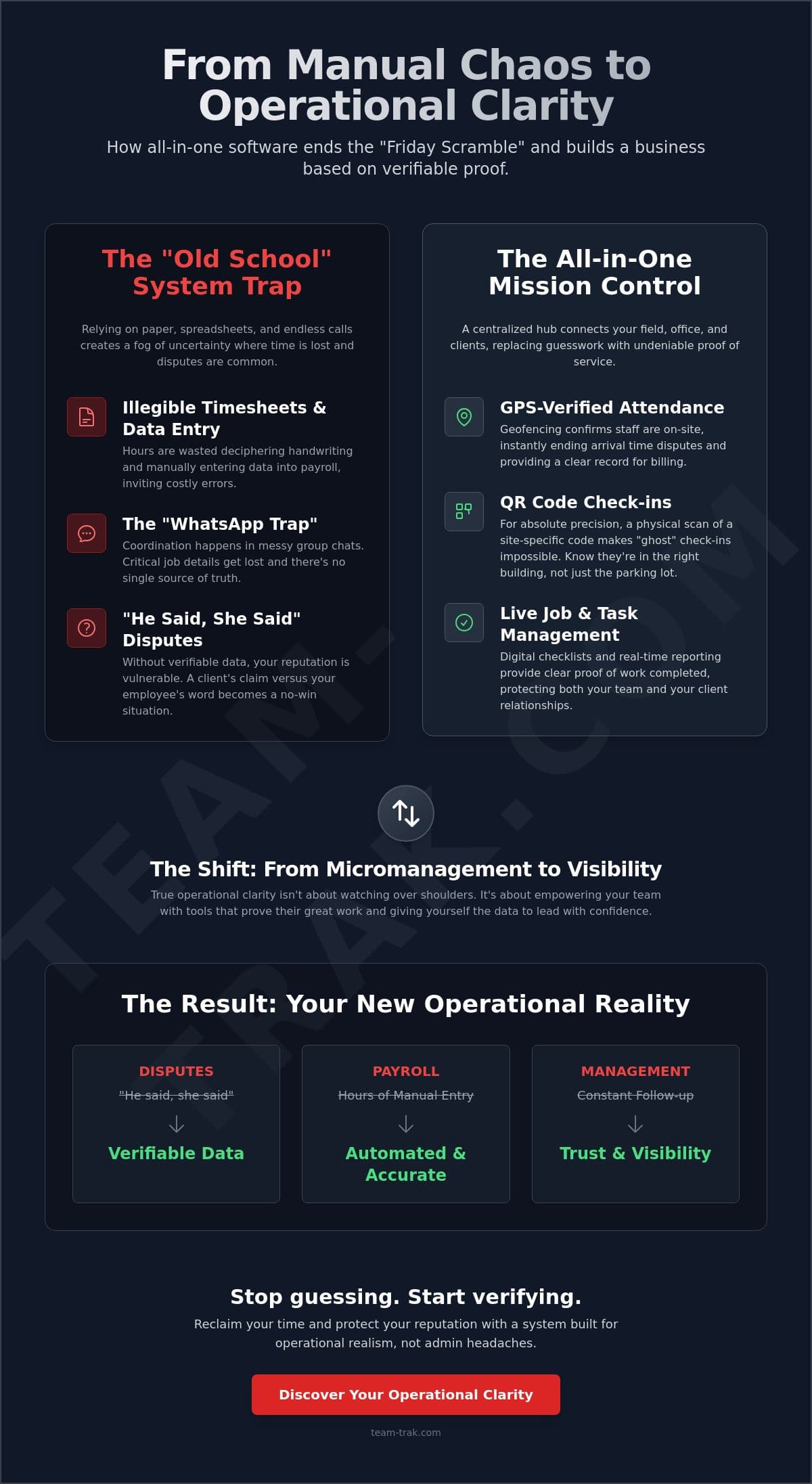
Think of all-in-one field service software as the mission control for your business. It isn’t just a digital version of your whiteboard. It’s a centralized hub that bridges the gap between your office team, your field staff, and your clients. For years, service businesses have relied on “Old School” methods; paper logs, messy spreadsheets, and endless phone calls. These manual systems create a fog where you never quite know where everyone is or if the job was done right. You’re left guessing, and in this industry, guessing is expensive.
The industry standard, often called Field service management (FSM), has evolved. Transitioning to all-in-one field service software replaces the daily chaos with operational clarity. Instead of a “Frankenstein” stack of three different apps that don’t talk to each other, a unified platform keeps everything in one place. You don’t have to copy data from a tracking app into a spreadsheet and then into an invoice. It flows naturally. This leads to what we call “Proof of Service.” It’s the ability to show a client exactly when your team arrived, where they were, and what tasks they completed. It turns a “he said, she said” dispute into a non-issue.
The Shift from Tracking to Visibility
Many owners worry that adding software feels like “Big Brother.” In reality, it’s about visibility, not just tracking. Visibility is a tool to simplify operation hurdles and support your staff. When a client claims a cleaner never showed up, your data is the shield that defends your team. It proves they were there and did the work. Real-time data lets you make decisions based on facts rather than gut feelings or the loudest voice in your ear. It provides the calm authority you need to lead effectively.
Core Industries That Require This Clarity
This level of accountability is no longer optional in certain sectors. In commercial cleaning or facilities management, site-specific proof is often a contractual requirement. For construction and trades, managing complex site attendance is the only way to keep payroll honest. Even short-term rental teams rely on this to ensure high-frequency turnovers are verified before the next guest arrives. Without a unified system, these details get lost in the shuffle. A centralized hub ensures that every job, no matter how small, is documented and verifiable.
Essential Features for Verifiable Field Accountability
Accountability isn’t about a lack of trust. It’s about having the data to back up your team when things go sideways. As an operator, you’ve likely faced the “he-said-she-said” trap where a client insists a technician arrived late or left early. Without objective data, you’re stuck in a defensive position. Modern all-in-one field service software changes that dynamic by providing verifiable proof of work that protects both your reputation and your bottom line.
The Power of GPS and QR Verification
Implementing GPS location verification is the first step toward operational peace of mind. It creates a geofenced safety net for your remote staff. Geofencing is a digital perimeter that uses location data to verify that a staff member is physically present within the job site boundaries. This eliminates arrival time disputes instantly. You no longer have to wonder if a team member is actually on-site; the software confirms it for you.
In industries like commercial cleaning or facilities management, GPS alone might not be enough. You need to know they are in the right room, not just the right parking lot. This is where QR code tracking becomes essential. By requiring a physical scan of a site-specific code, you ensure attendance that is impossible to “ghost.” This level of precision has been a hallmark of digital transformation in the past 15 to 20 years, moving businesses away from honor-system logs and toward absolute transparency.
From Task Completion to Client Portals
Real accountability goes beyond just showing up. It’s about what happens while the team is there. Using all-in-one field service software to deploy task management checklists ensures that every site receives the same high-quality service. It standardizes workflows so a new hire performs with the same consistency as your most experienced technician. This provides that “Proof of Service” that turns a skeptical client into a long-term partner.
These checklists shouldn’t just sit in your office. Utilizing Client Portal Access allows your customers to see progress and completed tasks without calling you for updates. It reduces the “where are we at with this?” phone calls that eat up your afternoon. When you automate this flow, you also generate automated timesheets based on real check-in and check-out data. This moves your payroll from manual data entry to a data-driven process that saves hours of admin time every week. If you’re tired of chasing paper timesheets, you can see how these features work in real-time.
The WhatsApp Trap: Why Manual Coordination Fails Service Teams
Most service business owners start with a WhatsApp group. It’s easy; it’s free; everyone knows how to use it. But as you grow, that group chat becomes a liability. Instructions get buried under a pile of memes and “OK” replies. This is the WhatsApp Trap. It creates a fragmented flow where tasks are lost and hours go unbilled because you simply can’t find the data when you need it. Transitioning to all-in-one field service software isn’t just about a new tool. It represents the strategic integration of digital technology into your daily operations. It’s the difference between reacting to pings and actually managing a team.
The “Hidden Admin Tax” is the real killer. Think about the time you spend every week double-handling data. You take a photo from WhatsApp, save it to a folder, then type the details into an invoice. It’s a waste of your expertise. A unified platform acts as a relief valve. It stops the constant pinging from multiple apps and puts the information exactly where it belongs. It replaces the noise with clarity.
The Risk of Unverified Attendance
Paper logs are the cousin of the WhatsApp Trap. They’re easily falsified and a nightmare to audit. If a staff member writes “08:00” but actually arrived at 08:15, you’re paying for “ghost hours.” Over a month, those fifteen minutes across a whole team add up to a significant financial leak. I’ve lived through the stress of manual audits. I’ve seen operators who were drowning in paperwork find massive relief by switching. One business owner I know saved 5 hours a week just by ditching the paper chase. That’s time they spent growing the business instead of squinting at messy handwriting.
Centralising the Source of Truth
To scale, you need a single source of truth. You need to move job instructions out of buried chats and into a dedicated mobile staff app. This shifts the responsibility from your shoulders to a system. It reduces owner burnout because the team has everything they need at their fingertips. You no longer have to be the middleman for every question. This eliminates the “Friday Afternoon Scramble.” Instead of chasing staff for their hours, the data flows automatically from the field to your office. It’s all-in-one field service software doing the heavy lifting so you don’t have to.
How to Choose All-in-One Software Without Adding Admin
Choosing all-in-one field service software shouldn’t create a new full-time job for you. Many owners make the mistake of buying a platform based on a flashy sales demo, only to find that it requires a PhD to actually operate. If the software is too complex, it becomes “shelfware” that your team avoids. You need an “Operator-First” design. This means the tool was built by people who have actually managed staff, handled payroll, and dealt with the administrative pressures of a service business. They understand that you need answers, not more data entry.
Avoid the trap of “Feature Bloat.” You don’t need enterprise-level AI modules or complex hardware integrations if you are running a cleaning, maintenance, or construction firm. You need visibility. You need to know that the job was done and that the client is happy. Paying for tools you will never use only adds to the noise. Focus on the core functions that drive accountability and protect your profit margins. Understanding how effective field service workforce management eliminates administrative friction is the first step toward choosing a platform that genuinely fits your business.
The Staff Experience Matters
The “Staff Adoption Test” is the most critical part of your decision. If the field app is hard to use, the office data will be wrong. It is that simple. A simple mobile interface is the #1 predictor of software success in the field. Your staff aren’t tech experts; they are technicians, cleaners, and tradespeople. They want clear smart schedules and easy clock-ins that don’t eat up their battery or their time. When you reduce friction for them, you get the accurate data you need to defend your business. Happier staff lead to more consistent results and fewer client complaints.
Linking Operations to Finance
Your field data shouldn’t live in a silo. The real ROI of all-in-one field service software comes from timesheet automation. When your field attendance data links directly to your payroll, you eliminate the “Friday afternoon scramble” entirely. By linking to online accounting systems like Xero or QuickBooks, you remove the need for manual invoicing. One-click payroll data ensures your team is paid accurately based on verified site attendance rather than estimated paper logs. This integration speeds up your billing cycle and significantly improves your cash flow. If you want to see how a streamlined system can simplify your week, you can book a practical walkthrough here.
Team-Trak: Field Service Software Built for Operational Realism
Most field management platforms are built by engineers for enterprise-level IT departments. They’re heavy, expensive, and often require a team of consultants just to get started. Team-Trak is different. We built this all-in-one field service software because we’ve been in your shoes. We’ve managed the cleaning crews, coordinated the tradespeople, and felt that pit in the stomach when a client disputes a bill we can’t prove. We prioritize “Proof of Service” because we know that in the real world, your reputation is your most valuable asset.
Transitioning to a digital hub shouldn’t feel like another administrative burden. Our focus is on operational realism. This means providing you with the data you need to defend your team and your margins without the unnecessary fluff. By centralizing your office, field, and client data, you move from a state of constant firefighting to one of “Calm Authority.” You gain the peace of mind that comes from knowing exactly what is happening on every site, every day, without having to be there yourself.
Tailored for Your Industry
We don’t believe in one-size-fits-all solutions that actually fit no one. Team-Trak offers specific tools for trades and field service companies that need to track complex site attendance and task completion. We also help short-term rental and Airbnb hosts manage high-frequency turnovers where verification is non-negotiable. Our “No Hype” promise is simple: we provide tools that actually work in the field. We’ve removed the enterprise jargon in favor of a practical interface that your staff will actually use.
Your Path to Operational Peace of Mind
Starting your digital transformation shouldn’t require a massive financial commitment or months of training. We’ve designed a low-friction onboarding process that respects your time as an operator. You can move your first team onto the platform in a matter of days, not months. This isn’t about a technology-first approach; it’s about a business-first result. You can finally stop the manual data re-entry and start focusing on growth.
If you are ready to trade the “Friday afternoon scramble” for a system that provides verifiable results, we are here to help. Our all-in-one field service software is built to give you back your time and your confidence. See how Team-Trak can simplify your field operations today and start leading with clarity instead of chaos.
Moving Toward Operational Excellence
Transitioning your business away from manual systems is the single most effective way to reduce administrative friction and reclaim your time. We’ve discussed why visibility beats guesswork and how the right tools protect your reputation through verifiable proof of service. Choosing all-in-one field service software shouldn’t be about adding complexity; it’s about building a digital bridge that connects your field staff directly to your office and your finance systems.
By implementing GPS-verified site attendance and QR code site tracking, you provide your clients with undeniable evidence of a job well done. When you pair this with automated timesheets for Xero and QuickBooks, you eliminate the double-handling of data that drains your energy every week. It’s time to step out of the “WhatsApp Trap” and lead your team with confidence. You can start your journey to operational clarity with Team-Trak and see how a system built by operators can transform your daily grind. You’ve worked hard to build this business; now it’s time to let a system help you run it.
Frequently Asked Questions
What is the best all-in-one field service software for small businesses?
The best all-in-one field service software for a small business is one that prioritizes ease of use over complex enterprise features. For operators in cleaning or trades, the “Staff Adoption Test” is the deciding factor. If the app is too difficult for your team to use in the field, your office data will always be unreliable. Look for a platform built by people who have actually managed field teams and understand daily operational friction.
Can field service software work without expensive hardware tracking devices?
No, you don’t need to install expensive hardware or vehicle trackers to maintain visibility. Modern software utilizes the GPS sensors already built into your staff’s smartphones via a mobile app. By combining this with QR code check-ins at specific sites, you get precise, verifiable proof of attendance without the high upfront costs or maintenance of dedicated tracking hardware. It’s a more flexible and cost-effective solution for growing service teams.
How does GPS verification help prevent client disputes?
GPS verification prevents disputes by providing objective, timestamped data of exactly when a staff member entered and exited a job site. When a client claims a technician was late or never arrived, you can instantly share a report showing the geofenced arrival time. This moves the conversation from a “he-said-she-said” argument to a factual discussion. It builds client trust and protects your business from unfair billing complaints.
Will my staff feel micromanaged if I use an attendance tracking app?
Staff usually embrace these tools when they understand that the data protects them just as much as the business. If a client makes a false accusation about their work or arrival time, the software acts as their digital witness. Frame the app as a tool that simplifies their day by providing clear schedules and removing the need for messy paper timesheets. Most team members prefer the clarity of knowing exactly what is expected of them.
Does all-in-one field service software integrate with Xero or QuickBooks?
Yes, a true all-in-one field service software must link directly to your accounting systems like Xero or QuickBooks. This integration allows your verified field data to flow straight into your invoicing and payroll modules. It eliminates the need for manual data entry and ensures that your billing is always accurate. Most operators find that this single connection is the biggest relief for their administrative team during the end-of-month rush.
How much time can I save by using automated timesheets?
Operators typically save several hours every week by eliminating manual timesheet collection and verification. Instead of chasing staff on Friday afternoons or squinting at illegible handwriting, your payroll data is generated automatically from site check-ins. This removes the “Friday scramble” and ensures that you only pay for actual hours worked. For a mid-sized team, this can easily add up to a full day of admin work saved every month.
Is a client portal necessary for a service-based business?
While not strictly mandatory, a client portal is a powerful tool for reducing the number of status-update phone calls you receive. It gives your customers 24/7 access to view job progress, completed checklists, and proof of service photos. This transparency builds professional credibility and makes your business appear more organized than competitors who still rely on manual emails or phone calls. It’s about providing peace of mind through self-service access.
What is the difference between field service management and simple scheduling?
Simple scheduling only tells you where someone is supposed to be; field service management tells you what actually happened while they were there. Scheduling is a plan, but management is the execution and accountability of that plan. It includes task checklists, GPS verification, and automated billing triggers. While a calendar app might manage your time, a full management platform manages your entire operational workflow and protects your profit margins.

Article by
Bob Fitzjohn
Bob Fitzjohn
Founder of Team-Trak and serial entrepreneur with over 50 years’ experience building and scaling service businesses. Bob writes about workforce management, operational efficiency, automation, and the realities of running small businesses in today’s environment.
Disclaimer
The information provided in this article is for general informational purposes only and reflects the opinions and experiences of the author. While every effort has been made to ensure accuracy, Team Trak makes no guarantees regarding completeness