
You are staring at a messy WhatsApp thread and a pile of handwritten notes, trying to figure out if a job was actually finished or if the team just left the site early. It’s a familiar, frustrating scene for anyone running a service business. I have spent too many Friday afternoons cross-referencing text messages with paper logs just to justify an invoice to a skeptical client. When you are constantly questioning whether staff are where they say they are, you aren’t just losing time; you are losing profit. So, what is field service management software and how does it stop the bleeding? It’s the digital backbone that replaces manual guesswork with absolute operational clarity.
We know the friction of legacy processes because we have managed the staff and handled the payroll ourselves. You deserve a system that provides solid proof of work without the administrative overhead. This guide will show you how modern tools use GPS verification and automated timesheets to protect your margins. We will explore how to transition from fragmented apps to a streamlined workflow that connects your field team directly to accounting software like Xero or QuickBooks, finally giving you back your peace of mind.
Key Takeaways
- Learn what is field service management software and how it acts as a single source of truth to connect your office administration with remote field staff in real-time.
- Identify the hidden costs of “ghost hours” and discover how replacing manual paper logs with digital verification protects your profit margins.
- Understand the four pillars of a modern platform, including how GPS and QR code check-ins provide indisputable proof of service for every client.
- Discover how to slash administrative overhead by linking field data directly to accounting systems like Xero and QuickBooks for seamless billing.
- Shift your focus from simple time tracking to operational clarity, ensuring your business is built on accountability rather than manual guesswork.
Defining Field Service Management (FSM) Software
When you strip away the tech jargon, what is field service management software? It’s simply the digital infrastructure for businesses that operate outside four walls. If your team spends their day at client sites, in residential homes, or moving between facilities, you’re running a field operation. In the past, this meant a heavy reliance on clipboards, frantic phone calls, and “best-guess” scheduling. Field service management (FSM) software changes that by creating a real-time link between your office staff and your remote team.
Think of it as a single source of truth. It’s the bridge between hoping a job is done and knowing it is done. Instead of waiting for a technician to return to the office with a crumpled timesheet, you see progress as it happens. It centralizes scheduling, attendance, task completion, and billing into one dashboard. For the operator, this means you’re no longer managing by manual data entry; you’re managing by exception and verified facts.
The Core Purpose: Operational Clarity
Managing a remote team is inherently stressful. I’ve spent years in the “management by phone call” trap, where my entire day was consumed by asking, “Where are you now?” or “Did you finish the checklist?” It’s a reactive way to work that leads to burnout. FSM software provides the antidote: visibility. When you have a live view of site attendance and task status, that constant background anxiety disappears. You move from reactive firefighting to proactive management. If a staff member hasn’t checked in by 9:00 AM, the system tells you before the client has a chance to complain. That’s the difference between a chaotic morning and a controlled operation.
Who is it for? Industries that Live in the Field
This isn’t just for enterprise-level utilities. It’s for any business where the “product” is labor delivered at a specific location. We see this most often in industries where accountability is the currency of the business. Cleaning and facility management teams use it to prove they were actually on-site for the contracted hours, eliminating “ghost hours” that eat into profits.
In construction and trades, it manages the complexity of multi-site visits and ensures that specific safety checklists are followed every time. Even short-term rental and Airbnb hosts rely on this software to coordinate tight cleaning windows between guest arrivals. If your business depends on people being in the right place at the right time doing the right work, FSM software is your most valuable asset.
Why Practical Operators are Moving Away from Manual Systems
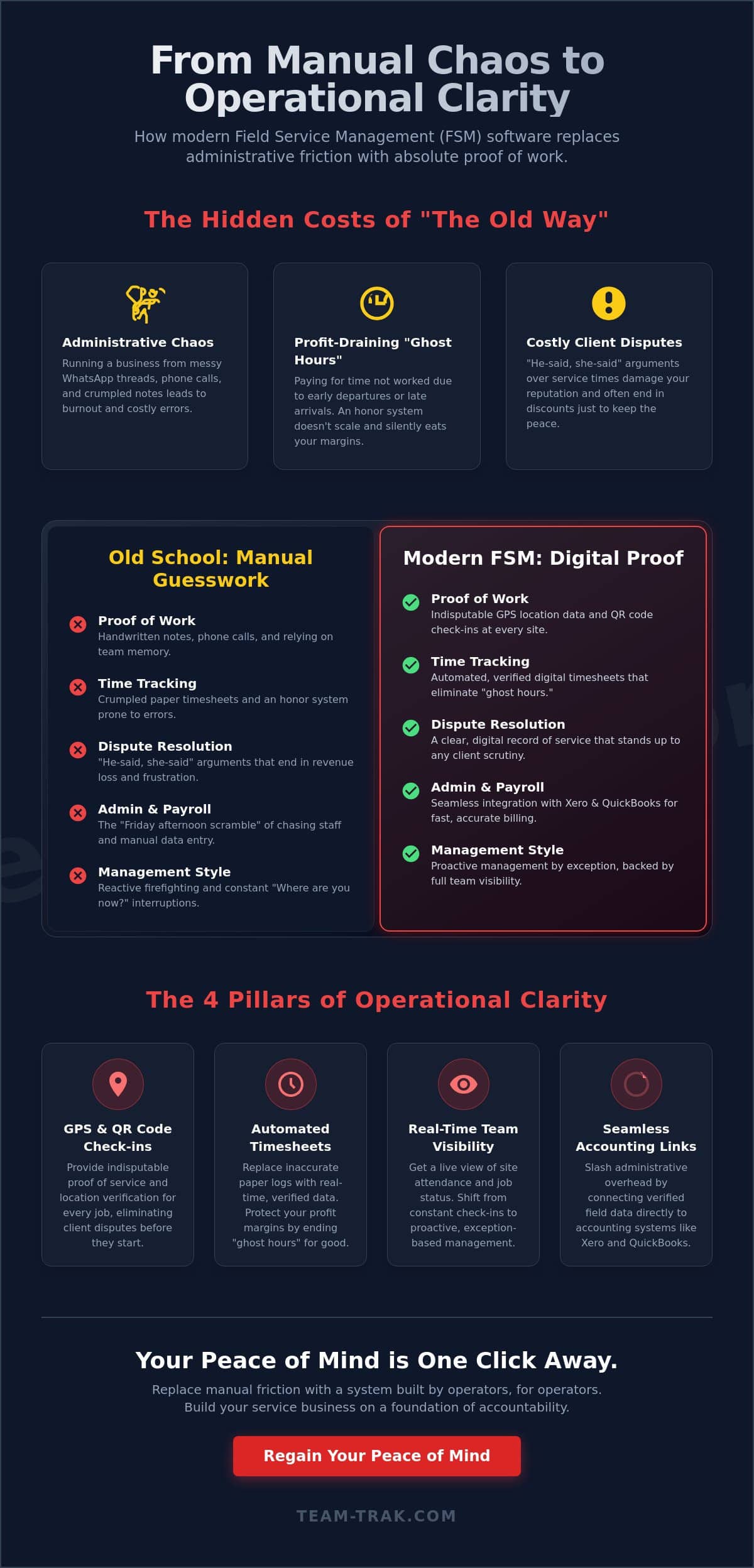
The “Friday afternoon scramble” is a rite of passage for many service business owners, but it’s one that usually leads to burnout. You spend hours chasing staff for photos, deciphering handwritten notes, and trying to piece together a coherent invoice from a messy WhatsApp thread. This administrative bottleneck isn’t just annoying; it’s a massive drain on your profitability. When you ask yourself what is field service management software, the most practical answer is that it’s the end of that chaos. It replaces the guesswork of manual systems with a streamlined, digital process that captures data as the work happens.
One of the most significant leaks in any service business is the cost of “ghost hours.” These are the minutes or hours you pay for when staff leave a site early or arrive late without your knowledge. Without a digital record, you’re essentially operating on an honor system that is impossible to scale. Manual errors in timesheets also lead to payroll headaches. If a technician forgets to log a three-hour job, you lose that revenue. If they overstate their time, your margins shrink. Industry reviews on Gartner Peer Insights consistently show that moving away from these manual friction points is the primary driver for business growth in the field service sector.
Reducing Client Disputes with Proof of Service
Client disputes are a major threat to your reputation. We’ve all had that call where a client claims the cleaner never showed up or the technician only stayed for ten minutes. Without data, it’s a he-said-she-said situation that usually ends with you giving a discount just to keep the peace. By understanding what is field service management software and how it works, you realize it provides an indisputable audit trail. You can show the client exactly when your team checked in and out. This how GPS verification reduces client disputes by turning a potential argument into a professional, data-backed resolution. It builds trust and protects your brand.
The Hidden Costs of Admin Friction
There is an emotional toll on owners who can’t step away because they are the only ones who can resolve timesheet discrepancies. I’ve seen a cleaning business owner spend over 10 hours a week just on payroll reconciliation because their paper logs didn’t match their client’s expectations. That is time stolen from finding new clients or spending time with family. Digital transformation isn’t just about technology; it’s about reclaiming your time. If you are tired of the manual grind, it might be time to see how a digital safety net can simplify your operations.
The 4 Pillars of a Modern Field Service Management Platform
When you look at what is field service management software in action, it isn’t just a single tool. It’s a combination of four essential pillars that support your entire business. These pillars take you from the initial client request to the moment the money hits your bank account. The first pillar is scheduling and dispatch. We’ve all used the office whiteboard or a shared Google Calendar that quickly becomes a mess of overlapping appointments. A modern platform uses dynamic digital calendars. This allows you to see exactly who is available and where they are, making dispatching a matter of seconds rather than a series of phone calls.
While IBM’s definition of FSM highlights the management of resources across the entire service lifecycle, for a practical service operator, it’s about making sure your team shows up and does the job right. Without these pillars, your business is built on a foundation of “I hope so.”
Verification: GPS vs. QR Code Check-ins
Attendance verification is the second pillar. GPS location verification is the gold standard for field accountability because it provides a timestamped coordinate of where your staff actually are. However, GPS can sometimes have a margin of error in high-rise buildings or dense urban areas. This is where QR code check-ins provide site-specific proof of arrival. By placing a physical code at the job site, you ensure the staff member was physically present at the exact location. It balances staff privacy by only tracking location at the point of check-in and check-out, providing you with operational visibility without being intrusive.
Task Management and Digital Checklists
The third pillar is task management. We’ve all heard the excuse, “I forgot to do that.” Digital checklists replace “I’ll remember” with mandatory workflows. You can require staff to capture site data, such as notes or photos, before they can finish a job. One common mistake I’ve seen is relying on staff memory for complex site requirements, which leads to call-backs and unhappy clients. These checklists empower junior staff to deliver senior-level quality because the expectations are laid out clearly in their palm.
Closing the Loop: Automated Timesheets and Invoicing
The final pillar is the transition from clock-in data to automated timesheets. By linking field data directly to your invoices and accounting systems like Xero or QuickBooks, you eliminate double entry and the errors that come with it. You no longer have to spend your Sunday night typing data from a paper log into your billing software. Operational flow is the seamless movement from job booking to paid invoice.
Old School vs. Modern FSM: A Comparison Framework
Most operators start with a clipboard and a prayer. It works when you have two staff members, but it fails the moment you try to scale. If you are still trying to understand what is field service management software, think of it as the upgrade from an “honor system” to a “verified system.” Paper logs rely entirely on memory and manual honesty. Digital verification relies on timestamped data. This shift changes the psychology of your workforce. When accountability is built into the daily workflow, performance naturally improves because the expectations are visible and indisputable.
The difference in response time is where the contrast becomes most painful. When a client calls to ask, “Where is my technician?” an old-school operator has to hang up, call the staff member, wait for an answer, and then call the client back. A modern operator simply looks at a dashboard. You can answer the query in five seconds with 100% accuracy. This level of professional transparency is what keeps clients from looking at your competitors. It moves you from being a “person with a van” to a professional service organization.
Scalability is the final hurdle for manual systems. There is a “breaking point” where the administrative weight of managing staff becomes too heavy for a single owner to carry. Usually, this happens around the five-to-ten staff mark. If your current manual system requires you to work every evening just to prep for the next day, you aren’t running a business; you’re managing a bottleneck. Digital systems allow you to add staff without adding a proportional amount of stress to your own life.
Why WhatsApp is Not a Management System
WhatsApp is a fantastic tool for family group chats, but it is a dangerous management system. It creates “information silos” where critical job data is buried under hundreds of messages and emojis. If you need to find a specific photo from a job three months ago to settle a dispute, you’ll be scrolling for hours. Furthermore, using personal messaging apps for business data carries significant compliance and data protection risks. You have no control over that data, and you certainly can’t export a chat thread into a professional reporting format for your clients or your payroll officer.
Transitioning from Spreadsheets to Operational Visibility
Every service business eventually hits the “spreadsheet limit.” This is the point where the time you spend updating and cross-referencing your sheets starts costing you more than a software subscription would. Spreadsheets are retrospective; they tell you what happened yesterday or last week. By Mastering Field Workforce Management Software in 2026, you move into real-time management. You see a missed check-in while the staff member is still supposed to be on-site, allowing you to fix the problem before the client even notices.
If your current manual processes are holding you back from growing your team, it is time to see how a verified digital system can give you back your Friday afternoons.
Choosing the Right Solution: Why Team-Trak for Service Businesses
When you are deciding what is field service management software for your specific needs, the source of the tool matters. Team-Trak wasn’t built in a vacuum by software engineers who have never stepped foot on a job site. It was built by operators who have personally managed field staff, handled complex payroll, and dealt with the administrative pressures of a growing service business. We understand the 6:00 AM panic when a staff member doesn’t show up and the frustration of a client questioning an invoice. This lived experience is baked into every feature of the platform.
Most systems focus purely on time tracking. We focus on “Proof of Work.” It is one thing to know a staff member was at a location; it is another to have indisputable evidence of the service they provided. By prioritizing operational clarity over simple clock-in data, we help you build a culture of accountability. This approach doesn’t just protect your margins; it restores your peace of mind. You can finally stop micromanaging and start leading because the system acts as your eyes and ears in the field.
Operational Realism in Software Design
We designed Team-Trak to handle the messy realities of the service industry. For example, we specifically address the “cleaning staff leaving early” problem by using a combination of GPS verification and site-specific tasks. If a job is supposed to take three hours but the staff member tries to check out after two, the system alerts you immediately. We also know that field staff often use older phones with low battery or work in areas with poor reception. Our mobile staff app is built for these conditions, ensuring that data is captured even when the environment isn’t perfect. This focus on replacing admin stress with operational visibility is what sets a practical solution apart from a generic one.
Getting Started Without the Tech-Induced Headache
Many owners hesitate to go digital because they fear a “tech-induced headache.” There is a common myth that what is field service management software implementation requires a dedicated IT team or weeks of downtime. That simply isn’t true. We’ve made simplicity a core feature so you can roll the system out to a team that is used to “the old way” without causing a revolt.
- Start with one or two core features like GPS check-ins.
- Explain to your team that the system protects them from client disputes.
- Link the data to your accounting software to show them how much faster payroll becomes.
The best software is the one your team actually uses every day. By removing the friction from the staff’s workflow and the stress from your desk, we help you transition from a manual grind to a scalable, professional operation.
Reclaim Your Time with Operational Clarity
Running a service business shouldn’t mean spending your weekends reconciling timesheets or your afternoons arguing with clients over site visits. Now that you understand what is field service management software, you can see it’s more than just a tracking tool. It’s the digital safety net that protects your margins and your reputation. By moving away from the “Friday afternoon scramble” and manual WhatsApp threads, you shift your focus back to growth and quality.
The relief of knowing your team is on-site and the job is done right is invaluable. With GPS-verified attendance tracking, a dedicated mobile app for your field staff, and seamless integration with Xero and QuickBooks, the administrative burden finally lifts. You deserve an operation that runs with precision even when you aren’t looking. It’s about moving from the stress of the unknown to the calm of data-driven results.
Ready to replace admin stress with operational clarity? Explore Team-Trak today.
You have built a great business. It’s time to give yourself the tools to manage it with ease and confidence.
Frequently Asked Questions
Is field service management software the same as GPS tracking?
No, GPS tracking is only one feature of a much broader system. While GPS confirms a staff member’s location, what is field service management software is actually the entire ecosystem that manages the job from start to finish. It handles scheduling, task checklists, and automated billing in one place. It’s the difference between knowing where someone is and knowing exactly what they’ve accomplished for the client.
Will my staff feel like I’m ‘spying’ on them if I use FSM software?
Transparency usually eliminates this concern. Most staff realize the system protects them from unfair client disputes and payroll errors. We focus on site-specific check-ins rather than 24/7 surveillance. When you explain that it ensures they get paid accurately for every minute worked, the “spying” worry typically turns into a sense of security and professional pride.
Building this trust often involves humanizing the management process; for example, some field service management software resources highlight the lighter side of field work through industry memes and shared stories to keep morale high.
Can I use FSM software if I only have a small team of 3 or 4 people?
Small teams often see the fastest return on investment. With only 3 or 4 people, the owner is usually the one doing all the admin, which means every hour saved on paperwork is an hour you can spend growing the business. Even at this size, losing a few “ghost hours” a week can be the difference between profit and loss for a small service business.
Does field service management software integrate with my accounting app?
Yes, the system is designed to link directly with online accounting systems like Xero and QuickBooks. This integration eliminates the need for manual data entry. Your validated field data flows straight into your billing tool. Invoices are accurate and timesheets are ready for payroll without you having to type a single number or chase a single paper log.
What happens if my staff have no internet connection at a job site?
The mobile staff app is built to handle real-world conditions, including poor signal. Most modern platforms allow staff to check in and complete checklists offline. Once they move back into an area with a connection, the data syncs automatically with the office. You won’t lose critical proof of work just because of a dead zone or a basement job site.
How much time can I realistically save by switching from manual timesheets?
Most operators save between 5 and 10 hours a week on administrative tasks. By removing the need to chase staff for hours and manually cross-reference notes, you reclaim your evenings. This time savings translates directly into lower overhead and a much faster billing cycle. Understanding what is field service management software means realizing it’s a tool for reclaiming your personal time.
Do I need to buy expensive hardware or tracking devices for my team?
No, there’s no need for specialized hardware or dedicated tracking devices. Your team uses the mobile staff app on their existing smartphones. This keeps your startup costs low and makes the transition much easier for your staff. You avoid the maintenance and cost of managing extra devices while still getting full operational visibility and verified proof of service.
How does FSM software help with health and safety compliance?
It makes safety a mandatory part of the daily workflow. You can set up digital checklists that require staff to complete a risk assessment or safety check before they can start a job. This creates a permanent, timestamped record of compliance. It moves safety from a forgotten piece of paper to a verified habit that protects both your staff and your business.

Disclaimer
The information provided in this article is for general informational purposes only and reflects the opinions and experiences of the author. While every effort has been made to ensure accuracy, Team Trak makes no guarantees regarding completeness