
How many times today have you picked up the phone just to ask a technician if they’ve actually arrived at the job? It’s a frustrating cycle. You spend your morning chasing attendance and your afternoon arguing with clients who claim your team never showed up. This manual dispatching chaos isn’t just annoying; it’s a massive drain on your time and energy. Choosing the right field service operations software isn’t about chasing tech trends. It’s about getting back your day. Clear visibility. Total control.
We all know the pressure of manual timesheets and the constant need to verify work that should have been logged hours ago. I’ll show you how to move from this manual chaos to a digital system that gives you total visibility without the constant phone calls. You’ll learn how to get proof of service to prevent disputes and finally reduce the time you spend on manual data entry. Here is how you can regain control and get some much-needed peace of mind.
Key Takeaways
- Identify why manual dispatching is likely draining 40% of your time and how you’ll break the cycle of the “Phone Call Trap.”
- See how field service operations software creates a quiet audit trail through a simple check-in and check-out process for your team.
- Learn to audit your operational “chaos points” to identify exactly where communication breaks down in your daily workflow.
- Discover how to map out smart schedules that account for real-world travel times and specific technician skill sets.
- Move from reactive management to proactive growth by gaining the visibility needed to let your business run itself.
The Hidden Cost of Manual Dispatching: Why Your Current System is Draining Your Time
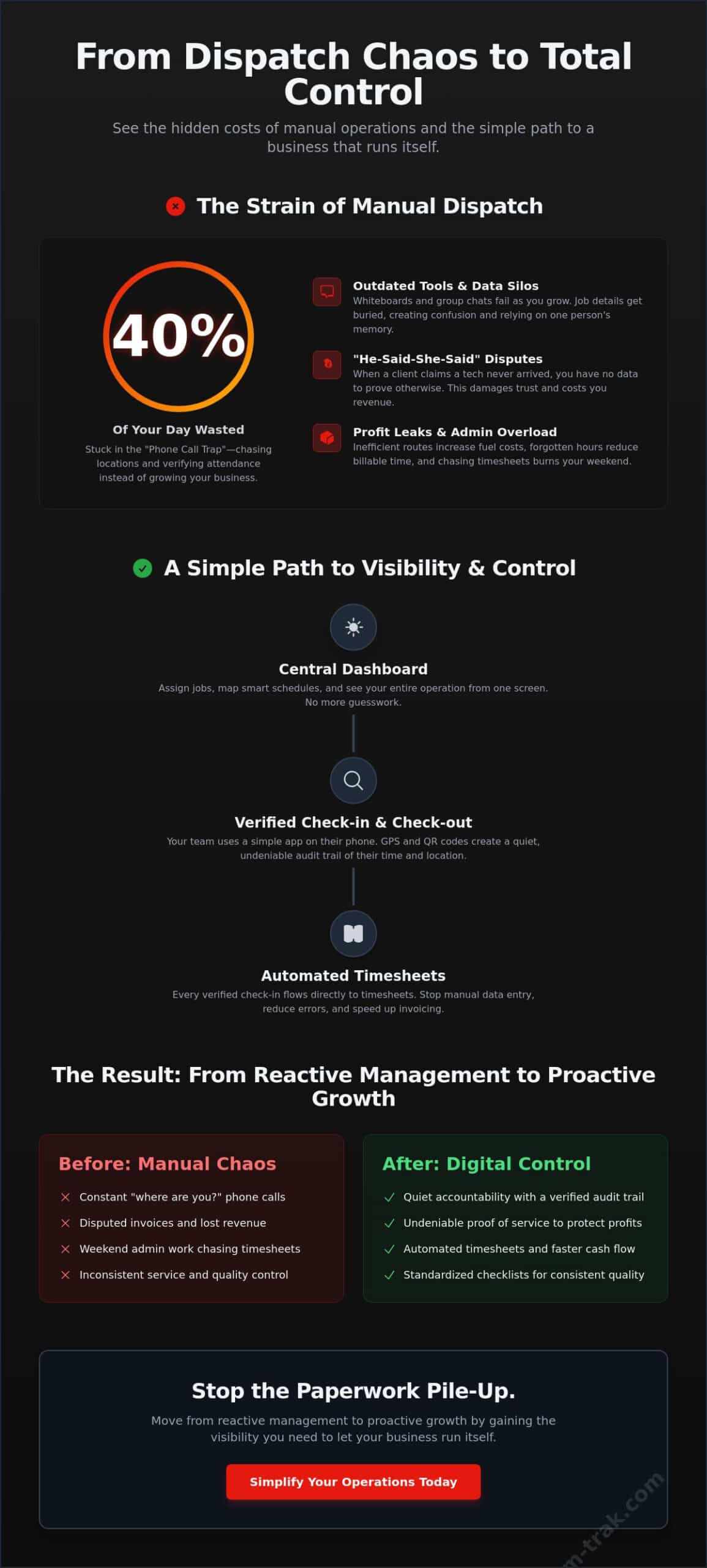
Dispatching isn’t just about telling someone where to go. It’s the essential link between a customer’s urgent request and a verified, completed job. In a perfect world, this happens quietly in the background. In the real world of manual systems, it’s usually a source of constant noise. Most business owners find themselves stuck in the “Phone Call Trap.” You spend nearly 40% of your day just checking locations and asking for updates. It’s exhausting, and it’s a poor use of your expertise.
Beyond the mental load, manual systems create “invisible leaks” in your bottom line. When you don’t have a clear view of the field, travel routes become inefficient and fuel costs climb. Billable hours slip through the cracks because a technician forgot to write down their finish time. Transitioning to a dedicated field service operations software isn’t about being a “tech-forward” company. It’s about stopping the bleed. It’s a way to reclaim your personal time so you aren’t still answering work queries at the dinner table. To understand the broader scope of these systems, you can look at What is Field Service Management? and how it serves as the backbone for modern service industries.
The Friction of Legacy Methods
Whiteboards and WhatsApp groups work fine when you have two technicians. Once you move beyond four or five, these methods fail. Information gets buried in chat threads. Vital job details live only in a manager’s head, creating dangerous data silos. This lack of a shared system leads to the “Friday afternoon scramble.” You spend hours chasing staff for manual timesheets and job updates just so you can get the invoicing done. It’s a stressful, reactive way to run a business. If you’re questioning whether a dedicated platform is the right move, understanding what is field service management software and how it replaces manual guesswork with operational clarity is a practical first step.
The Impact on Client Trust
Nothing erodes a customer relationship faster than a dispute over a site visit. If a client claims your team never showed up and you have no data to prove otherwise, you’re forced to back down. This lack of visibility also makes it hard to maintain consistent service standards across different sites. Implementing GPS location verification turns a “he-said-she-said” dispute into a non-issue by providing undeniable proof of attendance. It protects your team’s reputation and your profit margins at the same time.
How Modern Field Service Dispatch Software Works (The Simple Version)
The system works through two main components: a central dashboard for you and a straightforward app for your team. This is the heart of modern field service operations software. It replaces messy paperwork with a clean, digital loop. When a technician arrives at a site, they check in. When they finish, they check out. This simple action creates a verified audit trail without you needing to send a single text message or make a “where are you” phone call. It’s quiet, efficient, and reliable.
To keep quality consistent across every job, you can include task checklists. Your team follows the same steps every time, ensuring nothing is missed, whether it’s their first day or their fifth year. They use a mobile staff app on the devices they already own. There is no need for expensive company phones or complex training sessions. While the technology behind these tools can be complex, as seen in the Gartner Magic Quadrant for Field Service Management, the daily experience for your team remains focused on the job at hand.
Visibility Without Micromanagement
You don’t need to stare at a map all day to know work is getting done. GPS-verified check-ins give you proof of presence at the exact moment a job starts. For high-traffic or multi-site environments, QR code check-in and check-out adds another layer of precision. It’s about accountability, not micromanagement. Your team keeps their privacy when they’re off the clock, but you get the clarity you need while they’re on site. This balance builds trust and ensures everyone is on the same page.
Automating the Administrative Tail
The real magic happens after the job is finished. Every dispatch event flows directly into an automated timesheet. You no longer have to spend Sunday nights squinting at handwritten notes or messy spreadsheets. By linking your field operations directly to your invoicing and accounting tools, you stop the double entry of data. Information moves from the field to the office instantly, reducing errors and speeding up your cash flow. If you’re ready to stop the paperwork pile-up, you can explore how to simplify your operations today.
A Step-by-Step Guide to Modernising Your Dispatch Workflow
Moving from a whiteboard to field service operations software doesn’t happen overnight. It requires a practical approach that respects the daily rhythm of your business. Start by auditing your current “chaos points” to identify where communication breaks down most often. Is it the morning rush? Is it the Friday afternoon timesheet chase? Once you find the leaks, you can plug them. This isn’t about adding more tech; it’s about removing the friction that slows you down.
Next, map out your smart schedules to reflect real-world travel times and specific technician skills. This ensures the right person is sent to the right job without unnecessary driving or backtracking. Introduce the system to your team by focusing on the benefits for them. No more paper timesheets. No more phone calls asking for their location. Finally, use the data from your first week to refine routes and eliminate wasted travel time. Small adjustments in the first few days lead to massive savings over the month.
Setting Up Your Digital Hub
Structure your job checklists to be helpful, not a hindrance. Your technicians need a clear list of tasks, not a digital obstacle course. Organize client data so job history is available to the person on-site, not just the office. This builds a single source of truth; job statuses and technician availability are visible to everyone at once. No more guessing who is where or what was done during the last visit. It’s about giving your team the information they need to succeed without calling you.
Onboarding Your Team Without Resistance
Frame the software as a tool for their protection. It’s proof of work that prevents client disputes and ensures they get paid accurately for their time. When you choose field service operations software that is easy to use, training takes minutes, not days. Set clear expectations for app usage during the workday. When the team sees their admin burden vanish, they’ll embrace the change. Ready to leave the paperwork behind? You can contact us to start your transition today.
Beyond the Schedule: Building a Business That Runs Itself
When you finally have total visibility, the way you manage changes. You move from reactive management, where you’re constantly putting out fires, to proactive planning. This shift is what allows a founder to stop being the bottleneck and start being a leader. Using field service operations software gives you the data needed to make informed decisions about growth rather than just surviving the day. It provides a sense of calm that only comes from knowing exactly what’s happening in the field without having to ask.
A reliable field service operations software like Team-Trak is designed to replace that heavy admin stress with operational clarity. This isn’t just about internal tracking; it’s about the customer experience too. Features like client portal access provide professional updates to your customers automatically. They get the confirmation they need, and you get fewer “where is my technician” emails. It’s a quiet way to build a more professional brand.
Proof of Service as Your Best Marketing
Reliability is your strongest selling point. When you can provide verified job data, you win more contracts. You set yourself apart from old school competitors who still rely on paper notes and verbal promises. Having a digital history of every site visit is invaluable for long-term maintenance contracts. It builds a level of trust that keeps clients coming back year after year. You aren’t just selling a service; you’re selling accountability.
Regaining Your Evenings and Weekends
Think about the cumulative effect of saving 10 hours a week on manual timesheet and invoice preparation. That’s time you get back for your family, your hobbies, or simply to rest. Visibility is the ultimate cure for the anxiety of not knowing if work is getting done. When you can see progress at a glance, you can finally switch off. For more on how to optimize your team’s time, read our Workforce Management Scheduling: A Practical Guide for Service Businesses. You’ve worked hard to build your business. It’s time to let it work for you.
Take Back Your Time and Regain Operational Control
Running a service business shouldn’t mean being tethered to your phone all day. We’ve explored how manual systems create invisible leaks in your profit and how a quiet, digital loop can replace those constant “where are you” phone calls. By adopting field service operations software, you move from reactive fire-fighting to proactive growth. You gain the visibility needed to trust your team is on-site and the data required to defend your work against any client dispute.
It’s about the relief of knowing the job is done right without having to ask. With GPS-verified attendance for total peace of mind and QR code check-ins for foolproof site tracking, the administrative burden simply vanishes. Automated timesheets finally end that dreaded Friday scramble; this lets you head into the weekend without a pile of paperwork waiting on your desk—perhaps even giving you enough free time to check out Adventurerz for your next camping or remote travel trip. You’ve worked hard to build your reputation, and now you have the tools to protect it.
You’ve built this business with grit and expertise; now it’s time to let it run with precision. Replace admin stress with operational visibility; get started with Team-Trak today. You deserve a business that provides both clarity and your evenings back.
Frequently Asked Questions
What is the difference between simple scheduling and field service dispatch software?
Simple scheduling is essentially just a digital calendar that tells you when a job is supposed to happen. Field service operations software covers the entire loop from the initial request to verified completion. It includes GPS-verified check-ins, task checklists, and automated timesheets. This moves your business beyond just “making a plan” to having actual proof of work and operational visibility that a standard calendar cannot provide.
Do I need expensive hardware or GPS trackers for my vehicles to use this software?
You don’t need to purchase any specialized hardware or install tracking devices in your vans. The system runs through a mobile staff app on the smartphones your team already owns and uses every day. This removes the technical headache and high upfront cost of traditional fleet tracking. It’s a lightweight, practical solution that provides site-specific location verification without the need for company-issued devices or complex installations.
How much time does it typically take to set up a field service management system?
Most service businesses can get their core digital hub running in just a few hours. You can import your client list and set up your basic job templates in a single afternoon. The transition from a whiteboard or paper system is designed to be low-stress and intuitive. While you’ll continue to refine your checklists over the first week, you can start seeing a reduction in admin pressure almost immediately.
Will my technicians feel like I am spying on them if I use GPS verification?
The key is framing the tool as protection for the team rather than surveillance. GPS verification only records their location at the specific moments of check-in and check-out. It provides them with undeniable proof of work if a client ever disputes a site visit. Most technicians appreciate the system once they realize it ends the frustration of manual timesheets and ensures they are paid accurately for every job.
Can this software integrate with my existing accounting tools like Xero or QuickBooks?
Yes, the platform links directly to common online accounting systems to simplify your billing process. This integration allows your field data to flow straight into your invoicing tools without any manual data entry. By connecting your field service operations software to your accounting package, you eliminate the “double-entry” errors that often happen when moving information from the field back to the office office.
Is field service dispatch software worth the cost for a small team of 3-5 people?
Small teams often experience the most significant relief because the business owner is usually the one handling all the administration. Chasing five technicians for updates can easily eat up 10 hours of your week. By automating the attendance tracking and timesheet preparation, you reclaim that time to focus on quoting new work or growing the business. It allows a small team to operate with the professionalism and clarity of a much larger outfit.

Disclaimer
The information provided in this article is for general informational purposes only and reflects the opinions and experiences of the author. While every effort has been made to ensure accuracy, Team Trak makes no guarantees regarding completeness