
It’s 4:30 PM on a Friday. You’re staring at a stack of illegible paper timesheets while trying to handle a voicemail from a client who claims your team never arrived. Without GPS time tracking for multiple job sites, you’re stuck in a “he-said, she-said” battle that usually ends with a discounted invoice and a hit to your profit. We’ve all been there. It’s a stressful, exhausting way to run a service business.
Managing remote teams shouldn’t feel like a guessing game. It’s frustrating to deal with the anxiety of “invisible” operations when your reputation is on the line every day. GPS tracking isn’t about watching your staff; it’s about providing the operational clarity that protects your reputation and your profit. In this guide, you’ll learn how to replace the manual scramble with automated, accurate timesheets. We’ll explore how to provide undeniable proof of service to your clients and finally get the peace of mind that every site is being serviced exactly as promised.
Key Takeaways
- Understand why scaling a service business requires moving beyond the “honor system” and manual WhatsApp updates to a more reliable digital audit trail.
- Compare the benefits of hardware-free GPS verification against QR code check-ins to find the best fit for your specific site security requirements.
- Learn how to use GPS time tracking for multiple job sites to create “Proof of Service” records that resolve client disputes before they affect your cash flow.
- Discover the best way to introduce tracking to your staff by framing it as a tool for safety and payroll accuracy rather than simple surveillance.
- Find out how to connect location data with task management to ensure that your team isn’t just on-site, but actually completing the work as promised.
The Reality of Managing Multiple Job Sites: Beyond the Spreadsheet
Managing a single job site is straightforward. You’re there, you see the work, and you know who is on the clock. But the moment you scale to five, ten, or twenty locations, that visibility vanishes. GPS time tracking for multiple job sites isn’t just about dots on a map; it’s a digital handshake that confirms a team member is exactly where they need to be. Without this, you’re relying on a mix of WhatsApp pings, paper logs, and the “honor system.” These manual methods don’t just create admin stress; they invite “guesstimated” timesheets that quietly bleed your profit through payroll bloat. Implementing GPS time tracking for multiple job sites stops the “guesstimate” culture before it starts.
The “Invisible Workforce” Problem
There’s a specific kind of anxiety that comes with managing a remote team. You wonder if the site opened on time or if the crew left an hour early because the weather turned. This lack of visibility forces you into “management by fire-fighting,” where you only hear about problems when a client calls to complain. I once knew a founder who realized their reliance on paper timesheets was the reason they hadn’t taken a proper holiday in three years. They were too afraid to step away because the data they relied on was always two weeks old and usually inaccurate. Real operational clarity means knowing the site is being serviced without having to call and check.
Moving from Trust to Verification
Some owners worry that introducing GPS verification signals a lack of trust. In reality, it does the opposite. It protects your best workers from being grouped with those who “buddy punch” or cut corners. By using a mobile GPS tracking unit or smartphone app, you establish a baseline of truth. This shift is essential for trades and field service companies looking to professionalize. Transitioning to a modern field workforce management software doesn’t replace trust; it validates it. It allows you to focus on growth instead of acting as a private investigator for your own payroll.
GPS Verification vs. QR Codes: Which is Right for Your Sites?
Deciding how to verify attendance usually comes down to the physical environment of your job sites. You don’t need expensive hardware or clunky devices to track exactly when and where your team is working. Instead, you can rely on the smartphones already in their pockets. But the real question for an operator is whether a GPS ping is enough or if you need the physical stamp of a QR code. Both have their place in a modern operation, and often, the best solution is a mix of both.
The Case for GPS Location Verification
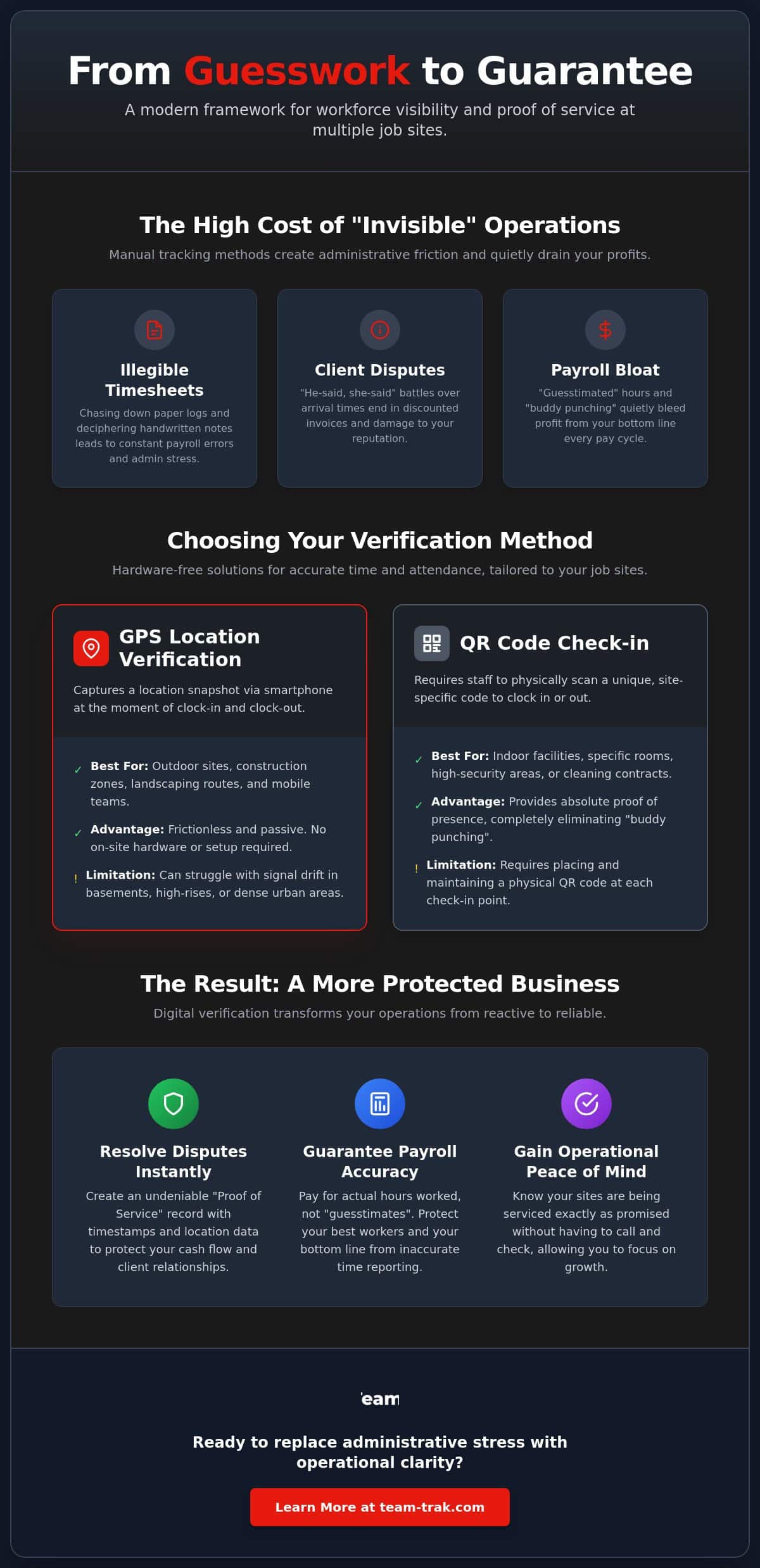
GPS verification is the most frictionless option. It’s passive. The app captures a location snapshot at the moment of clock-in and clock-out. This works perfectly for outdoor sites, construction zones, or landscaping routes where a clear line of sight to the sky exists. With geofencing, the system can even flag if a staff member wanders off-site during their shift. It’s a great way to maintain GPS time tracking for multiple job sites without making the team feel like they’re being micromanaged. You can see a deeper breakdown of these GPS verification features to see how they protect privacy while ensuring accuracy.
The Power of the QR Code Check-In
Sometimes GPS isn’t enough. If you’re managing staff in a high-rise, a basement, or a specific room in a large facility, GPS can struggle with signal drift. This is where QR code tracking becomes your best friend. It provides absolute proof of presence. To clock in, the staff member must physically be standing in front of the code you’ve placed on-site. This completely eliminates “buddy punching” and prevents anyone from clocking in from the car or the coffee shop down the street. It’s the gold standard for cleaning contracts and short-term rentals where being in the right room matters as much as being on the right property.
The most effective operators often use a hybrid approach. You might use GPS for your general field crews but require a QR scan for high-security areas or specific task milestones. This ensures 100% attendance accuracy across the board. Implementing GPS time tracking for multiple job sites requires this kind of flexibility to handle different site challenges. If you’re unsure which method fits your current workflow, reach out to discuss your specific site setup and we can help you find the right balance.
Protecting Your Business: Using Tracking to Resolve Client Disputes
Every business owner has felt that sinking feeling when a client questions an invoice. It usually happens just as you’re trying to close out the month. A client calls and insists your team left 30 minutes early or never showed up at all. Without GPS time tracking for multiple job sites, you’re forced to choose between a long, awkward argument or simply eating the cost to keep the peace. Relying on staff memory is a common operational mistake. In the heat of a dispute, “I’m pretty sure they were there” isn’t a valid defense. It’s a fast way to lose both revenue and professional standing.
Timestamped data acts as a vital insurance policy for your hard-earned revenue. Instead of guessing, you have “ready-to-show” evidence for every single site visit. This isn’t about invasive monitoring that kills morale; it’s about establishing an objective record of work performed. When you can pull up a digital log and show a client exactly when the clock started and ended, the conversation shifts from an accusation to a simple verification. This reduces administrative friction by providing the answers before the questions even turn into formal complaints.
Winning the “He-Said-She-Said” Argument
When a client claims a crew cut their shift short, having GPS time tracking for multiple job sites allows you to respond with facts, not feelings. I’ve seen a complex cleaning contract dispute resolved in under 5 minutes because the owner could provide a GPS-verified check-in report. It preserves your integrity and shows the client you run a tight ship. You don’t have to be the “bad guy” when the data does the talking for you. This clarity is especially useful when your staff are working across different locations and you can’t be everywhere at once to vouch for them.
Building Long-Term Client Trust
In the trades and field service industry, transparency is a massive competitive advantage. Clients are often wary of being overcharged by remote teams they can’t see. By offering verified “proof of work,” you can actually justify higher rates than unverified competitors. You’re selling more than just labor; you’re selling certainty. This level of professional accountability builds a foundation of trust that keeps clients coming back, knowing they only ever pay for the value they actually received. It turns your operational data into a powerful customer service asset that protects your bottom line.
The Founder’s Framework: Introducing Tracking to Your Staff
The biggest hurdle to implementing GPS time tracking for multiple job sites isn’t the technology. It’s the human element. When you tell a team you’re starting to track their location, the “Big Brother” alarm goes off immediately. As an operator, you know this isn’t about micromanagement; it’s about survival and scale. However, your staff might see it as a lack of trust. To avoid a mutiny, you have to address this objection head-on. You need a framework that shifts the narrative from surveillance to support. A clear usage policy that respects their privacy while demanding accountability is the foundation of a professional field operation.
Step 1: Focus on Safety and Payroll Accuracy
Frame the conversation around the benefits that actually matter to your team. If a lone worker has an accident on a remote site, GPS ensures you can send help exactly where they are. It’s a safety net, not a leash. Equally important is the promise of fair pay. When you move to timesheet automation, you eliminate the “missing hours” that often disappear in paper-based systems. Staff get paid for every minute they spend on-site, and the Friday afternoon stress of chasing them for logs vanishes. Staff tracking is a digital safety net that ensures help is always within reach and every minute worked is a minute paid.
Step 2: Training and Onboarding
Complexity is the enemy of adoption. If the app is hard to use, your team won’t use it. We’ve found that a “one-tap” clock-in experience is the only way to ensure compliance across a diverse workforce. I remember managing construction site crews who were notoriously skeptical of new tech. The turning point came when a sub-contractor’s hours were questioned by a client, and the GPS data proved he’d worked five hours of overtime that he’d forgotten to record. Suddenly, the “tracking app” was his best friend because it protected his paycheck. This real-world proof is worth more than any corporate speech.
You must provide clear guidelines on when the app is tracking. Be transparent: the app captures a location snapshot only when they clock in, clock out, or perform a specific task. It doesn’t follow them home, and it doesn’t watch them on their lunch break. This boundary is essential for maintaining morale while achieving GPS time tracking for multiple job sites. If you’re ready to modernize your team’s workflow without the friction, contact us to discuss your rollout strategy and we can share more lessons from the field.
Operational Excellence: Connecting Tracking to Your Bottom Line
Operational excellence isn’t just about having the right tools; it’s about how those tools talk to each other. When you implement GPS time tracking for multiple job sites, you’re doing more than just verifying attendance. You’re creating a stream of data that can eliminate hours of back-office drudgery. The real magic happens when your field data feeds directly into your billing and payroll systems. It turns a chaotic end-of-week scramble into a streamlined, automated process that actually lets you focus on growing the business.
Automating the Admin Burden
Manual data entry is where errors live. If you’re still transcribing hours from a WhatsApp message or a coffee-stained paper sheet into an Excel file, you’re losing money. By using timesheet automation, the clock-in data from the field becomes the payroll record. This reduces the “Friday Scramble” to almost zero. It’s about simplifying operations so that you aren’t a slave to your admin. When your field operations connect seamlessly to Xero or QuickBooks, invoicing happens in clicks, not hours.
The Final Piece: Client Portal Access
Transparency is a gift you give your customers. The best clients don’t want to micromanage you, but they do want “proof of work” without having to chase you for it. This is where a Client Portal changes the game. Instead of sending vague reports, you provide a professional space where they can see verified attendance and completed task checklists in real-time. This level of visibility is a major selling point for securing short-term rental and Airbnb contracts where owners are often hundreds of miles away. They can see that the cleaning is done and the property is ready for the next guest without sending a single email.
Knowing they are there is the baseline. Knowing the job is done is the goal. By integrating GPS time tracking for multiple job sites with task management, you close the loop on accountability. You move from a state of constant “checking in” to a state of calm authority. You have the data to back up your invoices, the automation to handle your payroll, and the transparency to keep your clients happy. That is the definition of operational clarity.
Secure Your Profit and Your Peace of Mind
Scaling your business shouldn’t mean losing sleep over what’s happening in the field. By implementing GPS time tracking for multiple job sites, you move from the chaos of manual spreadsheets to a system built on verification and clarity. You’ve seen how to handle client disputes with undeniable “proof of service” and how to frame these changes to your staff as a win for safety and fair pay. It’s about protecting your reputation as much as your payroll.
The true shift happens when your field data starts doing the heavy lifting. Whether you choose QR code check-ins for specific sites or GPS-verified attendance for mobile crews, the result is a streamlined operation. Your automated timesheets link directly to Xero or QuickBooks, and your customers enjoy self-service visibility through a professional Client Portal. This isn’t just about software; it’s about reclaiming your Friday afternoons and protecting your hard-earned profit from administrative friction.
Ready to simplify your field operations? Explore Team-Trak’s GPS verification tools today.
You’ve done the hard work of building a team. Now it’s time to give them, and yourself, the operational clarity needed to reach the next level. We’re here to help you make that transition smooth and stress-free.
Operational Clarity: Frequently Asked Questions
Does GPS tracking drain my employees’ phone batteries?
Modern tracking applications are designed to be extremely efficient and typically consume less than 1% to 2% of a device’s battery per day. The app doesn’t run a continuous live stream of location data. Instead, it takes a quick snapshot during specific actions like clocking in or out. This approach provides the visibility you need without forcing your team to hunt for a charger mid-shift.
Is it legal to track employees at multiple job sites?
It is legal across all 50 U.S. states to use GPS to track staff during work hours for business purposes. However, you must be aware of state-specific notification laws. States such as California, Connecticut, Delaware, and New York require employers to provide written notice before implementing tracking. It’s also illegal in every state to track a personal vehicle without explicit consent, so ensure your policy focuses strictly on work attendance.
What happens if a staff member forgets to clock in at a site?
You can manually adjust entries through your management dashboard whenever a staff member misses a punch. Because you’re using GPS time tracking for multiple job sites, you can often cross-reference other data points or client feedback to verify their presence. It’s a simple fix that is much more reliable than trying to reconstruct a week’s worth of missing paper timesheets from memory.
How do I handle staff who are worried about their privacy?
Transparency is the best way to handle privacy concerns with your team. Clearly explain that the system only captures location data during work hours or at the specific moment of a check-in. It doesn’t monitor them during lunch breaks or follow them home after their shift. When you frame it as a tool that ensures they get paid accurately for every minute worked, most resistance disappears.
Can GPS tracking work on sites with poor mobile signal?
Reliable tracking apps include offline functionality that stores data locally on the phone when a signal isn’t available. The timestamp and location coordinates are saved securely and then automatically sync to the cloud once the device reconnects to Wi-Fi or cellular data. This ensures you never lose “proof of service” records, even when your team is working in basements or remote rural areas.
Do I need to buy special phones for my team to use GPS tracking?
You don’t need to purchase dedicated hardware or expensive tracking devices for your crew. The system is built to run on the standard iOS and Android smartphones your staff already own. This makes it easy to roll out GPS time tracking for multiple job sites without a large upfront investment. For teams without personal phones, a single shared tablet can serve as a stationary check-in kiosk.
How does GPS verification prevent “buddy punching”?
GPS verification prevents “buddy punching” by ensuring the person clocking in is physically standing within the designated job site coordinates. If an employee tries to clock in for a coworker who hasn’t arrived yet, the system will flag the entry because the device isn’t in the right place. This creates an automatic layer of accountability that protects your payroll from being paid out for “phantom” hours.
Can I integrate this tracking data with my accounting software like Xero?
Yes, you can sync your verified attendance data directly with accounting tools like Xero and QuickBooks. This integration allows you to turn field data into professional invoices and payroll runs with just a few clicks. It eliminates the need for manual data entry and ensures that your billing is always 100% accurate. You’ll save hours of administrative work every week while reducing the risk of human error.

Disclaimer
The information provided in this article is for general informational purposes only and reflects the opinions and experiences of the author. While every effort has been made to ensure accuracy, Team Trak makes no guarantees regarding completeness