It is 4:30 PM on a Friday. Instead of winding down, you are stuck cross-referencing messy handwritten notes against a client’s angry email claiming your team left the site two hours early. It’s a frustrating, high-stakes game of “he-said, she-said” that kills your margins and your mood. Learning how to improve field technician accountability doesn’t have to mean breathing down their necks or checking their mirrors every ten minutes. In fact, the best way to keep people honest is to give them a system that proves their value automatically.
We know you want to trust your team, but you also need to protect your business from the manual timesheet scramble and the stress of unverified hours. You’ve likely realized that micromanagement only leads to staff turnover, yet you can’t afford the operational chaos of zero visibility. We promise to show you how to build a culture of “proof of work” that eliminates client disputes and slashes your administrative overhead. We will explore practical ways to use GPS verification and task checklists to create a transparent environment that gives you back your peace of mind.
Key Takeaways
- Understand the shift from intrusive surveillance to helpful verification, protecting your technicians from false client claims while ensuring site visits actually happen.
- Discover how to improve field technician accountability using practical, app-based tools like GPS location verification and QR code check-ins for objective proof of work.
- Eliminate the “Friday afternoon scramble” by replacing manual, rounded-up timesheets with accurate, automated data that flows directly into Xero or QuickBooks.
- Turn operational transparency into a marketing asset by using client portals to provide the high-level visibility that wins new contracts and builds long-term trust.
The Accountability Gap: Why Field Teams Drift and What It Costs You
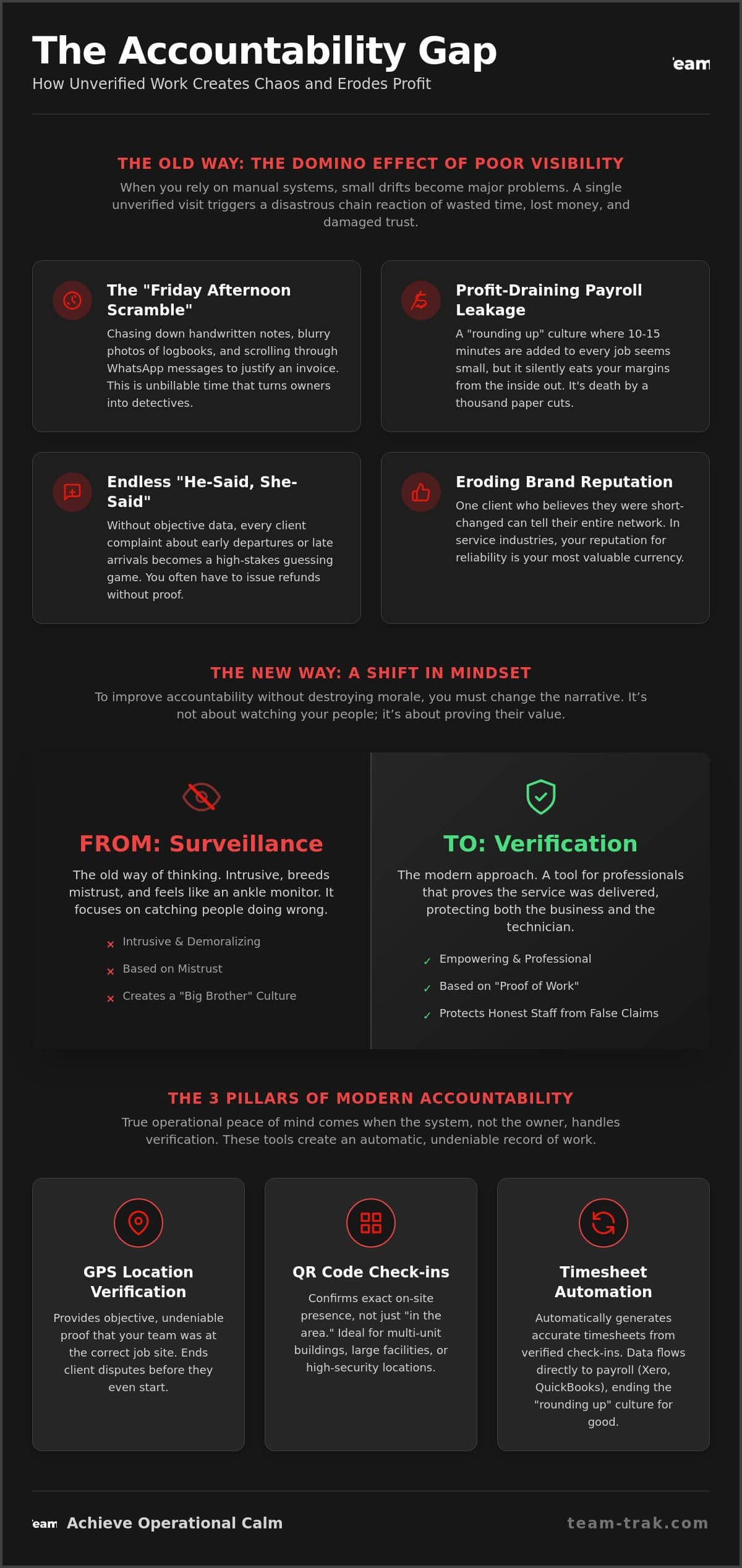
Most field technicians don’t set out to be dishonest. They simply drift when there is no clear structure to anchor them. It usually starts small. A cleaner finishes a job at 4:45 PM instead of 5:00 PM and decides to beat the traffic. A landscaper rounds a 3:40 PM finish up to 4:00 PM on their paper timesheet. In their mind, it’s “close enough.” To a business owner, however, these small discrepancies are the primary reason why learning how to improve field technician accountability is a survival skill rather than a luxury.
When you rely on manual systems, you aren’t just losing minutes; you are losing money. This “rounding up” culture creates significant payroll leakage that eats your margins from the inside out. Beyond the math, there is the foundational definition of accountability, which requires an individual to be answerable for their actions. Without a neutral way to verify site attendance, you are left in a permanent state of “he-said, she-said” with both your staff and your clients.
The emotional cost is perhaps the heaviest. Every Friday afternoon, many founders find themselves in a frantic scramble. You are chasing down blurry photos of paper logs or scrolling through WhatsApp messages to justify an invoice. It’s exhausting. It turns you into a detective instead of a CEO. This administrative friction is a direct result of a visibility gap in your daily operations.
The Domino Effect of Poor Visibility
A single unverified visit can trigger a disastrous chain reaction. If a client suspects a technician arrived late or left early, their trust in your entire brand vanishes. They won’t just ask for a refund; they’ll tell their network that your business is unreliable. In industries like construction or commercial cleaning, your reputation is your only real currency. Once a dispute starts, you spend hours of unbillable time defending your team, often without the data to back them up.
Common Mistakes in Managing Remote Teams
Many owners try to fix this by “trusting their gut” or relying on group chats. These aren’t systems; they are hopes. Common mistakes include:
- Relying on WhatsApp: Messages get buried, and location pins can be faked or sent from the wrong spot.
- Ignoring “Minor” Gaps: Letting a 10-minute discrepancy slide once tells your team that the schedule is just a suggestion.
- Lack of Proof: Failing to use timesheet automation that links directly to GPS data.
If you don’t provide a clear “proof of work” standard, you are essentially asking your staff to manage themselves. That rarely ends well for the bottom line. True operational peace of mind only comes when the system, not the owner, handles the verification.
Surveillance vs. Verification: Changing the Narrative for Your Team
When you first mention tracking to your team, the reaction is often a roll of the eyes or a defensive posture. They hear “surveillance,” but what you are actually proposing is “verification.” There is a massive difference. Surveillance is about watching the person; verification is about proving the service. If you want to know how to improve field technician accountability without losing your best staff, you must change this narrative from day one.
Old school tracking devices are intrusive and feel like an ankle monitor. Modern, app-based systems are different. They are tools for the professional, much like a spirit level or a digital multimeter. Field accountability is the bridge between operational reality and client expectations. It ensures that when a client questions an invoice, you have the data to end the dispute instantly. It moves the conversation away from “I think we were there” to “Here is the proof we were there.”
Protecting Your Best Workers
Your most reliable technicians are actually the ones who benefit most from “proof of work.” We’ve all dealt with that one client who swears the team never showed up, even when they did a perfect job. Without data, you might be forced to apologize or offer a discount. This feels like a slap in the face to the person who did the work. Verification data acts as a shield for your staff. It proves their value and provides the objective metrics you need to justify raises or performance bonuses. Beyond the paperwork, GPS verification for field teams is a vital safety feature. If a technician is working alone at a remote site and stops responding, knowing their exact last location is a critical safety net.
Addressing the ‘Micromanagement’ Fear
The irony of automated verification is that it actually eliminates micromanagement. When a manager can see a check-in on a dashboard, they don’t need to call the technician to ask, “Are you there yet?” The system handles the “where” and “when” so you can focus on the “how.” To get buy-in, focus your conversations on the job requirements rather than the individual’s movements. Explain that the client portal requires this data to trigger the invoice. It makes the process about the business workflow, not personal trust. If you are ready to stop the constant check-in calls, reach out to see how verification can simplify your day.
3 Practical Tech Pillars for Field Technician Accountability
If you want to know how to improve field technician accountability, you need to stop asking for updates and start building a system that provides them automatically. Technology doesn’t have to be complicated to be effective. For a service business, the goal is “operational clarity.” You need to know where your team is, when they arrived, and exactly what they did. This isn’t about spying. It’s about creating a neutral record that protects your margins and your reputation.
A dedicated mobile staff app is the foundation of this approach. It replaces the messy world of WhatsApp and paper logs with a professional tool. By using three specific pillars, you can move from a state of constant questioning to a state of calm authority.
- GPS Location Verification: This confirms a technician’s presence at the start and end of every shift. It’s the simplest way to ensure that “site time” matches “paid time.”
- QR Code Check-In: This is the gold standard for site-specific attendance. It requires the staff member to physically stand in front of a code at the job site.
- Digital Task Checklists: Accountability isn’t just about being there; it’s about doing the work. Checklists ensure the “how” is handled according to your standards.
Implementing QR Code Check-Ins
QR codes are far superior to manual logs, especially for high-frequency sites like commercial offices or construction zones. How QR code tracking works is simple: you place a unique code at the entry point of a site. Technicians scan it via the app to clock in. This prevents the “drive-by” check-in where a staff member might try to log time from their vehicle a block away. It’s a physical anchor for your digital records that leaves no room for dispute.
Automated Timesheets and Payroll Accuracy
The real magic happens when you link check-in data directly to your automated timesheet module. When a technician scans a QR code or triggers a GPS check-in, the system builds the timesheet in real-time. Operators who switch from manual entry to automated data often report reducing payroll errors by up to 90%. This data flows seamlessly into systems like Xero and QuickBooks, ensuring your team is paid for the exact work they did. It’s the ultimate cure for the “Friday afternoon scramble” we discussed earlier. For a deeper look at this process, see our guide on Automated Timesheets: Ending the Friday Afternoon Scramble.
Turning Accountability into a Competitive Advantage
Accountability is often viewed as a defensive shield to stop mistakes. In reality, it is a powerful offensive weapon for your sales team. When you are bidding for a new contract, showing a prospect exactly how to improve field technician accountability through real-time data sets you apart from every “old school” competitor. You aren’t just promising a good job; you are providing a system that guarantees it. This level of transparency is a massive selling point for trades and field service companies looking to win larger commercial accounts.
Most service businesses struggle with one specific hurdle: the client’s fear of being overcharged. By offering “proof of service” as a standard feature, you remove that friction immediately. High-accountability teams also tend to have better retention rates. Reliable staff enjoy having their hard work documented and protected from unfair criticism. It creates a professional environment where excellence is visible and rewarded, rather than a “low trust” culture where everyone feels they are being watched for the wrong reasons.
The Power of the Client Portal
The most direct way to build trust is to stop hiding the data. A Client Portal gives your customers 24/7 access to verification logs without them ever having to pick up the phone. This transparency is a “premium” service marker. It is especially valuable for short-term rental and airbnb hosts who need to know a property is ready for the next guest immediately. When the client can see the check-in time and the completed task list for themselves, administrative disputes virtually disappear. You save hours of time previously spent on “he-said, she-said” phone calls.
Data-Driven Performance Reviews
Stop managing by gut feeling. Use your GPS and task data to identify where your team is actually struggling. If three different technicians are taking twice as long on the same site, the problem might be the site access or the equipment, not the people. This shift from punishment to problem-solving encourages a culture of operational excellence. You can use smart schedules to optimize routes based on real-world travel data, rather than just guessing. This approach helps you identify training needs early, turning minor attendance discrepancies into opportunities for growth rather than grounds for dismissal.
See how our client portal can help you win more business.
Achieving Operational Calm with Team-Trak
Team-Trak wasn’t designed in a corporate boardroom by people who have never stepped foot on a job site. It was built by operators who lived the manual tracking nightmare for years. We know what it feels like to sit at a desk on a Sunday night, surrounded by crumpled paper timesheets and cryptic WhatsApp messages, trying to figure out if a job was actually completed. We’ve felt the pit in our stomachs when a client disputes an invoice and we don’t have the data to push back. We built this platform because we needed a way to end that cycle of administrative stress once and for all.
Our “Proof of Service” promise is about more than just tracking; it is about giving you the tools to lead with confidence. When you implement a system that provides objective data, you stop being a detective and start being a CEO again. This is the most practical answer to how to improve field technician accountability. It replaces personal friction with professional standards. Many trades and field service companies choose our platform specifically because it provides this level of operational clarity without the need for constant manager check-ins.
Efficiency is only half the battle. To truly scale, your field data must talk to your office systems. Team-Trak features a seamless integration with Xero and QuickBooks. This ensures that verified site attendance flows directly into your invoicing and payroll modules. You don’t have to double-handle data. You don’t have to worry about “rounding up” errors. You simply get accurate, end-to-end management that protects your bottom line.
Simplifying Your Workflow
We believe that technology should make your life easier, not more complicated. The mobile staff app is designed to be intuitive enough for any technician to master in minutes. It removes the burden of paperwork and messy logs, allowing your team to focus on the work they were hired to do. Onboarding is fast. Most businesses move from paper-based chaos to digital precision in days, not months. This quick transition is key to discovering how to improve field technician accountability without causing a revolt among your staff. You get to reclaim your weekends while your team gets a professional tool that proves their value every single day.
Ready to Scale Your Service Business?
Scaling a service business is impossible if you are constantly putting out administrative fires. You need a foundation of accuracy and accountability to grow with confidence. By adopting a “proof of work” culture, you satisfy your clients, protect your workers, and ensure your margins stay healthy. You move from a state of constant frustration to a state of action and growth. It’s time to leave the “old school” manual methods behind and embrace a future of operational excellence.
Start your journey toward operational excellence with Team-Trak.
Take Back Your Time and Scale with Confidence
Building a high-performance team shouldn’t require you to spend your life playing detective. By shifting from intrusive surveillance to objective verification, you protect your best workers and your business reputation at the same time. You now have a clear roadmap on how to improve field technician accountability by using simple tech pillars like GPS verification and QR code check-ins. These tools don’t just stop payroll leakage; they turn your proof of service into a powerful marketing asset that wins new contracts.
Team-Trak was built by service business operators who lived the manual tracking nightmare themselves. We’ve designed a platform with seamless Xero and QuickBooks integration, ensuring that GPS and QR-verified attendance data flows directly into your payroll and billing. It is time to replace the stress of unverified hours with the relief of precise, data-driven results. You can finally stop the guesswork and focus on growing your company. We are here to help you achieve the operational excellence your hard work deserves.
Stop the Friday afternoon scramble, get started with Team-Trak today
Frequently Asked Questions
Will my staff quit if I start using GPS verification?
Your most reliable technicians usually won’t quit because they appreciate having their hard work documented and protected. The key is to frame the system as a safety feature and a shield against unfair client disputes rather than a tool for spying. Good workers enjoy a level playing field where their punctuality and effort are visible. You might lose staff who were habitually cutting corners, but those are rarely the employees who help you scale.
What is the difference between tracking and verification?
Tracking is the intrusive act of following a person’s every movement throughout the day. Verification is the professional process of proving a specific outcome at a specific time. We focus on “proof of service,” which is a neutral record of site attendance and task completion. This data satisfies client requirements and triggers accurate invoicing without the need for constant manager check-ins or “big brother” surveillance tactics.
How do I handle a technician who forgets to check in via QR code?
You can use the manual override feature in your admin dashboard to log the time based on secondary evidence. This might include a site photo or a GPS timestamp from the mobile staff app. It’s a common operational mistake that usually requires a quick “trust but verify” conversation. Once staff realize that checking in is what ensures they get paid accurately and on time, the habit usually sticks.
Can I use these accountability tools for a small team of 5 people?
Small teams actually benefit the most from these tools because you have zero margin for error. With only 5 staff, a single unverified visit or a lost referral can significantly impact your weekly profit. Industry data from 2026 shows that 47% of appointments don’t go as planned. Having a system in place prevents these minor scheduling conflicts from turning into major client disputes that a small business can’t afford.
How does accountability software reduce my insurance or liability risks?
It provides a timestamped, location-verified digital audit trail of exactly who was on site and when. This data is your best defense against “slip and fall” claims or property damage allegations that might occur after your team has already left. Having “proof of service” data makes it much easier to prove your business wasn’t responsible for an incident, potentially lowering your long-term liability costs and administrative headaches.
What happens if a technician has no signal at a job site?
The mobile staff app is designed to store check-in and task data locally on the device when there is no signal. Once the technician returns to a service area, the app syncs the information automatically to the core platform. This ensures that “proof of work” is never lost, even in remote locations or underground basements. Your records remain accurate regardless of the local cellular coverage.
How much time can I save on payroll by automating timesheets?
Most operators save between 2 to 5 hours every week by eliminating manual data entry and the “Friday afternoon scramble.” When you discover how to improve field technician accountability through automation, your attendance data flows directly into Xero or QuickBooks. You no longer have to chase staff for missing logs or cross-reference messy WhatsApp messages. The system builds the timesheets for you in real-time based on verified site visits.
Is QR code check-in better than GPS for indoor service sites?
QR codes are the superior choice for indoor locations where GPS signals can be weak or bounce off tall buildings. A physical QR code placed inside the building provides absolute site-specific proof that the technician was exactly where they needed to be. It is a more precise method for cleaning and home care businesses where you need to verify presence in specific rooms or zones that GPS alone cannot distinguish.

Disclaimer
The information provided in this article is for general informational purposes only and reflects the opinions and experiences of the author. While every effort has been made to ensure accuracy, Team Trak makes no guarantees regarding completeness