
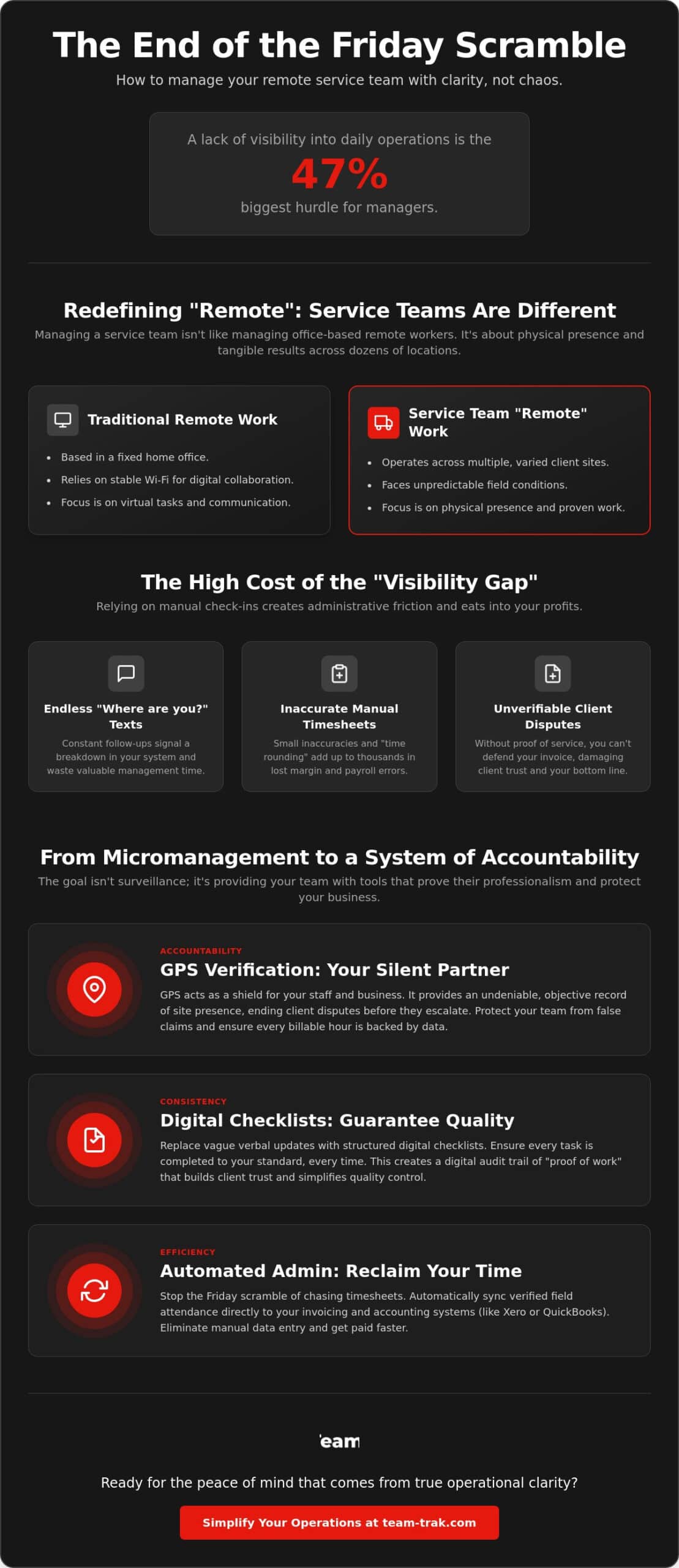
It is 4:30 PM on a Friday, and you are staring at a stack of manual timesheets that do not match the GPS pings on your dashboard. One client is calling to dispute billable hours, while another technician has effectively ghosted their final job site of the day. If this sounds familiar, you are not alone; 47% of managers report that a lack of visibility into daily operations is their biggest hurdle in 2026. You want to trust your people, but without a clear system, that trust often leads to inconsistent service and administrative headaches.
Managing a distributed workforce should not feel like a constant game of catch-up. We understand that the friction of legacy processes can drain your energy and your profits. This guide will teach you how to manage a remote service team effectively by building a culture of accountability that does not require micromanagement. You will learn how to navigate new “Stay-or-Pay” contract bans, use GPS verification to settle client disputes, and transition to an outcome-based model that rewards results over mere activity. It is time to replace the Friday afternoon scramble with the peace of mind that comes from true operational clarity.
Key Takeaways
- Learn why site-based service teams require a different management framework than traditional home-based remote workers.
- Discover how to manage a remote service team effectively by framing GPS verification as a tool for staff protection and dispute resolution.
- Shift from verbal updates to digital checklists to ensure consistent service quality and “proof of work” at every location.
- Replace manual data entry with automated timesheets that sync field attendance directly to your invoicing and accounting systems.
- Use operational transparency to build client trust and turn your internal processes into a powerful marketing tool.
Redefining ‘Remote’: Why Service Teams Need a Different Approach
When most people talk about remote work, they picture a software developer in a home office with a stable Wi-Fi connection. In the service industry, “remote” means something entirely different. Your staff aren’t at home; they are at a client’s site, a construction zone, or a patient’s residence. This distinction is vital for anyone trying to figure out how to manage a remote service team effectively. While virtual teams in the corporate world focus on digital collaboration, service leaders must manage physical presence and tangible results across dozens of unique locations.
This creates a “Visibility Gap.” The moment a technician leaves your headquarters or their own driveway, they enter a black hole of information. You don’t know if they arrived on time, if they are actually at the correct address, or if the work is being done to your standards. Relying on WhatsApp messages or quick phone calls to bridge this gap creates immense administrative friction. It forces you into the role of a private investigator rather than a business owner. In 2026, the industry is shifting toward “Operational Realism,” where data replaces guesswork and “proof of work” becomes the standard for every site visit.
The Pitfalls of Traditional Coordination
The “Where are you?” text is the most expensive message in your business. It signals a breakdown in your system. If you have to ask, you’ve already lost control of the schedule. Manual reporting often leads to accidental time theft; a few minutes rounded up here and there quickly adds up to thousands in lost margin. I’ve learned that “trust but verify” isn’t about being a suspicious boss. It’s about protecting your staff from client disputes and protecting your business from the chaos of manual timesheets. When you can’t see the work, you can’t defend the bill.
Managing the Dispersed Workforce in 2026
Spreadsheets and paper logs are the legacy systems that fail high-growth teams. They are static, prone to errors, and impossible to audit in real-time. To scale a service business today, you need a single source of truth for attendance and task completion. You need to know exactly when a job started and ended without chasing a single person. By moving to a unified platform, you can simplify your operations and stop the endless cycle of administrative catch-up. This shift allows you to focus on growth while the system handles the verification of every site visit automatically.
Establishing Accountability Without Micromanagement
Accountability is often misunderstood as surveillance. For a service founder, it’s actually about clarity. You can’t be everywhere at once, and you shouldn’t try to be. When you are learning how to manage a remote service team effectively, the goal is to move from “checking up” on people to creating a system where they “check in” with the work. By establishing clear rules of engagement for site arrivals and departures, you remove the ambiguity that leads to administrative friction and late-night phone calls.
Real-world insight: I’ve seen business owners lose thousands in client disputes simply because they couldn’t prove their staff were on-site when they said they were. Framing tracking as a shield for your staff’s reputation changes the conversation entirely. It’s no longer about “why are you watching me?” but rather “thank you for having the data to back me up.” When a client claims a technician was two hours late, your digital audit trail is the only thing that protects your staff’s professional standing and your company’s bottom line.
GPS Location Verification: The Silent Partner
GPS verification acts as your silent partner in the field. It eliminates the guesswork of “early departures” and ensures that every billable hour is backed by objective data. GPS verification for field teams provides the proof needed to settle disputes before they escalate into unpaid invoices. This system protects your staff from false client accusations by providing an undeniable record of their physical presence at the job site. Even academic research on managing a virtual team highlights that clear structures and objective data points reduce team stress and improve overall trust between management and staff.
QR Codes: Bridging the Physical-Digital Gap
Manual app entries are a step up from paper, but they still rely on human memory. QR codes bridge the physical-digital gap by requiring a physical scan at the job location. This ensures staff are physically present at the right site before they can clock in, preventing “buddy punching” or accidental check-ins from the wrong address. The benefits of QR code tracking extend beyond attendance; they ground your digital workflow in the physical world. For the best results, place QR codes in discreet but accessible locations, such as the inside of a utility cupboard or a designated staff area, to ensure they remain a permanent part of the site’s operational infrastructure.
Moving to this level of operational clarity is the only way to scale a service business without burning out. If you’re ready to stop the guesswork and start leading with data, see how we can help you automate your site verification.
Standardising Quality Through Digital Task Management
When your team is dispersed across multiple sites, the definition of “finished” can become alarmingly subjective. One technician’s idea of a completed site visit might look very different from another’s. If you want to learn how to manage a remote service team effectively, you have to move beyond the verbal “yes, I’m done” and start demanding proof. This isn’t about a lack of trust. It’s about standardising excellence so your brand remains consistent whether you are on-site or not.
Digital task management replaces vague instructions with granular, mandatory steps. It forces a shift from “Did you finish?” to “Show me the results.” By requiring photo evidence at specific stages of a job, you create a visual record of quality that protects your reputation. There is also a psychological win here for your staff. Tapping a screen to check off a completed task provides a sense of progress and accomplishment that a verbal update never can. It gives remote workers a clear, satisfying finish line for every job they tackle.
Checklists as Training Tools
Scaling a service business is hard because training new staff takes time you don’t have. Digital checklists act as an on-site mentor. Instead of shadowing a new hire for a week, you can provide them with a step-by-step guide directly on their mobile app. This reduces the need for constant on-site supervision and ensures that even your newest team members follow your exact protocols. When you integrate these lists with Smart schedules and task management, you ensure the right tasks are done at the right time, every single time.
The ‘Proof of Service’ Advantage
Client complaints are often a case of “he said, she said.” I once worked with a cleaning firm that faced a massive invoice dispute because a client claimed the floors were never mopped. Because the team had used mandatory digital checklists paired with timestamped photos, the owner settled the dispute in under five minutes. This level of transparency is your best defence against contract compliance issues. For a deeper dive into these tools, check out our Field workforce management software guide to see how digital workflows transform operational control.
Automating the Administrative ‘Friday Scramble’
The “Friday Scramble” is a ritual most service business owners know too well. It’s that stressful block of time spent chasing staff for missing hours, deciphering illegible notes, and cross-referencing WhatsApp messages against a calendar. This administrative burden is a major hidden cost of doing business. If you’re struggling with how to manage a remote service team effectively, the solution often lies in your back-office workflow. Manual timesheets don’t just cause headaches. They invite errors that eat into your margins and delay your payroll.
In 2026, operational excellence requires a direct link between the field and the office. When a technician checks out of a site using a verified app, that data should flow instantly into your accounting system. This real-time visibility allows you to spot discrepancies on a Wednesday rather than discovering them on a Friday afternoon. It’s about catching problems while they are small, rather than letting them explode into payroll disputes or client complaints.
Timesheet Automation for Service Teams
Managing a team shouldn’t mean being a professional reminder-sender. By removing the “chasing” phase of management, you free up hours of your own time every single week. Industry benchmarks show that automated timesheets for service businesses can reduce payroll errors by as much as 90% by eliminating the risks of manual data entry. This precision ensures your staff are paid accurately for the work they actually performed, which is a massive boost for team morale and retention.
Invoicing with Confidence
Cash flow is the lifeblood of any small to mid-sized service firm. When your invoicing is based on verified job data instead of guesses, you eliminate the “back and forth” with clients over disputed hours. Integrating your field data with accounting tools like Xero or QuickBooks means invoices go out faster and with total accuracy. This streamlined bridge between operations and accounting is the key to ending the Friday afternoon scramble for good. It allows you to bill for every minute worked without the fear of a client pushback.
Stop wasting your weekends on administrative catch-up. Book a demo to see how easy it is to link your field operations to your payroll.
Building Client Trust Through Operational Transparency
The final hurdle in learning how to manage a remote service team effectively is deciding how much of your data to share with your customers. Many owners fear that total transparency invites more questions. In my experience, the opposite is true. When a client can see the work for themselves, they stop calling you for status updates. Transparency is the most powerful marketing tool in your arsenal. It transforms your service from a “trust me” promise into a “see for yourself” reality. This level of clarity is what separates premium providers from the rest of the pack in 2026.
I once lost a major contract because I couldn’t prove my team had spent the full four hours on-site during a holiday weekend. The work was done, but the client saw an empty driveway at 3:00 PM and assumed we had skipped out. Had I been using a portal with verified timestamps back then, that dispute would never have started. Providing a window into the work being done on their behalf protects your reputation and justifies your pricing.
The Power of the Client Portal
Clients don’t want a 50-page report at the end of the month. They want to know that the job they paid for is happening right now. By offering self-service access to a Client Portal, you give them peace of mind without having to pick up the phone. This reduces the administrative “ping-pong” of status requests that clogs your inbox. Whether you are in trades and field service or home care, this transparency builds long-term customer retention. It is much harder for a client to leave a provider who offers total visibility and “proof of work” at every stage.
Scaling Your Service Business in 2026
Scaling a business is about moving from “Chief Firefighter” to “Strategic Director.” If you are still the only person who knows where every technician is, you don’t have a business; you have a very stressful job. The key to scaling without burnout is building systems that manage the staff for you. Effective management isn’t about watching over shoulders. It is about setting clear expectations, verifying presence with GPS verification, and using QR code check-ins to ground your operations in reality.
When your operations are clear, your mind is clear. You can finally focus on winning higher-value contracts because you have the data to prove your reliability. It’s time to step out of the daily grind and into a future of operational excellence. Discover how Team-Trak helps you manage remote teams with ease.
Moving Toward Operational Excellence in 2026
Success in the service industry today depends on moving from guesswork to grounded, data-driven results. We’ve explored how redefining your approach to site-based work and embracing digital task management can eliminate the “Visibility Gap.” By shifting the focus to proof of work, you build a culture of accountability that doesn’t rely on micromanagement. Learning how to manage a remote service team effectively is the key to scaling without losing your sanity or your profit margins.
The transition from “Chief Firefighter” to strategic leader starts with better systems. With GPS-verified attendance for total peace of mind and automated timesheets that sync seamlessly with Xero and QuickBooks, you can finally end the Friday scramble for good. Take control of your field operations today with Team-Trak and give yourself the operational clarity you deserve. You’ve done the hard work of building a business. Now, it’s time to let a system built by operators help you run it with ease. You’ve got this.
Frequently Asked Questions
How do I track remote staff without it feeling like micromanagement?
The secret is to frame tracking as a tool for staff protection rather than surveillance. You aren’t watching their every move; you’re verifying their “proof of work” to protect their professional reputation. When a technician knows that GPS data will defend them against a difficult client’s false accusations, they see the system as a shield. This shift in perspective allows you to maintain high standards of accountability without the need for constant, intrusive check-in calls.
What is the best way to verify that a service job was actually completed?
The most reliable method is combining digital checklists with mandatory photo evidence. Moving from a verbal “the job is done” to a visual “here is the result” ensures that every site visit meets your company’s quality standards. This creates a permanent digital record that you can share with clients to prove contract compliance. It’s a practical way to ensure consistency across multiple sites without having to physically visit every location yourself.
How can I reduce the time I spend on payroll and timesheets every week?
You can reclaim your weekends by linking field attendance directly to automated timesheet generation. This is how to manage a remote service team effectively while eliminating the manual data entry that leads to the “Friday scramble.” When staff check in and out via a mobile app, the system calculates their hours automatically. This data then flows directly into your accounting software, reducing payroll errors and saving hours of administrative work every single week.
Is GPS tracking legal for my remote service team?
GPS tracking is generally legal when it’s used for legitimate business purposes during work hours, such as verifying attendance or improving dispatch efficiency. It’s essential to be transparent with your staff about what is being tracked and why. You should only track location while they are on the clock to respect their privacy. Always check your local labor laws, especially as regulations regarding remote work and employee privacy continue to evolve in 2026.
What should I do if a staff member forgets to check in at a site?
Every experienced operator knows this happens occasionally. Your system should allow for manual overrides or adjustments by a manager to correct the record. Use these instances as coaching opportunities rather than reasons for punishment. If a specific team member forgets repeatedly, it might indicate that your “Rules of Engagement” aren’t clear or that the check-in process needs to be more accessible, such as placing a QR code in a more prominent location.
How do I handle a client who disputes the hours my team spent on site?
You handle disputes by presenting an undeniable audit trail of verified data. When a client claims your team was late or left early, you can produce GPS-verified timestamps that show exactly when the technician arrived and departed. This objective data usually settles the argument in minutes. It turns a potential conflict into a professional conversation backed by facts, which helps maintain the client relationship and ensures you get paid for every hour worked.
Can I integrate my field management software with Xero or QuickBooks?
Yes, and you absolutely should to maximize your operational efficiency. Integrating your field data with accounting tools like Xero or QuickBooks allows for seamless invoicing and payroll. It ensures that the hours verified on-site are the same hours billed to the client and paid to the employee. This connection reduces the risk of human error and significantly speeds up your cash flow by getting accurate invoices out the door faster.
What are the essential features of a mobile app for field staff?
A field staff app must be simple, reliable, and functional. The essential features include GPS location verification, QR code scanning for site check-ins, and digital checklists for task management. It should also provide a clear view of the staff member’s schedule so they know exactly where they need to be next. The goal is to provide how to manage a remote service team effectively with a tool that makes the technician’s job easier, not more complicated.

Disclaimer
The information provided in this article is for general informational purposes only and reflects the opinions and experiences of the author. While every effort has been made to ensure accuracy, Team Trak makes no guarantees regarding completeness