
It is Friday at 4:00 PM. Instead of heading home, you are hunched over a desk trying to match crumpled paper timesheets to a digital invoice. You know the work was done, but can you prove it to a skeptical client? Most service founders find that the hardest part of the job isn’t the labor itself. It is the friction that happens between finishing a task and seeing the funds hit the bank. Without precise invoice tracking, unbilled work inevitably slips through the cracks, and “I didn’t see your staff on-site” becomes a common reason for payment delays.
We understand that administrative stress shouldn’t be the price of doing business. You deserve a clear view of every job’s status without the constant manual scramble. This guide will show you how to bridge the gap between field work and final payment to eliminate disputes and stabilize your cash flow. We will look at moving away from disorganized legacy processes and toward a system that provides total operational clarity. By the end, you will have a framework for predictable payments and a business that runs with precision.
Key Takeaways
- Move beyond just sending bills to monitoring the entire lifecycle of a billable event from field work to cleared funds.
- Eliminate client disputes by attaching proof of service, including GPS verification and site photos, directly to your digital records.
- Implement a “proof-to-payment” workflow that uses professional invoice tracking to bridge the gap between on-site labor and final billing.
- Identify the hidden costs of manual spreadsheets and learn why they fail to scale as your team grows beyond five members.
- Discover how a “Full Loop” approach—connecting scheduling, attendance, and invoicing—creates predictable cash flow and operational peace of mind.
What is Invoice Tracking (And Why Service Businesses Fail at It)?
Invoice tracking is the end-to-end monitoring of a billable event from the moment work is performed to the moment funds clear. For a service business founder, this isn’t just an administrative box to check. It’s the bridge between field operations and cash flow stability. When your tracking is broken, your cash flow is broken. It’s that simple.
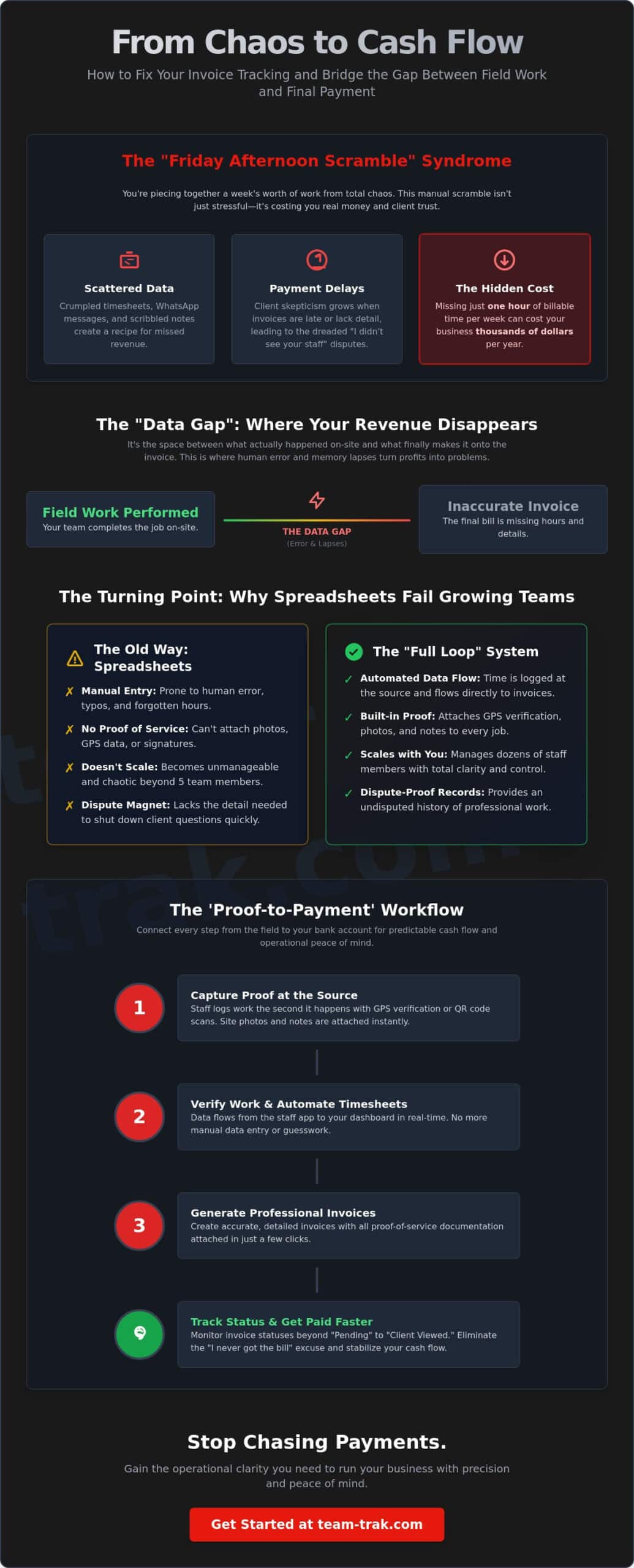
Most service businesses fail at this because of the “data gap.” This is the space between what actually happened on the job site and what finally makes it onto the invoice. If your staff uses paper timesheets or sends “job done” texts, you’re relying on a system that’s prone to human error and memory lapses. The psychological cost is heavy. Chasing money and justifying your bills drains the energy you should be using to grow the business. It’s hard to feel like a leader when you’re acting like a debt collector every Monday morning.
The ‘Friday Afternoon Scramble’ Syndrome
We’ve all lived through the Friday afternoon scramble. You’re sitting at your desk, piecing together a week’s worth of work from WhatsApp messages, scribbled notes, and your own memory. You’re trying to build a professional invoice processing workflow from total chaos. It’s a recipe for burnout and missed revenue.
The hidden cost of this disarray is massive. If unbilled work slips through the cracks, even missing just one hour of billable time a week can cost your business thousands of dollars every year. Beyond the money, operational messiness leads to client skepticism. When an invoice arrives late or lacks detail, clients start to wonder if they’re being overcharged. This doubt is exactly what triggers disputes and payment delays that can last for weeks.
Accounts Receivable vs. Operational Visibility
There’s a big difference between tracking Accounts Receivable and having true operational visibility. Your accounting software tells you what’s owed. Effective invoice tracking tells you why it was earned. It provides the “Proof of Service” that turns a bill into a verified, undisputed record of professional work.
Moving from a reactive mindset to a proactive one requires capturing data at the source. Using QR code tracking or GPS verification ensures that work is logged the second it happens. This transition gives you peace of mind. You no longer have to “hope” the staff was there or “guess” how long the job took. You have the data to prove it, making your invoice tracking a tool for growth rather than a source of stress.
The Core Components of an Effective Invoice Tracker
Effective invoice tracking isn’t just a list of numbers in a ledger. It is a live map of your business’s health. For founders in labor-intensive industries, the best systems integrate deeply with small business financial management principles. This means knowing exactly where every dollar sits in the pipeline at any given moment. When you move beyond basic spreadsheets, you gain the ability to attach indisputable proof to every bill.
Centralized documentation is the secret to winning disputes before they even start. When you can attach photos, client signatures, or GPS verification directly to an invoice record, you aren’t just asking for payment. You are presenting a verified history of work. This level of detail turns a bill into a professional record that is incredibly difficult for a client to challenge. It replaces “he said, she said” with hard data.
Status Labels that Actually Mean Something
Most accounting tools stop at “Pending” or “Paid.” In a service business, you need more nuance. You need to track stages like “Work Verified,” “Drafted,” and “Client Viewed.” Knowing exactly when a client has opened the invoice email is a game changer. It eliminates the “I never got the bill” excuse and helps you identify where the bottleneck actually lives. Is the delay happening because your office team hasn’t drafted the bill, or is it sitting in the client’s inbox? Clarity here allows you to take the right action at the right time.
Linking Work to the Bill
The foundation of accurate invoice tracking is how you capture the work in the first place. This is where automated timesheets become essential. By allowing data to flow directly from a staff app to the final bill, you eliminate the human error that occurs during manual entry. Using QR code tracking ensures that staff were actually on-site when they said they were. This creates a “Proof of Service” loop that protects your margins and your reputation.
Finally, your system must remove the awkwardness of asking for money. Automated reminders do the heavy lifting for you. You don’t have to be the “bad guy” when the system sends a polite follow-up for an overdue payment. When this automation integrates with your accounting software, like Xero or QuickBooks, your entire financial workflow becomes a silent, efficient engine. If you’re ready to stop chasing paper and start building a more transparent billing process, focusing on these core components is the first step.
Spreadsheets vs. Invoice Tracking Software: The Turning Point
Every founder starts with a spreadsheet. It is the logical first step because it is accessible and costs nothing but your time. However, there is a specific moment in every service business’s growth where that “free” tool starts costing you more than it saves. This turning point usually happens when your team expands beyond five people. At that scale, the manual effort required for invoice tracking becomes a full-time administrative burden that distracts you from higher-value work.
The “Truth Gap” is a real operational risk for teams relying on manual entry. This happens when your spreadsheet says a job took four hours, but the client’s records or doorbell camera suggests it was only two. Without a digital audit trail, you are forced to choose between a awkward argument or a discounted bill. Professional software closes this gap by providing an indisputable link between the field and the office. It replaces your brand’s reputation for “administrative messiness” with one of professional precision.
The Risks of Manual Tracking
Manual systems are prone to version control nightmares. We have all experienced the “deleted row” disaster where a billable job simply disappears because of a stray keystroke. Beyond simple errors, spreadsheets lack a verified audit trail. If a billable hour is changed, there is no record of who changed it or why. This lack of transparency is the primary cause of invoice disputes. When a client senses that your numbers are “best guesses” rather than data-driven facts, they are far more likely to delay payment while they scrutinize every line item.
The ROI of Automation
Calculating the true value of your time is essential for growth. If you are spending ten hours a week on manual admin, you aren’t saving money; you are losing the opportunity to land new contracts. Automation reduces your Days Sales Outstanding (DSO) by getting invoices out the door the moment a job is verified. You can read more about the hidden cost of manual time billing to see how these small leaks sink larger ships.
Modern invoice tracking software ensures that your cash flow is predictable. According to recent industry data from 2026, only about 32.6% of invoices are processed without human intervention globally. By automating your “proof-to-payment” workflow, you put your business in the top tier of operational efficiency. This shift doesn’t just improve your bank balance; it provides the “calm authority” needed to manage a growing team without the constant fear of unbilled work slipping through the cracks.
This evolution in operational efficiency is mirrored in the broader fintech space, where marketplaces are now embedding financial services directly for their users. To explore how this technology supports scale, you can discover Gemba and their banking infrastructure for platforms.
How to Build a ‘Proof-to-Payment’ Workflow
Most business owners treat invoicing as a separate chore that happens long after the work is done. This delay is where the profit leaks begin. A professional invoice tracking system succeeds because it treats the bill as the final chapter of the job itself. By building a “proof-to-payment” workflow, you connect what happens in the field directly to your bank account, removing the guesswork that leads to disputes.
- Step 1: Capture the event. Your team should use a mobile staff app to log work as it happens. This isn’t about micromanagement; it’s about capturing the start and end times with precision while the details are fresh.
- Step 2: Verify the data. Before an invoice is ever created, review automated timesheets for anomalies. One common mistake I see is waiting until the end of the month to reconcile. If a staff member forgot to log out on Tuesday, you want to catch that error on Wednesday, not three weeks later when the client is questioning the bill.
- Step 3: Generate and Link. Create the invoice and attach supporting “proof” like GPS logs or site photos. This data-backed approach makes your invoice tracking bulletproof.
- Step 4: Monitor and Remind. Once sent, the system should track the status. If it remains “Unopened” for three days, an automated trigger can send a polite nudge.
- Step 5: Reconcile. Ensure the payment is logged in your online accounting system to close the loop. If you want to stop the manual scramble, you can build your own proof-to-payment workflow today.
Eliminating Disputes Before They Happen
The best way to handle a dispute is to ensure it never starts. By providing clients with portal access, you allow them to see their own service history in real time. This follows the “No-Surprise Rule.” When a client can see that a job was completed with GPS verification and photos, they have no reason to hesitate when the bill arrives. This transparency doesn’t just get you paid faster; it builds a level of trust that keeps customers coming back for years.
Setting Up Smart Reminders
Chasing money is the most draining part of being a founder. You want to maintain the relationship, but you also need to be firm on your terms. A smart communication sequence starts with a “Gentle Nudge” two days before the due date. This isn’t a demand for payment; it’s a helpful reminder that the invoice is coming up. Timing matters. Sending the first reminder the day after it’s due feels like a “Final Notice” and can strain a good relationship. By automating these touchpoints, you remove the emotional friction and keep your cash flow steady without having to send a single awkward email yourself.
Operational Realism: Why Team-Trak is Different
Most software is built by developers who have never had to explain a disputed line item to an angry client. Team-Trak is different. It was built by operators who understand the messy reality of field work. We know that a staff member might forget to check out, or a client might swear they didn’t see your team on-site. Our approach to invoice tracking isn’t just about moving numbers; it’s about providing the “Proof of Work” that gives you total peace of mind.
We use a “Full Loop” methodology. This means your scheduling, attendance, and invoicing live in one fluid motion. When a job is scheduled, the data for the invoice is already being prepared. When the staff member checks in, the evidence is captured. By the time you’re ready to bill, the administrative friction has already been removed. You aren’t chasing data because the data has been following the work all along.
Designed for High-Accountability Industries
In industries where trust is the currency, data is your best defense. Many trades and field service companies use our tracking to justify higher rates. When you can show a client exactly when your team arrived and what they accomplished, you move from being a commodity to a verified partner.
This level of precision is equally vital for short-term rental and Airbnb hosts. In the hospitality world, timing is everything. If a turnover isn’t completed before a guest arrives, your reputation takes a hit. Data-backed invoicing protects that reputation. It proves your team was there, the work was done, and the property is ready. It turns your billing process into a tool for customer retention.
Getting Started Without the Stress
You don’t need a degree in finance to master our invoicing tools. We designed the interface to be intuitive for busy founders who have a million other things to do. The process of linking to online accounting systems is straightforward. Your field data flows into Xero or QuickBooks without the need for manual re-entry or complex workarounds.
Ultimately, professional invoice tracking isn’t about controlling your staff. It’s about clarity. It’s about the freedom to stop looking backward at what happened last week and start looking forward at how to scale your business. When you have operational realism on your side, you gain the confidence to lead with authority and the peace of mind to enjoy the growth you’ve worked so hard to achieve.
Master Your Operations and Reclaim Your Friday
Operational clarity starts with the decision to stop guessing and start verifying. We have explored how professional invoice tracking transforms a service business from a reactive scramble into a data-driven machine. By linking field work directly to your bills, you eliminate the “Truth Gap” and ensure every billable minute is accounted for. This shift doesn’t just protect your margins; it protects your reputation with clients who value transparency and professional precision.
This isn’t about complex finance; it’s about your peace of mind. Team-Trak provides GPS-verified attendance for 100% dispute resolution and offers seamless Xero and QuickBooks integration to keep your books in order. As service industry veterans, we built this tool to handle the messy reality of daily operations so you don’t have to. You deserve a workflow that works as hard as your team does every day.
Stop the Friday scramble and start tracking with Team-Trak today.
You have already done the hard work of building a business. Now it is time to give yourself the freedom to focus on its growth while your systems handle the details. We are here to help you make that transition with confidence and calm authority.
Frequently Asked Questions
What is the most common reason for unpaid invoices in service businesses?
The most common reason for unpaid invoices is a lack of verifiable proof that the work was completed as described. When a client receives a bill that feels like a “best guess” rather than a data-backed record, they often delay payment while they wait for clarification. This hesitation creates a friction point that stalls your cash flow and forces you into an awkward follow-up cycle. Providing “Proof of Service” details upfront usually solves this problem.
How often should I check my invoice tracking dashboard?
You should check your dashboard daily to catch anomalies before they become permanent records. Waiting until the end of the week to review your operations is a recipe for the administrative scramble. A quick two-minute review each morning allows you to address missing check-outs or unallocated hours immediately. This habit ensures your data is always ready for drafting, keeping your billing cycle moving without any manual interruptions.
Can invoice tracking help with tax compliance?
Yes, digital records are essential for meeting modern tax requirements and avoiding costly interest rates on underpayments. For instance, as of early 2026, the IRS interest rate for underpayment of taxes for individuals is 7%. Maintaining a digital audit trail through professional invoice tracking ensures you have the necessary documentation to justify your revenue and expenses during an audit. It replaces disorganized paper files with precise, searchable data that stands up to scrutiny.
Is it better to send invoices immediately or in monthly batches?
Sending invoices immediately after job verification is almost always better for your cash flow than monthly batching. This practice significantly reduces your Days Sales Outstanding (DSO) and keeps the value of your service fresh in the client’s mind. Batching often leads to large, intimidating bills that clients are more likely to scrutinize or delay. Processing work as it happens ensures a steady, predictable stream of cleared funds into your business bank account.
What should I do if a client disputes the hours tracked?
If a client disputes your hours, you should immediately present your “Proof of Service” documentation, such as GPS logs or site photos. Don’t get defensive; simply provide the hard data that supports the billable event. Most disputes vanish the moment a client sees a verified record of check-in and check-out times. This approach protects your professional reputation and shows the client that your business operates with a high level of accountability and operational clarity.
How do I move from a paper-based system to digital invoice tracking?
The best way to move from paper to digital is to start with a single team or your most “difficult” client to prove the system works. Introduce a mobile staff app for real-time logging and stop accepting hand-written timesheets for that specific group immediately. This transition might feel uncomfortable for a few days, but the relief of having automated, error-free data will quickly outweigh the old manual friction. Clarity is the ultimate reward for making this change.
Does invoice tracking software integrate with Xero or QuickBooks?
Yes, Team-Trak integrates directly with online accounting systems like Xero and QuickBooks to ensure your field data flows seamlessly into your financial records. This connection eliminates the need for manual data entry, which is the primary cause of administrative errors in service businesses. By linking your invoice tracking to your accounting software, you create a “Full Loop” workflow that saves hours of office work and ensures your books are always accurate and ready for reconciliation.
Will my staff feel ‘watched’ if I use GPS-verified invoice tracking?
Your staff won’t feel “watched” if you position GPS verification as a tool that protects them and proves their hard work. Explain that this data is their best defense against unfair client complaints or disputes over their hours. Most professional team members appreciate the accountability because it ensures they are paid accurately for every minute they spend on-site. It’s about establishing a culture of “Proof of Work” rather than one of surveillance.

Disclaimer
The information provided in this article is for general informational purposes only and reflects the opinions and experiences of the author. While every effort has been made to ensure accuracy, Team Trak makes no guarantees regarding completeness