
It’s Friday afternoon at 4:30 PM, and instead of wrapping up for the week, you’re stuck at your desk chasing staff for missing paper timesheets. One is lost, another is illegible, and you’re still not entirely sure if the team actually finished the job at that remote site. If you have ever asked yourself what is workforce management software, it is simply the tool that ends this weekly administrative scramble. It replaces manual guesswork with real-time visibility and digital proof that your team is exactly where they need to be.
You likely started your business to provide a great service, not to spend your life as a full-time data entry clerk or a private investigator for site attendance. We understand that the friction of old school processes makes it hard to scale or even just to relax. This guide explains how workforce management tools provide automated payroll data to save you hours of office work while offering the peace of mind that comes with knowing every site is covered. We will look at how simple features like QR code check-ins and GPS verification turn a verbal claim into undeniable proof of service for your clients.
Key Takeaways
- Understand that what is workforce management software is really about gaining operational visibility, ensuring the right person is at the right site at the right time.
- Uncover the hidden costs of sticking with manual systems, including the financial drain of unverified hours and estimated timesheets.
- Learn how to use GPS location verification and digital checklists to provide clients with professional proof of service and end billing disputes.
- Discover how to select a platform your team will actually embrace by prioritizing a simple, mobile-first experience that reduces staff friction.
Defining Workforce Management for the Service Business Owner
If you have spent your morning wondering what is workforce management software, you aren’t looking for a corporate lecture on human capital. You want to know how to get the right person to the right site at the right time without losing your mind. For a service business owner, this technology isn’t about complex HR metrics. It is about operational visibility. It is the quiet confidence of knowing exactly where your team is and what they are doing without having to pick up the phone every twenty minutes.
The “old school” way of managing a team relied on trust and a lot of paperwork. You hoped the team arrived on time; you hoped the work was done to your standards; and you hoped the timesheets turned in on Friday were accurate. While Workforce management (WFM) covers a broad range of institutional processes, for a growing service firm, it is the tool that replaces those hopes with hard facts. It moves your business from a state of reactive chaos to a state of proactive control.
The Shift from Paper to Proof
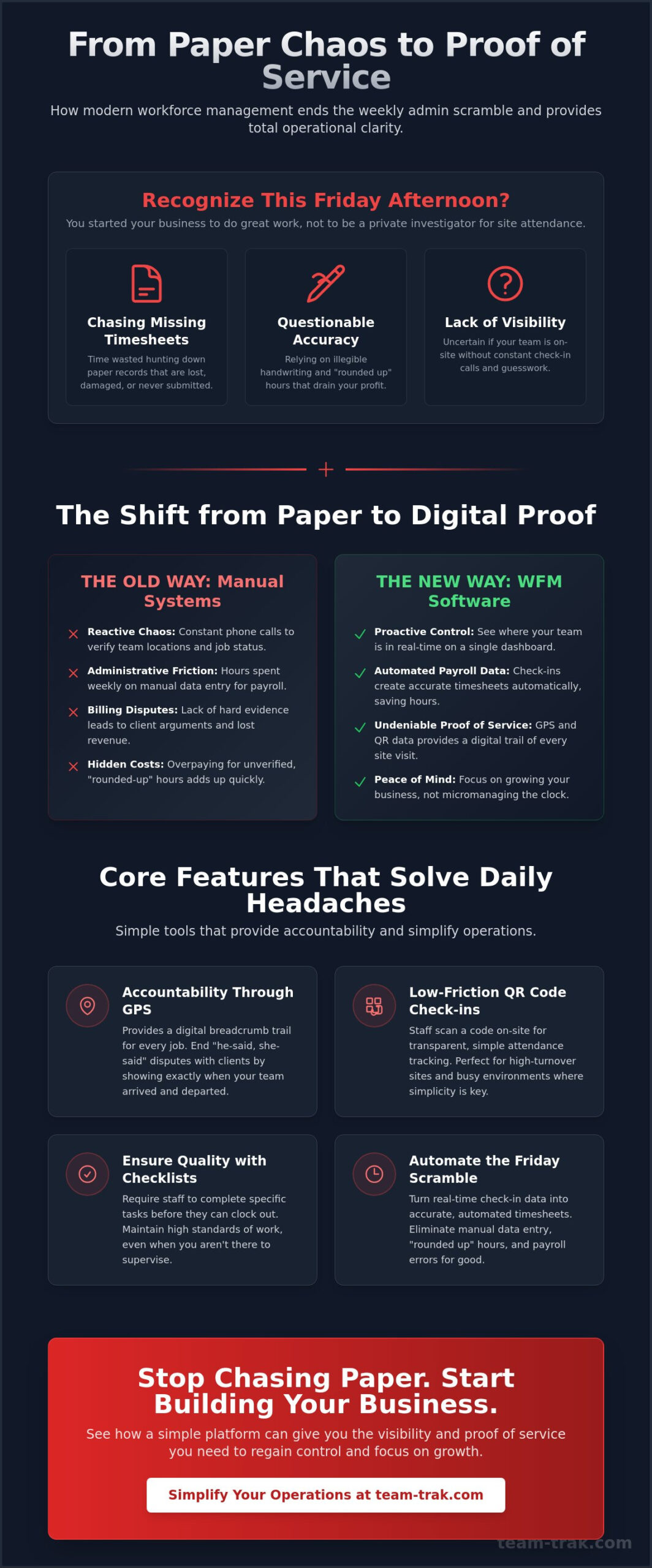
Paper timesheets are the single biggest source of administrative friction in 2026. They get lost, they get coffee stained, and they are almost always “rounded up” in the employee’s favor. This creates a culture of “trusting the word” rather than “verifying the work.” When you digitize this process, you aren’t just saving trees. You are creating a digital trail of accountability. Instead of chasing a staff member for a missing Friday sheet, the data is already in your system. This visibility ends the need for constant check-in calls. You can see the site is covered, so you can focus on growing the business instead of micromanaging the clock.
Why Service Firms Need a Specific Approach
Generic HR software is built for people sitting behind desks in climate-controlled offices. It doesn’t understand the reality of a rainy job site or a remote cleaning contract. Service firms require site-specific data that links a person’s time directly to a client’s location. For example, construction teams need to track progress against specific tasks while on-site. Managing remote teams requires a system that verifies attendance through location data, not just a manual log-in. This is what is workforce management software at its most practical level: a field-first solution that provides undeniable proof of service to your clients and total clarity for your office staff.
Core Features That Solve Daily Operational Headaches
When you ask what is workforce management software in a practical sense, you aren’t looking for fancy charts or complex labor forecasting. You want a tool that stops the phone from ringing with client complaints. High-impact features are those that remove the “he-said, she-said” from your daily operations. They provide a clear, digital record of every site visit, ensuring your team is accountable and your clients are satisfied.
Forbes highlights that tracking and scheduling are key components of a workforce management system, but for field service, these need to be rugged and simple. You don’t need a system that requires a degree to operate. You need one that works when your staff is standing in the rain at a job site. Operators looking to eliminate administrative bloat entirely may want to explore all-in-one field service software that connects every part of the operation from scheduling through to verified billing.
Accountability Through GPS and QR Codes
Client disputes regarding attendance can drain your profit and your patience. Using GPS location verification provides a digital breadcrumb trail for every job. It isn’t about spying; it’s about proof. When a client claims a technician didn’t show, you can pull up the data and show exactly when they arrived and left. For high-turnover sites or busy retail environments, QR code tracking offers an even simpler solution. Staff simply scan a code on-site to check in. This low-friction method makes attendance transparent and virtually eliminates “ghosting” at remote locations.
Task checklists further ensure quality without the need for micromanagement. By requiring staff to tick off specific duties before they can clock out, you ensure the standard of work remains high even when you aren’t there to supervise. If you want to see how these tools can simplify your daily site management, it’s often best to start with these core visibility features.
Automating the Friday Afternoon Scramble
The end of the week shouldn’t be a source of dread. Manual data entry is where errors live, and those errors lead to frustrated staff and incorrect billing. By turning check-in data into automated timesheets instantly, you remove the human element of “rounding up” hours. This is what is workforce management software at its most helpful: a quiet assistant that does the boring work for you. You get your weekend back, your payroll is accurate, and the administrative friction that used to take hours now takes minutes. It’s about replacing a pile of paper with a single, reliable source of truth.
The Hidden Costs of Sticking with Manual Systems
Running a service business is a game of margins. When you’re stuck in the “old school” way of doing things, you’re paying an invisible tax every single day. Most owners think about what is workforce management software in terms of a monthly subscription cost, but the real expense is the money leaking out of your business because you don’t have it. The cost of doing nothing is often much higher than the price of the solution itself. It’s the difference between a business that barely breaks even and one that scales with precision.
Think about the timesheets sitting on your desk right now. If your staff is manually writing down their hours, they aren’t being malicious when they round 4:52 PM up to 5:00 PM. It’s just human nature. But that eight-minute gap, multiplied across five employees and twenty working days, represents hours of unworked time you are paying for. Protecting your service reputation starts with having accurate data that reflects reality, not just a best guess. Without that data, you’re essentially flying blind.
Eliminating Client Disputes
There is nothing more awkward than a client calling to complain that your team left a site early when your invoice says otherwise. Without a digital record, it’s your word against theirs. This is where mobile workforce management solutions become essential. They act as an unbiased third party. When you can show a client the exact GPS-verified check-in and check-out times, the dispute vanishes. You maintain trust, you keep the contract, and you protect your brand from being labeled as unreliable or dishonest.
Recovering Lost Billable Time
The “5-minute rounding” problem isn’t just a payroll issue; it’s a revenue issue. If you’re billing clients based on manual logs, you’re likely under-billing or over-billing, both of which are dangerous for your long-term health. Beyond simple attendance, smarter scheduling helps you identify “dead time” between jobs. Are your teams taking the long route? Are they sitting in traffic when a more efficient path was available?
Accuracy is just as important for your staff as it is for you. They want to know they are being paid fairly for every minute they work. When you remove the guesswork, you create a fairer workplace and a more profitable company. If you are tired of the financial leak and want to regain control of your operational costs, it is time to move past the paper and embrace a system that works as hard as you do.
Choosing WFM Software Without Adding More Admin
The biggest risk in adopting new technology is choosing a system that creates more work than it saves. When you’re trying to figure out what is workforce management software for your specific team, the goal should be to simplify operations, not complicate them. If a tool requires a fifty-page manual or three days of training, it isn’t the right fit for a fast-moving service business. You need a solution that fits into your existing workflow like a missing puzzle piece. It should work quietly in the background so you can focus on your clients.
The “Staff-First” Adoption Rule
Field staff are often wary of new tracking tools. To get them on board, the mobile experience must be seamless. If an app is “heavy,” drains their battery, or is hard to navigate, they simply won’t use it correctly. When that happens, your data becomes unreliable. High-quality field service management software for small business should be intuitive enough for a new hire to use on day one without a formal lesson. Frame the switch as a benefit to them. It ensures they’re paid accurately for every minute on-site and removes the weekly hassle of chasing paper logs. When the team sees it as a tool that protects their paycheck, adoption happens naturally.
Integrating Operations with Finance
A great system doesn’t just track time; it closes the loop between the field and the back office. You should look for a platform that links your field data directly to your invoicing and accounting tools. This bridge eliminates the need for manual data entry, which is where most administrative errors happen. Understanding the full benefits of field service management software can help you make the case for this investment to yourself and your team. By automating the flow of information, you move from being a “busy” owner who is constantly putting out fires to a “controlled” owner who has total visibility.
This transition is about more than just efficiency. It’s about peace of mind. Knowing that your site attendance is verified and your billing is accurate allows you to step back from the daily grind. You aren’t just buying a tool; you’re investing in the ability to lead your business with clarity. Moving from a paper-based scramble to a digital source of truth is the fastest way to regain control of your time and your profit.
Moving Toward Operational Excellence and Clearer Site Management
Transitioning away from paper and guesswork isn’t just a tech upgrade. It’s a fundamental change in how you lead your team. You now know that what is workforce management software is more than a simple clock-in tool. It is a system built specifically for service businesses to provide GPS-verified attendance and total site visibility. You have seen how manual rounding and lost timesheets create a financial leak that drains your profit every month. Replacing that friction with automated billing and timesheet generation allows you to spend your time on growth rather than data entry.
You don’t have to stay stuck in the weekly scramble of chasing staff and settling client disputes. Real-world accountability starts with a tool that your field team will actually use. It’s time to trade the stress of disorganized records for the calm of data-driven results. Stop the administrative scramble and regain control of your business today. You’ve built a great service; now it’s time to give yourself the operational clarity and peace of mind you deserve.
Frequently Asked Questions
Is workforce management software different from simple time tracking?
Yes, it is a more comprehensive operational system than a basic digital punch card. While simple time tracking only records hours, what is workforce management software provides a full picture of where your team is and what they are doing. It links hours directly to specific sites, tasks, and client billing. This allows you to manage site attendance and operational visibility rather than just collecting a list of start and end times.
How does GPS verification actually work for my field staff?
GPS verification records a specific location stamp only at the moment a team member checks in or out of a job site. The mobile staff app confirms that the person is physically within the correct geographical area for that specific contract. It doesn’t track their every movement or private life; it simply provides a digital breadcrumb that proves they were on-site as promised to fulfill the client’s requirements.
Will my team feel like I am micromanaging them with this software?
Most reliable team members actually prefer the clarity and fairness that these systems provide. When you explain that the goal is to ensure everyone gets paid accurately for every minute they work, the conversation shifts from surveillance to accountability. It removes the daily friction of manual logs and protects your best workers by ensuring their hard work is documented and verified without any guesswork or disputes.
Can I use WFM software if I only have a small team of five people?
Small teams often see the biggest benefit because every hour of billable time is critical for your margins. Even with five staff members, the weekly scramble to collect paper timesheets and answer client questions about attendance can waste hours of your time. Using a digital system allows you to stay lean and organized, giving you the professional appearance of a much larger company without the administrative overhead.
Does this software integrate with my current accounting system?
Yes, the platform is built to link directly to major online accounting systems to close the loop on your office work. This integration allows you to take verified attendance data from the field and push it straight into your invoicing and billing tool. It eliminates the need for manual data entry, which reduces the risk of human error and ensures that your payroll and client invoices are always 100% accurate.
What is the main benefit of using QR codes for staff check-ins?
QR codes offer a simple, low-friction way to verify attendance at specific locations without requiring expensive hardware. By scanning a code placed on-site, staff provide undeniable proof that they were physically present at the job location. This is especially helpful for high-turnover sites or remote contracts where you can’t be there in person to confirm that the team arrived and started their tasks on schedule.

Disclaimer
The information provided in this article is for general informational purposes only and reflects the opinions and experiences of the author. While every effort has been made to ensure accuracy, Team Trak makes no guarantees regarding completeness