
You spend more time chasing paper trails than you do chasing new contracts. It is a common frustration for owners who feel like they are flying blind once their teams leave the office. When you cannot see where your remote staff are or verify if a job was actually completed to standard, your growth hits a ceiling. Finding the right field service management software for small business isn’t about chasing the latest “revolutionary AI” hype. It is about regaining control over your operations so the business can finally run smoothly without you being involved in every minor detail.
We understand the stress of manual timesheet errors and the payroll disputes that inevitably follow. You deserve a system that quietly removes these problems through clear visibility and accountability. This 2026 guide will show you how to eliminate administrative friction and build a more reliable remote team with the right platform. We will explore how to secure proof of work for your clients, automate your billing directly into your accounting software, and ultimately find the peace of mind you need to scale.
Key Takeaways
- Replace disorganized WhatsApp threads and paper calendars with a centralized digital hub that finally connects your office to your field staff.
- Identify the essential features of field service management software for small business that solve attendance fraud and automate the most tedious parts of your payroll prep.
- Protect your budget by avoiding complex feature bloat and choosing a mobile-first platform that your team can master in seconds.
- Streamline your cash flow by linking field data to your accounting tools to create professional invoicing and clear proof of work for every client.
- Master the implementation process with a soft launch strategy that establishes new standards of accountability without creating operational confusion.
What is Field Service Management Software for Small Business?
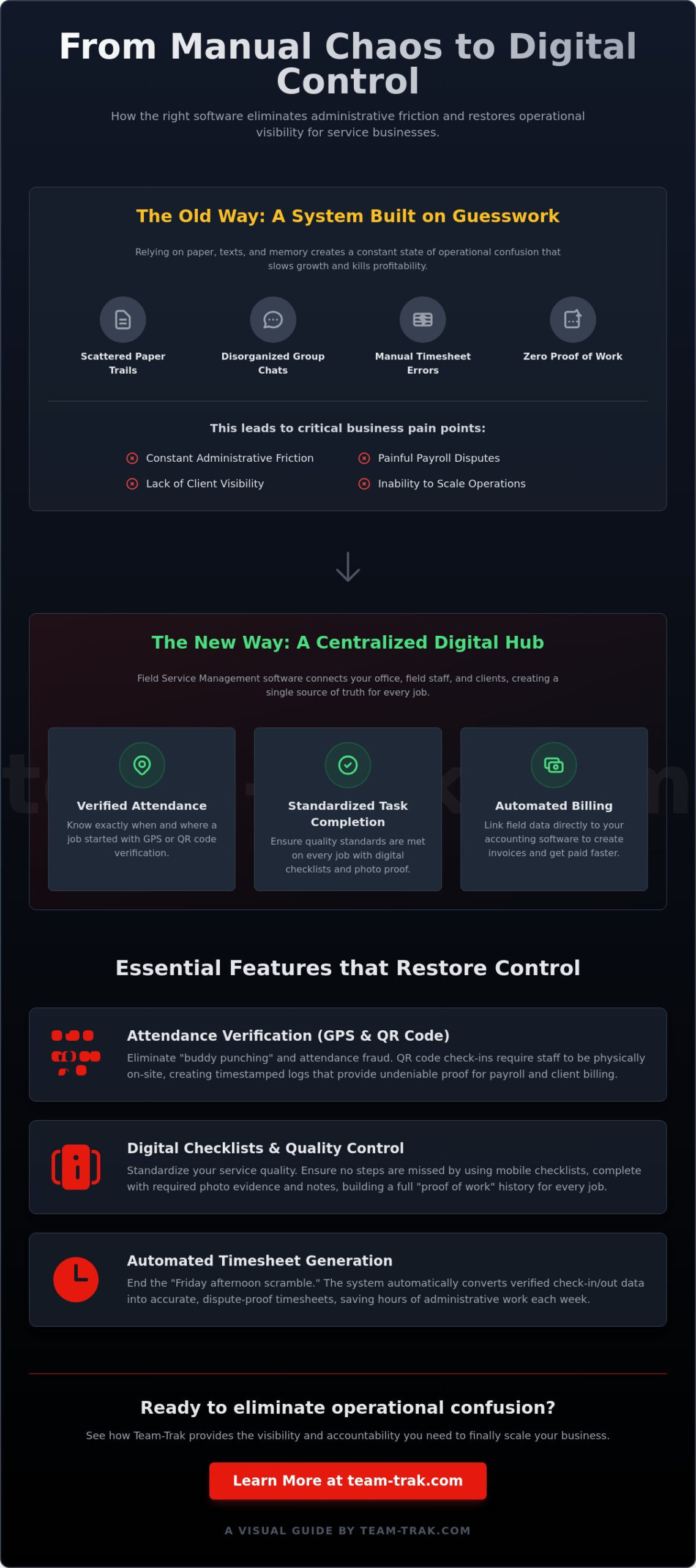
Field service management software for small business is a digital hub that replaces the chaotic mix of paper calendars, scattered WhatsApp threads, and manual spreadsheets. Its core function is to bridge the gap between your office, your field staff, and your end client. To understand the basics, What is Field Service Management? It is essentially an operational tool that provides real-time visibility into remote team activities. Instead of wondering if a job is on track, you have a live dashboard that confirms exactly what is happening on the ground.
Effective platforms focus on three core pillars that keep a service business profitable:
- Attendance: Knowing exactly when and where a job started.
- Task Completion: Ensuring specific quality standards are met through digital checklists.
- Billing: Linking field data directly to invoices to ensure you get paid without the usual administrative delays.
The Move from Manual to Digital Operations
Relying on old school methods like paper job sheets costs you more than just time. It creates administrative friction that slows down your billing cycle and makes scaling your business nearly impossible. When information is trapped on a clipboard in a technician’s van, you lose control over your cash flow. Digital platforms create a single source of truth for every job. You stop playing phone tag with staff just to find out if a client’s site was visited. You get the information when you need it, not when the paperwork finally lands on your desk at the end of the week.
Solving the Accountability Gap
Managing staff you cannot see is one of the biggest headaches for any owner. Relying on a “checking in” text message is a recipe for operational confusion and potential attendance fraud. By implementing GPS location verification, you replace guesswork with hard data. This isn’t about micromanagement. It is about building a culture of trust through transparency. Transparent data protects your best workers as much as it protects your business. It provides them with undeniable proof of work that prevents client disputes before they start. When the system handles the verification, you can finally focus on growth rather than auditing manual timesheets.
Essential Features for High-Growth Service Teams
High-growth doesn’t mean high-stress. The right field service management software for small business focuses on utility over complexity. While enterprise tools might overwhelm you with inventory sub-modules, a practical platform prioritizes features that solve your immediate headaches. According to recent FSM Market Trends, businesses are increasingly moving away from “all-in-one” bloat toward agile systems that handle the basics perfectly. You need tools that automate the most boring parts of your week, like payroll preparation and job status updates, so you can focus on winning more work. If you want a deeper look at how these tools fit into a broader operational strategy, our guide to field workforce management software covers the core features that solve real-world problems for service businesses.
To keep your operations lean, look for these four core capabilities:
- Attendance Verification: Stop the “attendance fraud” problem before it costs you a client.
- Automated Admin: Let the software handle the data entry for your timesheets.
- Client Portals: Provide transparency to your customers without them having to call you for updates.
- Accounting Links: Push job data directly to your billing tool to ensure you get paid faster.
Verification and Attendance Tracking
Visibility is the foundation of accountability. While GPS is helpful, many owners find that QR code check in and check out provides a more reliable level of site-specific proof. It requires the staff member to actually be at the location to scan a code, which virtually eliminates “buddy punching” or remote clock-ins. This data flows directly into your system, creating timestamped logs that serve as the final word in any payroll dispute. It kills the “Friday afternoon scramble” where you’re forced to guess hours based on vague text messages and scribbled notes.
Task Management and Quality Control
Standardizing your service is the only way to scale. Digital checklists ensure that your quality standards never slip, regardless of which technician is on the site. By requiring photo evidence and notes for specific tasks, you build a comprehensive “proof of work” history for every client. This isn’t just for your records; it’s a powerful tool for customer retention. These completed tasks then link naturally to automated timesheets, turning the work performed in the field into the data you need for billing. If you’re ready to see how these tools can quiet your operations, you might want to explore how a simplified platform fits your team.
Evaluation Framework: Choosing the Right Solution
Choosing the right field service management software for small business often feels like a gamble. You’re bombarded with flashy demos and promises of revolutionary technology. But as a business operator, you know that the best tool is the one that actually gets used every day. Avoid the trap of feature bloat. Paying for complex modules that your team will never touch is a waste of capital and creates unnecessary operational confusion. Focus instead on a mobile-first design. If your staff cannot figure out the app in seconds, the entire system will fail before it even starts.
Scalability is just as important. You need a platform that handles your 5th employee today and your 50th employee next year without requiring a complete overhaul of your processes. Look for a provider that offers genuine onboarding support. You don’t want a 200-page manual; you want a partner who helps you configure the system to match your specific workflow. The goal is to quietly remove problems, not add a new layer of technical stress to your plate. If you’re still asking yourself what is workforce management software and how it differs from other tools, our practical guide for service owners breaks down exactly what these platforms do and how they replace the weekly administrative scramble.
The Staff Experience Test
A complex app is the ultimate deployment killer. Field teams are busy. They’re often working in high-pressure environments where every second counts. We recommend the “two-tap” rule. A worker should be able to check in and view their daily tasks within two taps of their screen. If it takes longer, they’ll eventually revert to “old school” paper methods. You can reduce staff resistance by framing the software correctly. It isn’t a surveillance tool. It’s a system that protects their pay accuracy by creating an undeniable record of their hard work and attendance.
Industry-Specific Requirements
Your specific industry dictates which features matter most for your daily operations. In construction and trades, site safety and material tracking are often the priorities. For cleaning and facilities management, the focus shifts to recurring smart schedules and site-specific instructions that ensure no corner is missed. Short-term rental hosts, meanwhile, require rapid task turnover and photo verification to ensure a property is guest-ready within a tight window. Finding the right operational fit is about more than just a checklist of features. It’s about finding a platform that speaks your industry’s language. If you’re ready to cut through the noise, get in touch to discuss your specific operational needs.
Implementing Your Field Service Management System
Successful implementation isn’t a technical event; it’s a cultural shift within your business. You don’t need to flip a switch for the entire company overnight. Start with a soft launch by selecting your most trusted team members to test the mobile staff app first. This phased approach allows you to identify any site-specific friction or operational confusion in a controlled environment. Once your core team is comfortable, you can roll the system out to the rest of the workforce with confidence.
You must set clear expectations from the beginning. The software is the new standard for proof of work. If a task isn’t logged or a site isn’t checked into via the platform, the job isn’t considered complete. This isn’t about being rigid; it’s about establishing a professional baseline that protects everyone. When you connect your billing workflow to your accounting system immediately, you’ll start to see the ROI in reduced administrative hours. Review your operational data weekly to identify dead time between jobs or inefficient travel routes that are quietly eating your margins.
Professionalising the Client Relationship
Client relationships thrive on transparency. Using a client portal gives your customers self-service access to job reports and completion photos without them needing to call your office for updates. This level of transparency reduces complaints and builds the kind of long-term retention that grows a business. Providing undeniable evidence of a job well done turns your field service management software for small business into a powerful customer service tool. For more on coordinating these moving parts, see how smart schedules keep your team and clients in sync.
Measuring Success and ROI
Measuring success means looking beyond the software subscription cost. Calculate the actual hours your office staff saves on manual data entry and payroll reconciliation each month. The real financial win often lies in dispute-free invoicing. When you send an invoice backed by timestamped logs and photo evidence, you get paid on time because the work is beyond question. In the service industry, ROI is the combination of recovered administrative time and a protected business reputation. By removing the friction of legacy manual processes, you finally gain the peace of mind to focus on high-level growth.
Take Control of Your Field Operations
The transition from manual spreadsheets to a digital hub is the most significant step you can take toward scaling your business. By focusing on a mobile-first design and the “two-tap” rule, you ensure that your team actually uses the system rather than fighting against it. You’ve seen how the right platform provides undeniable proof of work while quietly removing the administrative friction that keeps you stuck in the office. Investing in field service management software for small business isn’t about chasing trends; it’s about building a foundation of visibility and accountability that protects your margins.
You can finally replace operational confusion with precise data. With GPS-verified attendance logs and QR code site check-ins, you have the evidence you need to resolve any dispute. When you combine this with direct accounting system integration, your billing cycle moves as fast as your field team. It’s time to step away from the paperwork and focus on the high-level growth your business deserves.
Quietly remove your operational problems with Team-Trak and start building a more accountable, professional remote team today. You’ve built a great business; now it’s time to let it run smoothly.
Common Questions About Field Operations
Is field service management software worth it for a team of under 5 people?
Yes, implementing field service management software for small business is often most impactful when your team is small. It allows you to build scalable processes before you’re overwhelmed by growth. Instead of spending your evenings reconciling five different paper timesheets, you can automate that data collection from day one. This keeps your overhead low and ensures you don’t need to hire an office manager just to handle the basic paperwork.
How does GPS verification actually protect my business from time theft?
GPS verification creates a digital breadcrumb that confirms exactly where a staff member was when they clocked in or out. It eliminates “buddy punching” and prevents workers from claiming they were on-site when they were actually still at home. By providing a clear, objective record of attendance, you remove the need for awkward confrontations and ensure you only pay for the time actually spent on the job site.
Will my staff feel like I am “spying” on them if I use a mobile app?
Staff resistance is common, but it usually disappears when you frame the app as a tool for pay protection. Explain that the mobile app provides undeniable proof of their hard work, which prevents client disputes and ensures their timesheets are always accurate. It isn’t about constant surveillance; it’s about replacing manual logs with a system that guarantees they get paid exactly what they’re owed without any guesswork.
Can I link this software to my existing accounting system like Xero or QuickBooks?
Yes, linking your field operations to accounting systems like Xero or QuickBooks is a core capability of the Team-Trak platform. This integration allows you to push verified job data directly into your invoicing tool. You eliminate the need for manual data entry, which is where most billing errors occur. By automating this workflow, you can send invoices as soon as a job is marked complete, significantly improving your cash flow.
What happens if my field staff lose internet connection while on-site?
Modern field service management software for small business includes offline capabilities to handle spotty connections in the field. If a staff member loses signal while on-site, the mobile app stores the data locally on their device. Once they move back into an area with a stable internet connection, the app automatically syncs the timestamped logs and checklists to your dashboard. This ensures no proof of work is lost due to poor reception.
How long does it typically take to set up a field service management platform?
A basic setup can often be completed within a few days, though a full rollout usually takes one to two weeks. This timeline includes configuring your client list, setting up task checklists, and conducting a soft launch with a few trusted workers. We recommend starting small and adding complexity only after your team is comfortable with the basic check-in and check-out functions. This gradual approach minimizes operational confusion and ensures a smoother transition.

Disclaimer
The information provided in this article is for general informational purposes only and reflects the opinions and experiences of the author. While every effort has been made to ensure accuracy, Team Trak makes no guarantees regarding completeness