
Imagine sitting down at the end of a long day, only to be met with a client dispute claiming a job wasn’t completed. You know your team was there, but you lack the specific evidence to prove it. Without a robust system for mobile workforce task management, you’re forced to spend your evening scrolling through disorganized WhatsApp threads or making frantic phone calls to staff who have already clocked off. It’s a frustrating gap in accountability that leaves you feeling out of control.
Most operators of field-based teams feel this weight daily. You want to trust your staff, but you also need to protect your reputation and your bottom line. This transition isn’t about micromanagement; it’s about creating a clear digital trail that removes administrative friction. In this guide, you’ll discover how to move beyond basic location tracking to a verified system that ensures quality and generates professional reports for your clients. We’ll show you how to gain total visibility into remote progress while finally silencing the constant buzz of status-update messages.
Key Takeaways
- Identify the hidden costs of using informal messaging apps and why they fail to provide true operational visibility.
- Discover how mobile workforce task management transforms vague updates into verifiable proof of work using GPS-backed check-ins.
- Use digital checklists to set clear guardrails for your team, ensuring every job meets your standards without requiring your physical presence.
- Eliminate the stress of manual reporting by replacing paper trails and WhatsApp threads with a streamlined digital workflow.
- Build client trust through professional reporting and transparent data that settles service disputes quickly and professionally.
Understanding the Visibility Gap in Mobile Operations
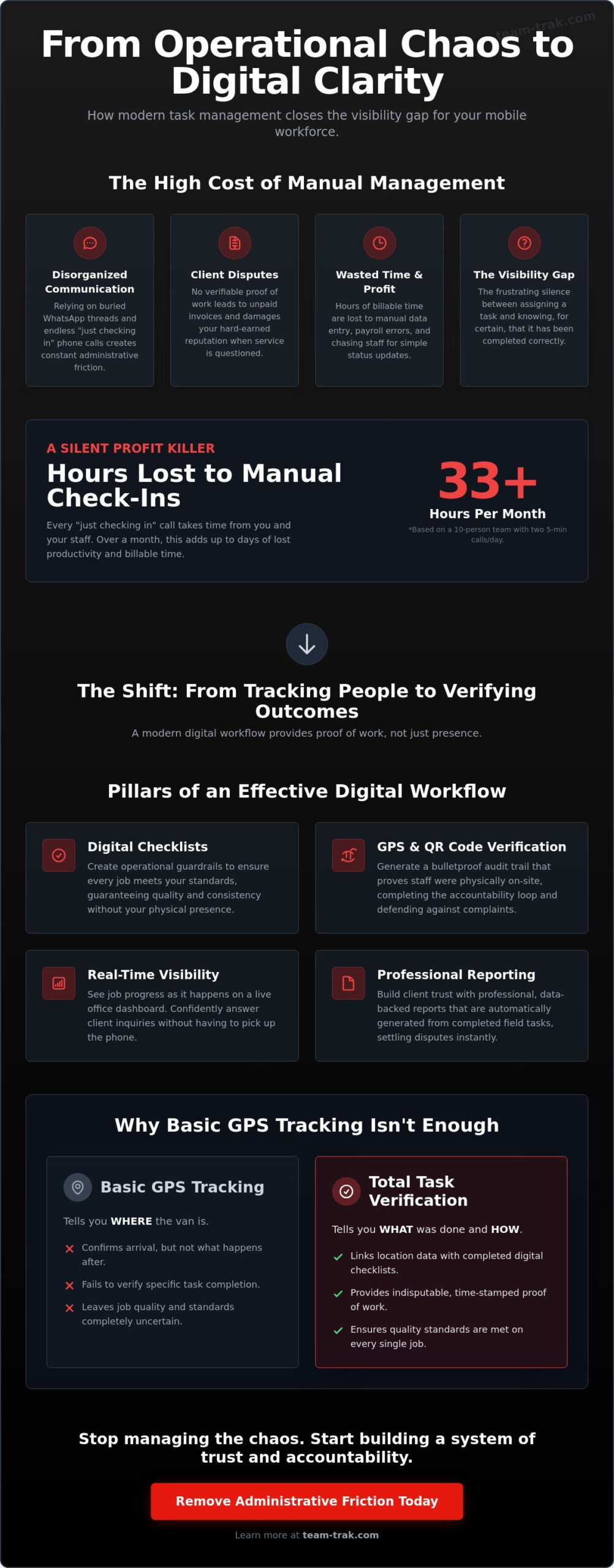
Managing a remote team often feels like trying to solve a puzzle with missing pieces. You assign a job, send the details via text, and then wait. The “visibility gap” is that uncomfortable silence between a task being assigned and the moment you actually know it’s finished correctly. It’s the disconnect between your expectations and the reality on the ground. For many business owners, this gap is filled with “hope” rather than “certainty.”
Relying on traditional communication creates immense administrative friction. WhatsApp threads get buried. Phone calls interrupt your staff while they’re trying to be productive. This “operational confusion” isn’t just annoying; it’s expensive. A solid Workforce Management Overview highlights that mobile operations require more than just a schedule; they need a feedback loop. By implementing a dedicated system for mobile workforce task management, you stop tracking people and start verifying outcomes. This shift builds trust with your team because they have clear guardrails and a way to prove their hard work without you looking over their shoulder.
The Hidden Cost of Manual Task Management
Manual systems are silent profit killers. Every “just checking in” call takes five minutes from you and five minutes from your field staff. Multiply that by ten employees and twenty days a month, and you’ve lost hours of billable time. Beyond lost time, there’s the risk of client disputes. Without digital proof of work, it’s your word against theirs when a client claims a service wasn’t performed. These disputes lead to unpaid invoices and damaged reputations. Finally, manual data entry is prone to human error. A misplaced decimal point or a forgotten timesheet entry can lead to significant errors in your billing and payroll, causing even more administrative headaches on Friday afternoon.
Why Basic GPS Tracking Is Not Enough
Many operators think a GPS dot on a map solves their problems. It doesn’t. GPS tells you the van arrived at the property, but it doesn’t tell you what happened once the engine was turned off. Did the cleaner finish the kitchen? Did the contractor use the right materials? While GPS verification confirms a staff member’s arrival, it doesn’t confirm the quality of the work performed. You need to know that the specific requirements of the job were met. The accountability loop is the marriage of location data and completed checklists that provides absolute certainty for every job.
The Pillars of Effective Remote Task Management
If the visibility gap is the problem, these pillars are the structural support for your solution. True mobile workforce task management isn’t about mass texting or constant status updates. It’s about building a system that runs itself. This starts with moving beyond simple location tracking to actual task verification. A comprehensive Guide to Mobile Workforce Management suggests that the best systems integrate scheduling with real-time feedback. You need to see progress as it happens, without picking up the phone.
Real-time syncing means the office dashboard updates the moment a task is ticked off in the field. You don’t have to wait for an end-of-day report to know that a site is cleared or a repair is finished. This visibility allows you to handle client inquiries with confidence, knowing exactly what’s been completed at any given moment. It quietly removes the operational friction that usually eats up your morning.
Digital Checklists as Operational Guardrails
Think of digital checklists as guardrails for your staff. They ensure that even your newest team member follows the exact steps required for a high-quality job. By using mandatory fields, you can ensure that critical safety checks or quality photos aren’t skipped. This level of detail doesn’t just improve service; it simplifies your back office. When checklists are completed, they can automatically trigger timesheet automation. This ensures that payroll is based on verified work rather than estimated hours or messy paper logs.
Verification via QR Codes and GPS
While checklists guide the work, verification proves it happened. QR code tracking provides an unhackable audit trail, which is especially useful in high-accountability areas like commercial cleaning or short-term rentals. It proves the staff member was physically in the room at a specific time. Combine this with gps verification, and you have a bulletproof defense against client complaints. This isn’t about catching people out. It’s about building a culture of “proof of work” that rewards your most reliable staff. If you’re ready to stop the guesswork, you can see how this works for your industry.
Moving from Messy WhatsApp Threads to Digital Workflows
The transition from informal messaging to a professional workflow begins with an honest audit. Look at your current “systems.” Are instructions scattered across paper notebooks, verbal briefings, and endless WhatsApp threads? These informal methods feel easy at 9:00 AM on Monday, but they are the source of that heavy stress you feel every Friday afternoon. This is when the administrative friction peaks as you scramble to verify who did what and for how long. It’s a cycle of operational confusion that prevents your business from scaling.
Effective mobile workforce task management requires moving these scattered pieces into a single digital home. By standardising your most common jobs into repeatable digital templates, you ensure every worker knows exactly what is expected. No more “I forgot” or “I didn’t know I had to do that.” You aren’t just buying software; you are building a predictable operation that runs without your constant intervention. It allows you to step back from the day-to-day chaos and focus on growth.
The 3-Step Transition Framework
Success doesn’t happen overnight. Trying to move your entire team at once often causes more confusion than it solves. Instead, follow a phased approach:
- Phase 1: Pilot the system with your most reliable “champion” staff member. Get their feedback and iron out any site-specific hurdles before a wider rollout.
- Phase 2: Transition one core service, such as end-of-tenancy cleans or routine maintenance checks, to digital checklists. This keeps the initial learning curve manageable.
- Phase 3: Connect task completion to automated timesheets. This is the moment where payroll becomes a matter of clicks rather than hours of detective work.
Overcoming Staff Resistance to Change
It’s natural for staff to be wary of new technology. They might view it as a “big brother” device designed to track their every move. Address this head-on by explaining how digital task management actually protects them. If a client makes an unfair accusation about service quality, the system provides the “proof of work” needed to vindicate the staff member. The message is simple: check in, follow the list, and check out. It quietly removes operational problems and eliminates the need for annoying follow-up calls or paper logs at the end of a shift. When your team realizes the software makes their day easier, the resistance usually vanishes. Ready to clear the clutter? Contact us today to start your transition.
Team-Trak: Professional Task Management for Field Teams
Team-Trak is built for the ground-level reality of trades and field service companies. It isn’t a complex, tech-heavy fleet tool designed for corporate boardrooms. Instead, it’s a practical partner for the business owner who’s tired of the chaos. Our focus is on providing a system that quietly removes operational problems so you can focus on growing your business rather than just surviving the week.
The mobile staff app is designed to simplify the field worker’s day, not complicate it. Your team doesn’t want to spend their shift filling out digital forms any more than they want to carry around soggy paper logs. By providing a clear, intuitive interface, the app allows them to see their schedule, follow their checklists, and provide proof of work with a few taps. It turns a disorganized day into a structured, manageable workflow. When your team has the right tools, mobile workforce task management stops being a chore and starts being a standard part of their professional routine.
Beyond the field, the client portal is a powerful tool for building long-term trust and retention. It allows you to share verified progress with your customers without sending a single manual email. This level of professional visibility sets you apart from competitors who are still relying on verbal promises. We believe in low-friction onboarding, which is why we focus on getting you started without long-term financial stress or complex setup hurdles.
From Field Work to Professional Client Reporting
Every time a staff member completes a task, that data is instantly available for your reports. You no longer have to spend your Sunday evenings compiling data from various sources to justify an invoice. This data links directly to your workforce management scheduling, ensuring that what was planned actually happened on-site. The client portal creates transparency as a service, giving your customers 24/7 access to the status of their jobs and the proof of work they expect.
Ready to Remove the Administrative Friction?
You don’t have to keep living with operational confusion. There is a better way to manage your remote team that doesn’t involve constant phone calls or chasing paperwork. We invite you to see exactly how our platform can bring order to your specific industry. With a risk-free start and an interface designed for ease of use, you can begin closing the accountability gap today. Start your journey toward operational peace of mind with Team-Trak and reclaim your time.
Reclaiming Your Time and Operational Control
The visibility gap is a choice, not a permanent state of being for your business. By moving away from disorganized messaging and embracing a verified system, you replace constant anxiety with data-driven peace of mind. Effective mobile workforce task management isn’t about watching your team’s every move; it’s about providing the tools they need to succeed and the proof you need to get paid. You’re shifting from a reactive mindset to one of proactive control.
With GPS-verified attendance and QR code check-ins for unhackable site audits, you can finally stop the Friday afternoon scramble for information. Your field operations will flow directly into your back office through seamless integration with online accounting systems, ensuring your billing is as accurate as your work. This isn’t just about internal efficiency; it’s about building a professional reputation that clients can trust. You’ve felt the weight of administrative friction for long enough. It’s time to let a practical system handle the small details so you can focus on the big picture of growth.
Start your risk-free trial of Team-Trak today
Take the first step toward a calmer, more profitable operation. You’ve built a great business; now give it the foundation it deserves to thrive.
Common Questions About Mobile Workforce Task Management
How does mobile task management improve staff productivity?
It boosts productivity by providing staff with clear, digital roadmaps for every shift. Instead of waiting for a phone call or scrolling through messy text threads, workers simply open the app to see their assigned tasks and checklists. This clarity reduces downtime and prevents the confusion that often leads to half-finished jobs or unnecessary return visits to a site. It allows your team to focus on the work rather than the administration.
Is GPS verification considered micromanagement by remote staff?
Most staff find that GPS verification actually protects them from unfair client complaints. It provides objective proof that they were on-site and on time, which is invaluable when a customer questions service quality. When you position it as a tool for transparency and safety, it builds a culture of accountability that rewards your most reliable team members. It’s about verifying outcomes, not watching every movement.
Can I use digital checklists for specific industries like cleaning or construction?
You can customize digital checklists to fit the exact requirements of any field-based trade. For a cleaning business, this might include room-by-room tasks and required photo evidence of a finished space. In construction, checklists can cover safety inspections or material sign-offs. These digital guardrails ensure that quality standards remain consistent across your entire operation, regardless of which team member is assigned to the job.
What happens if my field staff lose internet connection while completing tasks?
The mobile staff app is built to handle dead zones and intermittent signals. Workers can continue to check off tasks, capture photos, and log their progress while offline. Once the device reconnects to a network, all the data syncs automatically with the core platform. This ensures that mobile workforce task management remains effective even in remote locations, and the office always receives accurate, verified data.
How does mobile task management reduce administrative costs?
It slashes costs by automating the most time-consuming parts of your back-office routine. You stop wasting hours manually cross-referencing paper logs or WhatsApp messages to verify hours for payroll. Because the system tracks task completion in real-time, it generates automated timesheets and professional client reports instantly. This reduces the administrative friction that usually requires dedicated staff time to manage and resolve.
Do I need to buy special hardware for my mobile workforce?
You don’t need to purchase any specialized hardware or proprietary tracking devices. The system runs entirely through a mobile app that your staff can download onto their existing smartphones. This low-friction approach means you can get your entire team up and running without any upfront equipment costs. It makes mobile workforce task management accessible for businesses of all sizes without the stress of a major financial commitment.

Disclaimer
The information provided in this article is for general informational purposes only and reflects the opinions and experiences of the author. While every effort has been made to ensure accuracy, Team Trak makes no guarantees regarding completeness