
You’re sitting at your desk on a Friday afternoon when a long-term client calls to dispute an invoice, claiming your team never showed up on Tuesday. You know they were there, but your only evidence is a crumpled, hand-written timesheet and a “trust me” from a field tech who is currently out of cell range. It’s a frustrating position to be in, and it’s one that most service-based business owners know too well. Managing a remote team shouldn’t feel like a guessing game based on manual logs and constant follow-up calls. When you use mobile workforce management solutions, you replace that operational “hope” with verifiable proof of work.
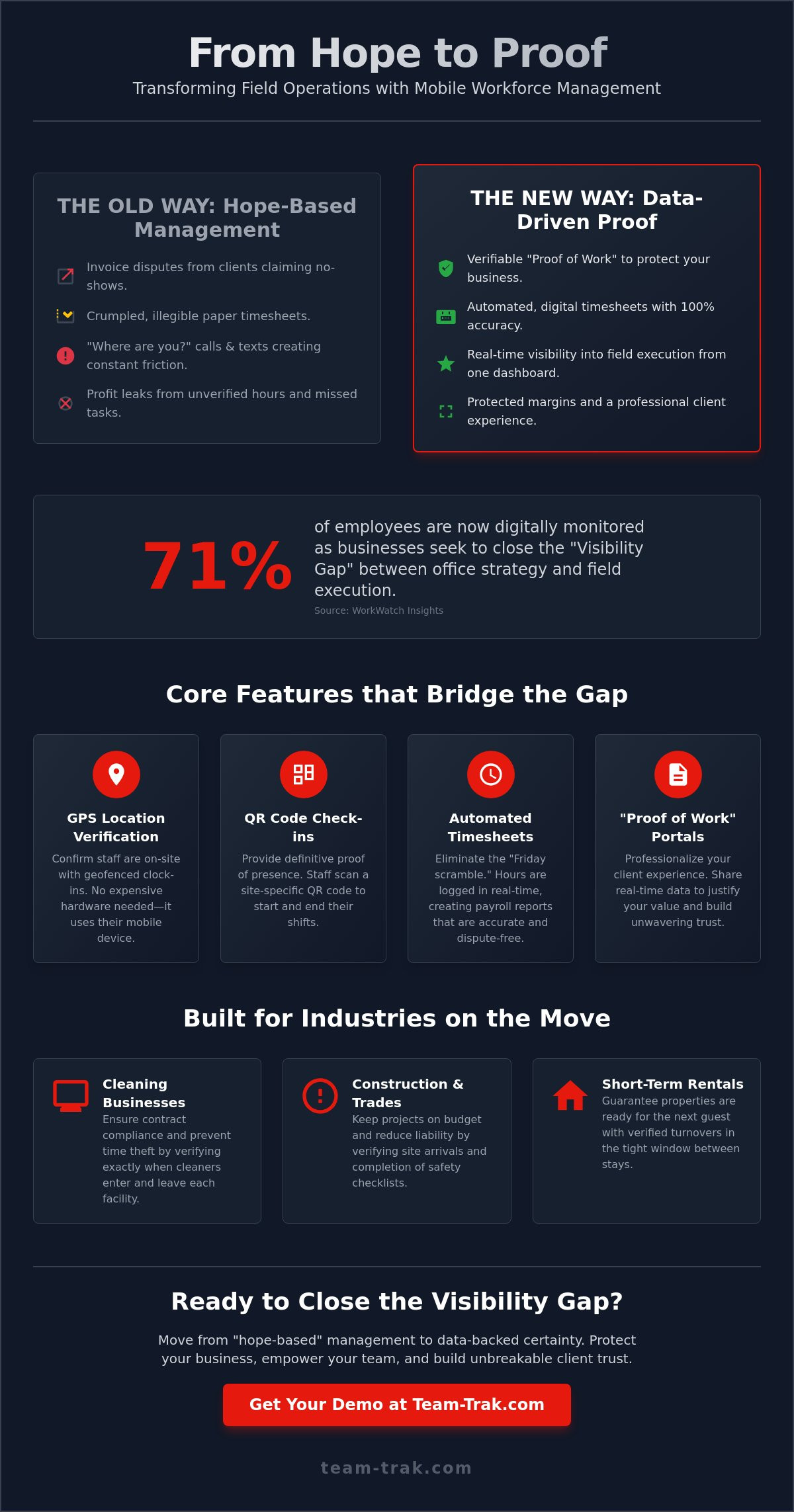
We understand that the friction of manual processes isn’t just an administrative headache; it’s a threat to your service reliability. According to WorkWatch Insights, 71% of employees are now digitally monitored as businesses seek to close the visibility gap. You likely agree that your office and field teams need to stay on the same page without the constant back-and-forth of phone calls and text messages. This guide will show you how to bridge that gap to reduce administrative friction and improve your service reliability.
We will explore how to achieve total visibility of your field operations and automate your payroll to eliminate disputes once and for all. You’ll also learn how to generate professional client reporting that builds trust and protects your bottom line. It’s time to move past old-school methods and gain the peace of mind that comes with data-driven results.
Key Takeaways
- Move from “hope-based” management to data-backed visibility by creating a digital bridge between your office strategy and field execution.
- Discover how modern mobile workforce management solutions use GPS verification and QR codes to ensure staff accountability without the need for expensive hardware.
- Learn to implement new systems without staff pushback by framing the technology as a tool for worker protection and accurate, dispute-free payroll.
- Professionalize your client experience by using real-time field data and “proof of work” portals to justify your value and protect your margins.
- Reduce daily administrative friction by choosing a human-first platform that simplifies communication rather than adding technical complexity.
What are Mobile Workforce Management Solutions for Service Teams?
Most service business owners start their day with a clear plan, only to have it dissolve into operational confusion by mid-morning. You send your team out to various sites and then you wait. You hope they arrived on time. You hope the work meets your standards. You hope the client doesn’t call with a complaint you can’t disprove. This is the “Visibility Gap,” the space between your office strategy and field execution where profit often leaks away through unverified hours and missed tasks.
Modern mobile workforce management solutions act as the digital bridge that closes this gap. It’s the end of “hope-based management.” Instead of relying on crumpled paper timesheets or a series of “where are you?” text messages, you get a clear, data-backed view of your operations. While the concept of workforce management has existed for decades in large corporate offices, these new tools are designed for the practical, daily friction of field service. They quietly remove administrative friction by automating the flow of information from the worker’s phone directly to your dashboard.
The Shift from Surveillance to Accountability
Effective management isn’t about being a “big brother” or spying on your staff. It’s about protecting your business, your reputation, and your employees. When you implement GPS location verification or QR code check-ins, you’re establishing a neutral record of the truth. This “Proof of Work” is your best defense when a client disputes an invoice. It ensures your staff is paid fairly for every minute they’re on site, and it gives you the evidence needed to maintain high service standards without constant phone calls.
Who Benefits Most from Mobile Management?
Specific industries face unique pressures that manual methods simply can’t handle as the business scales. These solutions provide the most value where teams are remote and site visits are frequent.
- Cleaning Businesses: Managing multiple sites means you can’t be everywhere at once. Knowing exactly when a cleaner enters and leaves a facility prevents time theft and ensures contract compliance.
- Construction and Trades: Projects depend on timing. Verifying site arrivals and ensuring construction teams complete safety checklists helps keep jobs on budget and reduces liability.
- Short-Term Rentals: For Airbnb hosts, the window between guest stays is incredibly tight. Verified turnovers are the only way to guarantee a property is ready before the next guest arrives.
Core Features of Modern Workforce Management Platforms
Closing the visibility gap requires more than just a general idea of where your team is. It requires specific, functional tools that capture data at the source. While legacy systems often relied on expensive, hard-wired vehicle trackers or manual logs, today’s mobile workforce management solutions leverage the technology already in your team’s pockets. By using specialized mobile workforce management tools, you can verify site presence and work quality without adding extra hardware to your overhead.
One of the most immediate benefits of a digital platform is the end of the “Friday afternoon scramble.” Instead of chasing down staff for missing hours or squinting at illegible handwriting, an automated timesheet module collects data in real time. When a worker clocks in using GPS verification, the system creates an unalterable record. This transition from manual to automated processes quietly removes the administrative friction that typically eats up your office manager’s time.
The Power of GPS and QR Verification
While GPS provides a general radius of location, QR code tracking offers a “hard” timestamp that is virtually impossible to fake. By placing a unique QR code at a specific service location, you ensure that staff are physically present exactly where they need to be. This level of precision is about more than just oversight; it’s about protection. GPS verification provides the data needed to settle a client dispute in seconds rather than days. It moves the conversation from “he said, she said” to a factual review of verified data.
Checklists and Task Accountability
Attendance is only half the battle. To maintain your reputation, you need to verify that work was actually performed to your standards. Digital task management checklists allow you to create “standardized excellence” across every site. For your staff, this provides a clear psychological benefit: they know exactly what “done” looks like for every job. You can even require photo uploads for specific tasks, giving you visual proof of work that you can share directly with clients through a portal.
If you’re ready to stop guessing and start seeing exactly how your field operations are running, it might be time to see how these tools fit your specific workflow.
How to Implement a Mobile System Without Staff Pushback
Introducing mobile workforce management solutions often triggers a defensive reaction from field teams. Workers who have spent years operating with a degree of autonomy might view digital check-ins as a lack of trust or “big brother” surveillance. To move past this hurdle, you must address the human element of the transition before you ever ask a technician to download an app. A successful rollout focuses on how the technology supports the worker, not just the office.
- Step 1: Frame the solution as staff protection. Explain that a verified GPS timestamp ensures they are paid accurately for every minute on site. It also provides the “proof of work” needed to protect them against unfair client complaints.
- Step 2: Choose a “human-first” app. If the software is too complex or requires constant troubleshooting, your team will find reasons to avoid it. Select a platform that prioritizes a clean interface and intuitive navigation.
- Step 3: Run a pilot program. Start with your most trusted “champion” workers. Let them test the system and provide feedback; their peer-to-peer endorsement will carry more weight than a mandate from management.
- Step 4: Set clear expectations. Be transparent about how the data visibility will be used. Link the new system to existing performance goals so the team understands the “why” behind the change.
- Step 5: Replace manual reporting entirely. Do not ask staff to use the app while still filling out paper logs. Double-handling data creates unnecessary administrative friction and builds resentment.
Onboarding Remote Teams Effectively
Effective onboarding requires a focus on minimizing daily friction for the person in the field. A simple, one-click check-in process ensures that the tool feels like a help, not a hindrance. You should also explicitly address privacy concerns by explaining exactly when the app tracks location (while on the clock) and when it doesn’t. This transparency is essential for simplifying operations and maintaining a culture of mutual respect.
Reducing Administrative Pressure for Managers
For managers, the shift to mobile workforce management solutions is about moving from “chasing” to “approving.” By using automated timesheets, you eliminate the need for manual data entry and the dreaded Friday afternoon scramble. You no longer have to spend hours verifying hours against text messages or phone calls. A successful implementation is one where the office team stops asking “where are you?” because the screen already tells them. When evaluating your options, our guide to choosing field service management software for small business without creating more admin can help you identify the right platform for your team’s needs. For a broader look at the tools available to service businesses today, our guide to mastering field workforce management software in 2026 walks through the core features that solve real-world operational problems.
If you’re ready to see how a low-stress implementation can work for your specific team, reach out to discuss a rollout plan that fits your workflow.
Leveraging Field Data for Business Growth and Profitability
The data collected in the field is more than just a record of attendance; it’s a powerful asset for business growth. Most operators view tracking as a way to stop problems, but the real advantage comes from using that information to professionalize your client relationships. When you can show a client exactly when a team member arrived and provide a digital record of completed tasks, you move from being a commodity service to a high-trust partner. This “Proof of Work” data is your best tool for justifying price increases and ensuring long-term contract retention.
Beyond client trust, mobile workforce management solutions help you identify “profit leaks” that are invisible to the naked eye. By reviewing historical data, you might discover that travel time between specific sites is consistently higher than quoted, or that certain properties require 20% more labor than others. This visibility allows you to adjust your quoting and job costing with surgical precision. It’s about moving away from gut feelings and making decisions based on operational reality. Choosing the right field workforce management software is what makes this level of data-driven decision-making accessible to service businesses of any size.
The Role of the Client Portal
Transparency is a competitive advantage. Giving clients access to their own data through a portal significantly reduces administrative friction by cutting down on “where is my cleaner?” phone calls. When a client can see check-in times and completed checklists in real time, they feel a sense of control and peace of mind. For a deeper look at how this transforms service delivery, you can refer to this Client Portal Guide for service businesses.
Closing the Loop: From Field to Invoice
The final step in removing operational confusion is linking your field data directly to your bottom line. By integrating your management platform with online accounting systems like Xero or QuickBooks, you speed up the “cash-to-cash” cycle. Billing errors disappear because invoices are based on verified GPS timestamps and completed task logs rather than estimated hours. This precision ensures you’re paid for every minute of work performed while providing your clients with clear, indisputable billing.
Ready to see the difference for yourself? Contact us for a tailored walkthrough to see how these tools can protect your margins and simplify your daily operations.
Take Control of Your Operational Truth
Transitioning from manual, hope-based management to a data-backed framework isn’t just about efficiency; it’s about reclaiming your peace of mind. By implementing mobile workforce management solutions, you can finally close the visibility gap and replace administrative friction with verified proof of work. You now have the roadmap to handle staff pushback by focusing on protection and accuracy rather than surveillance, ensuring your team feels supported while your business stays protected.
You don’t need complex, unproven technology to fix your operations; you need visibility that works in the real world. With GPS-verified attendance for total accountability and QR code check-ins for 100% site-arrival certainty, you can confidently close the loop between the field and your invoices. Automated timesheets that integrate with your accounting software ensure that you get paid for every minute worked while building undeniable trust with your clients through transparent reporting.
It’s time to stop chasing hours and start growing your margins. Quietly remove your operational problems; get in touch with Team-Trak today. You’ve built a strong business; now give it the visibility it deserves to thrive in the long term.
Frequently Asked Questions
Is mobile workforce management just another name for GPS tracking?
No, GPS tracking is only one component of a much larger operational framework. While GPS provides location verification, mobile workforce management solutions focus on the complete lifecycle of a job. This includes digital checklists, automated timesheets, and real-time reporting. It’s about moving from simple location pings to full visibility of work quality and site-arrival certainty. You’re managing the output and accountability of the team, not just their coordinates on a map.
Will my staff object to using a mobile management app on their personal phones?
Staff pushback is a common hurdle, but it’s usually solved through clear communication. Most workers appreciate the system once they realize it guarantees they’re paid accurately for every minute they work. It’s important to explain that the app only monitors activity while they’re clocked in. By framing the tool as a way to protect them from client disputes and payroll errors, you turn a potential conflict into a shared benefit for the whole team.
How much data does a mobile workforce app actually use?
Modern apps are designed to be extremely lightweight and won’t drain a staff member’s data plan. The system primarily sends small text-based packets for timestamps, GPS pings, and checklist updates. Unless your team is uploading high-resolution photos for every task, the monthly data consumption is typically lower than browsing a few social media pages. It’s a practical solution that respects the hardware and data limits of your field workers’ personal devices.
Can I use these solutions for subcontractors as well as full-time employees?
Yes, these platforms are ideal for managing subcontractors who may not be familiar with your specific quality standards. By requiring them to use the mobile app, you ensure they follow your checklists and provide the same “proof of work” as your full-time staff. This creates a consistent experience for your clients and simplifies the billing process. You can verify their hours and site presence just as easily as you do for your internal team.
Do I need to buy expensive hardware to use mobile workforce management?
You don’t need to purchase any specialized hardware or tracking devices to get started. The entire system runs on the smartphones your team already owns. This significantly lowers the barrier to entry and eliminates the maintenance costs associated with hard-wired vehicle trackers. By using mobile workforce management solutions, you leverage existing technology to gain total visibility. It’s a cost-effective way to modernize your operations without a heavy upfront financial commitment in equipment.
What happens if a staff member forgets to check out or loses signal?
If a staff member loses signal, the app stores the data locally and syncs it once they’re back online. This ensures no “proof of work” is lost in remote areas. If someone forgets to check out, managers can easily adjust the entry through the core platform. The system is designed to be flexible, allowing you to maintain accurate records even when the daily reality of field work doesn’t go perfectly to plan.

Article by
Bob Fitzjohn
Bob Fitzjohn
Founder of Team-Trak and serial entrepreneur with over 50 years’ experience building and scaling service businesses. Bob writes about workforce management, operational efficiency, automation, and the realities of running small businesses in today’s environment.
Disclaimer
The information provided in this article is for general informational purposes only and reflects the opinions and experiences of the author. While every effort has been made to ensure accuracy, Team Trak makes no guarantees regarding completeness