
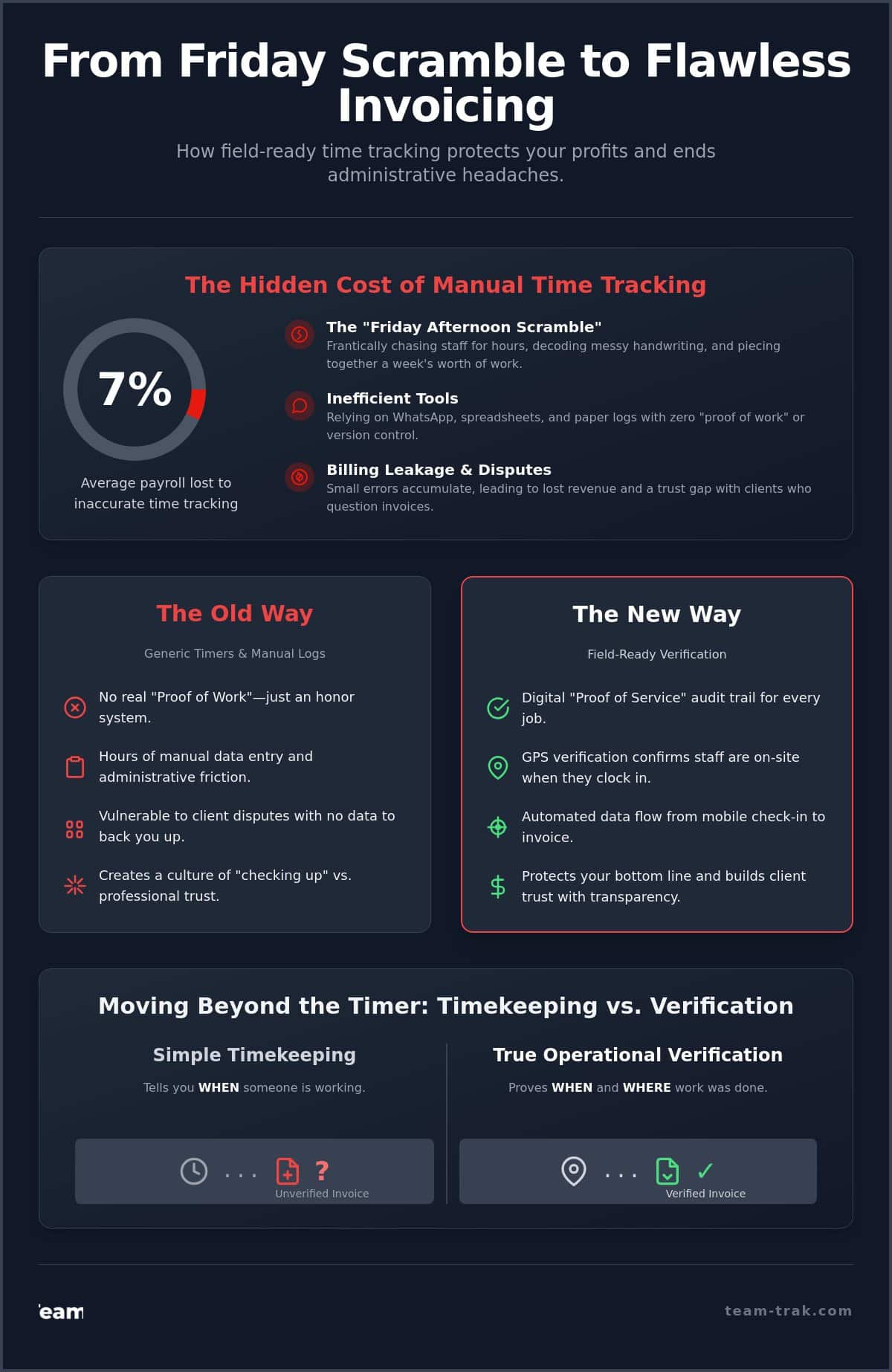
It is 4:30 PM on a Friday. Instead of heading home, you are scrolling through three different WhatsApp groups and a stack of coffee-stained paper logs. You are trying to piece together a week’s worth of work, wondering if the team actually arrived on time or if a client’s “where were they?” email is actually valid. This scramble is more than just a headache; it is a profit killer. Research shows that companies can lose an average of 7% of their total payroll costs due to inaccurate time tracking. Finding the right time tracking software for billable hours is not about adding more tech. It is about reclaiming your time and securing your revenue.
We agree that you shouldn’t have to play private investigator just to send an invoice. You deserve a system that provides proof of work without the administrative friction. In this guide, you will learn how to eliminate billing leaks and stop the Friday afternoon scramble with verified, field-ready time tracking. We will walk through how to transition from chaotic manual systems to a streamlined process that offers GPS-backed accountability, automated invoicing, and the operational clarity you need to grow your service business with confidence.
Key Takeaways
- Replace the stress of the “Friday afternoon scramble” with a system that captures field data accurately as it happens.
- Understand the critical difference between a desk-based timer and field-ready verification that uses GPS to prove staff were actually on-site.
- See how the right time tracking software for billable hours protects your profit by eliminating billing leaks and manual entry errors.
- Learn to automate the flow of data from a mobile check-in directly to your client invoices and accounting software.
The Hidden Cost of Manual Time Tracking for Billable Hours
Billable hours are the lifeblood of any field service business. They represent the bridge between the hard work your team does on-site and the revenue that keeps your operations running. However, if you are still relying on memory or paper logs, that bridge is likely crumbling. Many operators find themselves caught in the “Friday Afternoon Scramble,” a frantic ritual of chasing staff for hours, decoding messy handwriting, and trying to remember if a job took three hours or four. This isn’t just an administrative chore; it is a fast track to burnout for you and your management team.
The financial impact of these manual systems is often underestimated. Small, 15-minute errors might seem trivial in the moment, but they create a phenomenon known as “billing leakage.” Research shows that companies can lose an average of 7% of their total payroll costs due to inaccurate time tracking. If five technicians each lose just 15 minutes of billable time per day, you are looking at over an hour of lost revenue every single day. Beyond the numbers, manual systems create a trust gap. When a client questions an invoice, a paper timesheet offers no defense. Implementing a dedicated time tracking software for billable hours ensures that every minute is accounted for with a digital trail, reducing disputes and speeding up payment cycles.
Why Spreadsheets and WhatsApp Fail Field Teams
Using WhatsApp or spreadsheets might feel like a free solution, but the hidden costs are massive. These tools provide zero “proof of work.” A text message saying “I’m finished” doesn’t tell you where the staff member was or if they actually completed the job requirements. For the business owner, manual data entry becomes a second, unpaid job. You spend your evenings moving data from a chat app into a spreadsheet, only to realize someone retrospectively edited their hours. This lack of version control makes it impossible to maintain a single source of truth. To simplify operations, you need a system that captures data at the source rather than relying on a game of digital telephone.
The Psychology of “Operational Realism”
There is often a friction between tracking and trusting a team. We call this operational realism. Experienced operators know that staff actually prefer clear, digital systems. Vague manual processes leave employees wondering if they’ll be paid correctly or if they’ll be blamed for client complaints. Moving to time tracking software for billable hours shifts the culture from “checking up” on people to “checking in” on progress. It provides a neutral, third-party record that protects the staff member’s hard work just as much as it protects your bottom line. When you use Time-tracking software that is built for the field, the “Friday scramble” disappears, replaced by a sense of calm and professional accountability.
Moving Beyond the Timer: Why Field Teams Need Verification
Most time tracking software for billable hours was originally designed for people sitting at desks. In that world, tracking is simple; you click a button on your laptop and the clock starts. But for field service operations, a simple timer is not enough. When your team is spread across multiple sites, you don’t just need to know when they are working; you need to know where they are working. This is the difference between simple timekeeping and true operational verification. Verification provides the ground truth that protects your revenue and your reputation.
Without verification, you are forced to rely on the honor system. While we all want to trust our teams, the lack of data leaves you vulnerable to client disputes and human error. If a client claims a technician arrived late or left early, you have no evidence to prove otherwise. Moving beyond a basic timer to a verification-based system allows you to provide a digital “proof of service” audit trail. This transparency is one of the major benefits of tracking employee hours, as it transforms a simple bill into a verified record of work performed.
GPS Verification: Protecting Your Reputation
GPS verification isn’t about micromanagement. It is about data integrity. By using GPS location verification, you can confirm that a staff member was physically at the correct address when they clocked in. If a client disputes a charge, you can pull up a verified map coordinate and timestamp to settle the issue in seconds. GPS verification acts as an insurance policy for your billable hours, ensuring every invoice you send is backed by hard data. This level of accountability often results in faster payments and fewer awkward phone calls with skeptical customers.
QR Codes: The End of “Buddy Punching”
For site-specific attendance, QR code tracking is the gold standard. By placing a unique QR code at a client’s location, you ensure that staff must be physically present to start their billable clock. This effectively eliminates “buddy punching” or the temptation for staff to clock in while they are still ten minutes away in traffic. I once worked with a cleaning business owner who suspected her team was leaving 30 minutes early on Friday afternoons. After implementing QR code check-outs, she discovered she was losing nearly ten hours of billable time across her team every week. The system didn’t just catch the error; it corrected the behavior immediately without a single argument. If you want to see this level of clarity in your own business, you can reach out to see how verification works in the field.
Comparing Generic SaaS Timers vs. Operational Workforce Platforms
When you search for time tracking software for billable hours, most results point toward tools built for agencies, lawyers, or graphic designers. These users sit at desks with consistent power and high-speed internet. Their primary need is a digital stopwatch to log six-minute increments. However, your reality as a field operator is vastly different. Your team is navigating basements, remote sites, and long drives between jobs. A tool designed for a quiet office will struggle to survive the operational chaos of a service business.
The “SaaS Trap” happens when a business owner chooses a free or low-cost generic timer to save money, only to realize it creates more work. If your staff has to manually type in job names or if you have to double-check every entry against a GPS log, you haven’t solved the problem; you’ve just digitized the mess. There is also the matter of compliance. The U.S. Department of Labor maintains strict FLSA recordkeeping requirements that mandate specific data for every non-exempt employee. A basic timer often fails to capture the level of detail needed to protect you in a payroll audit.
Decision Framework: Choosing the Right Tool
To find a system that actually works, evaluate it based on staff usability first. If the app is too complex for a technician with wet hands or limited tech experience, they won’t use it. Second, look at the depth of integration with your accounting software. You want a system where timesheet automation handles the heavy lifting, moving data directly to Xero or QuickBooks. Finally, ask if the tool offers verification, like the GPS and QR codes we discussed earlier, rather than just a start button.
Field-Specific Features You Shouldn’t Ignore
A true operational workforce platform includes features that generic SaaS apps ignore. This includes an offline mode for remote sites and the ability to attach photo evidence or task checklists to a shift. These aren’t just “nice-to-haves”; they are the proof of service that justifies your billable hours to a skeptical client. For trades and field service companies, these features turn a simple time log into a comprehensive job record. Investing in a tool built for the field ensures your system stays robust as you scale from five staff members to fifty.
Turning Tracked Hours into Revenue: Automated Invoicing
The ultimate goal of tracking time isn’t just compliance; it’s cash flow. For a field operator, the most frustrating delay occurs between the moment a job is finished and the moment the invoice hits the client’s inbox. This gap is usually where profit disappears. If you are manually re-typing hours from a technician’s text message into an invoice, you are inviting human error. Using specialized time tracking software for billable hours creates a direct pipeline from the field to your bank account, ensuring no minute goes unbilled.
Automating the approval process changes how you spend your time. Instead of playing investigator, you become a reviewer. You can see at a glance if the hours match the scheduled shift and the GPS data. Once you hit approve, the data should move instantly into Xero, QuickBooks, or Sage. I’ve spoken with owners who used to spend their entire Sunday night reconciling hours just to get invoices out by Monday. By automating the data flow, they reduced their “Time-to-Pay” significantly, simply because the invoice was accurate and arrived while the service was still fresh in the client’s mind.
The Integrated Workflow for Service Firms
A professional workflow should feel like a straight line. When the process is digital, the data handles the heavy lifting for you:
- Step 1: Staff check in via a mobile app to simplify operations and record their exact arrival time.
- Step 2: The system uses timesheet automation to calculate billable totals based on your specific site rates.
- Step 3: You review the digital summary and push it directly to your accounting software with one click.
The Power of the Client Portal
Transparency is the best way to stop “Where is my invoice?” emails before they are even sent. Providing a client portal gives your customers self-service access to their service history. They can see the proof of work, including timestamps and task completions, whenever they want. This level of openness positions you as a modern partner and makes it very difficult for a client to dispute a bill. When the evidence is right there in front of them, payments happen faster. If you’re ready to stop the manual data entry, reach out to see how we automate the billing cycle.
Operational Clarity: How Team-Trak Protects Your Profit
For many business owners, the word “tracking” feels like a chore. It sounds like another administrative burden added to an already full plate. But when you shift your mindset from tracking time to managing operations, everything changes. True operational clarity isn’t about watching the clock; it’s about protecting your profit margins and ensuring that every ounce of effort from your team is reflected in your bank account. Using a dedicated time tracking software for billable hours is the most effective way to secure the value your business provides to its clients.
Team-Trak wasn’t built in a tech incubator; it was built on job sites and in back offices. We created this platform because we lived the frustration of manual systems. We knew the pain of losing a day’s worth of billing because a paper timesheet went missing or a technician forgot to log their travel time. This experience is why we prioritize “proof of work” over flashy, unnecessary features. When you have a verified record of every site visit, you gain a sense of calm authority. You no longer have to guess or apologize to clients; you simply show the data. This clarity is what ultimately gives you your weekends back.
Built for Your Industry
Every industry has its own rhythm and its own set of administrative headaches. We’ve tailored our solutions to meet the specific demands of construction firms and trades and field service companies where site-specific verification is non-negotiable. We also address the unique, fast-paced needs of short-term rental and Airbnb hosts who need to coordinate cleaning and maintenance across multiple locations with total precision. Your software should work for you by adapting to your specific workflow, rather than forcing you to change how you do business.
Getting Started Without the Stress
The transition from paper or WhatsApp to a digital system doesn’t have to be overwhelming. We focus on low-friction onboarding that allows you to move at your own pace. You can start by simply replacing paper logs with the mobile app and then gradually integrate more advanced features as your team gets comfortable. This visibility is the foundation for long-term growth; you can’t scale what you can’t measure. By implementing a professional time tracking software for billable hours, you are investing in the future stability of your company. You’ll find that when the administrative friction disappears, your team is happier, your clients are more trusting, and your business is more profitable. If you are ready to see the difference that operational realism makes, book a demo to see Team-Trak in action and start verifying your value today.
Take Control of Your Operational Future
The Friday afternoon scramble isn’t an inevitable part of running a service business; it’s a symptom of a system that lacks verification. By moving from basic timers to a model that prioritizes proof of work, you protect every dollar your team earns in the field. Implementing a professional time tracking software for billable hours ensures that your revenue is backed by hard data rather than memory or messy paperwork. You’ve learned how GPS-verified attendance and direct Xero or QuickBooks integration can turn hours into invoices in minutes, not days.
We built Team-Trak as experienced service operators who have lived through the stress of client disputes and manual payroll. We know the relief that comes when you finally have total workforce visibility. You deserve to send invoices with confidence and get your weekends back. It’s time to replace the chaos of WhatsApp and paper with a system designed for operational realism. Verify your value and build a more resilient, profitable business today.
Stop the Friday scramble and start tracking billable hours with precision—Try Team-Trak for free
Frequently Asked Questions
How does GPS verification actually work for my staff?
GPS verification captures a single location coordinate at the exact moment a staff member clocks in or out using the mobile app. It doesn’t monitor their every move throughout the day; it simply provides a digital breadcrumb that proves they were physically on-site when the billable clock started. This data is then attached to the digital timesheet for your review, providing the ground truth needed to settle any potential client disputes.
Can I track billable hours if my team works in areas with poor mobile signal?
Yes, the mobile staff app is designed with an offline mode specifically for remote job sites or basements where cellular signals fail. The app stores the timestamp and location data locally on the employee’s device. Once the technician returns to an area with a stable connection, the information syncs automatically to the central platform. This ensures your time tracking software for billable hours remains accurate regardless of signal strength.
Does this software integrate with Xero or QuickBooks?
Team-Trak offers direct links to online accounting systems including Xero, QuickBooks, and Sage. This integration allows you to push approved billable data directly into your invoicing tool without any manual typing. It eliminates the “double-handling” of information that often leads to costly human errors and ensures your ledger matches the work actually performed in the field.
Will my staff feel like I am spying on them?
Most field staff actually prefer digital systems because it protects them from being blamed for client complaints or late arrivals. When you frame the system as a tool for “proof of work,” it builds a culture of accountability rather than suspicion. It ensures they are paid correctly for every minute they work, which removes the stress of wondering if their manual logs will be questioned on payday.
How much time can I expect to save on payroll and invoicing?
While every business is different, operators often report a 50% reduction in the time spent on administrative tasks. By using time tracking software for billable hours, you stop the manual “Friday scramble” of chasing paper logs and decoding messy handwriting. Invoices that used to take an entire weekend to prepare can often be reviewed, approved, and sent in a matter of minutes.
Is it possible to track specific tasks within a billable hour?
You can utilize task management and checklists to document exactly what was accomplished during a shift. This provides a detailed “proof of service” that goes far beyond a simple timestamp. Instead of a vague invoice for “labour,” your client receives a verified list of completed tasks, which justifies your rates and builds long-term professional trust.
Can I give my clients access to see their own billable history?
Yes, the Client Portal Access feature allows your customers to log in and view their own service history at any time. They can see timestamps, task completions, and verified attendance records for their specific locations. This self-service model drastically reduces the volume of “Where is my invoice?” emails and positions your company as a modern, transparent service provider.
What happens if a staff member forgets to check out?
If a staff member remains clocked in past their expected shift end, the system flags the entry for manager review. You can easily adjust the timesheet based on GPS data or a quick conversation with the technician before the data is pushed to payroll. This failsafe ensures that your records remain precise even when human forgetfulness occurs on a busy job site.

Disclaimer
The information provided in this article is for general informational purposes only and reflects the opinions and experiences of the author. While every effort has been made to ensure accuracy, Team Trak makes no guarantees regarding completeness