
What if the biggest drain on your profit isn’t your labor cost, but the three hours you spend every Monday morning arguing over when a team actually arrived on site? You aren’t alone in feeling this weight. Most service business owners accept administrative friction as an unavoidable tax on their time. You’ve likely dealt with guesstimated hours or awkward client disputes that leave you wishing for a clearer picture of the work day. It is incredibly difficult to lead a mobile team when you lack real visibility into their daily attendance and progress.
Finding the right gps time clock app for service businesses changes that dynamic by turning location data into a practical operational anchor. This guide will show you how to eliminate manual timesheet entry and verify field attendance with absolute precision. We will walk through the essential features for 2026, including geofencing and legal compliance, to give you the visibility you need to run a more profitable, stress-free operation. You will discover how to replace operational confusion with data-driven peace of mind.
Key Takeaways
- Identify the “invisible costs” of manual timesheets and how to stop profit leaks caused by rounded hours and administrative friction.
- Evaluate the essential features of a gps time clock app for service businesses to ensure your solution provides true location verification rather than just basic tracking.
- Learn how to navigate staff concerns by positioning GPS tools as a way to ensure fairness and reward the accountability of your best field workers.
- Discover how to provide clients with definitive proof of work, reducing disputes and building trust through total operational visibility.
- See how tools like QR codes and smart schedules can quietly streamline your workflow and remove the weight of constant manual oversight.
The High Cost of “Rough Estimates”: Why Service Businesses Need GPS Verification
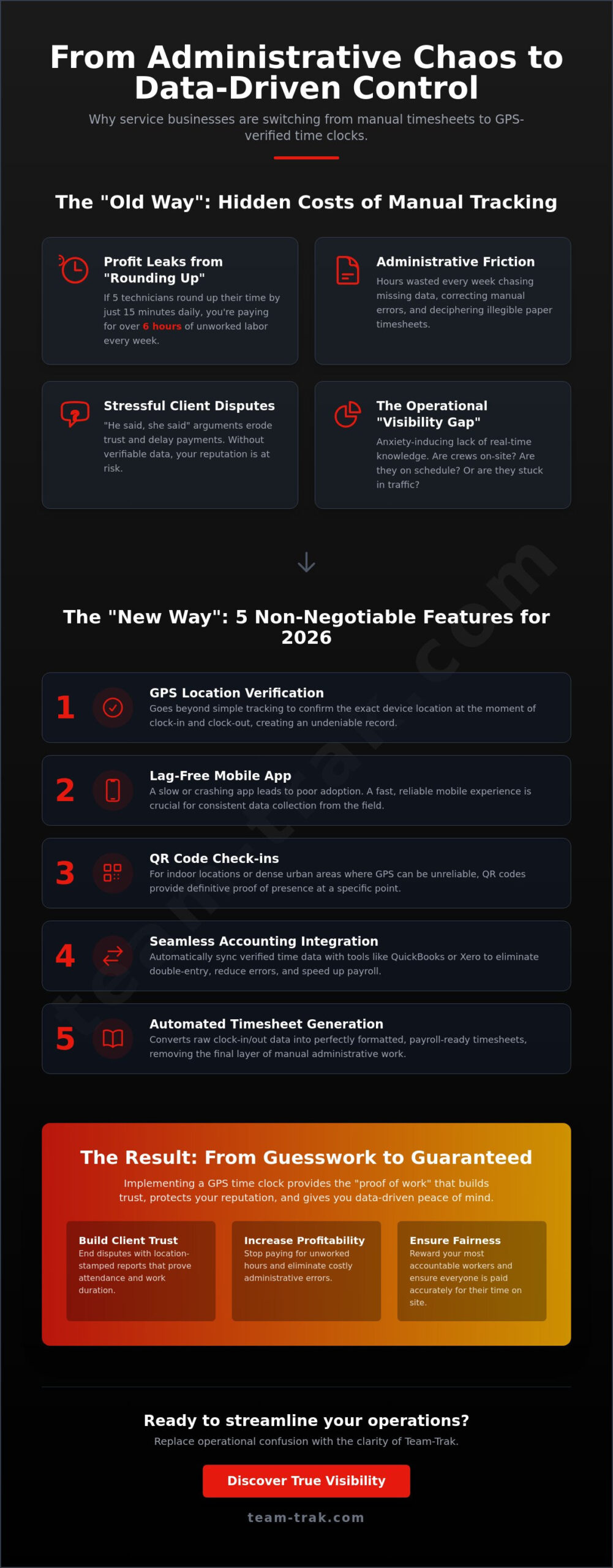
Every Friday afternoon, thousands of service business owners face the same chaotic ritual. It starts with a pile of illegible paper timesheets or a flurry of “I forgot to clock in” text messages. This scramble to piece together the week’s labor isn’t just a headache; it’s a massive drain on your focus. When you rely on rough estimates, you aren’t just managing a team; you’re playing a guessing game with your profit margins. Manual time and attendance systems often lead to “invisible costs” that quietly eat away at your cash flow. If five technicians round up their finish time by just fifteen minutes every day, you’re paying for over six hours of unworked labor every single week.
The right gps time clock app for service businesses replaces these guesses with hard facts. Beyond just stopping time theft, it eliminates the operational confusion that stems from disorganized data. When you can verify exactly when a team arrived and departed from a job site, you move from a state of constant defensive management to one of calm control. This level of GPS location verification provides the “proof of work” your clients increasingly expect. It turns a simple administrative task into a professional value-add that sets your business apart from competitors who still rely on old-school methods.
Beyond the Clock: The Visibility Gap in Field Operations
Knowing your team logged forty hours is one thing. Knowing they spent those hours at the correct properties is another. Managing remote teams without real-time data creates a visibility gap that fuels anxiety for business owners. You shouldn’t have to wonder if a crew is on-site or still stuck in traffic. Administrative friction is the cumulative mental energy wasted on chasing missing data, correcting manual errors, and reconciling conflicting reports. A dedicated gps time clock app for service businesses closes this gap by providing a clear, real-time map of your operations, allowing you to breathe easier knowing the work is actually getting done.
Protecting Your Reputation with Verified Data
Client disputes are an unfortunate reality of the service industry. A customer might claim a cleaner only stayed for twenty minutes when they were actually there for an hour. Without data, it’s your word against theirs. GPS data acts as an objective third party in these disagreements. Instead of a stressful “he said, she said” phone call, you can simply provide a location-stamped report that proves attendance. This transparency builds immense trust. It shows your clients that you value accountability as much as they do, protecting your reputation and ensuring your invoices get paid without delay.
Evaluating GPS Time Clock Apps: 5 Non-Negotiable Features for 2026
Choosing a gps time clock app for service businesses isn’t just about finding a digital timer. It’s about building a system that verifies reality. In 2026, simple location tracking is no longer the standard for excellence. You need tools that offer high-resolution visibility without the lag that frustrates your field staff. If your mobile staff app is slow or crashes, your team will stop using it. This leads to missing data and a return to the manual entry you’re trying to escape. Effective employee performance monitoring relies on data that is both accurate and easy for workers to provide.
The most effective platforms link directly to your accounting systems. This closes the loop between the job site and the bank account. When data flows automatically, you eliminate the risk of human error and the administrative friction of double-handling information. Look for these five essential features:
- GPS Location Verification: Confirms the exact position at the moment of clock-in.
- Lag-Free Mobile App: Ensures high adoption rates among field technicians.
- QR Code Check-ins: Provides undeniable proof of presence at specific indoor locations.
- Accounting Integration: Syncs data with tools like Xero or QuickBooks instantly.
- Automated Timesheets: Converts raw attendance data into ready-to-process records.
GPS vs. QR Codes: Which Verification Method Wins?
GPS geofencing is excellent for passive tracking. It’s great for construction or landscaping where the job site covers a large area. However, QR code tracking features offer a higher level of site-specific accountability. For cleaning or home care, a QR scan proves the worker was physically inside the building. Use GPS for general location and QR codes when you need absolute proof of presence at a specific doorway or equipment station. This multi-layered approach removes operational confusion for both you and your client.
The Role of Automated Timesheets and Billing
Your gps time clock app for service businesses should do more than record time; it should prepare your business for billing. By using automated timesheets, you move data from a clock-in directly to an invoice. This reduces the “death by a thousand spreadsheets” that plagues growing companies. Direct accounting links ensure your payroll is fast and your billing is accurate. If you want to see how these tools simplify your day, you can speak with an operations expert to find the right fit for your team.
Implementation Without Friction: Navigating the “Big Brother” Concern
Introducing a gps time clock app for service businesses often triggers a common reaction: the “Big Brother” concern. It’s a natural hesitation. Most field workers value their independence and don’t want to feel micromanaged or watched. As an operator, you must address this head-on by reframing the conversation. This isn’t a surveillance tool; it’s a tool for fairness. When everyone’s time is verified, your most reliable workers no longer have to carry the weight of those who round up their hours. It levels the playing field and ensures that hard work is documented and rewarded.
A “Privacy First” approach is the foundation of a successful rollout. Make it clear that tracking only occurs during active clock-ins. Once a staff member clocks out, the visibility ends. This boundary is non-negotiable for building trust. By focusing on technical confidence and clear boundaries, you can move from operational confusion to a culture of high performance without losing the respect of your team.
Step-by-Step: Rolling Out Your New Time Clock App
A phased rollout is always more effective than a sudden mandate. Follow these steps to ensure a smooth transition:
- Step 1: Communicate the “Why.” Explain that verified data builds client trust and protects the company’s reputation.
- Step 2: Start with a pilot group. Choose a few trusted veterans to test the app and provide feedback.
- Step 3: Provide clear training. Show the team exactly how GPS verification works so they feel in control of the process.
- Step 4: Review data together. Show them how the app automatically generates their timesheets, saving them from the dreaded Friday afternoon paperwork scramble.
Building a Culture of Accountability
True accountability goes beyond just showing up. By integrating task management and checklists into the clock-in process, you add value to the technician’s day. They get a clear roadmap of their tasks, and you get proof of work. This transparency reduces staff turnover because payroll errors are virtually eliminated. When people know they will be paid accurately and on time for every minute worked, their job satisfaction increases. If you’re ready to build a more transparent team culture, you can book a discovery call to see how we handle the human side of implementation.
Streamlining Operations with Team-Trak: The Grounded Choice
Many software platforms promise to revolutionize your industry with complex AI or overwhelming feature sets. Team-Trak takes a different approach. We believe the best gps time clock app for service businesses is the one that quietly removes operational problems without adding new ones. Our focus is on providing a practical, grounded solution that replaces administrative friction with clear, data-driven results. It’s about giving you the peace of mind that comes from knowing your mobile team is exactly where they need to be, doing exactly what they were hired to do.
For cleaning companies, construction crews, and trade professionals, the combination of GPS verification and smart schedules creates a seamless workflow. You aren’t just tracking time; you’re managing a professional standard. By using a gps time clock app for service businesses that integrates QR code check-ins, you ensure site-specific accountability that clients respect. This visibility allows you to step back from the day-to-day chaos and lead your business with confidence.
From Clock-In to Client Portal
Transparency is the most effective way to eliminate billing disputes and build long-term client trust. With Team-Trak, verified hours from the field feed directly into a dedicated client portal. This creates a bridge of total transparency between your team’s effort and your client’s invoice. The transition from field work to verified billing happens in a single click, removing the need for manual data entry. To understand how this fits into your larger digital strategy, explore our Client Portal Software Guide.
Ready to Simplify Your Operations?
The shift from administrative friction to operational excellence starts with a single decision to prioritize visibility. You don’t need a revolutionary overhaul; you need a reliable partner that understands the realities of managing a mobile workforce. Our onboarding process is designed to be stress-free and low-commitment, ensuring your team can get started without technical headaches. If you’re ready to see how we help trades and field service companies succeed, book a consultation to see how we help service businesses today.
Take Control of Your Field Operations Today
Managing a mobile workforce shouldn’t feel like a constant battle against missing data and administrative friction. By moving away from rough estimates and embracing verified proof of work, you reclaim your time and protect your profit margins. We’ve seen how a modern gps time clock app for service businesses provides the visibility needed to resolve client disputes before they even start. Whether you utilize GPS Location Verification for broad site coverage or QR Code Check-ins for specific indoor accountability, the result is the same: professional excellence.
Linking these tools through Direct Accounting Integration ensures your payroll is as precise as your field work. This transition isn’t just about adopting new software; it’s about building a business culture rooted in fairness and transparency. You deserve the peace of mind that comes from a streamlined, automated operation that lets you focus on growth rather than paperwork. It’s time to leave the Friday scramble behind and move toward a more organized future.
Quietly remove your operational headaches; Contact Team-Trak today
Common Questions About GPS Time Tracking
Is a GPS time clock app considered “spying” on employees?
GPS verification is a tool for professional accountability, not surveillance. The app only captures location data when an employee is actively clocked in for a shift. Once they clock out, the visibility ends entirely, and no further data is shared. This approach respects personal privacy while providing the proof of work needed to bill clients accurately and pay staff fairly for their actual time on site.
How much data does a GPS time clock app use on a staff member’s phone?
A gps time clock app for service businesses uses a negligible amount of cellular data. It typically requires less data than loading a single mobile webpage because it only sends small packets of text coordinates and timestamps. Most field workers won’t notice any impact on their monthly data plan or battery life. It is designed to be a lightweight background process that doesn’t interfere with other phone functions.
What happens if a field worker loses internet connection while on site?
If a technician loses signal in a remote area or a basement, the app stores the timestamp and location data locally on the device. As soon as the phone reconnects to a cellular or Wi-Fi network, the information syncs to the core platform automatically. This ensures your records remain accurate without requiring the team to stop work or hunt for a signal just to log their hours.
Can I use a GPS time clock app for both contractors and full-time staff?
You can use the platform for your entire mobile team regardless of their employment status. It’s a practical way to maintain a single standard of accountability across your workforce. Since the mobile app is easy to install on any smartphone, onboarding external contractors takes minutes. This unified system eliminates the administrative friction of managing different tracking methods for different types of workers.
Do GPS time clock apps integrate with accounting software like Xero or QuickBooks?
Yes, the system is built to link directly with major online accounting systems. This allows you to move verified hours from the automated timesheet module straight into your payroll or invoicing software with a few clicks. By closing the loop between the field and the office, you remove the risk of manual data entry errors. A gps time clock app for service businesses simplifies your billing and ensures everyone gets paid correctly.
How do I handle staff who forget to clock out at the end of their shift?
Managers can easily adjust or close out entries through the administrative dashboard if a worker forgets to clock out. The system also allows you to set up automatic reminders that prompt staff to check their status when they leave a designated job site. These small guardrails help reduce operational confusion and ensure your data is clean and ready for payroll review by the time the week ends.

Disclaimer
The information provided in this article is for general informational purposes only and reflects the opinions and experiences of the author. While every effort has been made to ensure accuracy, Team Trak makes no guarantees regarding completeness