
You are sitting at your desk on a Friday afternoon when a high-value client calls to dispute a four-hour labor charge. You are certain your team was on-site, but without a clear audit trail, it is your word against theirs. It is a frustrating, familiar scenario that leaves you feeling more like a private investigator than a business owner. This lack of “proof of work” doesn’t just hurt your bottom line; it erodes the professional reputation you have worked years to build.
We agree that managing field operations should not feel like navigating a series of blind spots. Whether it is staff leaving sites early or the administrative nightmare of correcting manual timesheets, the lack of visibility is exhausting. You want a team that is accountable and a business that reflects your high standards. Adopting software to track job progress in real-time is the fastest way to turn that vision into a daily reality for your service business.
This guide will show you how to eliminate operational friction and build a more transparent, professional operation. We will look at how moving away from paper systems toward digital verification provides the operational clarity your clients demand and the peace of mind you deserve.
Key Takeaways
- Understand why manual tracking fails as you scale and how “ghost hours” silently erode your profit margins over time.
- Discover how software to track job progress in real-time uses mobile apps and GPS verification to create a reliable digital audit trail for every site visit.
- Learn to use digital task checklists to move beyond simple location tracking and ensure consistent service quality across every team.
- See how providing a client portal can eliminate 90% of status-update phone calls and build the transparency needed to justify premium pricing.
- Get a clear three-step roadmap for transitioning from administrative chaos to a streamlined system that integrates directly with Xero or QuickBooks.
The Visibility Gap: Why Service Businesses Struggle with Real-Time Tracking
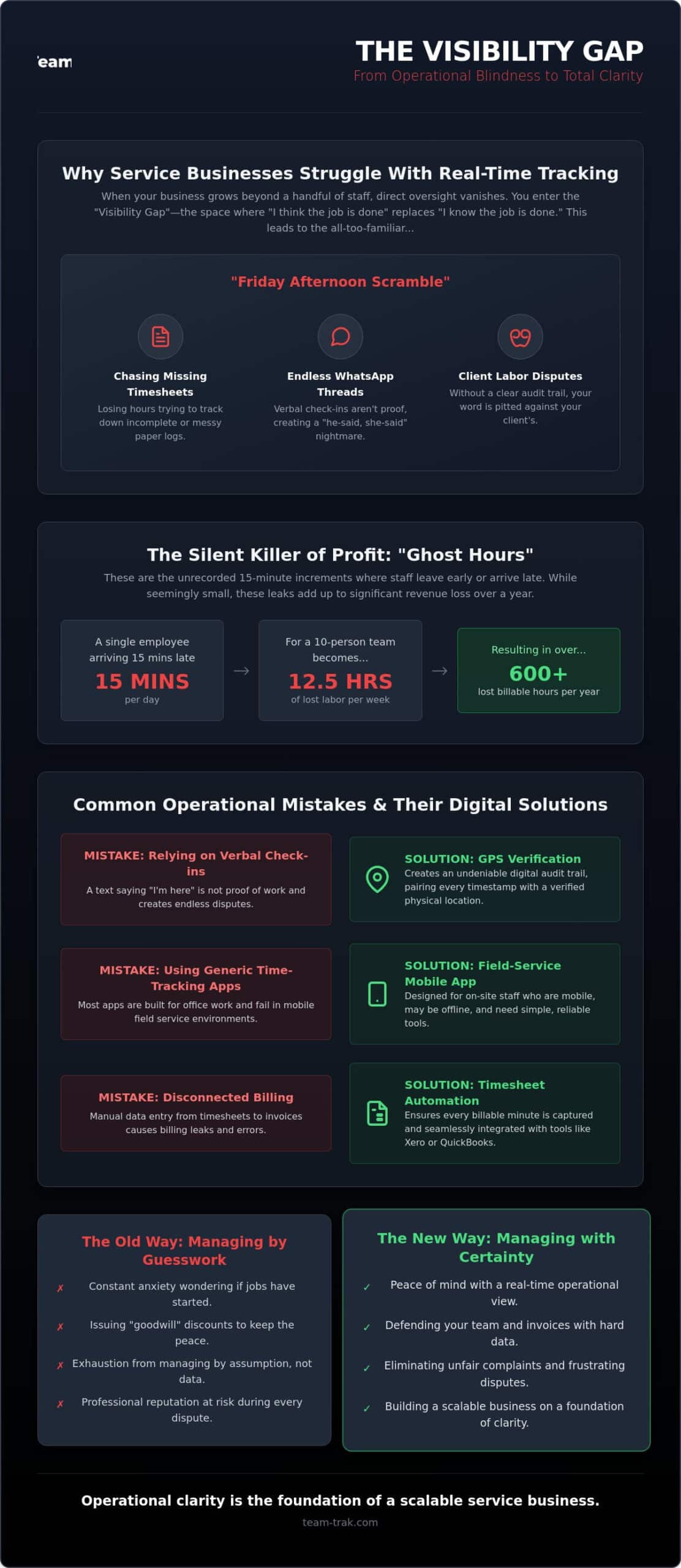
Scaling a service business is a double-edged sword. When you had two employees, you knew exactly where they were and what they were doing. Once you grow past five or ten staff members, that direct connection vanishes. You enter the “Visibility Gap.” This is the space where “I think the job is done” replaces “I know the job is done.” Without software to track job progress in real-time, you are effectively flying blind, relying on trust in an industry where margins are often thin.
Most operators experience this gap during the “Friday Afternoon Scramble.” This is that frantic hour spent chasing staff for missing timesheets, deciphering messy handwriting on paper logs, or scrolling through endless WhatsApp threads to confirm a site visit. It is an administrative nightmare that scales poorly. If your systems rely on manual input, you aren’t just losing time; you are losing money to “ghost hours.” These are the unrecorded fifteen-minute increments where staff leave early or arrive late. While they seem small, these leaks add up to significant revenue loss over a fiscal year.
This challenge falls under the broader umbrella of Field service management (FSM), a category of operations focused on coordinating off-site resources. When you lack a digital audit trail, you are stuck in a “he-said, she-said” dynamic. If a client claims your team wasn’t there, you have no hard data to defend your staff. Moving from reactive management to proactive visibility means you stop solving problems after they happen and start seeing them as they develop.
Common Operational Mistakes in Staff Tracking
- Relying on verbal check-ins: A text saying “I’m here” is not proof of work. Without GPS verification, you have no way to confirm the staff member was actually on-site.
- Using generic time-tracking apps: Many apps are designed for office workers sitting at desks. They fail in field service environments where workers are mobile, offline, or moving between multiple high-pressure jobs.
- Disconnected billing: Failing to link your tracking to your final invoice is a recipe for disaster. Using timesheet automation ensures that every billable minute is captured, preventing the “billing leaks” that happen when manual data is entered days after the work is finished.
The Emotional Toll of Operational Blindness
There is a specific kind of anxiety that comes with not knowing. You sit in your office wondering if a high-priority job has actually started or if your team is stuck in traffic. This lack of data makes it impossible to stand your ground during unfair client complaints. You end up issuing “goodwill” discounts just to keep the peace, even when you suspect your team did nothing wrong. It is exhausting to manage by guesswork.
Operational clarity is the foundation of a scalable service business, providing the verifiable data needed to eliminate disputes and ensure every hour of labor is accounted for.
How Real-Time Job Progress Software Actually Works in the Field
Real-time job tracking is more than just a digital version of a punch clock. It is a verification system that pairs a timestamp with a physical location to confirm work is happening exactly where it should be. For an operator, this means moving from a state of constant questioning to a state of absolute certainty. This transition relies heavily on a mobile staff app that acts as the primary link between your desk and the technician on-site.
To be truly effective, software to track job progress in real-time must capture both the “when” and the “where” of every shift. Knowing a staff member clocked in at 8:00 AM is useless if they were actually at a coffee shop three blocks away. Achieving near real-time visibility across your entire workforce allows you to spot delays before they become client complaints. It turns raw data into a reliable proof-of-service record that protects your business and your reputation.
GPS Location Verification vs. QR Code Check-Ins
Different sites require different levels of proof. For broad field work like landscaping or construction, GPS verification is usually sufficient to confirm arrival and duration. However, for high-security environments or multi-room cleaning contracts, QR code check-in and check-out is the gold standard. It requires the staff member to be physically standing in front of a specific point, eliminating any chance of “buddy punching” or remote clock-ins.
Introducing these tools requires a shift in perspective. Don’t frame it as monitoring. Instead, tell your team that this data protects them. In my experience, staff buy-in increases when they realize the app provides the unalterable proof needed to defend them against a difficult client’s claims. It takes the “he-said, she-said” out of their workday too.
Automating the Paperwork Trail
The real magic happens after the staff member taps “Finish” on their screen. That check-in data flows directly into automated timesheets, removing the human error that plagues manual logs. Your team no longer has to “remember” their hours on a Friday afternoon. They simply work, and the system builds the record for them.
This creates a transparent log that ensures your business stays compliant with labor laws. It prevents the billing leaks that happen when hours are guessed rather than measured. If you’re ready to stop the administrative guesswork, you can see how these tools fit your specific workflow.
Beyond the Map: Using Task Checklists for Quality Control
Knowing your team arrived on time is a solid start. But if you are managing a cleaning business or a trade firm, location is only half the battle. You need to know exactly what was done before they left the site. Without software to track job progress in real-time, you are still relying on a “best-case scenario” mindset. Digital checklists bridge the gap between presence and performance, ensuring that “done” actually means done to your specific standards.
Think about a commercial cleaning crew. They might stay on-site for the full four hours, but if they miss the executive boardroom, the client doesn’t care about their GPS coordinates. They only care about the missed room. By using task management and checklists, you standardize the quality of work regardless of which staff member is on duty. This creates “Proof of Service.” It is the verifiable data you need to justify premium pricing to high-value clients who demand perfection and accountability.
Building Effective Field Checklists
Keep your lists simple. I have seen operators build 50-item lists that staff eventually ignore because they are too cumbersome. Focus on five to ten non-negotiables per job. Use mandatory fields for the most critical parts of the service. If a staff member checks off a complex 20-minute task in under ten seconds, the system flags it. This is an operational red flag. It tells you exactly where you need to provide more training or oversight before a client notices the shortcut.
Real-Time Problem Escalation
Real-time tracking isn’t just for checking boxes. It is for reporting the unexpected. If a technician finds broken equipment or can’t access a specific wing of a building, they shouldn’t wait until they get back to the office to tell you. Instant reporting via the mobile staff app reduces the time between a problem being found and a solution being delivered. You can call the client immediately to resolve the access issue, showing them you are on top of the job as it happens.
Digital checklists transform a standard staff member into a consistent brand representative who delivers the same high-quality result every single time.
Winning the Trust War: The Power of a Client Portal
Most business owners view tracking as an internal tool for managing staff. I see it differently. In a competitive market, software to track job progress in real-time is your most powerful sales tool. It moves you out of the “low-tech” category and positions you as a transparent, professional partner. When you give clients a window into your operations, you aren’t just showing them data; you are giving them peace of mind. This is the “Transparency Advantage,” and it is why high-value clients are willing to pay a premium for your services.
Think about the time you spend answering the phone just to confirm a technician has arrived or finished a task. These status-update calls are a symptom of a lack of trust. By providing client portal access, you eliminate 90% of these interruptions. The client can see the live status of their property without ever picking up the phone. It saves your time and theirs, creating a streamlined professional relationship that traditional paper-based competitors simply cannot match.
What Should a Client Portal Include?
A functional portal needs to be simple and data-rich. It should provide real-time status updates like “Staff on site” or “Job completed” based on actual QR code check-ins. Beyond the current job, clients should have access to historical logs. These reports prove consistency over months or years of service. Finally, linking your invoices directly to these verified work hours through timesheet automation makes your billing indisputable. When a client can see the timestamped, GPS-verified history of every visit, they stop questioning the bill and start valuing the results.
Protecting Your Service Reputation
Client disputes are often the result of a misunderstanding or a lack of evidence. I have personally sat through meetings where a client insisted a team member was late, only to show them the GPS verification data that proved my team was on-site five minutes early. That data doesn’t just win an argument; it saves a relationship. Transparency builds long-term loyalty because it removes the friction of doubt.
Use this portal as a core selling point in your next big contract pitch. Tell the prospect, “You won’t have to wonder if we did the work; you’ll have a login to see it for yourself.” This level of accountability is rare in field services. It reduces “churn” in contract-based businesses because clients are hesitant to leave a partner they can actually trust. If you want to see how a portal can change your client relationships, you can book a walkthrough of our client portal features.
Implementation: From Manual Chaos to Operational Excellence
Transitioning from paper logs to digital systems can feel like a massive hurdle. I’ve spoken to many operators who worry that new technology will just add another layer of complexity to an already busy day. However, the move toward software to track job progress in real-time is actually about simplification. It is about removing the manual steps that lead to errors and exhaustion. To get it right, you don’t need a tech degree; you need a practical, three-step plan.
- Audit your friction: Identify exactly where your current system breaks down. Is it missing timesheets? Is it client disputes over hours? Start where the pain is loudest.
- Pilot with one team: Don’t roll everything out at once. Pick your most reliable crew and let them test the system for two weeks. Their feedback will help you refine the process before the full launch.
- Full Rollout: Once the pilot team is comfortable, move the rest of the business over. By this stage, you’ll have internal “champions” who can show their peers how much easier their Friday afternoons have become.
This isn’t just about tracking; it’s about the return on your time. If you can save just two hours of administrative work per week by eliminating manual data entry, the system pays for itself. For most business owners, those two hours are the difference between finishing work at 5:00 PM or staying late to fix payroll errors. We built Team-Trak because we lived the “Friday afternoon scramble” ourselves and knew there had to be a better way to manage a growing service business.
Connecting Field Ops to Finance
In 2026, manual invoicing is a liability. Linking your field data to accounting tools like Xero or QuickBooks is non-negotiable for a modern operation. When a job is marked as complete in the field, that verified data should become an invoice in seconds, not days. This drastically reduces the “payment gap” and ensures your cash flow remains healthy. Payroll accuracy also improves because you are paying staff based on verified check-in data rather than their best guesses from three days ago. It removes the friction between your field ops and your finance office.
Setting Up for Success
The key to staff buy-in is showing them what they gain. No more carrying around soggy paper timesheets or trying to remember where they were on Tuesday morning. Clarity is a gift to your team. By setting up Smart Schedules, you give your staff a clear view of their week ahead, reducing the “where am I going next?” phone calls. If you are ready to replace the chaos with control, you can start your journey toward operational clarity with Team-Trak today.
Take Control of Your Operational Future
You have spent years building a reputation for quality and reliability. Don’t let a lack of visibility erode that hard work. Transitioning to a digital verification system isn’t just a technical upgrade; it’s a strategic move to protect your margins and your sanity. By capturing every site visit and task completion, you build a business that is fundamentally more accountable and professional. Precision in the field. Peace in the office.
Adopting software to track job progress in real-time provides the data you need to win client disputes and eliminate the administrative friction that slows you down. With GPS-verified attendance for total accountability and seamless integration with Xero or QuickBooks, you can finally focus on scaling your business instead of chasing missing timesheets. We built Team-Trak because we are service operators who have lived these challenges and wanted a better way to work.
It is time to trade the stress of the unknown for the relief of precise, data-driven results. Ready to stop the scramble? Explore Team-Trak today. You’ve done the hard work of building your business; now let’s build the systems that help it thrive.
Frequently Asked Questions
Is real-time job tracking considered ‘spying’ on my employees?
Tracking isn’t about spying; it’s about creating a factual record of work that protects everyone. When you frame it as a tool that defends staff against unfair client complaints, buy-in increases. It’s a safety net that proves they were where they said they were, doing exactly what they were paid to do. Most professional teams appreciate having an unalterable record that validates their hard work.
How much data does a mobile staff app use on a technician’s phone?
Mobile apps for field tracking use remarkably little data. Sending a GPS coordinate and a timestamp uses less data than sending a single photo on WhatsApp or checking a weather report. Most staff won’t even notice the impact on their monthly data plan, as the app only transmits small bursts of text-based information during check-ins and task completions.
Can I track job progress if my staff are in an area with poor mobile signal?
You can still track progress without a constant signal. High-quality software to track job progress in real-time includes an offline mode that stores check-in data and completed tasks locally on the device. Once the technician moves back into a 4G or Wi-Fi area, the system automatically syncs the information to the office portal without any extra steps.
What is the difference between GPS tracking and GPS verification?
GPS tracking follows a person’s every move throughout the day, which can be invasive and heavy on battery life. GPS verification only records the location at specific moments, such as when a staff member checks in or out of a site. This provides the “proof of arrival” you need for billing and accountability without monitoring their entire driving route or private breaks.
How do I integrate job tracking software with my existing accounting system like Xero?
Integration is typically a straightforward process handled through a secure API connection in the settings menu. Once you link the accounts, your verified job data flows directly into your accounting platform. This allows you to generate accurate invoices or process payroll in Xero or QuickBooks without the need for manual data entry or double-checking paper logs.
Will real-time tracking software work for a very small team of 2-3 people?
Small teams often benefit the most from these systems because their margins are tighter. When you only have two or three people, you can’t afford to lose hours to administrative errors or unverified client disputes. Implementing professional software to track job progress in real-time early on sets a standard of accountability that makes scaling much easier as you grow.
What happens if a staff member forgets to check in or out?
Admins have the authority to manually adjust timesheets if a staff member makes a mistake. The system will usually flag these specific entries as “manually edited” rather than “GPS verified.” This keeps your records honest and transparent while allowing for the human reality of a busy, high-pressure workday in the field.
Can clients see the exact GPS location of my staff at all times?
No, clients do not see live GPS movements or the private locations of your staff. Their portal access is limited to job status updates and verified arrival or completion timestamps. This maintains staff privacy and business security while still providing the high level of transparency that modern clients demand for their own records.

Disclaimer
The information provided in this article is for general informational purposes only and reflects the opinions and experiences of the author. While every effort has been made to ensure accuracy, Team Trak makes no guarantees regarding completeness