
It’s 4:00 PM on a Friday. Instead of heading home, you’re stuck in the office chasing down missing hours and defending a disputed invoice from a skeptical client. You know your team is working hard, but without a clear record of their location and time on-site, it’s your word against the customer’s. You need a way to see what’s happening on the ground without making five phone calls for every job. Finding the right field technician software shouldn’t feel like adding another chore to your list. It should be the tool that finally gives you your time back.
We understand that your time is far too valuable to be spent playing detective with payroll and site visits. You deserve a system that provides indisputable proof of service while actually stripping away the administrative weight that holds you back. In this article, you’ll learn how to choose a platform that offers real-time visibility and automated timesheets without making your technicians feel micromanaged. We will show you how to replace the Friday afternoon scramble with professional records and total operational peace of mind.
Key Takeaways
- Stop the Friday afternoon scramble by identifying the hidden financial drain of manual timesheets and unverified site visits.
- See how GPS and QR code check-ins give you instant visibility into your team’s location without the need for constant phone calls.
- Learn why choosing the right field technician software means prioritizing simple, user-friendly tools that your team will actually use.
- Discover how to turn verified field data into faster payments by linking your site operations directly to your accounting software.
- Bridge the trust gap with your staff by framing accountability tools as a way to protect their professional reputation.
The Real Cost of Managing Field Teams on Paper
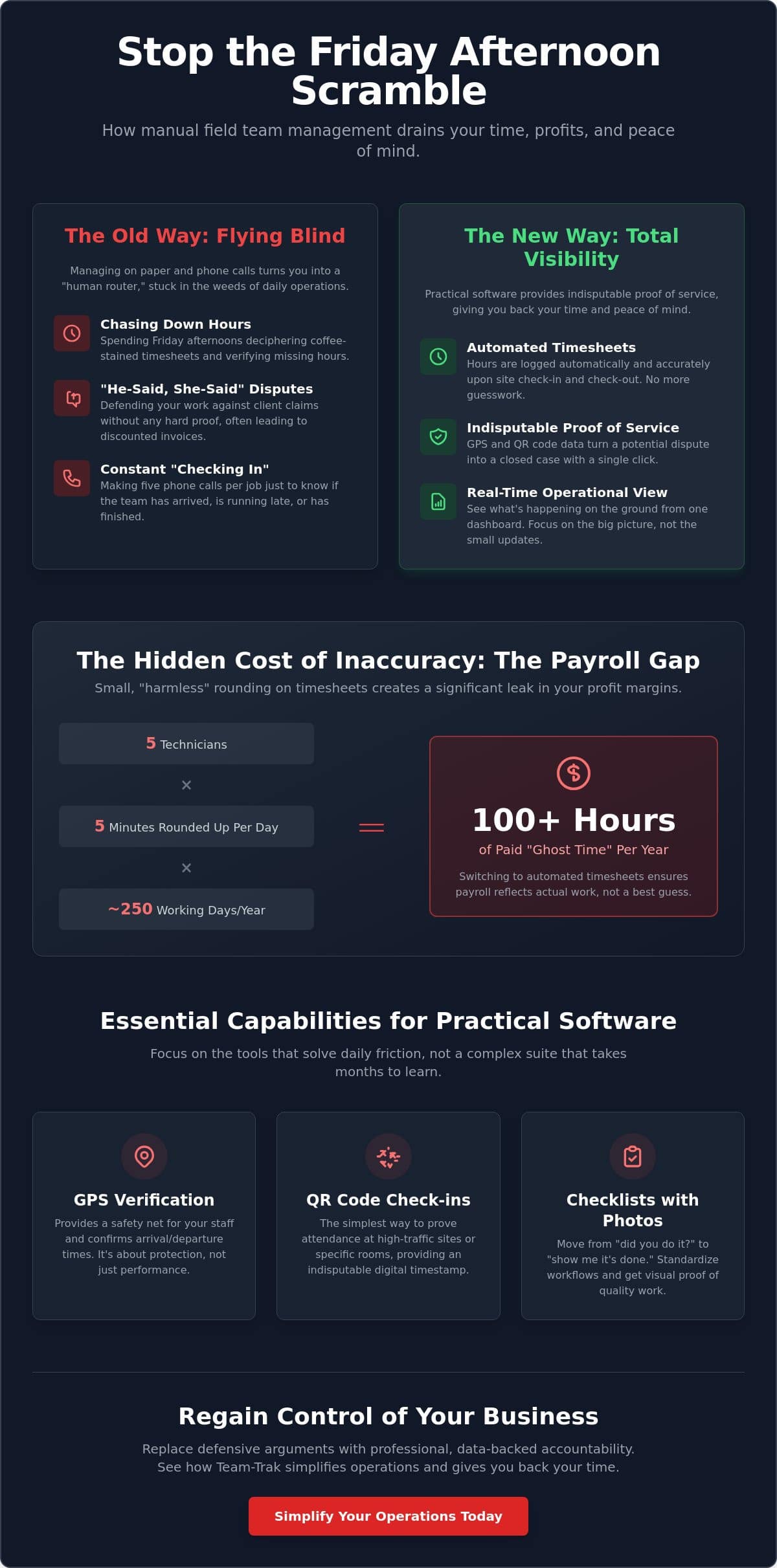
Most business owners didn’t start their company to spend Friday afternoons squinting at coffee-stained timesheets. Yet, for many, this is the weekly reality. Managing a mobile team using paper logs or text messages creates a massive administrative burden. It turns you into a “human router,” forcing you to juggle dozens of small updates just to keep the day moving. Field service management (FSM) is often discussed in complex technical terms, but at its heart, it’s about solving this specific chaos. Without reliable field technician software, you’re flying blind, relying on memory and honesty rather than hard data.
Consider the mental load of these daily interruptions:
- Calling a tech to see if they’ve arrived at the third job of the day.
- Texting a client to explain why the team is running late.
- Answering “how long will this take?” without having the previous job’s data.
- Verifying hours for payroll when the paperwork is missing or illegible.
This constant “checking in” doesn’t just waste time. It drains the energy you should be using to grow the business. It keeps you stuck in the weeds of daily operations instead of looking at the big picture.
The Payroll Gap: When Hours Don’t Match Reality
Deciphering handwritten notes at the end of the week is a recipe for error. When a technician can’t remember exactly when they finished on Tuesday, they round up. It feels harmless to add five minutes here and there. However, those small gaps add up. If you have five technicians rounding up five minutes every day, you’re paying for over 100 hours of “ghost time” every year. This isn’t just a minor mistake; it’s a direct leak in your profit margins. Switching to automated timesheets ensures that payroll reflects actual work, not just a best guess made days after the job was finished.
Client Disputes and the Need for Proof
Trust is the currency of any service business. When a client calls to claim a technician never showed up, or left an hour early, you’re stuck in a “he-said, she-said” trap. Without evidence, you often end up discounting the invoice just to keep the peace. In a modern service economy, simply saying “I was there” isn’t enough to protect your reputation. You need an indisputable record. We define proof of service as the digital verification of a technician’s presence and activity at a specific location. It serves as the ultimate shield for business owners, turning a potential dispute into a closed case with one click. Implementing field technician software moves your business away from defensive arguments and toward professional, data-backed accountability.
Essential Capabilities for Practical Field Technician Software
Choosing the right field technician software shouldn’t be about collecting the most features. It’s about finding the ones that actually solve your daily friction. You don’t need a complex enterprise suite that takes months to learn. You need tools that give you immediate answers. When your software handles the basic questions of “where,” “when,” and “how well,” you can stop managing individual tasks and start managing your business growth.
Verification That Protects Your Team and Your Business
There is a vital difference between “tracking” and “verification.” Tracking often feels like surveillance, which technicians rightfully resist. Verification, however, is about proof of work. Using GPS verification provides a safety net for your staff. If a lone worker is on a remote site and hasn’t moved for an hour, you have the visibility to check on their safety. It’s a tool for protection, not just performance.
For high-traffic sites or multi-room facilities, QR code tracking is the simplest way to prove attendance. A quick scan provides an indisputable digital stamp that confirms a technician was standing in the right room at the right time. This level of detail builds a connected business ecosystem where facts replace guesses. It protects your team from unfair client claims and protects your business from liability.
Checklists That Drive Consistency
Consistency is the hardest thing to maintain as you scale. You need to move from asking “did you do it?” to “show me it’s done.” Digital checklists with photo uploads turn a verbal promise into visual proof. Whether it’s a new hire or a twenty-year veteran, standardizing the workflow ensures every client receives the same high-quality service. Smart checklists transform your team from a group that needs constant supervision into a self-managing unit of experts.
Once the work is verified and the checklist is complete, the administrative work should be over. Modern field technician software takes that field data and moves it directly toward invoicing. No more double entry. No more chasing paper. If you want to see how these practical tools can simplify your specific workflow, reach out to our team for a chat.
Why Most Software Fails Your Field Team (and How to Avoid It)
Most business owners look at a feature list and think more is better. In reality, feature-heavy enterprise software is often the primary reason field teams revolt. If an app requires ten clicks just to start a job, your technicians will simply stop using it. They’re working in the real world with rain, dirty gloves, and spotty signal. They don’t have time for digital clutter or complex menus that slow them down.
The #1 predictor of long-term success with field technician software is ease of use. When a tool is simple, it becomes an invisible part of the workflow. When it’s complex, it becomes a burden that gets ignored. To build a truly Connected Field Service Management Ecosystem, you have to prioritize the person holding the phone. If the software doesn’t work for them, it won’t work for your business.
Avoiding Tech Fatigue in the Field
Your team will hate an app that feels like a chore. If they have to navigate multiple menus to log a site visit, they’ll wait until they get home to do it. By then, the data is just a guess. You need “one-tap” operations where a quick scan or a single button press is all it takes to verify their presence. This is the key to field service management that actually reduces your admin instead of adding to it.
Implementation Without the Stress
Don’t try to change every process in one day. Start small. Introduce verification as a way to protect the team rather than watch them. When a client disputes an invoice, that digital record is the technician’s best friend. It proves they were there and did the job right. Proof of work is a benefit for the technician’s own protection, ensuring their reputation and hard work are never questioned. As a founder, you set the tone. Show them the tool is about clarity and accountability, not surveillance.
Ready to simplify your operations and support your team? Talk to us about getting started today.
Streamlining Your Business from Site Visit to Invoicing
The real goal of any operational system isn’t just to watch the team. It’s to ensure that every hour of hard work translates into a healthy bank balance as quickly as possible. When you use field technician software that captures verified data in real time, you remove the lag between the site visit and the invoice. Instead of waiting days for a technician to drop off a crumpled job sheet, you have the proof you need to bill the client the moment the work is done. This speed doesn’t just look professional; it directly improves your cash flow.
When your field data is accurate and verified, disputes vanish. You don’t have to second-guess the numbers or apologize for billing errors. You simply present the facts. This clarity builds a foundation of trust with your clients that manual systems can never match. It turns your billing cycle from a source of friction into a streamlined, automated process that supports your business rather than draining it.
Connecting the Field to the Front Office
For many trades and field service companies, the biggest financial leak isn’t material costs. It’s the “lost job” syndrome. This happens when a technician completes a small repair or an extra task on-site but forgets to record it. Without a direct link to your invoicing system, that work is essentially a gift to the client. By capturing every check-in and checklist completion digitally, you ensure that nothing slips through the cracks. Linking your field operations to your online accounting software eliminates the need for double entry. It reduces the chance of manual error and frees up your office staff for more valuable work.
Regaining Your Time as a Founder
Ultimately, this software exists to give you a “bird’s eye view” of your business without requiring you to be tied to your desk. You shouldn’t have to spend your day micro-managing every arrival and departure. With a reliable system in place, you gain the peace of mind that comes from knowing your operations are under control. You can stop putting out daily fires and start focusing on high-level strategy. It’s the transition from being a reactive manager to a proactive founder. For a deeper look at how to separate the facts from the fiction in this industry, read our guide on field service tracking software: busting the myths of operational visibility. When you have total visibility, you have the freedom to grow.
Take Back Your Friday Afternoons
Running a service business shouldn’t mean being chained to an office chair chasing down missing timesheets or defending disputed invoices. You’ve seen how manual systems leak profit and how overly complex tools just gather digital dust. The right field technician software acts as a quiet partner that works in the background. It provides GPS-verified site visits and automated timesheets without the enterprise-level complexity that often leads to staff resistance. It’s about getting the answers you need without the admin headache.
By focusing on proof of service instead of constant surveillance, you build a culture of accountability and professional trust. You gain the visibility to make better decisions and the speed to bill clients the moment a job is finished. It’s time to stop putting out daily operational fires and start focusing on the high-level goals you had when you first started your business. You have the tools to move from chaos to control.
Start simplifying your field operations with Team-Trak today. You deserve the clarity and peace of mind that comes from a business that finally runs itself.
Frequently Asked Questions
What is the most important feature in field technician software?
The most important feature is the ability to provide indisputable proof of service without adding to your administrative workload. You need a tool that verifies location and time automatically so you don’t have to spend your day making phone calls. Features like GPS verification and QR code check-ins ensure that the data is accurate from the moment the technician arrives on-site. This foundation of reliable data is what makes the rest of your business operations possible.
Will my technicians feel like they are being spied on?
Technicians usually embrace software when it’s framed as a tool for their own protection rather than surveillance. A digital record of their work provides them with a shield against unfair client complaints or disputes over site arrival times. When the focus is on “proof of work” and safety for lone workers, it creates a culture of accountability. Most staff appreciate having a clear, professional way to show they’ve done their job correctly.
How does field software help with client disputes?
Field software ends the “he-said, she-said” trap by providing time-stamped, location-verified evidence of every site visit. If a client claims a technician never showed up, you can instantly pull up a record showing exactly when they checked in via GPS or QR code. This professional proof of service allows you to resolve issues calmly and quickly. It protects your reputation and ensures you get paid for the work your team actually performed.
Can field technician software help with my payroll?
Yes, the right field technician software simplifies payroll by generating automated timesheets that match the reality of the work day. Instead of deciphering handwritten notes or chasing down missing hours on a Friday afternoon, you have a digital log ready for review. This eliminates the “rounding up” errors that can cost a business thousands of dollars over a year. It turns a stressful weekly chore into a quick, data-driven task that you can handle in minutes.
Is this software suitable for a small team of only 2-3 people?
Small teams often benefit the most from field technician software because they have the least amount of time to waste on administration. When you only have a few people, every hour spent on paperwork is an hour taken away from billable work or business growth. A simple system allows a small team to look like a much larger, more professional operation. It provides the visibility you need to manage the team effectively without needing a dedicated office manager.
Do I need expensive hardware to use field technician software?
You don’t need any specialized hardware or expensive tracking devices to get started. Most modern systems are designed to run as an app on the smartphones your technicians already carry in their pockets. This mobile-first approach keeps your setup costs low and ensures the team is comfortable using a device they already understand. As long as they have a standard smartphone with a camera for QR scanning and GPS, you have everything you need to gain total operational visibility.

Article by
Bob Fitzjohn
Bob Fitzjohn
Founder of Team-Trak and serial entrepreneur with over 50 years’ experience building and scaling service businesses. Bob writes about workforce management, operational efficiency, automation, and the realities of running small businesses in today’s environment.
Disclaimer
The information provided in this article is for general informational purposes only and reflects the opinions and experiences of the author. While every effort has been made to ensure accuracy, Team Trak makes no guarantees regarding completeness