
It’s 4:00 PM on a Friday when a client calls to dispute their invoice, claiming your team was thirty minutes late every day this week. Without a reliable app for clocking in and out with location, you’re left digging through text messages or checking vehicle logs while the clock ticks. It’s a defensive, stressful position that takes the wind out of your sails. We’ve all been there, and we know that “ghost hours” and manual errors don’t just hurt your bottom line; they erode the trust you’ve worked so hard to build.
You want a system that works for your staff and gives you total operational visibility without the need for constant micromanagement. In this guide, you’ll discover how to use location-verified attendance to create accurate timesheets and provide undeniable proof of service to your clients. We will break down the top tools for 2026 and provide a framework for introducing tracking to your team in a way that builds respect rather than resentment.
Key Takeaways
- Identify the hidden financial drain of “ghost hours” and see why manual timesheets often fail both you and your honest staff members.
- Learn how an app for clocking in and out with location uses geofencing to provide undeniable proof of service and settle client disputes instantly.
- Compare the benefits of mobile apps over traditional hardware tracking to reduce your upfront costs and maintenance headaches in 2026.
- Discover the right way to introduce location verification to your team by focusing on safety, payroll accuracy, and mutual accountability.
- Streamline your workflow by moving from manual data entry to automated timesheets that integrate directly with your accounting software.
The High Cost of “Ghost Hours”: Why Manual Clocking Fails
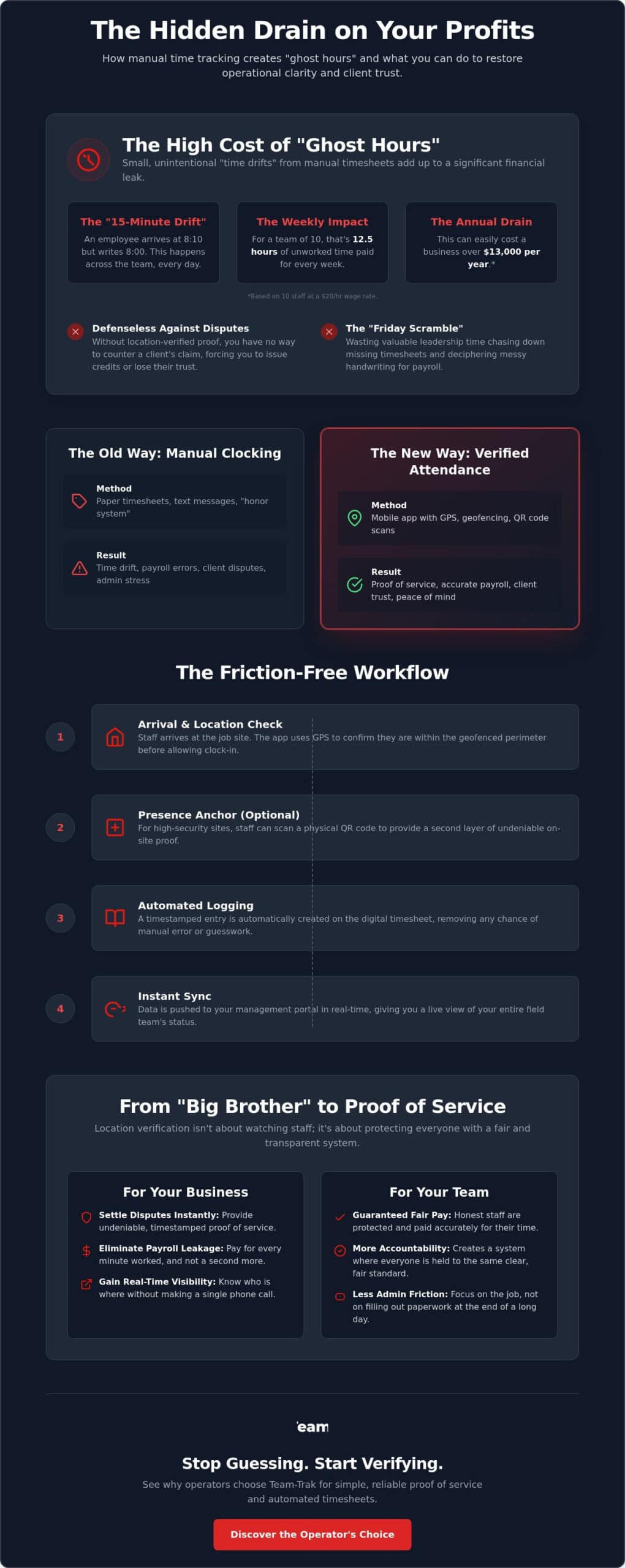
Every service business owner starts with the same goal: hire good people and trust them to do the job. But trust isn’t a payroll strategy. When you rely on manual clocking or the “honor system,” you inevitably run into the 15-minute drift. It starts small. A staff member arrives at 8:10 but writes down 8:00. They leave at 4:50 but log 5:00. These tiny discrepancies are the “ghost hours” that haunt your bank account. If you have a team of ten people, and each person adds just 15 minutes of unworked time per day, you’re paying for 12.5 hours of non-existent labor every single week. Over a year, that is a massive drain on your profit margins.
Without an app for clocking in and out with location, you’re also defenseless against the “Friday afternoon scramble.” This is that frantic hour spent chasing down missing timesheets, deciphering messy handwriting, or scrolling through text messages to piece together who was where. It’s a waste of your leadership energy. Even worse, if a client disputes a bill, you have no hard evidence to prove your team was on-site. You end up issuing credits or losing the client entirely because you lack a verified paper trail. It’s an exhausting way to run a business.
The Reality of Service Business Leakage
In field operations, we often see a difference between intentional “time theft” and accidental “time drift.” Time theft is rare, but time drift is universal. It happens when staff simply forget their exact start times. Modern Time and attendance systems have moved beyond the wall-mounted punch clock to solve this. For cleaning or construction businesses, verifying work at remote sites is a constant friction point. Manual errors almost always favor the employee, simply because it’s easier to round up than to be precise. This leakage is often the difference between a profitable job and a break-even one.
The “Proof of Work” Solution
The goal here isn’t to play “Big Brother.” It’s about creating GPS verification that protects everyone. When you use an app for clocking in and out with location, you shift the narrative from “watching the staff” to “verifying service delivery.” You gain a timestamped, location-verified record for every job. This provides incredible peace of mind during your weekends. You no longer have to wonder if the job was done; you have the data to prove it. Moving toward timesheet automation ensures that your billing is accurate, your payroll is fair, and your client relationships are built on transparency rather than guesswork.
How an App for Clocking In and Out with Location Works
Understanding the mechanics behind a modern attendance system helps remove the mystery for both you and your team. It isn’t about constant surveillance; it’s about a series of digital handshakes that confirm work is happening where it should. When a staff member uses an app for clocking in and out with location, the process is designed to be invisible and friction-free. Here is how that workflow looks on the ground:
- Step 1: Arrival. The staff member arrives at the pre-defined job site or client location.
- Step 2: Location Check. Upon opening the app, GPS verification confirms the device is physically within the allowed perimeter.
- Step 3: Physical Anchor. For high-security or specific task areas, the staff member scans a QR code located on-site to provide a second layer of presence.
- Step 4: Automated Logging. The app generates a timestamped entry, automatically creating a line item on the digital timesheet.
- Step 5: Instant Sync. This data is pushed to your management portal, giving you a real-time view of your entire field team without making a single phone call.
This sequence replaces the old habit of scribbling times on a notepad at the end of the day. It ensures that the data is captured in the moment, which is the only way to guarantee 100% accuracy for your payroll and billing.
GPS Verification vs. Geofencing
While often used interchangeably, these two features serve different roles. GPS verification is a snapshot; it checks the coordinates at the exact second someone hits “clock in.” Geofencing, however, acts as a virtual boundary. It can prevent a staff member from clocking in if they are still three blocks away, or send an alert if they leave the site before clocking out. You can learn more about the benefits of GPS verification to see how it adds a layer of quiet accountability to your daily operations.
The Power of QR Code Check-Ins
In dense urban areas or large industrial complexes, GPS can sometimes “drift,” showing a staff member in the street when they’re actually inside. This is where QR codes become essential. They act as a physical anchor to a specific room, piece of equipment, or asset. By requiring a scan, you eliminate any doubt about their location. It’s important to balance this with trust; research on employee monitoring suggests that when tracking feels like a “gotcha” game, it can damage morale. However, when framed as a way to simplify their day and ensure they get paid correctly, it becomes a benefit. You can explore how QR code tracking adds a layer of accountability that protects both the business and the worker. If you’re ready to see how this fits your specific workflow, chat with us about your team’s needs.
Mobile Apps vs. Hardware Tracking: Which Is Better for 2026?
Hardware trackers used to be the gold standard for fleet management. If you ran a plumbing business or a delivery service, you bolted a box under the dashboard and called it a day. But in 2026, that “old school” approach is showing its age. Hardware is expensive. You have the upfront cost of the units, the labor for installation, and the constant headache of maintenance. If a van goes in for a service, your tracking goes with it. If a staff member swaps vehicles, your data gets messy. It’s a rigid system that doesn’t account for the fluid nature of modern service work.
An app for clocking in and out with location removes these barriers. It turns the smartphone already in your employee’s pocket into a powerful operational tool. This shift isn’t just about saving money on equipment; it’s about tracking the person and the task, not just the vehicle. For industries like home care or commercial cleaning, the work happens inside the building, far from the van’s GPS unit. You need to know that the staff member is at the specific door, not just in the parking lot. App-based tracking provides that granular visibility without the enterprise-level price tag.
Why Hardware-Free is the Future
Dedicated tracking devices are notorious for getting lost, broken, or simply left in a glovebox when they should be in use. When you move to a software-based solution, you eliminate the “broken hardware” excuse. A mobile staff app ensures visibility where the work actually happens. It travels with the employee from the car to the job site and back again. If you’re still weighing the pros and cons of different systems, check out our guide on Field Service Tracking Software: Busting the Myths of Operational Visibility.
Task Management and Checklists
The biggest advantage of an app is that it doesn’t just record a location; it records an outcome. You can link a clock-in event directly to specific job requirements. Instead of a simple “on-site” status, you get a “job started” status that includes digital checklists. This might include:
- Mandatory safety checks before the work begins.
- Specific cleaning or maintenance tasks that must be ticked off in real-time.
- The ability to attach “before and after” photos directly to the timesheet.
This level of detail provides the “proof of service” that hardware units simply can’t offer. It turns a basic attendance record into a comprehensive report that you can share with your clients to build trust. This integration of location and task management is what truly helps to simplify your operations and gives you back your time.
Implementing Location Tracking Without Losing Staff Trust
Introducing a new app for clocking in and out with location can feel like a delicate conversation. Many operators worry their team will see it as a lack of trust or an invasive “Big Brother” move. But the #1 mistake you can make is framing it as a tool for punishment. If you present it as a way to catch people doing the wrong thing, you’ll be met with immediate resistance. Instead, position it as a tool for professional clarity. It’s a system designed to protect the business, the client, and most importantly, the honest staff members who are already doing the work.
Think about the last time a client called to complain that a technician never showed up. Without verified data, it’s your word against theirs. Location-verified attendance gives your team a digital shield. It proves they were exactly where they were supposed to be, at exactly the right time. This removes the stress of false accusations and ensures your team gets the credit they deserve. When staff understand that accurate data leads to faster, dispute-free paydays, the conversation shifts from “monitoring” to “accountability.”
The Transparency Framework
Successful implementation starts with a clear “fair use” policy. Your team needs to know that you aren’t watching them at the grocery store on their day off. A professional app for clocking in and out with location is designed for privacy; it only captures coordinates during active shift hours or at the specific moment of clocking in. It’s also helpful to address the common “battery drain” myth early on. Modern background-efficient apps use minimal power, often less than a five-minute scroll on social media. Clear communication about how the data is used, and how it isn’t, is the fastest way to get buy-in.
Gamifying Accountability
You can even use this visibility to reward your best workers. When punctuality and “proof of service” are visible in the management portal, it becomes easy to recognize high performers. This level of oversight is particularly valuable in labor-intensive sectors. For example, see how construction firms use location data to manage remote sites to keep projects on track without constant site visits. When you remove the friction of manual timesheets, your team spends less time on paperwork and more time on the job. If you’re unsure how to introduce this to your specific team, reach out for a practical onboarding strategy that fits your unique business culture.
Why Team-Trak is the Operator’s Choice for Location-Based Attendance
We didn’t build Team-Trak because we had a passion for GPS satellites. We built it because we were tired of the Friday afternoon timesheet chase. Having managed field teams ourselves, we know the sinking feeling of realizing a payroll error happened three weeks ago, or the stress of a client questioning a bill you can’t verify. Team-Trak is designed by operators who have lived through the administrative pressure of service businesses. It’s a tool that prioritizes your peace of mind over complex tech jargon.
When you implement an app for clocking in and out with location, the goal is to make the data work for you, not the other way around. Team-Trak creates a seamless bridge between the field and the office. The moment a staff member clocks in, that data flows directly into our automated timesheet module. There is no manual entry, no deciphering handwriting, and no “guessing” where the time went. By the time you sit down to run payroll, the work is already done. Your data is verified, timestamped, and ready to sync with your accounting software like Xero or QuickBooks.
Operational Clarity for High-Growth Teams
As your business scales, the “honor system” becomes a liability. You need to know your labor costs to the cent if you want to protect your margins. Team-Trak moves you from a state of constant questioning to a state of absolute knowing. Having all your field data in one centralized platform means you can spot inefficiencies before they become expensive habits. Whether you’re managing three vans or thirty, you can simplify your operations with our trades and field service solutions. This visibility allows you to focus on growth rather than micromanagement.
The End of Administrative Friction
The real hero of the Team-Trak experience is the relief you feel when the billing cycle stays on track. Beyond just tracking time, our platform includes a Client Portal that gives your customers live visibility into their job status. This “Proof of Work” is your best marketing tool for winning recurring contracts. It shows your clients that you are professional, transparent, and organized. When you automate the path from clock-in to invoice, you remove the friction that slows down your cash flow. It’s time to stop chasing paper and start leading your team with confidence. Start your journey toward operational excellence today and see what it feels like to have total control over your remote operations.
Take Control of Your Field Operations Today
Running a service business is about managing people and promises. We have explored how moving away from the “honor system” isn’t about a lack of trust; it’s about providing the clarity your business needs to thrive. By adopting an app for clocking in and out with location, you eliminate the guesswork that eats into your margins and the disputes that drain your energy. You gain more than just data. You gain the freedom to focus on growth while your administrative tasks handle themselves.
With GPS-verified attendance and QR code check-in functionality, you provide your clients with undeniable proof of service. Meanwhile, direct integration with Xero and QuickBooks ensures your payroll is as precise as your field work. It is time to trade the “Friday afternoon scramble” for a system that works as hard as you do. You have built a great business. Now, it’s time to build the visibility required to protect it.
Get Started with Team-Trak: The Operator-First Attendance Platform
Frequently Asked Questions
Is an app for clocking in and out with location legal for my business?
Yes, it is generally legal to use these tools, but you must follow specific state regulations. As of 2026, states including California, New York, Connecticut, and Delaware require employers to provide written notice or obtain consent before using GPS tracking. It’s best practice to maintain a clear, written policy that explains how and when location data is captured to ensure total transparency.
How accurate is the GPS location on a mobile staff app?
Modern smartphone GPS is typically accurate within 5 to 10 meters when outdoors with a clear view of the sky. In dense urban areas where tall buildings can cause signal “drift,” using an app for clocking in and out with location that includes QR code verification adds a necessary layer of precision. This ensures you have a physical anchor to the job site even when satellite signals are obstructed.
Will the app track my employees when they are off the clock?
No, professional attendance platforms are built with privacy boundaries that limit tracking to active shift hours. Most systems only record location at the specific moment of a clock-in or clock-out event. This ensures you get the “proof of service” you need without intruding on your team’s personal time, which is vital for maintaining long-term staff trust.
What happens if a staff member has no internet connection at the job site?
The app uses an offline storage mode to capture the timestamp and GPS coordinates locally on the staff member’s phone. Once the device reconnects to a cellular network or Wi-Fi, the data automatically syncs to your management portal. You won’t lose visibility or accuracy just because a team member is working in a basement or a remote rural location.
How do I handle staff who refuse to use a location-tracking app?
Focus the conversation on how the app for clocking in and out with location protects them from unfair client disputes. Explain that verified data is their best defense if a customer claims they didn’t show up or left early. When you frame the tool as a way to guarantee accurate, on-time pay, most honest workers quickly see the personal benefit.
Can location-verified timesheets be used for payroll processing?
Yes, these records provide the most reliable data for your payroll cycle. By using verified start and end times, you eliminate the “15-minute drift” common with manual systems. Most platforms allow you to export this data directly into accounting tools like Xero or QuickBooks, which significantly reduces the administrative friction of your Friday afternoon payroll run.
Does the app work on both iPhone and Android devices?
Yes, the mobile staff app is designed to be cross-platform and works on almost any modern iOS or Android device. This allows your team to use the hardware they already own, which removes the need for you to purchase and maintain expensive dedicated tracking units. It makes the onboarding process much smoother for new hires.
How much data does a clock-in/out app typically use?
These apps use a negligible amount of data, typically less than what is required to load a single webpage. The data packets sent during a clock-in or clock-out event are extremely small, consisting only of basic text and coordinate information. Your staff don’t need to worry about the app impacting their personal data limits or slowing down their phones.

Disclaimer
The information provided in this article is for general informational purposes only and reflects the opinions and experiences of the author. While every effort has been made to ensure accuracy, Team Trak makes no guarantees regarding completeness