
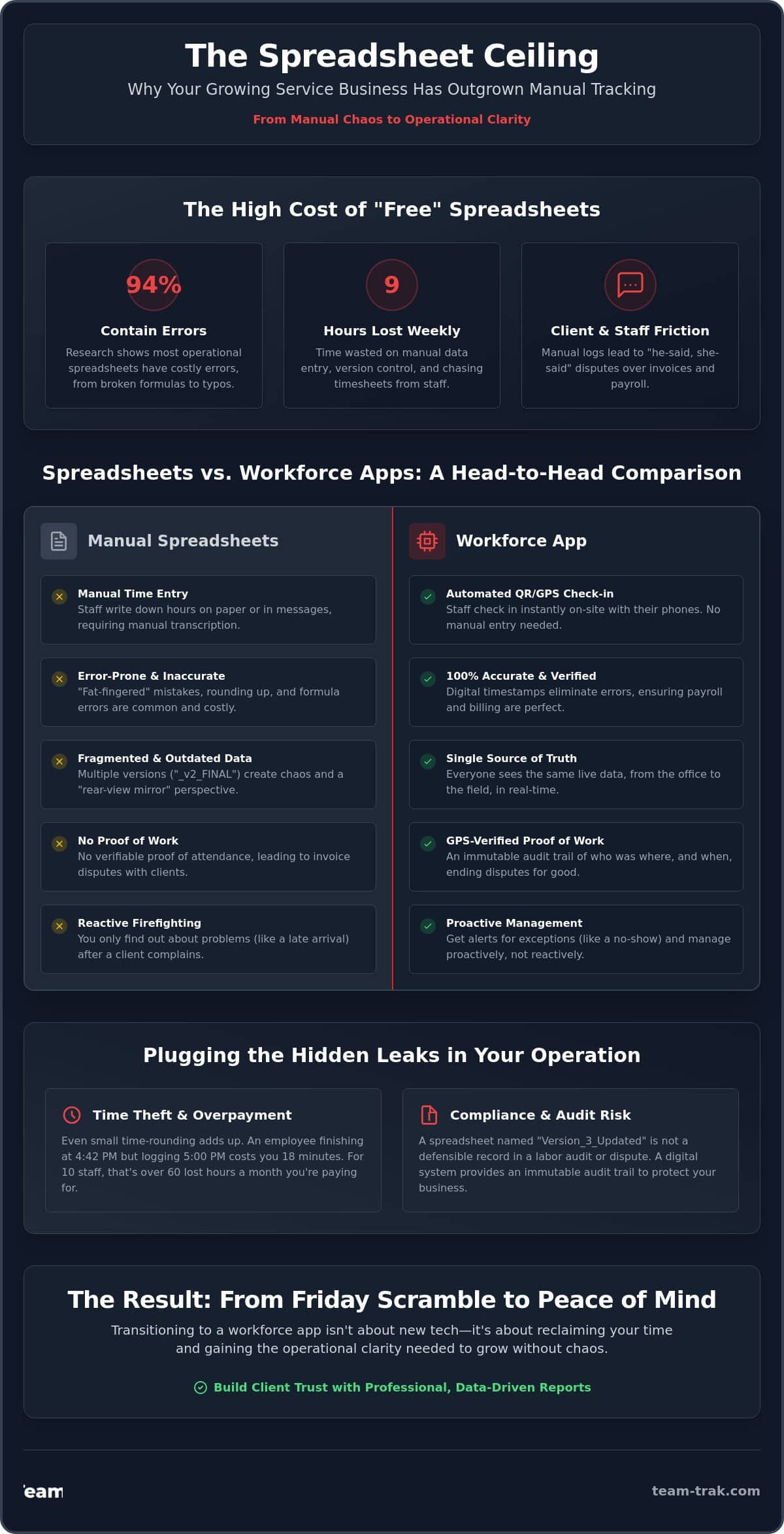
It’s Sunday evening and you’re cross-referencing a WhatsApp message against a spreadsheet named “Master_Payroll_v2_FINAL” just to make sure Mike gets paid for Tuesday. You know the frustration of a client questioning an invoice because you don’t have proof of work beyond a manual entry. Research shows that 94% of operational spreadsheets contain errors, and when those errors impact your payroll or client trust, the cost is far higher than a simple typo. If you feel like you’re drowning in admin, moving from spreadsheets to a workforce app is the only way to stop the bleed.
We understand that spreadsheets were your best friend when you started, but they’ve become a bottleneck for your growth. You deserve to reclaim the nine hours a week typically lost to manual data entry and version control nightmares. This guide provides a step by step path to transition your operations to a digital system that offers 100% accurate timesheets and professional reporting. We’ll cover how to move your data without a revolt from your staff and how to use GPS verification to end client disputes for good.
Key Takeaways
- Identify why manual spreadsheets create an operational “ceiling” that leads to version control nightmares and payroll friction.
- Learn how to eliminate “he-said, she-said” client disputes by replacing manual logs with verified proof of work and GPS tracking.
- Follow a practical two-step framework for moving from spreadsheets to a workforce app without causing team friction or data loss.
- Compare the speed and accuracy of automated QR code check-ins against manual entry to see exactly where your administrative time is being wasted.
- Transition from the stress of the “Friday afternoon scramble” to professional, data-driven client reporting that builds long-term trust.
The Spreadsheet Ceiling: Why Your Service Business Has Outgrown Excel
Most service businesses start with a spreadsheet. It’s free, it’s familiar, and it feels like the logical way to track who is working where. But there is a fundamental problem. Excel was built for static accounting. It was designed for accountants sitting at desks, not for managers running dynamic field operations. When your team is moving between sites, a spreadsheet is always one step behind the reality on the ground.
The “Version Control” trap is the first sign that you’ve hit the ceiling. You open a file called “Staff_Schedule_Final,” only to realize your supervisor is currently editing “Staff_Schedule_Final_v2.” This disconnect leads to payroll disasters. If the office is looking at one set of hours and the field is working another, someone is going to get paid incorrectly. It’s a recipe for frustration. A dedicated Workforce management system replaces these fragmented files with a single, live data stream.
Scalability is the next hurdle. Managing 10 staff members on a spreadsheet is manageable. You can keep the details in your head. Managing 50 staff members is impossible. At that size, the “scalability wall” hits hard. Information gets trapped in data silos. The office doesn’t know if a team arrived late to a construction site until the client calls to complain. By then, the damage to your reputation is already done.
The Fragility of Manual Data Entry
One broken formula can ruin an entire month’s billing. We’ve seen operators lose thousands because a single cell didn’t calculate overtime correctly. Then there is the risk of “fat-fingered” errors. When you’re manually transcribing hours from a paper log or a WhatsApp message into a sheet, mistakes are inevitable. Moving from spreadsheets to a workforce app eliminates this manual friction. Those “free” spreadsheets actually cost you hours in administrative overhead every single week. That’s time you could spend winning new contracts instead of fixing broken rows.
From Reactive to Proactive Operations
Spreadsheets are a rear-view mirror. They tell you what happened last week, usually when it’s too late to fix it. Moving from spreadsheets to a workforce app shifts your entire perspective. You stop “firefighting” and start managing by exception. If everyone has checked in via QR code tracking, you don’t need to do anything. You only step in when the system flags an issue. There is an immense psychological relief in having a single source of truth. You finally gain the operational clarity needed to grow without the chaos.
The Hidden Operational Costs of Staying Manual
Most operators view spreadsheets as a free tool. In reality, they are one of the most expensive pieces of software you’ll ever use. The costs aren’t found in a monthly subscription but in the silent leaks that drain your profitability every day. When you’re moving from spreadsheets to a workforce app, you aren’t just buying technology. You’re plugging financial holes that you might not even realize exist.
Time theft and overpayment are the most common leaks. It isn’t always malicious. Sometimes it’s just human nature to round up. If a staff member finishes at 4:42 PM but writes 5:00 PM on a manual log, that’s 18 minutes of unearned pay. Multiply that by 10 staff members over a month, and you’ve lost over 60 hours of labor. Spreadsheets lack the formal rules for designing, testing, and documenting spreadsheet models required to catch these discrepancies. Without a live system, you are essentially paying for time that was never worked.
Compliance is another hidden danger. In a labor audit or a sensitive staff dispute, “Version_3_Updated” won’t hold up as a reliable legal record. You need an immutable audit trail. Relying on manual entries leaves you vulnerable to claims of unpaid overtime or missed breaks. A digital system provides the operational clarity needed to sleep soundly, knowing your records are accurate and defensible.
Ending the Friday Afternoon Scramble
We’ve all lived through the Friday afternoon scramble. It’s that stressful window where you’re chasing staff for missing hours, deciphering messy handwriting, and trying to build automated timesheets from a pile of WhatsApp messages. This administrative fatigue is a silent killer of business growth. When you are stuck in the weeds of payroll, you can’t focus on high-level strategy or client relationships. You become the bottleneck in your own company.
Proof of Service: Protecting Your Reputation
Nothing damages a client relationship faster than a “he-said, she-said” dispute over whether your team actually showed up. If a client claims a site was skipped, a spreadsheet can’t defend you. It’s just a row of text. By GPS location verification, you can provide instant, undeniable evidence of service. This level of accountability ends disputes before they escalate and protects your professional reputation. If you’re ready to stop the administrative friction, you can see how we simplify field operations here.
Spreadsheets vs. Workforce Apps: A Feature-by-Feature Comparison
When you are managing a field team, the difference between a spreadsheet and a dedicated app isn’t just about the interface. It’s about the shift from a flat, static file to a living operational tool. In a spreadsheet, information is dead the moment you type it. If you are moving from spreadsheets to a workforce app, you are moving from guesswork to certainty. The following table breaks down the functional differences that impact your daily operations.
| Operational Feature | The Spreadsheet Method | The Workforce App Method |
|---|---|---|
| Staff Scheduling | Static PDFs or WhatsApp images; prone to version confusion. | Live Smart Schedules with real-time updates. |
| Attendance Proof | The “honor system” or manual paper logs. | Verified QR code check-ins and GPS stamps. |
| Task Management | Verbal instructions or unchecked lists. | Digital checklists with mandatory photo evidence. |
| Billing & Payroll | Manual transcription from sheets to accounting software. | Direct data sync to Xero or QuickBooks. |
Verification: The GPS and QR Advantage
One of the biggest leaks in manual systems is “buddy punching.” This happens when one staff member signs in for a friend who is running late. Spreadsheets have no way to prevent this. By implementing an app-based system, you ensure that a staff member is physically present at the specific site before they can clock in. It is important to distinguish between “tracking” and “verification.” We don’t want to follow staff every second of the day. We simply want to verify that the service we promised the client was actually delivered at the right place and time.
Invoicing and Billing: From Days to Minutes
The “time-to-cash” gap is what kills small service businesses. In a manual system, you have to wait for the week to end, chase down timesheets, and cross-reference them with your spreadsheet. This process can take days of administrative effort. A workforce app allows you to simplify operations by creating a direct link to your accounting software. Consider these advantages:
- Instant Data Flow: Approved hours move directly into your billing tool without manual typing.
- Reduced Errors: Eliminates the “fat-fingered” mistakes common in manual transcription.
- Faster Payments: You can move from a verified clock-out to a sent invoice in minutes, keeping your cash flow healthy.
How to Move from Spreadsheets to a Workforce App Without the Chaos
Transitioning your business shouldn’t feel like a leap of faith. It’s a calculated move. Most failures in moving from spreadsheets to a workforce app happen because owners try to change everything overnight. Technology is only half the battle; the other half is change management. If you want your team to embrace the new system, you need a rollout plan that respects the daily reality of their work.
To ensure a smooth transition, follow this operational framework:
- Audit your current workflow: Map the path a job takes from the initial booking to the final invoice. Identify the specific points where information currently gets stuck in a WhatsApp thread or a paper log.
- Clean your data: Don’t move “trash” into a new system. Archive inactive clients and old staff records now. This ensures your new platform is lean and accurate from day one.
- Run a ‘pilot’: Start with your most reliable field team members. Let them find the edge cases and provide feedback. These early adopters will become your internal advocates for the rest of the staff.
- Set a hard ‘sunset date’: Give your team a clear two-week transition period, then turn off the old spreadsheets permanently. Dual systems only create confusion and data duplication.
Training Your Field Team for Adoption
Staff often fear that a new app is just “Big Brother” watching them. You need to flip that narrative. Frame the app as a tool for their protection. It ensures their hours are recorded perfectly, meaning no more chasing the office for pay discrepancies. When they see that a simple QR code scan replaces a messy manual timesheet, the resistance usually fades. Provide simple, visual training materials that they can access on-site to build their confidence.
Setting Up Your Operational Guardrails
A workforce app allows you to build the “brain” of your business into the software. Instead of hoping staff remember every detail, you can define task management and checklists to ensure consistent service. Configure your alerts so you’re only notified when something goes wrong, such as a missed check-in or a late arrival. This allows you to manage by exception rather than micromanaging every row of data. If you’re ready to leave the spreadsheet chaos behind, you can book a demo to plan your transition today.
Operational Excellence: Reclaiming Your Time with Team-Trak
Imagine a Friday afternoon where you aren’t chasing missing hours or deciphering messy handwriting. You’ve already approved the timesheets. The invoices are ready to go. This is the “after” state of adopting professional field workforce management software. It transforms your business from a reactive, firefighting operation into a proactive machine. When you finish moving from spreadsheets to a workforce app, you gain something more valuable than just data. You gain peace of mind.
Scaling a service business usually creates a paradox. The more you grow, the more administrative staff you need to hire just to keep the paperwork moving. It’s a trap that eats your profitability. By using a digital platform, you can double your field team without adding a single person to your office overhead. The software handles the verification, the tracking, and the reporting automatically. This operational clarity is your ultimate competitive advantage. It allows you to bid on larger contracts with the absolute confidence that you can manage the delivery.
Professional reporting via the Client Portal changes how your customers perceive you. Instead of sending a vague spreadsheet, you provide them with a window into the work being done. This transparency builds massive trust. When a client can see verified check-ins and completed task lists, the “he-said, she-said” disputes simply disappear. You stop being a vendor and start being a reliable partner.
Industry-Specific Success: From Cleaning to Construction
Different industries face different friction points, but the need for accountability is universal. For trades and field service companies, the focus is often on protecting tight margins. They use Team-Trak to ensure every billable hour is accounted for and every site visit is verified. In the world of short-term rental and Airbnb hosts, the challenge is managing high-frequency turnarounds. Specialized workflows ensure cleaning crews never miss a task, protecting the host’s rating. Meanwhile, construction teams rely on “proof of work” to trigger progress payments. Instead of arguing over completion percentages, they show the client verified check-ins and photos from the site.
Your Next Step Toward Administrative Peace
You don’t need a tech degree to manage a modern workforce. We built Team-Trak for operators who are tired of the spreadsheet chaos and want a tool that actually works in the real world. Our onboarding process is designed to be low-friction. You can start small, get your core team comfortable, and then scale fast across your entire operation. The “old school” way of working is holding you back. It’s time to stop the administrative friction and start growing your business with clarity. Reclaim your Friday afternoons today.
Take Control of Your Operations Today
Relying on “Master_Schedule_v3” isn’t just a headache; it’s a risk to your business’s reputation and profitability. We’ve explored how manual systems create a ceiling for your growth and why the “Friday afternoon scramble” is a symptom of outdated tools. By moving from spreadsheets to a workforce app, you transition from reactive firefighting to proactive management. You gain the operational clarity needed to scale without adding more office overhead.
Team-Trak provides the tools you need for total visibility, including GPS-verified attendance for total visibility and a dedicated Mobile Staff App that gives your team on-site clarity. With direct integration with Xero and QuickBooks, your billing cycle moves from days to minutes. You don’t need to be a tech expert to modernize your workflow. You just need a system built by people who understand the daily pressures of running a service business.
Ready to reclaim your Friday afternoons? Explore Team-Trak’s Core Platform today.
It’s time to trade the spreadsheet chaos for a professional system that works as hard as you do. Your team, your clients, and your weekends will thank you.
Frequently Asked Questions
Is a workforce app really better than a free spreadsheet?
A workforce app is superior because it eliminates the hidden administrative costs that “free” spreadsheets create. While Excel doesn’t have a subscription fee, the time spent fixing broken formulas and chasing missing data is expensive. Research shows that 94% of operational spreadsheets contain errors. An app provides a live, error-free environment that actually protects your bottom line and your sanity.
Will my field staff actually use a mobile app?
Field staff will use a mobile app if it makes their lives easier. Most workers prefer a quick QR code scan over carrying around paper timesheets or sending manual WhatsApp updates. When you frame the app as a way to ensure they get paid 100% accurately and on time, adoption happens quickly. It removes the friction of paperwork for them and for the office.
How long does it take to move from Excel to Team-Trak?
The process of moving from spreadsheets to a workforce app typically takes between one and two weeks. This timeline includes auditing your current data, running a small pilot with a few reliable team members, and a full company rollout. The key is to clean your data first so you aren’t importing old mistakes or inactive records into your new system.
Can I link my workforce app to my accounting software like Xero?
Yes, Team-Trak links directly to online accounting systems like Xero and QuickBooks. This integration allows verified hours to flow straight into your invoicing tool. It significantly reduces your “time-to-cash” gap. You can move from a staff member clocking out to a sent invoice in just a few minutes instead of waiting until the end of the month.
Does an app-based system help with labor law compliance?
An app-based system is a massive asset for compliance because it creates an immutable audit trail. Unlike a spreadsheet where anyone can change a cell without a trace, an app records exactly when and where a staff member checked in. This is critical during labor audits or disputes where you need to prove that staff took their required breaks and worked their recorded hours.
What happens if a staff member loses internet connection on-site?
If a staff member loses connection, the mobile app stores the data locally on the device. Once they move back into a service area or connect to Wi-Fi, the system automatically syncs the check-in or task completion to the office. This ensures that work in remote construction sites or basements is still recorded accurately without any data loss or manual intervention.
Is my data safer in a workforce app than in a Google Sheet?
Your data is far more secure in a dedicated app than in a shared Google Sheet. Spreadsheets are easily copied, accidentally deleted, or shared with unauthorized people by mistake. A workforce app uses centralized access controls. You decide exactly who can see client details or financial data. This protects your sensitive business information from internal errors and external risks.
How much money can I actually save by switching from manual tracking?
You can save thousands of dollars annually by eliminating manual data entry and rounding errors. A 2025 survey found that manual data entry costs the average employee over 9 hours per week. By moving from spreadsheets to a workforce app, you end the practice of “rounding up” timesheets and reclaim those administrative hours for high-value tasks like winning new contracts and growing your business.

Disclaimer
The information provided in this article is for general informational purposes only and reflects the opinions and experiences of the author. While every effort has been made to ensure accuracy, Team Trak makes no guarantees regarding completeness