
It’s 4:00 PM on a Friday, and instead of heading home, you’re hunched over a desk trying to decipher smudged handwriting on a stack of manual timesheets. You know the drill. A client is disputing a Tuesday afternoon visit, and you don’t have the hard evidence to back your team up. It’s a frustrating, high-stakes guessing game that eats your time and drains your energy. Implementing a simple qr code check in and check out system changes that dynamic instantly. It replaces the friction of manual logs with a quiet, digital record that proves your team was exactly where they said they were.
We understand that you didn’t start your business to become a full-time administrator. You want to focus on the work, not the paperwork. This guide will show you how to move away from the Friday afternoon scramble and toward a system that provides automated timesheets and verified proof of service. We’ll walk through the practical steps to set up QR codes for your field teams, ensuring you get the visibility you need without making five phone calls a day. It’s about regaining control and finally having the peace of mind that your sites are being attended as promised.
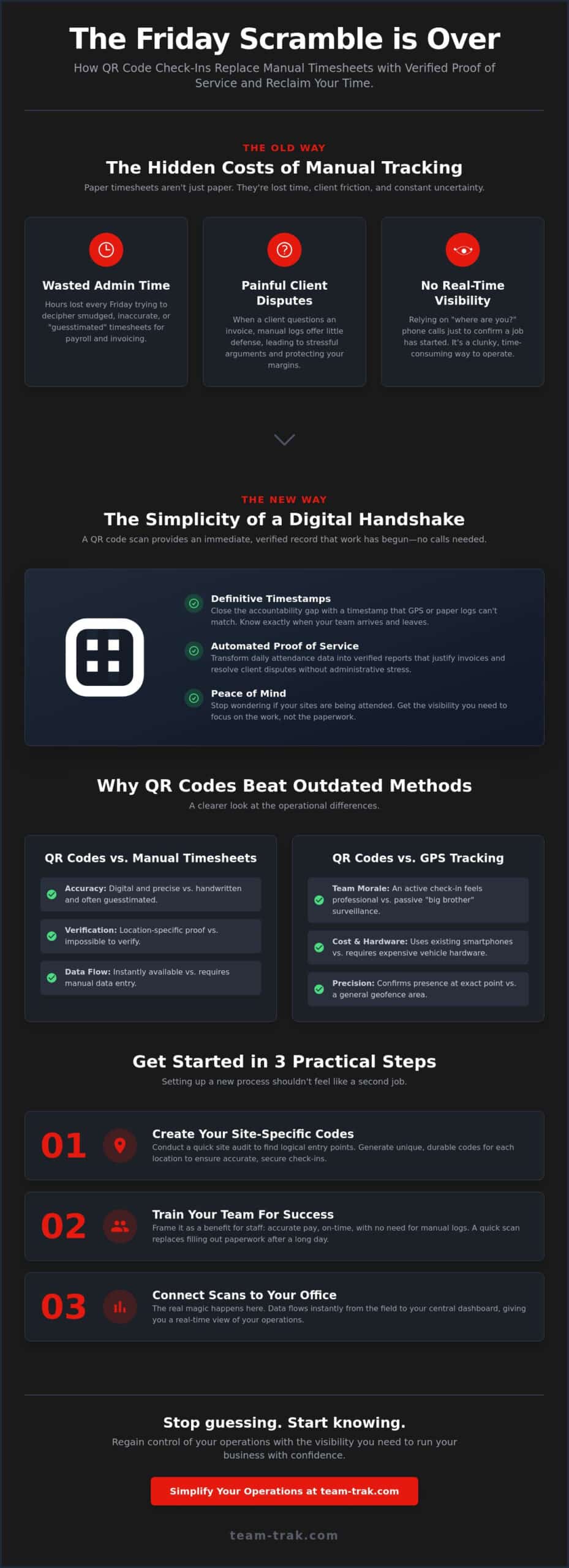
- Stop the endless “where are you?” phone calls by establishing a simple digital handshake between your team and the job site.
- Learn how to conduct a site audit to place codes where they’ll actually be used, ensuring your staff are at the correct entrance every time.
- Close the accountability gap by using qr code check in and check out to get a definitive timestamp that GPS or paper logs simply can’t match.
- Transform your daily attendance data into verified proof of service to justify invoices and resolve client disputes without the administrative stress.
Moving Beyond the “Where Are You?” Phone Call
Managing teams you cannot see is a constant source of low-level anxiety for most service business owners. You trust your staff, but you also have a business to run and clients to answer to. When you don’t have eyes on the site, you’re often forced to rely on “where are you?” phone calls just to confirm a job has started. It’s a clunky, time-consuming way to manage operations that interrupts your team and eats up your day. A qr code check in and check out system acts as a digital handshake between your staff and the location. It provides an immediate, verified record that the work has begun, giving you visibility without the need for constant interruptions.
Manual logs are the old way of doing things, and they are notoriously unreliable. Papers get lost, handwriting becomes unreadable, and times are often “guesstimated” at the end of a shift rather than recorded in the moment. This leads to an accountability gap that causes friction between you, your team, and your customers. Using a simple QR code printed on a site card or posted at an entry point removes the guesswork. It creates a timestamped entry that is nearly impossible to fudge, ensuring your records match reality every single time.
The Real Cost of Manual Attendance Tracking
The true cost of paper timesheets isn’t just the price of the stationery. It’s the hours you lose during the “Friday afternoon scramble” trying to reconcile messy logs for payroll. When a client disputes an invoice, claiming a team member arrived late or left early, a manual log offers very little defense. Implementing service tracking software changes that conversation entirely. Instead of a defensive argument, you provide a verified proof of service. This transparency builds long-term trust and protects your profit margins from being eaten away by unbillable disputes.
QR Codes vs. Traditional GPS Tracking
Many owners consider GPS hardware as a solution, but passive tracking often creates a culture of “big brother” surveillance that staff resent. There is also the significant expense of buying and installing specialized devices in every vehicle. A qr code check in and check out process is different. It’s an active check-in that requires the staff member to participate. Most teams prefer this because it feels like a professional standard rather than a constant tail. Plus, it utilizes the smartphones your team already carries. You get the same location verification without the hardware headaches or the dip in team morale. You can learn more about how this fits into your daily workflow by exploring our QR code tracking features.
How to Set Up a QR Code Check-In System for Your Staff
Setting up a new process shouldn’t feel like a second job. To get the most out of your system, start with a quick site audit. Walk through your typical job location and identify where your team naturally enters. Is it the back loading dock, the front reception, or perhaps a specific folder kept in a site shed? Placing your codes in these high-traffic, logical spots ensures that the qr code check in and check out process becomes a habit rather than a chore. Once you’ve identified these spots, a simple “Scan, Confirm, Work” workflow is all your team needs to follow. Pairing this with a capable field service management app means the data flows directly into your operations without any manual re-entry.
Step 1: Creating Your Site-Specific Codes
Security and accuracy depend on unique codes for every single location. If you use a generic code for all sites, you lose the ability to prove exactly where a staff member was. Using QR code tracking features allows you to generate site-specific IDs that link directly to a client record. For durability, consider lanyards for mobile teams or weather-resistant wall stickers for outdoor sites. While QR technology is simple, always use a secure platform to avoid risks like harmful links in QR codes that can compromise your data.
Step 2: Training Your Team for Success
Change can be met with hesitation, so frame this as a benefit for the staff. Explain that this system ensures they get paid accurately and on time without the need for manual logs. A quick scan via a mobile app replaces the dreaded task of filling out paper timesheets at the end of a long shift. Address practical concerns early. If a camera is broken or a signal is weak, ensure they know the backup plan, such as a quick photo or a manual entry that you can verify later. Most teams find that once they start, they appreciate the clarity it brings to their day.
Step 3: Connecting Scans to Your Office
The real magic happens when the data flows instantly to your central dashboard. You no longer have to wait until Monday morning to see who was on-site on Friday. By combining these scans with GPS location verification, you create a dual layer of proof. The system confirms the scan happened and that the phone was actually at the correct coordinates. This level of visibility reduces the need for micro-management and lets you focus on growing the business. If you’re ready to simplify your site management, reach out to see how we can help.
Why QR Codes Beat Manual Timesheets and GPS Tracking Alone
GPS hardware has a significant blind spot that most service business owners eventually discover. It tracks the vehicle, not the person. While seeing a van parked at a job site is a start, it isn’t definitive proof that work is being performed. A qr code check in and check out system closes this “accountability gap” by requiring an active, physical scan from the staff member on-site. This creates a verified, timestamped record that is far harder to “fudge” than a paper log or a passive GPS ping from a dashboard device. It turns a vague location into a confirmed arrival.
Capturing data at the source also eliminates the common errors that plague manual entries. When a team member scans a code, the exact time is logged instantly. There is no more “rounding up” to the nearest hour or trying to remember arrival times days later. This precision reduces payroll errors and ensures you are only paying for actual time spent on-site. It shifts the culture from one of estimation to one of professional accuracy.
Accountability Without the “Big Brother” Feel
Passive tracking often creates a culture of distrust. Constant surveillance can make good employees feel like they aren’t trusted to do their jobs. A QR scan is different. It’s a deliberate act that signals the start of a professional service. This system actually protects your staff. If a client complains about a missed visit or a late arrival, that digital timestamp is the shield your employee needs to prove they were present. It moves the conversation away from hearsay and grounds it in hard, undeniable data.
Eliminating the “Friday Afternoon Scramble”
Think about the mental energy you spend every week chasing down missing hours and deciphering messy logs. It’s a massive drain on your operational efficiency. By moving to automated timesheets, you ensure that your payroll data is ready for review the moment the shift ends. For trades and field service companies, this level of accuracy is essential for staying profitable. You regain control over your billing and can finally stop the guesswork that leads to lost revenue. If you are ready to remove the administrative stress from your Friday, get started with a simpler way to track your team.
Simplifying Your Operations with Verified Proof of Service
Imagine opening your computer and seeing every site marked as attended without sending a single text message. This is the shift from being a reactive operator to a proactive business owner. A qr code check in and check out system provides the business intelligence you need to stop guessing. When your dashboard confirms that every team member is on-site and on-task, the daily friction of managing remote locations disappears. You’re no longer hunting for information; it’s being served to you in real-time, allowing you to focus on high-level strategy and client relationships.
Building Trust with Professional Reporting
Client disputes often stem from a lack of transparency. If a customer questions why a bill reflects four hours of work when they only saw a van for two, you need a professional answer. Sharing check-in logs provides that answer before the question turns into a heated dispute. This is especially critical for high-stakes industries like short-term rentals or Airbnb management, where proof of service is the primary product you’re selling. Providing this level of detail separates you from “old school” competitors who still rely on verbal promises and handwritten notes. It shows your clients that you value their business enough to provide precision, accountability, and a high standard of service.
Regaining Control of Your Time
The ultimate reward for fixing your operational leaks is the time you get back. Automating the flow from a site scan to an invoice removes the manual bottlenecks that typically slow down a service business. Your software shouldn’t be another complex tool you have to manage; it should be a quiet partner that handles the administrative heavy lifting. Every qr code check in and check out captured at the site becomes a building block for a more efficient, profitable company. By removing the stress of attendance tracking, you finally have the freedom to work on your business rather than being trapped inside the daily admin. It’s about trading the Friday afternoon scramble for the peace of mind that comes with knowing your sites are attended as promised.
Ready to see how a simple scan can transform your business? Reach out today to see the system in practice.
Regaining Control of Your Field Operations
Moving away from the chaos of manual logs doesn’t have to be a complex project. By implementing a qr code check in and check out system, you’re choosing a path of precision over guesswork. You’ve seen how this simple tool bridges the accountability gap, providing the visibility you need without the friction of constant phone calls. It’s about moving from a state of administrative stress to a state of operational clarity. Your business deserves records that match reality, and your team deserves a system that protects their professional integrity.
The transition to a digital handshake between your staff and the site is a quiet, powerful change. It replaces the “Friday afternoon scramble” with automated timesheet generation and GPS-verified check-ins. This approach was designed specifically for field service operators who are ready to stop managing paperwork and start leading their teams. You can finally provide your clients with undeniable proof of service while reclaiming the hours you used to spend on billing disputes.
Ready to simplify your site attendance? Book a discovery call with Team-Trak
You have built a business based on hard work and reliability. Now it’s time to let your systems reflect that same standard. Take the first step toward a simpler, more profitable future today.
Frequently Asked Questions
Is a QR code check-in and check-out system difficult to set up?
Setting up a system for your sites is straightforward and can be done in minutes. You simply generate a unique code for each client location through your dashboard and print it on a site card or sticker. There’s no complex wiring or technical expertise required. It’s designed to be a practical solution that fits into your existing operational workflow without causing extra administrative headaches.
Do my staff need to download a special app to scan the QR codes?
Yes, your team will use a dedicated mobile staff app to perform each scan. This ensures the data is secure and linked directly to their specific profile. Using a dedicated app rather than a generic phone camera prevents the risks associated with external links and ensures the timestamp is verified by the system. It’s a lightweight tool that works on standard smartphones, so you don’t need to purchase extra hardware.
What happens if a staff member forgets to check out?
If a team member forgets to scan out, the system will show an open session on your management dashboard. You can then manually adjust the timesheet based on secondary evidence or by speaking with the staff member. This visibility allows you to catch errors immediately rather than discovering them days later during the Friday payroll scramble. It keeps your records clean and ensures that your invoicing remains accurate.
Can staff “cheat” the system by scanning a photo of the QR code from home?
No, the system uses GPS location verification to ensure the staff member is actually on-site when they scan. Even if someone had a photo of the code at home, the scan would be flagged or blocked because their phone’s coordinates wouldn’t match the job site. This dual-layer security is what makes a professional qr code check in and check out system far more reliable than paper logs or generic forms.
Does a QR code system work in areas with poor mobile signal?
The system is built to handle the realities of field work, including spots with spotty reception. Most professional apps will cache the scan locally on the device and sync the data once a stable connection is restored. This ensures that the arrival time is recorded accurately the moment it happens, regardless of the signal strength. Your team can keep working without worrying about technical interruptions or lost data.
How much does it cost to implement a QR code attendance system?
Implementing a qr code check in and check out system is generally very cost-effective because it removes the need for expensive hardware or tracking devices. Instead of buying specialized equipment, you utilize the smartphones your team already carries. The primary investment is the software subscription, which is typically offset by the hours saved on administration and the reduction in payroll errors. It’s a scalable solution that grows with your business.

Disclaimer
The information provided in this article is for general informational purposes only and reflects the opinions and experiences of the author. While every effort has been made to ensure accuracy, Team Trak makes no guarantees regarding completeness